





Что это такое?
 Recall — это бесплатное приложение с открытым исходным кодом для macOS, которое позволяет играть в Overwatch на Mac с Apple Silicon, используя Wine и собственный слой трансляции на Metal вместо CrossOver или Windows.
Recall — это бесплатное приложение с открытым исходным кодом для macOS, которое позволяет играть в Overwatch на Mac с Apple Silicon, используя Wine и собственный слой трансляции на Metal вместо CrossOver или Windows.Как его запустить?Скачайте Recall, откройте образ диска и перетащите его в папку «Программы», затем откройте Recall и пройдите шаги настройки: они подготовят всё необходимое и откроют Battle.net, чтобы вы могли войти в аккаунт и установить Overwatch.
Скачайте Recall, откройте образ диска и перетащите его в папку «Программы», затем откройте Recall и пройдите шаги настройки: они подготовят всё необходимое и откроют Battle.net, чтобы вы могли войти в аккаунт и установить Overwatch.Нужны ли CrossOver, Windows или Boot Camp?Нет. Recall включает всё необходимое для запуска Overwatch на вашем Mac, так что не нужно покупать CrossOver или устанавливать Windows, а Boot Camp на Mac с Apple Silicon вообще не существует.
Нет. Recall включает всё необходимое для запуска Overwatch на вашем Mac, так что не нужно покупать CrossOver или устанавливать Windows, а Boot Camp на Mac с Apple Silicon вообще не существует.Почему первые матчи подтормаживают?При первом запуске игре нужно скомпилировать графические шейдеры, из-за чего возникают кратковременные подтормаживания, которые постепенно исчезают по мере игры; заранее «прогреть» их можно с помощью кода 929PJ в «Кастомных играх» (Custom Games).
При первом запуске игре нужно скомпилировать графические шейдеры, из-за чего возникают кратковременные подтормаживания, которые постепенно исчезают по мере игры; заранее «прогреть» их можно с помощью кода 929PJ в «Кастомных играх» (Custom Games).Работает ли это и на Mac с Intel?Нет, поддерживаются только Mac с Apple Silicon (M1 или новее) под управлением macOS Tahoe 26.5 или новее; Mac с Intel не подходят.
Нет, поддерживаются только Mac с Apple Silicon (M1 или новее) под управлением macOS Tahoe 26.5 или новее; Mac с Intel не подходят.Это безопасно для моего аккаунта Blizzard?Вы входите напрямую в Battle.net, и Recall никогда не запрашивает ваш пароль; он не изменяет файлы игры Overwatch, не внедряет код и не читает её память, хотя Blizzard официально не поддерживает игру на Mac.
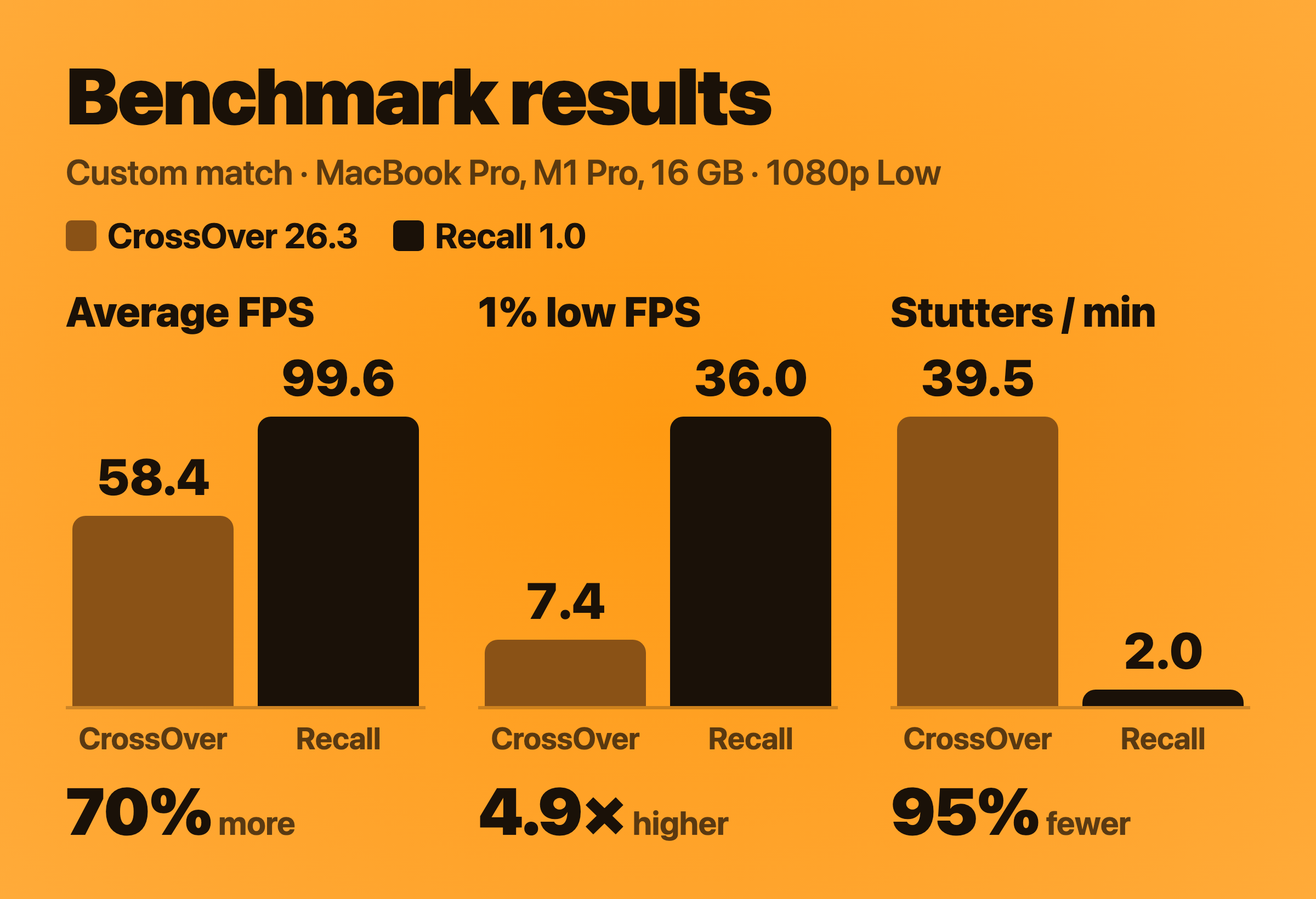
Вы входите напрямую в Battle.net, и Recall никогда не запрашивает ваш пароль; он не изменяет файлы игры Overwatch, не внедряет код и не читает её память, хотя Blizzard официально не поддерживает игру на Mac.Насколько Recall быстрее CrossOver для Overwatch?В тесте автора в кастомном матче Recall в среднем выдавал 99.6 FPS против 58.4 FPS у CrossOver (+70%), с 95% меньшим числом подтормаживаний в минуту и частотой опроса мыши до 16 раз выше, потому что Recall считывает мышь напрямую до 2 000 раз в секунду вместо 120 у CrossOver.
В тесте автора в кастомном матче Recall в среднем выдавал 99.6 FPS против 58.4 FPS у CrossOver (+70%), с 95% меньшим числом подтормаживаний в минуту и частотой опроса мыши до 16 раз выше, потому что Recall считывает мышь напрямую до 2 000 раз в секунду вместо 120 у CrossOver.Можно ли установить Overwatch на внешний диск?Да, во время настройки можно выбрать внешний SSD; приложению нужно 85–95 ГБ свободного места — либо на самом Mac, либо на внешнем SSD, который должен оставаться подключённым во время игры.
Да, во время настройки можно выбрать внешний SSD; приложению нужно 85–95 ГБ свободного места — либо на самом Mac, либо на внешнем SSD, который должен оставаться подключённым во время игры.Как удалить Recall?Используйте Settings > Uninstall Recall, чтобы переместить в Корзину и само приложение, и игру, которой оно управляет, — на ваш аккаунт Blizzard это не повлияет; если Recall установлен через Homebrew, вместо этого выполните команду 'brew uninstall --zap --cask recall'.
Используйте Settings > Uninstall Recall, чтобы переместить в Корзину и само приложение, и игру, которой оно управляет, — на ваш аккаунт Blizzard это не повлияет; если Recall установлен через Homebrew, вместо этого выполните команду 'brew uninstall --zap --cask recall'.Почему Джош создал Recall, а не просто пользовался CrossOver?Как давний игрок в Overwatch на ПК, он хотел бесплатный специализированный способ играть на своём MacBook, превосходящий универсальный слой совместимости с Windows от CrossOver, в надежде показать Blizzard, что спрос на нативный клиент для Mac существует.
Как давний игрок в Overwatch на ПК, он хотел бесплатный специализированный способ играть на своём MacBook, превосходящий универсальный слой совместимости с Windows от CrossOver, в надежде показать Blizzard, что спрос на нативный клиент для Mac существует.What are similar projects?Whisky, highball, steamac, OpenEmu, MonitorControl, LASRecomp, PureMac, OpenYoink
Whisky, highball, steamac, OpenEmu, MonitorControl, LASRecomp, PureMac, OpenYoinkWhich topics is it in?wine, mac, metal, macos-app, homebrew, gaming, apple-silicon, performance, free, desktop-app, apache-2.0, python
wine, mac, metal, macos-app, homebrew, gaming, apple-silicon, performance, free, desktop-app, apache-2.0, python