
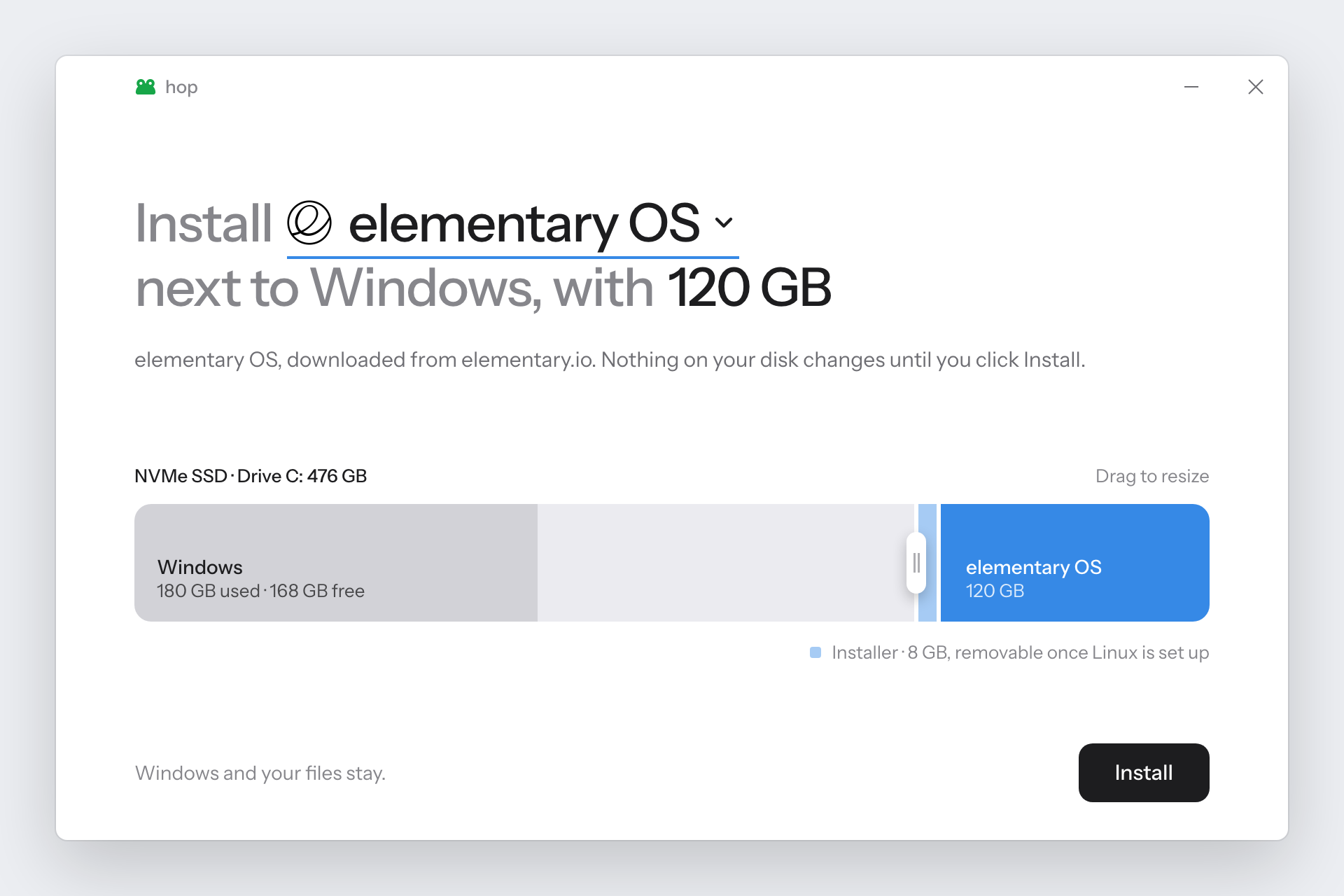

这是什么?
 hop 是一款 Windows 应用,无需 U 盘,即可在现有的 Windows 系统旁安装一个 Linux 发行版。
这是 U 盘安装器,还是别的东西?不需要 U 盘:hop 会下载 Linux 的 ISO 镜像,直接在内置硬盘上制作出相当于 U 盘安装器的内容,然后从中启动。
不需要 U 盘:hop 会下载 Linux 的 ISO 镜像,直接在内置硬盘上制作出相当于 U 盘安装器的内容,然后从中启动。我该怎么用它来安装 Linux?从 Releases 页面下载 hop.exe,并以管理员身份运行。选择一个 Linux 系统,挑选磁盘,拖动滑块设定要分配的空间大小,然后点击 Install 按钮;hop 会缩小磁盘分区、复制 ISO 文件,并设置一个一次性的启动项,直接进入安装程序。
从 Releases 页面下载 hop.exe,并以管理员身份运行。选择一个 Linux 系统,挑选磁盘,拖动滑块设定要分配的空间大小,然后点击 Install 按钮;hop 会缩小磁盘分区、复制 ISO 文件,并设置一个一次性的启动项,直接进入安装程序。我的电脑需要满足什么要求?需要 Windows 10(1803 版或更新)或 Windows 11,并且电脑使用 UEFI 启动、硬盘为 GPT 分区格式,近几年销售的电脑几乎都符合。Linux 必须安装在内置硬盘上,不能装在 U 盘里。
需要 Windows 10(1803 版或更新)或 Windows 11,并且电脑使用 UEFI 启动、硬盘为 GPT 分区格式,近几年销售的电脑几乎都符合。Linux 必须安装在内置硬盘上,不能装在 U 盘里。它支持所有 Linux 发行版吗?有什么需要注意的吗?目前只支持一份精选列表中的系统:Ubuntu 及其衍生版、Mint、Pop!OS、Zorin、Debian、Fedora、Arch、CachyOS、Omarchy、Ultramarine。Kubuntu 明确不受支持,因为其 ISO 中有一个文件过大,超出了 FAT32 的限制。部分系统还需要额外操作,例如关闭 Secure Boot 或彻底禁用 BitLocker;由于 hop 尚未进行代码签名,首次运行时 SmartScreen 会发出警告。
目前只支持一份精选列表中的系统:Ubuntu 及其衍生版、Mint、Pop!OS、Zorin、Debian、Fedora、Arch、CachyOS、Omarchy、Ultramarine。Kubuntu 明确不受支持,因为其 ISO 中有一个文件过大,超出了 FAT32 的限制。部分系统还需要额外操作,例如关闭 Secure Boot 或彻底禁用 BitLocker;由于 hop 尚未进行代码签名,首次运行时 SmartScreen 会发出警告。它只能与 Windows 并存,还是也能替换掉 Windows?hop 默认是与 Windows 并存地安装 Linux。但对于 Ubuntu、Zorin OS、Debian 和 Arch,它还提供一个单独的选项,可以完全抹除 Windows 并将其替换,此操作需要输入 ERASE 进行确认。
hop 默认是与 Windows 并存地安装 Linux。但对于 Ubuntu、Zorin OS、Debian 和 Arch,它还提供一个单独的选项,可以完全抹除 Windows 并将其替换,此操作需要输入 ERASE 进行确认。如果安装出错,或者我想撤销安装,该怎么办?hop 会先检查电脑,检查通过之前不会对其做任何更改。如果你重新启动进入 Windows,再次打开 hop 会说明发生了什么,并可以重启进入 BIOS。Undo 选项会把空间归还给原来的磁盘,还可以选择是否删除已安装在其中的 Linux。
hop 会先检查电脑,检查通过之前不会对其做任何更改。如果你重新启动进入 Windows,再次打开 hop 会说明发生了什么,并可以重启进入 BIOS。Undo 选项会把空间归还给原来的磁盘,还可以选择是否删除已安装在其中的 Linux。hop 从哪里获取 Linux 的 ISO?hop 直接从官方项目服务器下载 ISO,并在官方提供校验值的情况下进行校验。你也可以让 hop 使用你已有的 ISO 文件。
hop 直接从官方项目服务器下载 ISO,并在官方提供校验值的情况下进行校验。你也可以让 hop 使用你已有的 ISO 文件。有哪些类似的项目?microsoft-outlook-desktop, DEsk, Winhance, sway, soundpad-audio-suite, hitfilm-desktop-installer, openvpn-install, power-director
microsoft-outlook-desktop, DEsk, Winhance, sway, soundpad-audio-suite, hitfilm-desktop-installer, openvpn-install, power-director它属于哪些主题?fedora, linux-distribution, arch-linux, debian, ubuntu, system, operating-system, powershell, dotnet, installer, app, windows-app
fedora, linux-distribution, arch-linux, debian, ubuntu, system, operating-system, powershell, dotnet, installer, app, windows-app