
Что это такое?
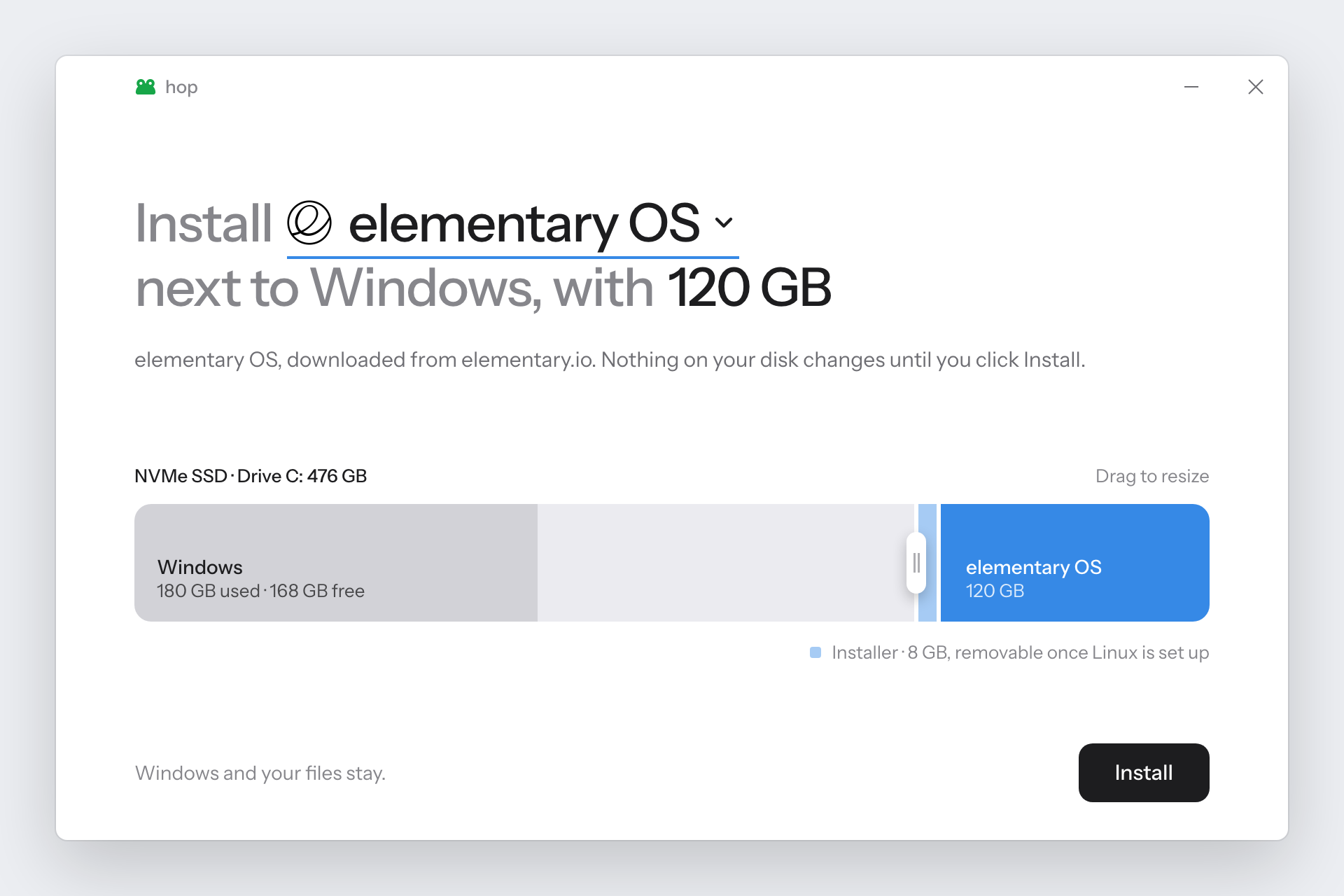
 hop — это приложение для Windows, которое устанавливает дистрибутив Linux рядом с уже установленной Windows, без необходимости в флешке.
Это установщик на флешку или что-то другое?Флешка не нужна: hop скачивает ISO-образ Linux и сам создаёт на внутреннем диске аналог загрузочной флешки, после чего загружается в него.
Флешка не нужна: hop скачивает ISO-образ Linux и сам создаёт на внутреннем диске аналог загрузочной флешки, после чего загружается в него.Как пользоваться, чтобы установить Linux?Скачайте hop.exe со страницы Releases и запустите от имени администратора. Выберите систему Linux, укажите диск, перетащите ползунок, чтобы задать, сколько места ей выделить, и нажмите «Установить». hop уменьшит раздел диска, скопирует файлы ISO и настроит одноразовую загрузку в установщик.
Скачайте hop.exe со страницы Releases и запустите от имени администратора. Выберите систему Linux, укажите диск, перетащите ползунок, чтобы задать, сколько места ей выделить, и нажмите «Установить». hop уменьшит раздел диска, скопирует файлы ISO и настроит одноразовую загрузку в установщик.Какие требования должен выполнять мой компьютер?Нужна Windows 10 (версия 1803 или новее) или Windows 11 на компьютере с UEFI и диском GPT — такие почти все компьютеры, продаваемые в последние годы. Linux нужно ставить на внутренний диск, а не на USB-накопитель.
Нужна Windows 10 (версия 1803 или новее) или Windows 11 на компьютере с UEFI и диском GPT — такие почти все компьютеры, продаваемые в последние годы. Linux нужно ставить на внутренний диск, а не на USB-накопитель.Работает ли с любым дистрибутивом Linux и есть ли подводные камни?Поддерживается только ограниченный список систем (Ubuntu и её варианты, Mint, Pop!OS, Zorin, Debian, Fedora, Arch, CachyOS, Omarchy, Ultramarine). Kubuntu явно не поддерживается, так как её ISO содержит файл, слишком большой для FAT32. Некоторым системам нужны дополнительные шаги, например отключение Secure Boot или полное отключение BitLocker. А при первом запуске SmartScreen будет выдавать предупреждение, поскольку hop пока не подписан цифровым сертификатом.
Поддерживается только ограниченный список систем (Ubuntu и её варианты, Mint, Pop!OS, Zorin, Debian, Fedora, Arch, CachyOS, Omarchy, Ultramarine). Kubuntu явно не поддерживается, так как её ISO содержит файл, слишком большой для FAT32. Некоторым системам нужны дополнительные шаги, например отключение Secure Boot или полное отключение BitLocker. А при первом запуске SmartScreen будет выдавать предупреждение, поскольку hop пока не подписан цифровым сертификатом.Он только добавляет Linux рядом с Windows или может и заменить Windows?По умолчанию hop добавляет Linux рядом с Windows, но для Ubuntu, Zorin OS, Debian и Arch есть отдельная опция полностью стереть Windows и заменить её. Для подтверждения нужно ввести ERASE.
По умолчанию hop добавляет Linux рядом с Windows, но для Ubuntu, Zorin OS, Debian и Arch есть отдельная опция полностью стереть Windows и заменить её. Для подтверждения нужно ввести ERASE.Что будет, если установка пойдёт не так или я захочу её отменить?hop проверяет компьютер до внесения каких-либо изменений, так что ничего не меняется, пока эти проверки не пройдены. Если вы загрузитесь обратно в Windows, повторный запуск hop объяснит, что произошло, и может перезагрузить в BIOS. Опция «Отменить» вернёт место исходному диску и, при желании, удалит уже установленный там Linux.
hop проверяет компьютер до внесения каких-либо изменений, так что ничего не меняется, пока эти проверки не пройдены. Если вы загрузитесь обратно в Windows, повторный запуск hop объяснит, что произошло, и может перезагрузить в BIOS. Опция «Отменить» вернёт место исходному диску и, при желании, удалит уже установленный там Linux.Откуда hop берёт ISO-образ Linux?Он скачивает ISO напрямую с официальных серверов проектов и проверяет контрольную сумму там, где она опубликована. Также можно указать hop уже имеющийся у вас файл ISO.
Он скачивает ISO напрямую с официальных серверов проектов и проверяет контрольную сумму там, где она опубликована. Также можно указать hop уже имеющийся у вас файл ISO.Какие есть похожие проекты?microsoft-outlook-desktop, DEsk, Winhance, sway, soundpad-audio-suite, hitfilm-desktop-installer, openvpn-install, power-director
microsoft-outlook-desktop, DEsk, Winhance, sway, soundpad-audio-suite, hitfilm-desktop-installer, openvpn-install, power-directorВ каких он темах?fedora, linux-distribution, arch-linux, debian, ubuntu, system, operating-system, powershell, dotnet, installer, app, windows-app
fedora, linux-distribution, arch-linux, debian, ubuntu, system, operating-system, powershell, dotnet, installer, app, windows-app- Автор
- Arjun-Ingole
- Размер
- 2.5 MB
- Звёзды
- 1.7K
- Обновлён
- КоммитNov 15Релизv0.3.4Nov 15
- Возраст
- 19 д
- Коммиты · 90 дней