
Dossier
Your job search, on your own server: one profile, a tailored resume and cover letter for every job, and every application tracked from draft to offer.






Dossier keeps your career history in one profile and turns it into a clean resume. For every job you apply to, it reads the posting, shows how you match, and drafts a tailored resume and cover letter that only use facts from your profile. You refine them in a chat, download them as PDFs and track each application from draft to offer.
It's for one person on a small server: one password, your data in your own PostgreSQL database, and an AI model of your choice. That can be a local model through Ollama, so your profile and documents never leave your server, or a hosted one (any OpenAI-compatible API, or Anthropic), which then receives what it writes from. Privacy says what goes where.
Demo

Recorded with the demo data (Jane Doe is made up) and a stand-in AI server that answers at once, played at 1.2× speed. With a real model, reading a posting and writing the documents takes from a few seconds to a few minutes.
Features
- Profile: basics, skills and languages, experience, education and references, in the order you choose, with a strength meter. Start it from an existing resume (PDF, Word or Markdown) if you like.
- Base resume: twelve themes and a theme builder, previewed live and printed to PDF on the server. Duplicate themes, or share them as files.
- Find jobs: search postings near your city, or anywhere you choose, through JSearch (LinkedIn, Indeed and more), Adzuna or Germany's Bundesagentur für Arbeit. Save the good ones, dismiss the rest, and start an application from a posting with one click.
- New application: paste a posting; Dossier pulls out the details and requirements, matches them against your profile, and writes a tailored resume and cover letter in the tone you pick.
- Never invents experience: drafts only use facts from your profile. What the posting asks for and your profile doesn't have is shown as a gap, not made up.
- Refine: ask for changes in a chat, edit or regenerate any part (every part of the cover letter too: sender, date, recipient, greeting and sign-off, written in the letter's language), undo AI changes or go back to any earlier version, keep private notes.
- Send: an email to go with each application, to whoever the posting says to send it to, ready to copy or open in your mail app, with the resume and cover letter PDFs to attach. Edit, rewrite or refine it like the documents.
- Gmail and Calendar (optional): connect your Google account to send an application from your own address with its PDFs attached, see employers' replies next to each application, have the AI read what they ask and draft your answer from your profile, offer interview times you're free, and see your week or month on a Calendar screen, with interviews kept in step with Google Calendar both ways. Nothing is sent without your confirmation. Set it up by entering your Google OAuth client in Settings → Google, or with
DOSSIER_GOOGLE_CLIENT_ID and DOSSIER_GOOGLE_CLIENT_SECRET (see .env.example).
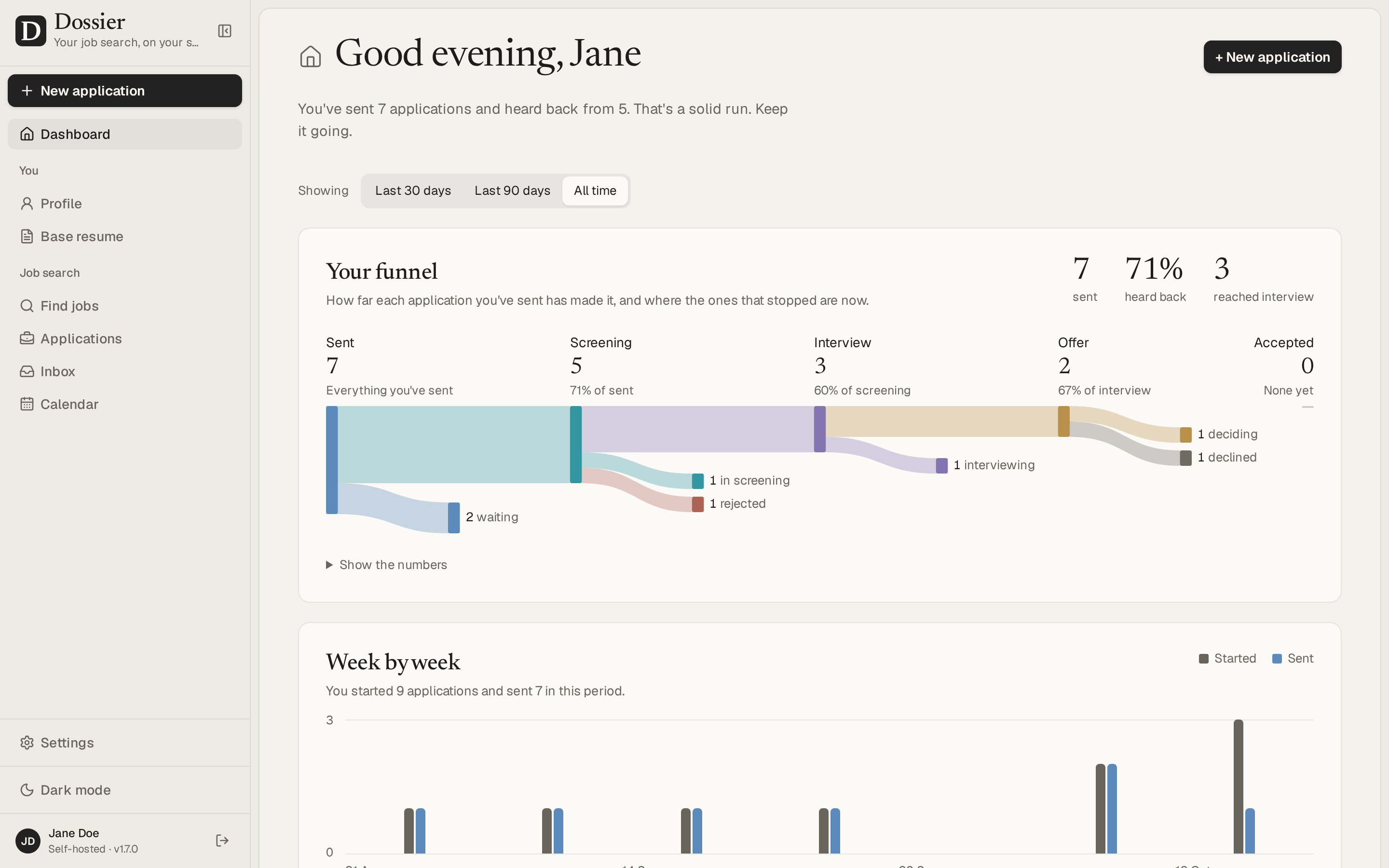
- Track: a board and a table of every application, and a dashboard with your funnel (last 30 days, 90 days or all time), a week-by-week chart and what's worth a look next, upcoming interviews included.
- Your data: export and import everything as one file, nightly backups, and Delete everything.
Screenshots
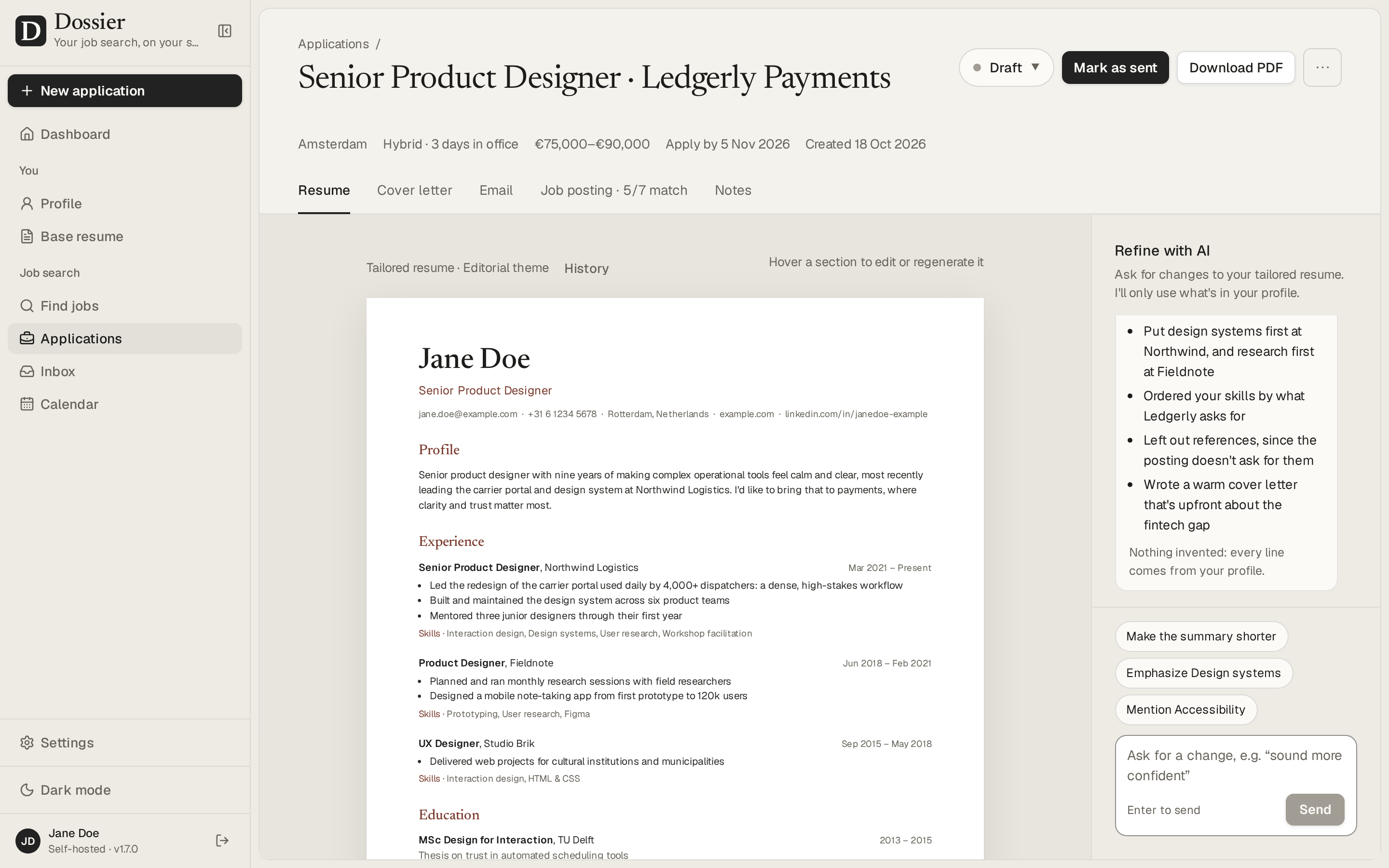
An application: the tailored resume, and a chat to refine it |
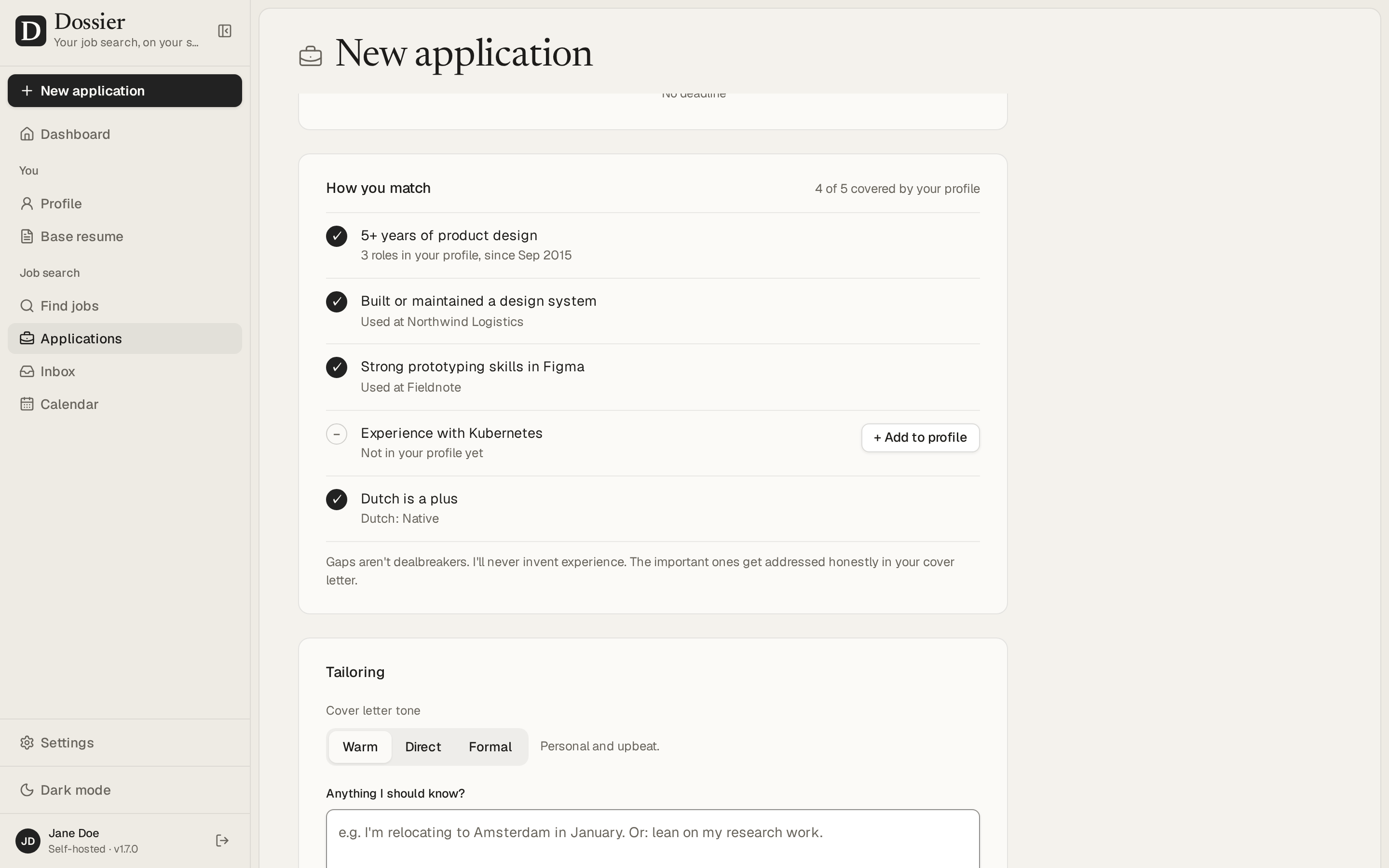
A new application: how you match the posting |
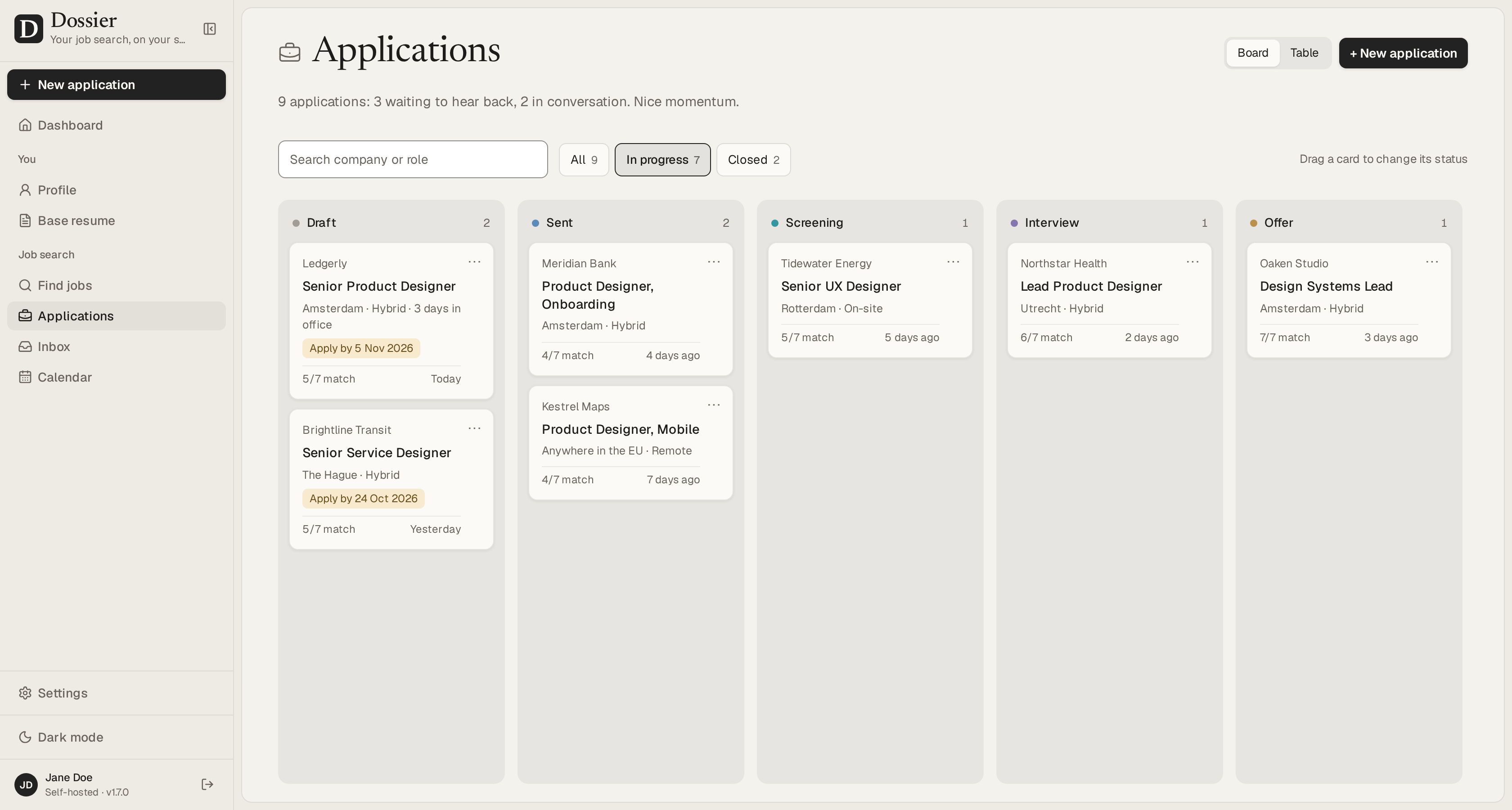
Every application on a board, from draft to offer |
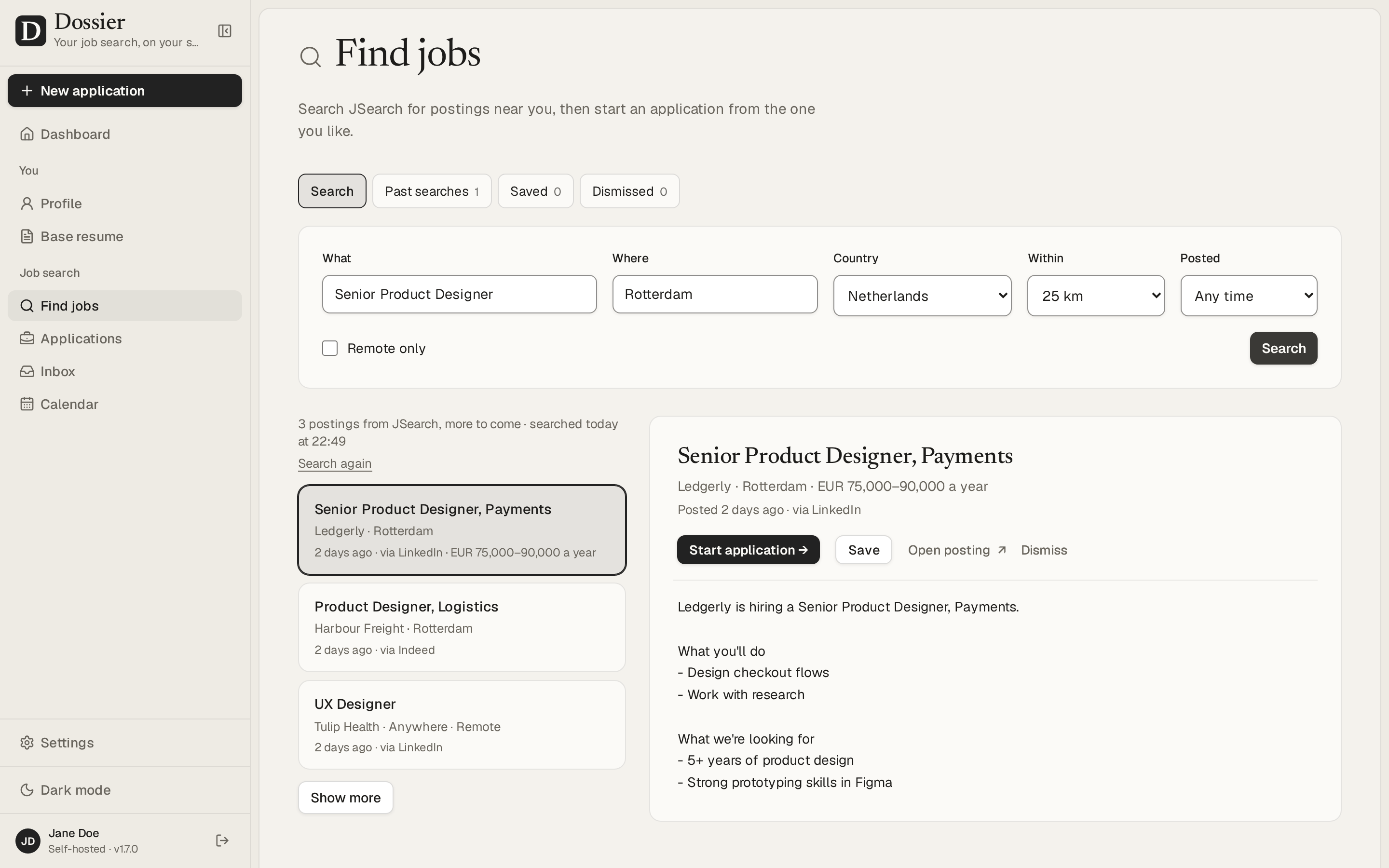
Find jobs and start an application from a posting |
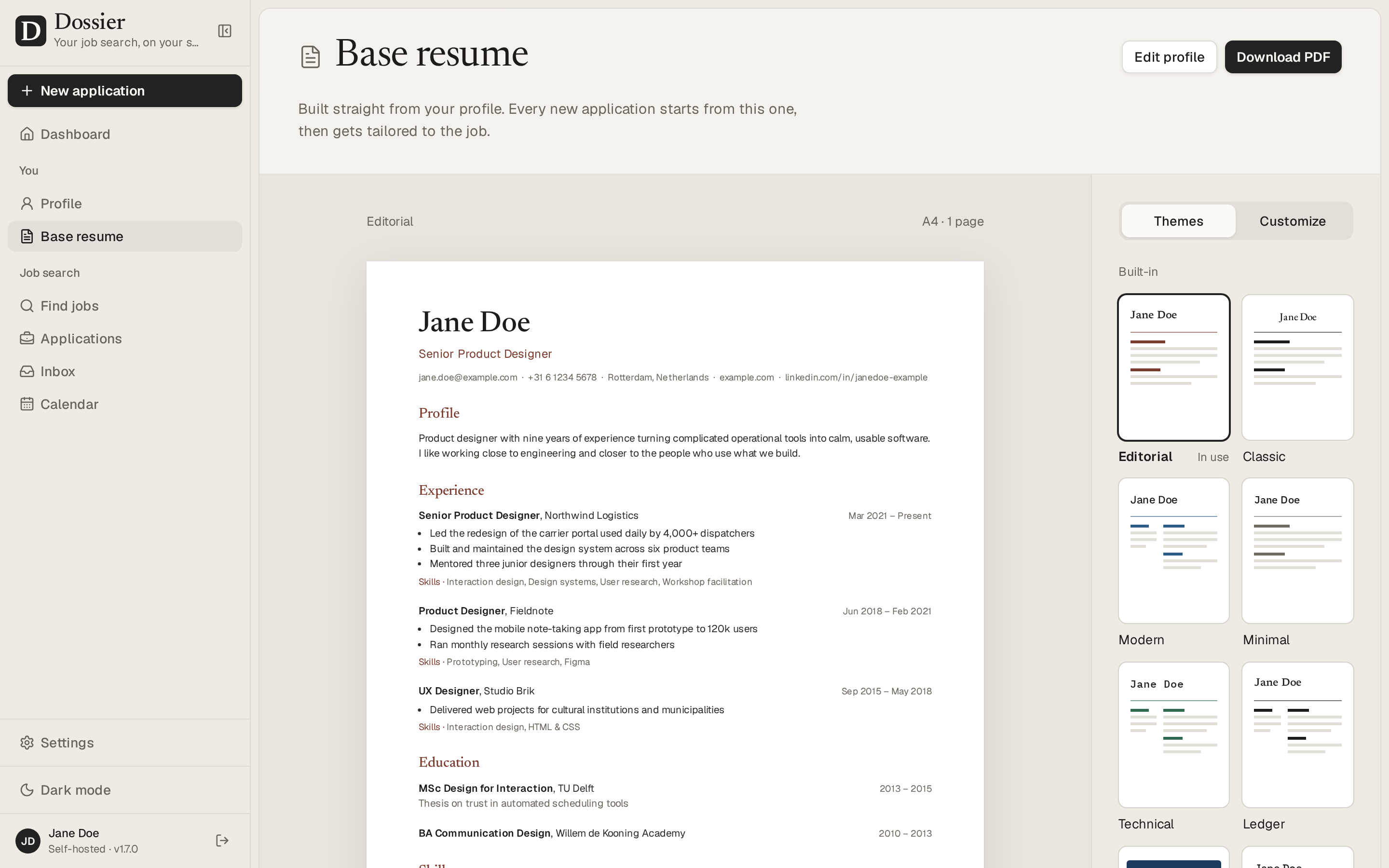
The base resume, with twelve themes and a theme builder |
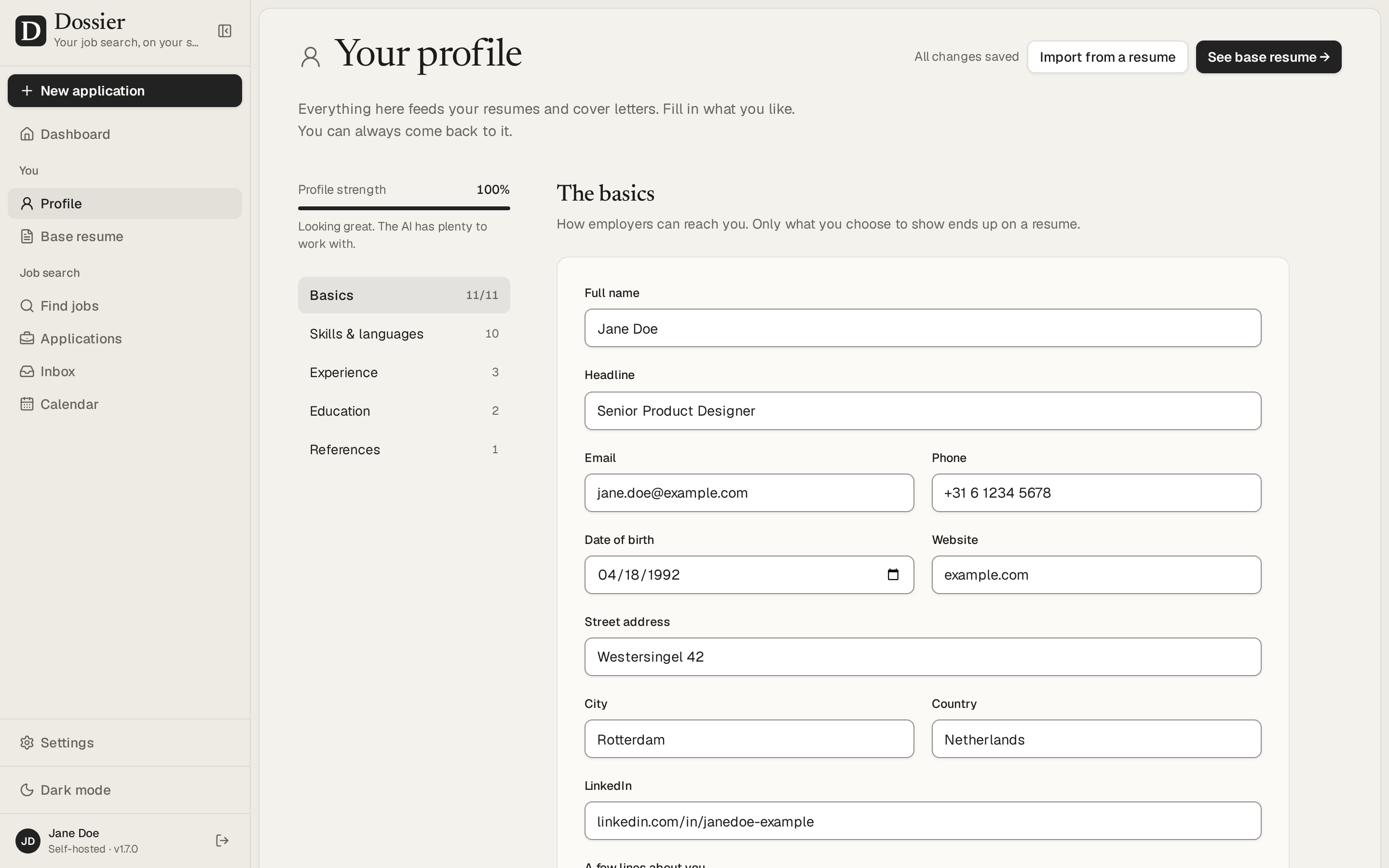
One profile that every resume and letter comes from |
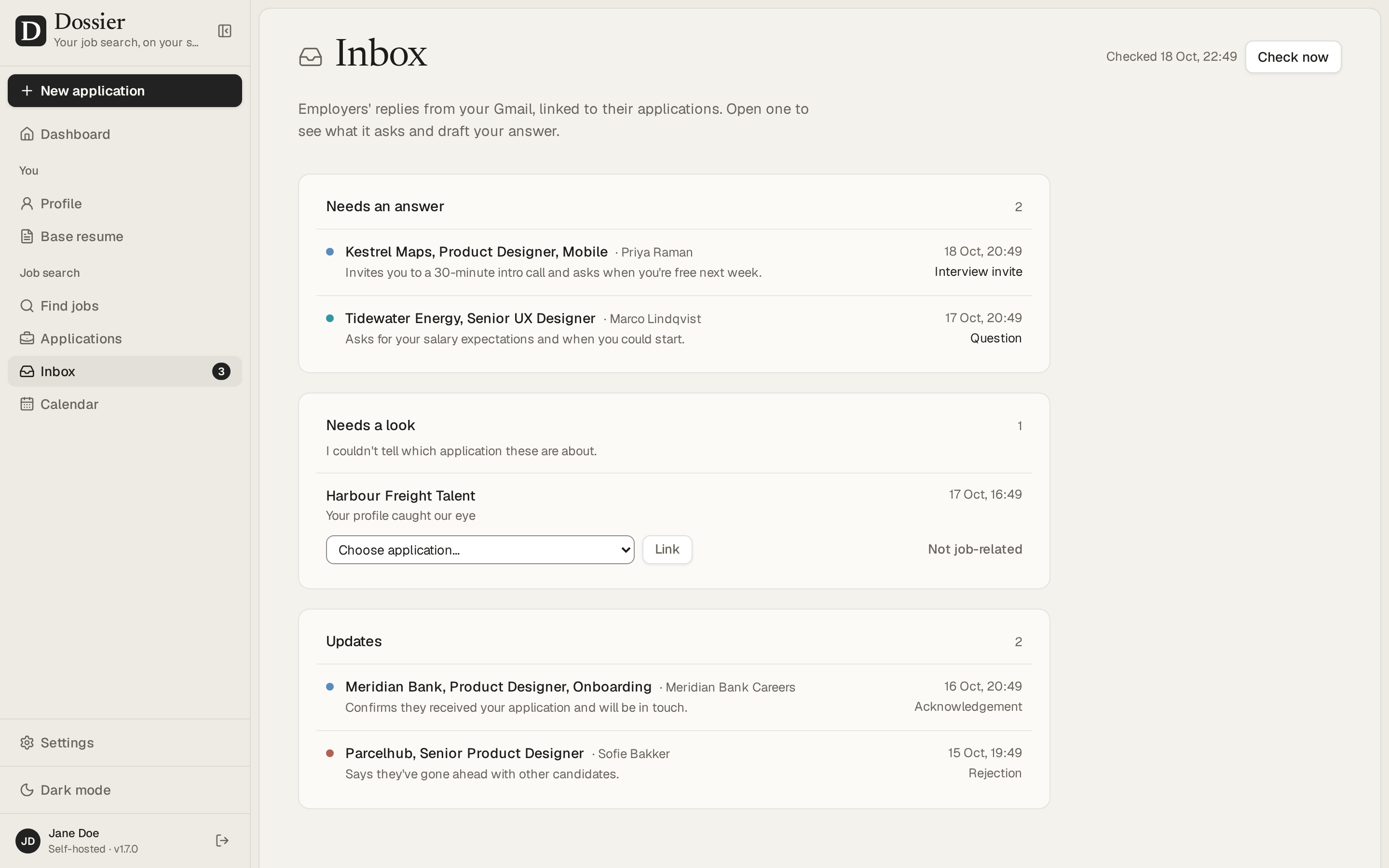
Replies from Gmail, read by the AI, with answers it drafts |
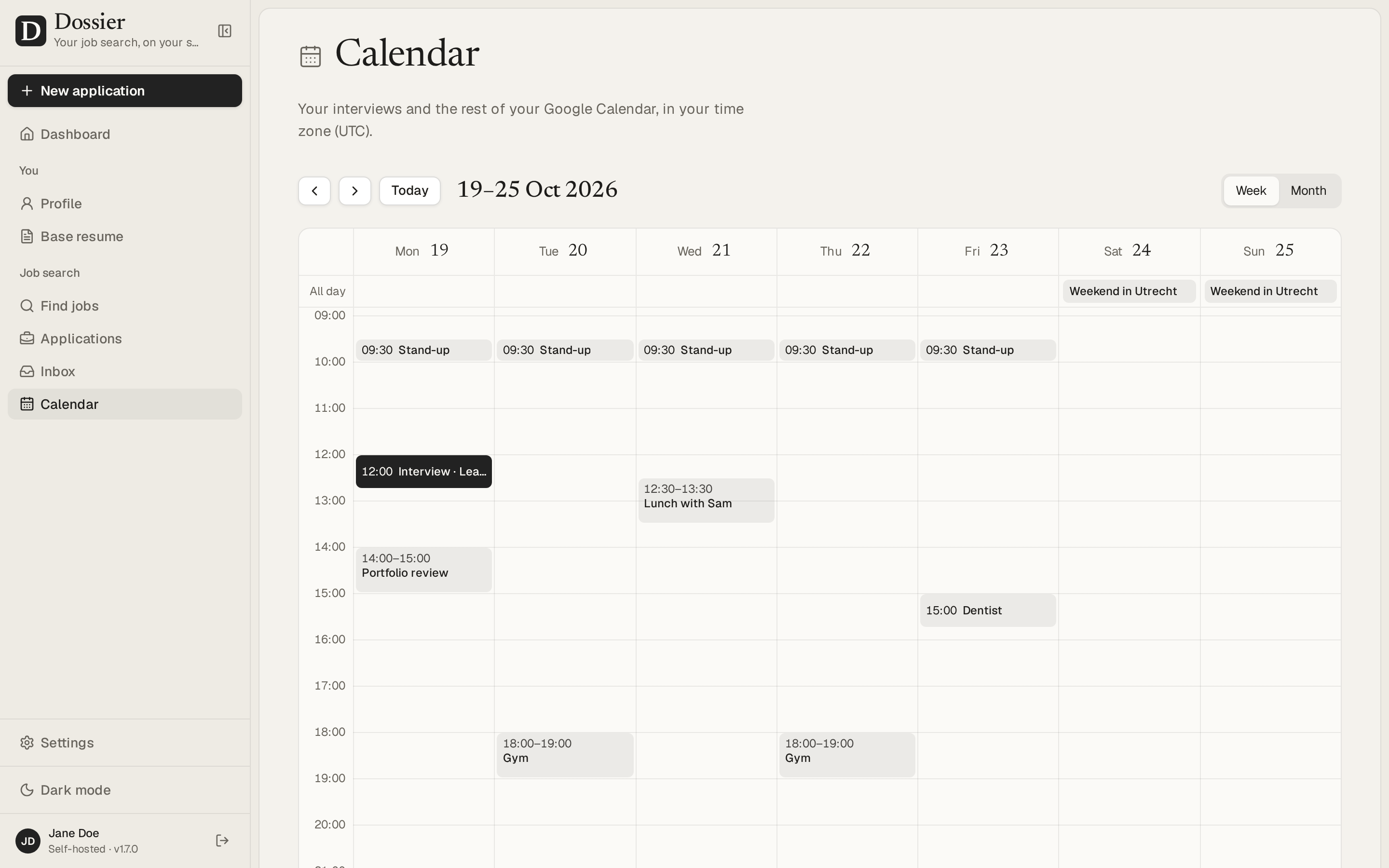
Your interviews in your Google Calendar's week, kept in step |
The screenshots show the demo data: Jane Doe is made up.
Self-hosting
Dossier runs as two containers, the app and PostgreSQL, from one Compose file. These four steps take a fresh server to Dossier on your own domain, with HTTPS.
1. Get a VPS
Any Linux server you can reach over SSH works, from any provider. Give it:
- At least 2 vCPUs and 2 GB of memory. Dossier uses up to about 1 GB, since it prints PDFs with a built-in Chromium; PostgreSQL and the system need the rest (see Performance and sizing).
- A few GB of disk. The image is about 1.7 GB; your data takes far less.
- More for a local model: about 6 GB of extra memory and 4 or more cores for
qwen2.5:7b (see Local model with Ollama). With a hosted AI provider, you don't need any of that.
- A domain name for HTTPS, such as
dossier.example.com, with a DNS A record pointing at the server.
The commands below are for Debian or Ubuntu. Only SSH (port 22) and the web (80 and 443) need to be open to the internet.
2. Install Docker and Docker Compose
Docker's install script sets up Docker Engine and the Compose plugin:
curl -fsSL https://get.docker.com -o get-docker.sh
sudo sh get-docker.sh
sudo usermod -aG docker $USER
The last line lets you run docker without sudo (membership in the docker group is as good as root, so only add accounts you trust). Log out and back in for it to apply, then check:
docker compose version
To install by hand instead, follow Docker's guide for your distribution.
3. Set up the database
Dossier keeps everything in PostgreSQL 18, which runs in its own container next to the app. Nothing outside can reach it, only the app, and its data lives in a Docker volume that survives restarts and upgrades.
Make a folder for Dossier, fetch the Compose file into it, and give the database a random password:
mkdir ~/dossier && cd ~/dossier
curl -fsSL -o compose.yml https://raw.githubusercontent.com/AienTech/dossier/main/compose.production.yml
echo "POSTGRES_PASSWORD=$(openssl rand -hex 24)" > .env
chmod 600 .env
.env holds your secrets, so it's readable only by you. The database starts with the app in the next step; Compose waits until it's ready before it starts Dossier.
4. Set up the app
Dossier needs two more secrets in .env:
DOSSIER_SECRET: 32 or more random characters. It signs sessions and encrypts saved API keys.DOSSIER_PASSWORD: a hash of the password you'll sign in with. Dossier only takes the hash, never the password itself, so reading the server's settings doesn't reveal it.
echo "DOSSIER_SECRET=$(openssl rand -base64 32)" >> .env
docker run --rm -it ghcr.io/aientech/dossier hash-password
Note: In case you are building or running it locally on Apple Silicon (M-series Mac), use the following command to specify the platform:
docker run --platform linux/amd64 --rm -it ghcr.io/aientech/dossier hash-password
Type your password twice. The command prints one line that starts with argon2id:; add it to .env as DOSSIER_PASSWORD=argon2id:… (for example with nano .env). Then start Dossier and watch it come up:
docker compose up -d
docker compose logs -f app
On every start, Dossier applies the database migrations and loads its built-in themes before it serves, and the log shows each step. Press Ctrl+C to stop following it. curl -s localhost:3000/api/health answers {"status":"ok", …} once it's up.
HTTPS. Dossier only listens on the server itself (127.0.0.1:3000), so put a reverse proxy with HTTPS in front of it. Caddy gets and renews the certificate on its own. Install it (on older releases, see Caddy's install guide) and replace its default configuration with your domain:
sudo apt install -y caddy
sudo tee /etc/caddy/Caddyfile > /dev/null <<'EOF'
dossier.example.com {
    reverse_proxy localhost:3000
}
EOF
sudo systemctl reload caddy
Open https://dossier.example.com and sign in. Then pick an AI model in Settings → AI provider (see Choosing an AI provider) and, if you like, a job source in Settings → Job search.
Another proxy, or no HTTPS at home
- Traefik, nginx or another proxy: it has to set
X-Forwarded-Proto and append the client's address to X-Forwarded-For. Caddy and Traefik do both by default; with nginx, add proxy_set_header X-Forwarded-Proto $scheme; and proxy_set_header X-Forwarded-For $proxy_add_x_forwarded_for;, and raise client_max_body_size to 12m so imports of up to 10 MB get through. Dossier relies on these headers: X-Forwarded-Proto: https makes the session cookie Secure, and the last address in X-Forwarded-For is the client the sign-in rate limit counts. So never expose port 3000 itself to the internet: requests that skip the proxy could set those headers themselves.
- A home network without a domain: change the app's
ports entry in compose.yml to "3000:3000", run docker compose up -d, and open http://<the server's address>:3000. Everything works, but the session cookie can't be marked Secure.
Environment variables
Dossier is configured with environment variables; everything else is set in the app. Put them in .env next to compose.yml, then run docker compose up -d to apply them (a plain restart keeps the old values). The server doesn't start while a required variable is missing or invalid, and its log says which one and how to fix it.
Required:
| Variable |
What it's for |
POSTGRES_PASSWORD |
The database's password. compose.yml builds the app's DATABASE_URL from it. |
DOSSIER_PASSWORD |
A hash of the password you sign in with, made with hash-password (see step 4); the password itself isn't accepted. It's only read from here, never stored. Changing it signs every session out. |
DOSSIER_SECRET |
At least 32 random characters. Signs sessions and encrypts saved API keys; changing it signs everyone out, and API keys have to be entered again. |
Optional:
| Variable |
Default |
What it's for |
TZ |
UTC |
The server's time zone, e.g. Europe/Berlin. Nightly backups run at 03:00 in it, and dates the server writes (a letter's date, "today") follow it. |
DOSSIER_BACKUP_RETENTION_DAYS |
14 |
How many days of nightly backups to keep. |
DOSSIER_TELEMETRY |
on |
off stops the usage ping, which sends a random install ID and the version number once on each day Dossier is used (see Privacy). |
DOSSIER_AI_PROVIDER |
none |
local (Ollama or llama.cpp), openai (any OpenAI-compatible API) or anthropic. A default for Settings → AI provider; a choice saved there wins. |
DOSSIER_AI_URL |
per provider |
The AI server's address, e.g. http://ollama:11434. |
DOSSIER_AI_MODEL |
per provider |
The model to use, e.g. qwen2.5:7b or claude-sonnet-5. |
DOSSIER_AI_KEY |
none |
The API key for a hosted provider. |
DOSSIER_AI_TIMEOUT_SECONDS |
300 local, 120 hosted |
How long one AI request may take. |
DOSSIER_JOBS_SOURCE |
off |
jsearch, adzuna, arbeitsagentur or off. A default for Settings → Job search; a choice saved there wins. |
DOSSIER_JSEARCH_KEY |
none |
A JSearch key, from OpenWeb Ninja or RapidAPI. |
DOSSIER_JSEARCH_HOST |
openwebninja |
Where that key is from: openwebninja or rapidapi. |
DOSSIER_ADZUNA_APP_ID, DOSSIER_ADZUNA_KEY |
none |
Adzuna's app ID and key. |
DOSSIER_GOOGLE_CLIENT_ID, DOSSIER_GOOGLE_CLIENT_SECRET |
none |
A Google OAuth client, for Gmail and Calendar (see Connecting Gmail and Calendar). A client saved in Settings → Google wins. |
DOSSIER_PUBLIC_URL |
the address in use |
The address Dossier is reached at, e.g. https://dossier.example.com, for Google's redirect after you sign in. Only needed when your proxy doesn't pass on the host and protocol. |
DOSSIER_IMAGE |
ghcr.io/aientech/dossier:latest |
The image to run. Set a version, e.g. ghcr.io/aientech/dossier:v1.4.1, to upgrade only when you choose. |
DOSSIER_PORT |
3000 |
The port on the server (127.0.0.1) that Dossier listens on, for the reverse proxy. |
COMPOSE_PROFILES |
none |
ai runs Ollama as well (see Local model with Ollama). |
Running the image without the Compose file? Set DATABASE_URL (postgresql://user:password@host:5432/database) instead of POSTGRES_PASSWORD, and mount a volume at /data, where nightly backups and zipped PDFs go.
Choosing an AI provider
Open Settings → AI provider, pick one, and press Test connection:
- Local model: Ollama or llama.cpp on your own hardware. Private and free, but slower; see below for setup and model sizes.
- OpenAI-compatible: OpenAI itself or any server that speaks its API (OpenRouter, vLLM, LM Studio and others). Enter its address, your API key and the model.
- Anthropic: Claude models with your own API key.
API keys are stored encrypted with DOSSIER_SECRET and never sent back to the browser. Never invent experience (on by default) keeps drafts to facts from your profile and flags anything it can't find there.
Local model with Ollama
With a local model, your profile, postings and documents never leave your server. The Compose file can run Ollama next to Dossier. Switch it on, start it, and pull a model:
echo "COMPOSE_PROFILES=ai" >> .env
docker compose up -d
docker compose exec ollama ollama pull qwen2.5:7b
Then, in Settings → AI provider → Local model, set the server address to http://ollama:11434, pick the model and press Test connection. Or set DOSSIER_AI_PROVIDER=local, DOSSIER_AI_URL=http://ollama:11434 and DOSSIER_AI_MODEL=qwen2.5:7b in .env.
Which model: qwen2.5:7b is a good start: a 4.7 GB download that needs about 6 GB of memory with Dossier's 16k-token context. On a smaller server, qwen2.5:3b (2 GB, about 3 GB of memory) works, with plainer writing. These are suggestions, not yet benchmarked. On a CPU, reading a posting takes a minute or two and a whole new application several minutes, so the local timeout is 5 minutes per request (DOSSIER_AI_TIMEOUT_SECONDS); 4 or more cores help, a GPU much more.
Ollama elsewhere: on another machine in your network, use http://<its address>:11434, and start Ollama there with OLLAMA_HOST=0.0.0.0 so it listens beyond localhost. For Ollama installed on the same server outside Docker, use http://host.docker.internal:11434, which compose.yml points at the server; Ollama then has to listen beyond localhost too, so make sure your firewall keeps port 11434 closed to the internet. Inside a container, localhost is the container itself, never the server.
Choosing a job source
Find jobs is off until you pick a source in Settings → Job search. LinkedIn and Indeed don't let other apps read their job listings, so Dossier searches one of these instead:
| Source |
What it covers |
Key and cost |
| JSearch |
Google for Jobs: postings from LinkedIn, Indeed, Glassdoor, Stepstone and company sites, in most countries, with their whole text. |
A key from OpenWeb Ninja or RapidAPI. The free plan has 200 searches a month; each page of results is one. |
| Adzuna |
Adzuna's own index in 19 countries. It only shares the start of each posting; Dossier fetches the rest from the posting's page. |
A free app ID and key from Adzuna's developer site, about 250 searches a day. |
| Bundesagentur für Arbeit |
Germany's federal job board, with whole postings. Germany only. |
No key, free. It isn't an official API (it's the access the agency's own site uses), so it can change without notice. |
The search starts from your profile's city, country and current role; change the place, radius (10 to 200 km), how recent and Remote only as you like. Every search is kept with what it found until you remove it, under Past searches, so going back to one, or reloading, doesn't spend another search.
Connecting Gmail and Calendar
This is optional. With a Google account connected, Dossier sends an application from your own Gmail address with its PDFs attached, checks Gmail every few minutes for employers' replies and links them to their applications, has the AI read each reply and draft your answer, offers times you're free in Google Calendar, and adds agreed interviews to it. Nothing is sent, and no status changes, until you confirm it.
The Calendar screen shows your week or month: the events in your Google Calendar, with your interviews linked to their applications. Interviews stay in step both ways: change or remove an interview's date in Dossier and its event moves or goes; move or delete the event in Google Calendar and Dossier follows.
Google doesn't let one sign-in serve every server, so each install brings its own OAuth client:
- In Google Cloud Console, create a project and enable the Gmail API and the Google Calendar API.
- Set up the OAuth consent screen as External, add yourself as a test user, then publish it (In production). While it's in Testing, Google stops the access after 7 days.
- Create an OAuth client ID of type Web application, with
https://<your Dossier address>/api/google/callback as an authorised redirect URI. Settings → Google shows the exact address to copy.
- Enter the client's ID and secret in Settings → Google, or set
DOSSIER_GOOGLE_CLIENT_ID and DOSSIER_GOOGLE_CLIENT_SECRET. Then press Connect Google account and choose what Dossier may do: send, read, and use your calendar.
Google only verifies apps that read mail after a security review, so its sign-in page warns that the app isn't verified. It's your own client: continue under Advanced. The refresh token is stored encrypted with DOSSIER_SECRET. Disconnect revokes Dossier's access at Google.
By default the inbox check only keeps mail in threads Dossier sent and mail from the companies you applied to. Every new email in Settings → Google keeps all new mail outside Promotions and Social, and the AI reads that too. PRIVACY.md says what's kept, for how long, and what goes to Google and the AI.
Backups and restore
Run these from your Dossier folder (~/dossier).
Export: Settings → Your data → Export downloads everything (profile, themes, settings, applications with their documents, chat, notes and history) as one JSON file. Your API key is left out unless you tick the box.
Import: importing such a file replaces all data in one step, after saving a backup of what was there to the data directory's backups folder.
Nightly backups (on by default) write the same export to /data/backups in the app's volume at 03:00 server time, keeping DOSSIER_BACKUP_RETENTION_DAYS days of them. Copy them off the server now and then: docker compose cp app:/data/backups ./backups.
Database dumps: back up PostgreSQL itself too:
docker compose exec -T db pg_dump -U dossier -Fc dossier > dossier.dump
To restore a dump, stop Dossier, load the dump, and start Dossier again:
docker compose stop app
docker compose exec -T db pg_restore --clean --if-exists -U dossier -d dossier < dossier.dump
docker compose start app
Keep a copy of .env with your backups: saved API keys can't be read without its DOSSIER_SECRET (an export with the key included carries it in plain text instead).
Upgrading
When a new version is out, the sidebar says so, with a link to what's new; Settings → About shows it too. Dossier checks GitHub for it once on each day you use it (switch that off in Settings → About).
Take a backup first (an export, or a database dump). Then, in your Dossier folder:
docker compose pull
docker compose up -d
latest is always the newest release. If you've pinned a version with DOSSIER_IMAGE, change it to the new one first. When a release's notes say compose.yml changed, fetch it again with the curl line from step 3.
The new version updates the database on start. Going back to an older version after that isn't supported: restore the backup you took instead.
From 1.4, Dossier sends a usage ping (see Privacy). If you'd rather it didn't, set DOSSIER_TELEMETRY=off before you upgrade to 1.4 or later.
From 1.0: Dossier 1.0 took the password itself in DOSSIER_PASSWORD; newer versions only take a hash of it, and don't start until it is one. Make the hash with the newer image (docker run --rm -it ghcr.io/aientech/dossier hash-password, typing your current password to keep it), put it in .env, then pull and start as above. Every browser is signed out once and signs in again with the same password.
Troubleshooting
docker compose logs app shows the app's log (add -f to follow it). After changing .env, run docker compose up -d again.
- "Dossier didn't start: applying the database migrations failed." The error above that line says why.
P1001 means the database isn't reachable: check that the db container is running (docker compose ps). If a migration failed halfway, the database needs repairing before the next start: restore the dump you took before upgrading, or ask for help with the log.
- "… is not set" or "DOSSIER_SECRET is too short": set the variable the log names in
.env.
- "DOSSIER_PASSWORD must be a hash of your password": it's set to the password itself, which Dossier 1.0 took. Make a hash with
docker run --rm -it ghcr.io/aientech/dossier hash-password and set DOSSIER_PASSWORD to it.
- PDFs fail or time out: Chromium needs memory; give the app at least 768 MB (
compose.yml gives it 1 GB). Fonts are bundled with Dossier, so documents look the same everywhere; a custom document language in a script Dossier has no font for may show empty boxes.
- The AI times out: local models on a CPU are slow. Try a smaller model, or raise
DOSSIER_AI_TIMEOUT_SECONDS. Test connection in Settings shows whether Dossier reaches the server at all; inside Docker, localhost isn't the server.
- An import fails with "413" or "Request Entity Too Large": the reverse proxy's upload limit is below 10 MB. Caddy has none by default; with nginx, set
client_max_body_size 12m;.
- "That file is over 10 MB": imports are capped at 10 MB, roughly 500 applications. Raising the cap means changing two settings in the code (see Import size limit).
- "Too many attempts": after five wrong passwords in a minute, sign-in pauses for 30 seconds, then longer each time, up to 15 minutes. The count is kept in the database, so restarting doesn't reset it: wait it out.
- Forgot the password: make a hash of a new one with
hash-password (see step 4) and set it as DOSSIER_PASSWORD in .env.
- Is it up?
/api/health answers {"status":"ok"} when the app and its database are fine, and 503 when the database isn't reachable.
Privacy
Everything you enter is kept in your PostgreSQL database and data directory. PRIVACY.md has the details: what's kept and for how long, what deleting removes, everything that leaves your server and who receives it, and a note on the GDPR.
- AI: with a local model, your profile, postings and documents never leave your server. A hosted provider receives what each task needs: the posting, your profile without contact details (no email, phone, address, date of birth or links), what you tell it about the application, and, when you refine, the drafts and your chat messages, though never a letter's sender or signature. Importing a resume sends its whole text, contact details included; the import page says so first. The notes you keep on an application are never sent. How long the provider keeps what it receives, and where it processes it, depend on its terms and your account.
- Task data: what an AI task was given and wrote (a posting being read, a resume's text, drafts you didn't turn into an application) is deleted after 24 hours, or as long as Settings → Your data says. Deleting an application deletes its task data at once.
- Usage ping: on each day you use Dossier, your server sends
telemetry.dossier.aien.me a random install ID and the version number, once, so the project knows how many installs are in use and how often. Nothing else is sent. Set DOSSIER_TELEMETRY=off to stop it. PRIVACY.md says what the receiver keeps, for how long, and how to have it deleted.
- Update check: once on each day you use Dossier, and when you press Check for updates, your server asks GitHub for the latest release, and sends nothing about you or your install. Switch the daily check off in Settings → About.
- Gmail and Calendar: off until you connect a Google account. Dossier then keeps the mail about your applications (only their text, not attachments) and what the AI read in it, and a hosted AI provider receives each reply it reads or answers. Deleting an application deletes its mail; Disconnect revokes the access at Google.
- When you ask for it: Find jobs, off until you choose a source, sends the source what you search for and nothing from your profile. Fetch asks a job site for a posting's page, from your server.
- No other tracking or analytics: Dossier loads nothing from other sites (its Content-Security-Policy forbids it, and the ping comes from your server, not your browser), and Next.js telemetry is off in the image.
Known limitations
- Desktop only: made for a laptop or desktop browser, not for phones.
- Single user: one password and one profile; there are no accounts.
- English interface: documents can be written in other languages, but the app itself is in English.
- One instance: run a single copy of the app per database. The nightly backups, the AI job queue and the PDF browser live inside the app's process.
Measured on 28 September 2026 with the production build in a container limited to 2 vCPUs and 1 GB:
- PDFs: the base resume renders in about 0.25 s, or 1 s when Chromium has to start first (it closes after five idle minutes). Two render at a time and the rest queue: six requested at once are done in 1.4 s. Dossier used at most about 520 MB, Chromium included, so give the container at least 768 MB.
- Screens: with ten times the demo data (90 applications), the dashboard and the applications list answer in 20–90 ms, and every query takes under a millisecond. With 900 applications they take up to about 0.2 s, mostly rendering; the tables are indexed for the queries they get.
- Interactions (changing a status, moving a card, switching tabs, opening an editor, typing, picking a theme) respond within 32 ms, and within about 100 ms on a CPU four times slower.
Security
What protects your data, how to run Dossier safely and how to report a problem: see SECURITY.md.
Development
Working on Dossier itself: see DEVELOPMENT.md.
License
Dossier is free software under the GNU Affero General Public License v3.0. You may use, change and share it; if you run a changed version for others over a network, you must offer them its source code.

 Dossier is a self-hosted web app for job hunting: you keep one career profile, and for each job posting it drafts a tailored resume and cover letter from it, lets you refine them in a chat, and tracks every application from draft to offer.