 Operit AI
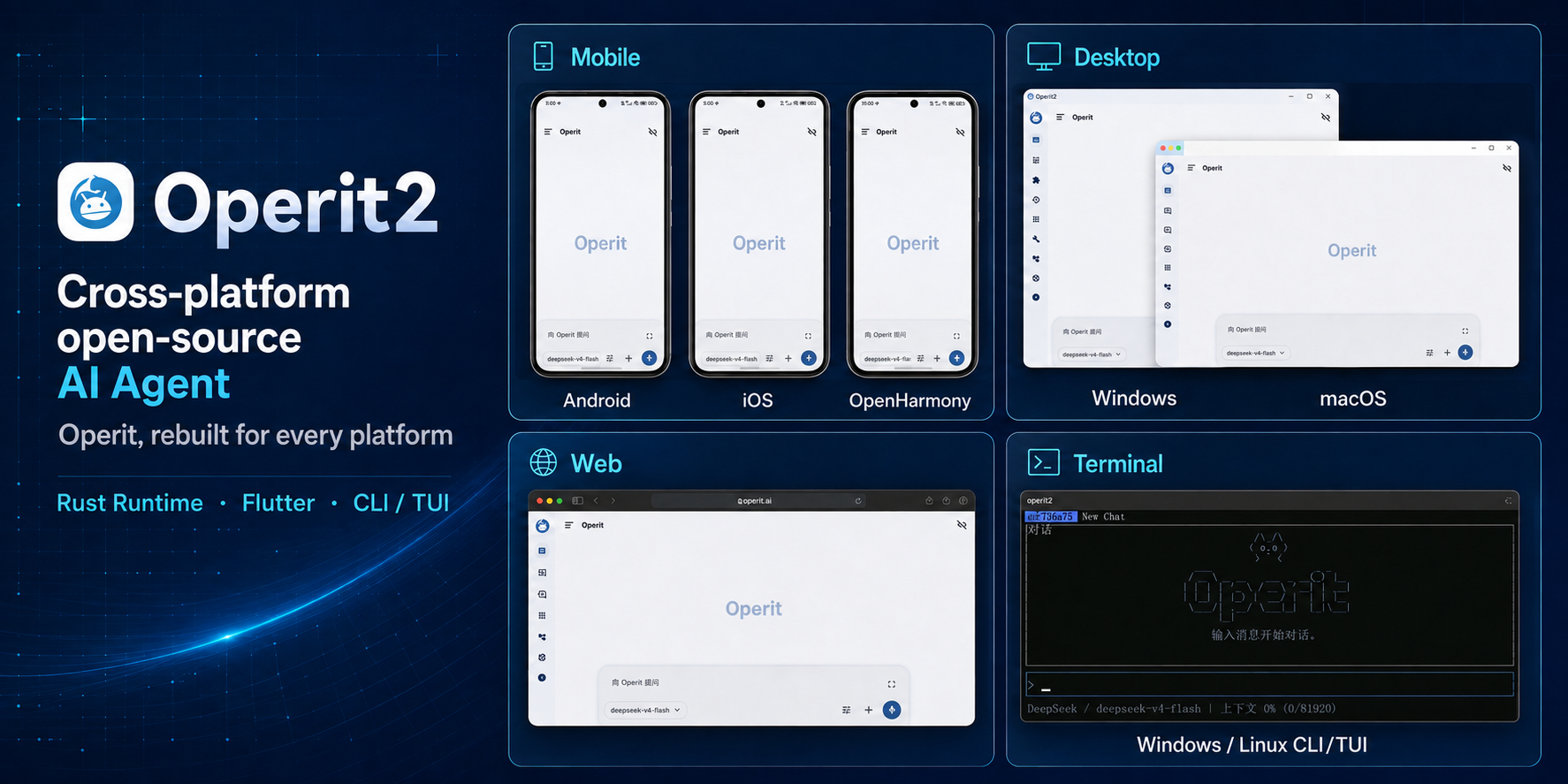
This repository is Operit's Android edition. Operit 2 is a separate second-generation implementation centered on a shared Rust runtime, Flutter clients, and the operit2 CLI/TUI. It currently includes implementation or build paths for Android, iOS, Windows, macOS, Linux, and Web, with OpenHarmony support under active development. To follow the cross-platform version, visit Operit 2.
Introduction
Operit AI is an open-source AI Agent platform for Android that supports cloud and local models, connecting them to Android system capabilities, terminals, browsers, files, and project workspaces to perform real tasks such as information retrieval, file processing, code development, and device automation through tool calling, workflows, and extensions such as ToolPkg, MCP, and Skills.
Highlights
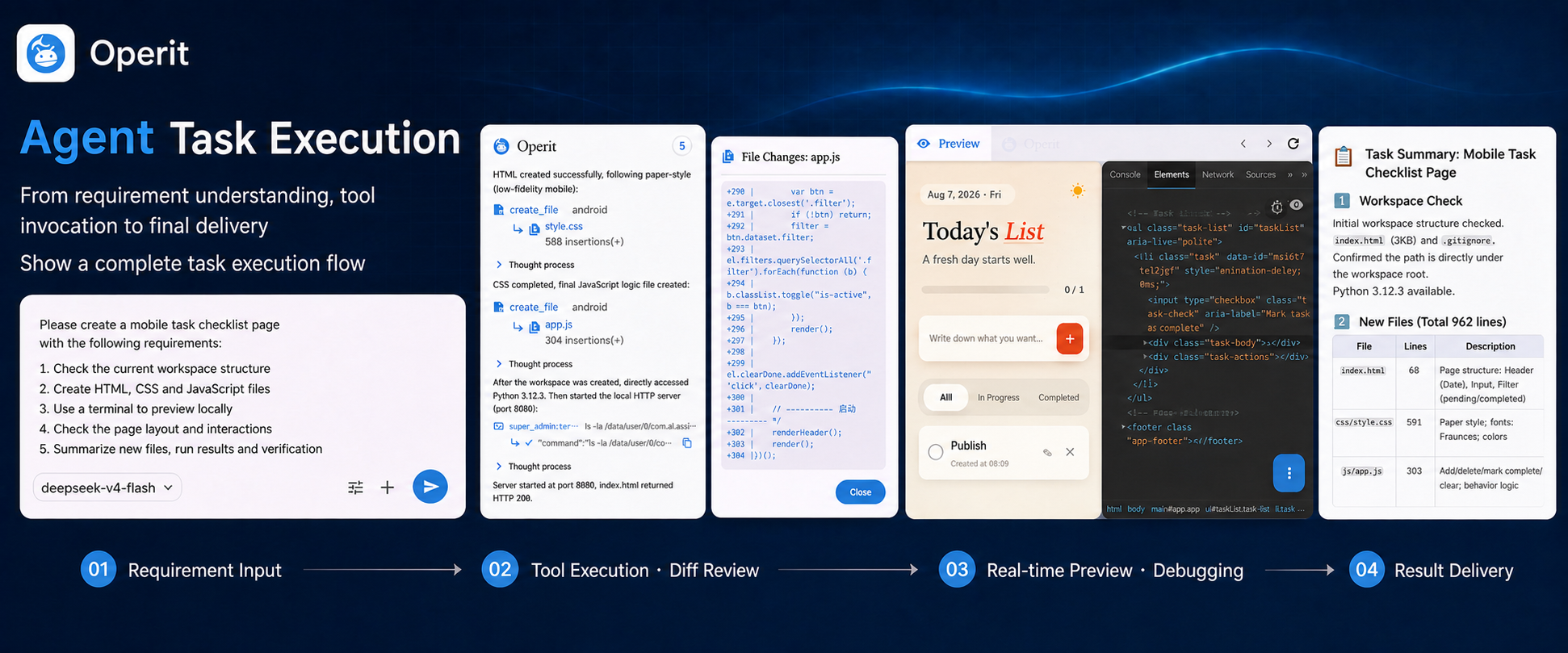
- A task-oriented agent workspace: Work with attachments, workspace context, tool execution progress, file changes, and multi-turn tasks
- Your choice of models and services: Connect cloud models, custom compatible endpoints, and key pools, or use MNN models and GGUF models through llama.cpp
- Deep Android and web integration: Use system capabilities after authorization, operate app interfaces, and read or interact with pages through the built-in browser
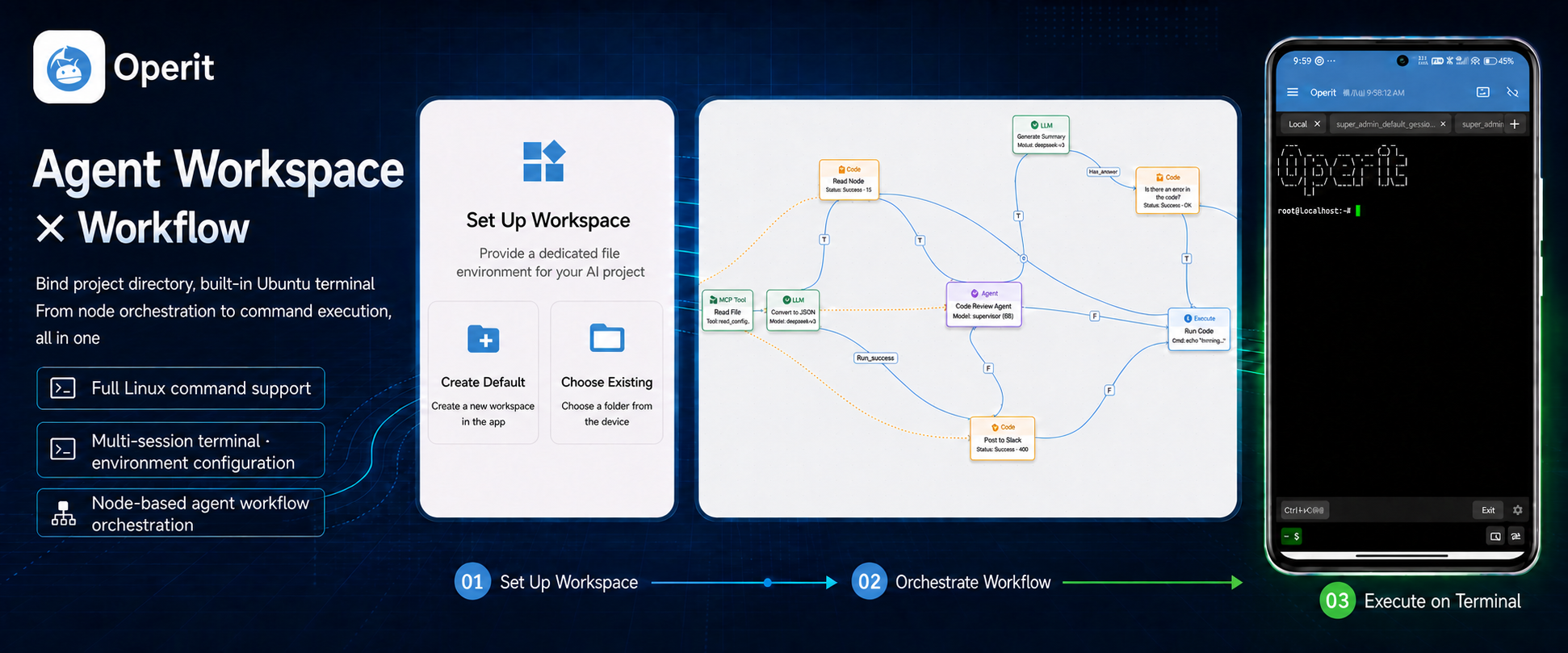
- Mobile development and terminal environment: Manage projects, edit code, preview web apps, and use an Ubuntu 24.04 user space, SSH, and SFTP on your phone
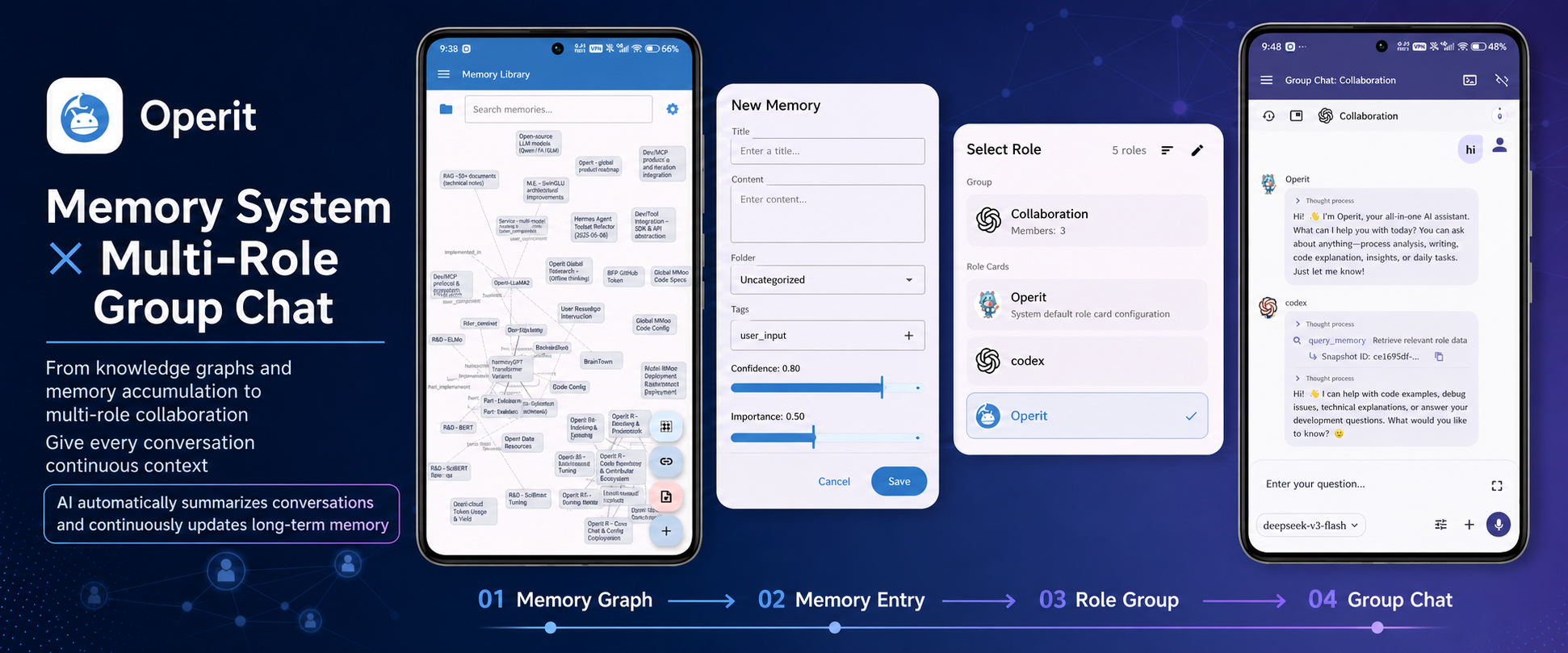
- Long-term memory and characters: Manage graph-based memory, chat history, character cards, and multi-character conversations, with an independent set of capabilities assigned to each character
- Composable extensions and automation: Combine tools through the unified marketplace, workflows, and system integrations to create repeatable task flows
Feature Showcase
Main Features
AI Chat and Models
- Add images, audio, video, documents, and workspace files to conversation context
- Use message branches, chat-history grouping and migration, automatic summaries, context limits, and parallel conversations
- Connect OpenAI Chat/Responses, Anthropic, Gemini, and many compatible services, with additional providers available through ToolPkg
- Manage multiple model configurations, parameters, key pools, and connection tests
- Assign separate models to chat, memory, summarization, UI control, and other tasks
- Run local inference with built-in MNN support or run GGUF models with llama.cpp
- Connect to local model services such as Ollama and LM Studio
Tools, Device Automation, and Browser Agent
- Use built-in tools for files, networking, search, media, system operations, software management, and development
- Choose among Allow automatically, Ask every time, and Deny for each tool; the default setting asks for permission
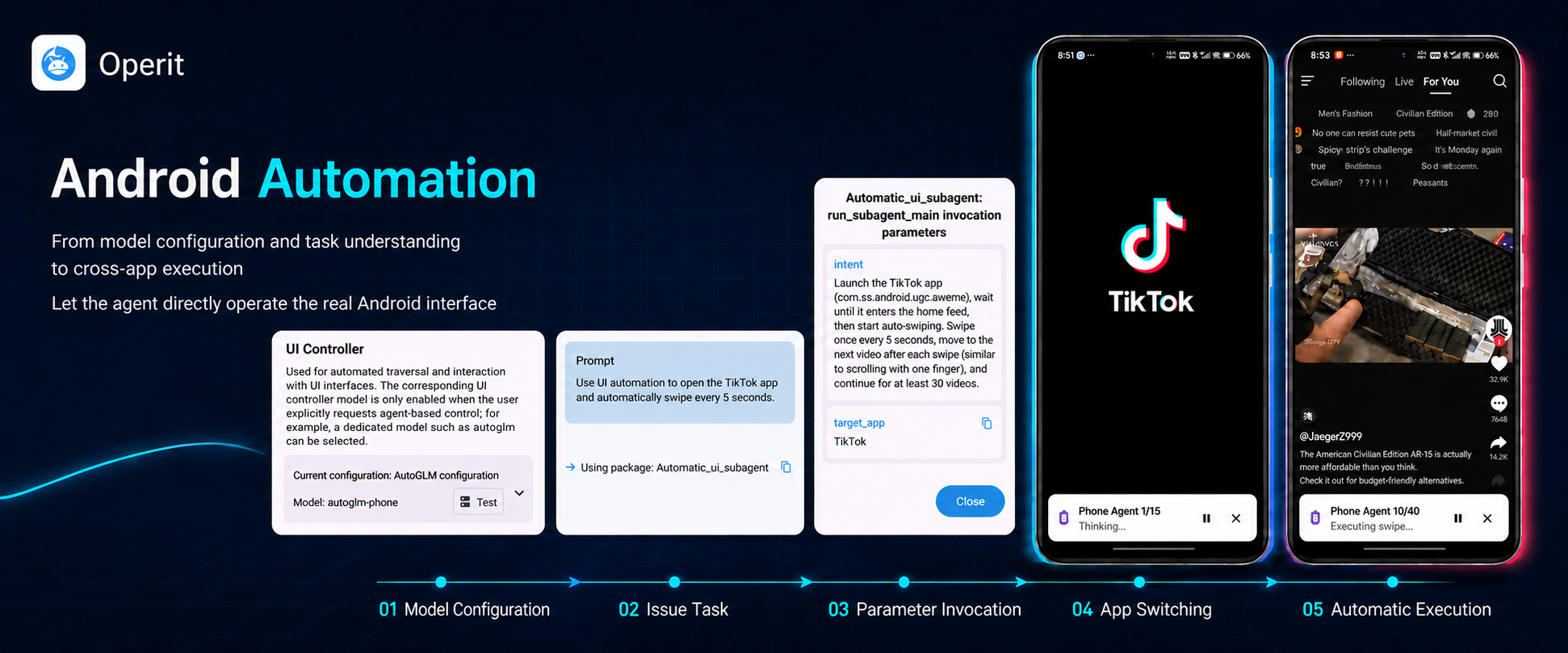
- Automate Android interfaces through Accessibility, ADB-level debugging access provided by Shizuku, or Root
- Use PhoneAgent/AutoGLM with visual screen understanding to perform actions; capabilities such as virtual displays require the appropriate permissions and device support
- Use the built-in browser with tabs, history, bookmarks, downloads, permissions, multiple windows, and user scripts
- Let the browser agent inspect page structure, click elements, enter text, scroll, send key presses, and capture screenshots
- Use OCR, image understanding, the camera, FFmpeg, web access, and file transfer tools
Project Workspaces and Terminal
- Start from Web, Android, Flutter, Node.js, TypeScript, Python, Java, Go, and other project templates
- Use a file tree, code editor, syntax highlighting, live previews, change tracking, backups, and export tools
- Bind a workspace to a chat so the AI can read project rules, reference files, and modify code
- Access app-internal directories, SAF, SFTP, and SSH file systems as workspaces
- Run an Ubuntu 24.04 ARM64 user space through PRoot by default, with chroot available on supported setups
- Use multiple terminal sessions, Python, Node.js, vim, SSH, tmux, custom keys, and custom package sources
- Work with development tools including Logcat, SQLite, Git, APKTool, and HTML packaging
Memory, Characters, and Chat Management
- Manage multiple memory spaces, imported and chunked documents, editable node relationships, and hybrid search
- Extract information from conversations and attachments, then use temporal, semantic, and relational retrieval for long-term memory
- Import, export, back up, and share character cards by QR code, including Tavern JSON/PNG formats
- Bind separate models, memory spaces, tool packages, Skills, and MCP services to each character
- Run multi-character group chats with mentions, separate histories, and collaboration between characters
- Import, export, lock, branch, migrate in bulk, back up, and restore chat records
Extension Marketplace and Workflows
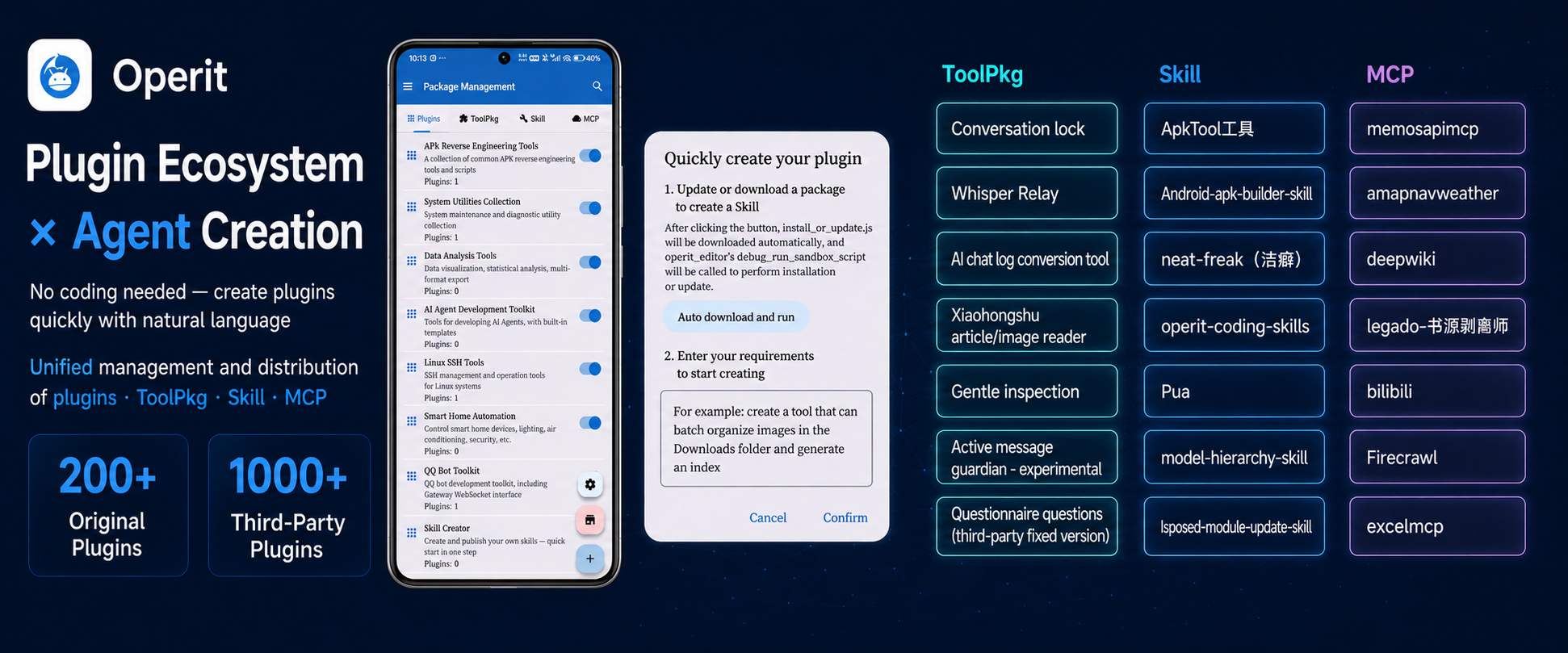
- Search, install, and manage scripts, ToolPkg, Skills, and MCP services through one unified marketplace
- Use the separate prompt and tag marketplace, along with project and Artifact management and publishing flows
- Extend tools, interfaces, model providers, hooks, and runtime behavior through ToolPkg
- Run local or remote MCP services, including launch methods such as uvx and npx
- Build visual workflows from trigger, execution, condition, logic, and data extraction nodes
- Trigger workflows manually, on schedules, through Tasker, intents, voice, or app startup
- Inspect workflow logs and statistics, cancel runs, and manage workflows in batches
Voice, Avatars, and Interface
- Use local Chinese and English speech recognition or cloud STT interfaces such as OpenAI and Deepgram
- Use Android system TTS, local ONNX VITS, custom HTTP services, and multiple cloud TTS providers
- Enable continuous voice conversations, background wake-up, custom wake templates, automatic read-aloud, and music queues
- Open Operit from a floating window, chat bubble, home-screen widget, or the Android default assistant entry point
- Use virtual avatars in DragonBones, WebP, MP4, MMD, glTF/GLB, and FBX formats
- Customize themes, fonts, chat bubbles, backgrounds, toolbars, Markdown rendering, and layouts
- Choose Chinese, English, Korean, Spanish, Malay, Indonesian, Brazilian Portuguese, or Romanian, or follow the system language
- Optionally enable the LAN Web Chat and HTTP API, which are disabled by default; configure a bearer token and assess the risks of LAN exposure before enabling them
Quick Start
| Item |
Description |
| System Requirements |
Android 8.0 (API 26) or newer; ARM64 (arm64-v8a) devices only |
| Resource Usage |
Memory and storage usage depend on the terminal environment, installed tool packages, and local models; reserve space according to each model's documentation |
| Download |
Get the latest APK from the Releases page |
| User Guide |
Visit the Operit website for tutorials and examples |
Security notice: Only download installation packages from the official Releases page or the Operit website. Packages from unknown sources may be modified and may put your data or device at risk.
Installation: Download the APK → Install and launch → Follow the setup flow to configure models and permissions → Start using Operit
Data and network boundaries: Chats, characters, memories, and model configurations are stored locally by the app. Cloud-model requests are sent from your device to the provider endpoint you configure; Operit does not host chat inference. Marketplace, MCP, Skill, speech, and drawing features may connect to third-party services. Web Chat/HTTP API are disabled by default; review network exposure and bearer-token settings before enabling them, and use Android intent/broadcast integrations only with trusted apps.
Project Evolution
- April to August 2025 · From AI chat to tool execution: Added tool calling, MCP, voice, floating windows, web development, and character cards
- September to December 2025 · Deeper device and development integration: Added the Ubuntu terminal, memory system, MNN, SSH workspaces, GUI automation, and the Skill ecosystem
- 2026 to present · A mobile agent platform: Expanded workflows, GGUF local inference, the browser agent, character group chat, Web Chat, ToolPkg, and the unified marketplace
View selected release summaries
- v1.12.0 · 2026-07-01: Introduced a unified marketplace and Artifact workflows, enhanced project workspaces and the ToolPkg runtime, expanded language, voice, and media support, and improved crash recovery
- v1.11.0 · 2026-05-16: Added Web Chat, the Artifact marketplace, ToolPkg AI providers and hooks, and improvements to memory, context, and browser automation
- v1.10.1 · 2026-04-17: Upgraded the built-in browser and web automation, added FBX avatars, liquid-glass themes, and a local HTTP chat entry point
- v1.10.0 · 2026-03-18: Added character group chat, AI self-configuration, Ollama/NVIDIA/OpenAI Responses modes, and more development tools
- v1.9.1 · 2026-02-20: Focused fixes for terminals, strict tool calling, remote MCP, memory, and workflows
- v1.9.0 · 2026-02-17: Added mobile web automation, Windows terminal control, the SQLite viewer, and Android workspace templates
- v1.8.1 · 2026-02-03: Added llama.cpp GGUF local inference and expanded interface, backup, Skill, and workspace capabilities
- v1.8.0 · 2026-01-13: Introduced workflows, voice wake triggers, parallel conversations, and automatic backups
- v1.7.1 · 2025-12-31: Added Root virtual displays, the Skill protocol and marketplace, region-based screen recognition, and chat locking
- v1.7.0 · 2025-12-19: Introduced AutoGLM GUI automation and virtual displays
- v1.6.4 · 2025-12-12: Integrated AutoGLM and improved automation status indicators, tool-package environment variables, and debug logs
- v1.6.3 · 2025-12-07: Added native tool calling, multi-model configurations, SSH file systems, and workspace project templates
- v1.6.2 · 2025-11-22: Expanded chat branching and migration, context binding, and academic search
- v1.6.1 · 2025-11-16: Refactored UI rendering and added visual understanding, SSH terminals, automatic summaries, and Deep Search
- v1.6.0 · 2025-10-21: Added MNN local models, intelligent memory, Tasker integration, and desktop pets
- v1.5.2 · 2025-10-05: Improved MCP, workspace
.gitignore support, camera tools, HTML rendering, and regex filters
- v1.5.1 · 2025-09-25: Added the MCP marketplace, key pools, workspace rollback on chat resend, and manual memory refresh
- v1.5.0 · 2025-09-20: Integrated the Ubuntu 24.04 terminal and Deep Search mode
- v1.4.0 · 2025-09-01: Added parallel tool execution, the character card system, and PNG character card import
- v1.3.0 · 2025-08-04: Added web development, the theme selector, and Anthropic Claude support
- v1.2.x · 2025-07: Added voice conversations, the knowledge base, and DragonBones animation
- v1.1.x · 2025-05 to 06: Added MCP, OCR, floating windows, and Gemini support
- v1.0.0 · 2025-04-11: Released basic AI chat, tool calling, and Shizuku/Root integration
See the Releases page for complete release notes.
Open Source and Collaboration
Contributions to Operit's scripts, extensions, documentation, and core features are welcome.
Contributors

Support Development
If Operit is useful to you, you can voluntarily support ongoing development and basic project operations:
- International support: Patreon
- Mainland China: Afdian
- Support is entirely voluntary and does not unlock features, quotas, updates, answers to questions, or other benefits
- Choosing not to support does not affect normal use, updates, or access to the source code
License
The main code in this repository is licensed under GNU LGPL v3 (LGPL-3.0-only). Tools, examples, templates, and third-party dependencies may use other licenses; refer to LICENSE, the license files in their respective directories, and package metadata for their terms.
Star History
Made with ❤️ by the Operit Team






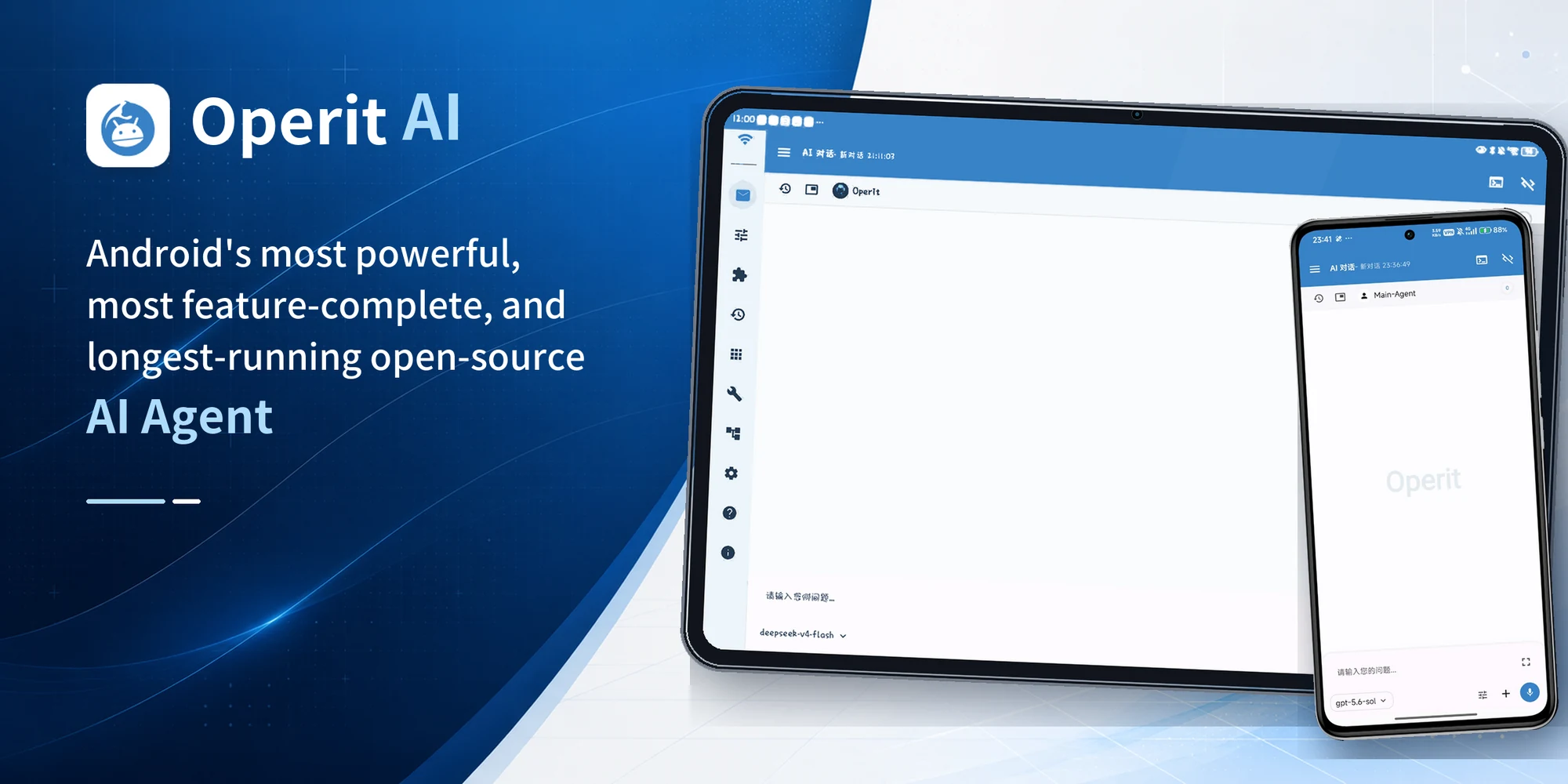


 Operit is an open-source AI agent platform for Android that connects cloud or local AI models to your phone's system, terminal, browser, files, and project workspaces so the AI can actually perform tasks like file management, coding, and device automation.