DOPPLERGEIST uses aircraft Doppler signatures in audio recordings and ADS-B flight data to geolocate recordings. It includes a Python CLI and a local browser interface.
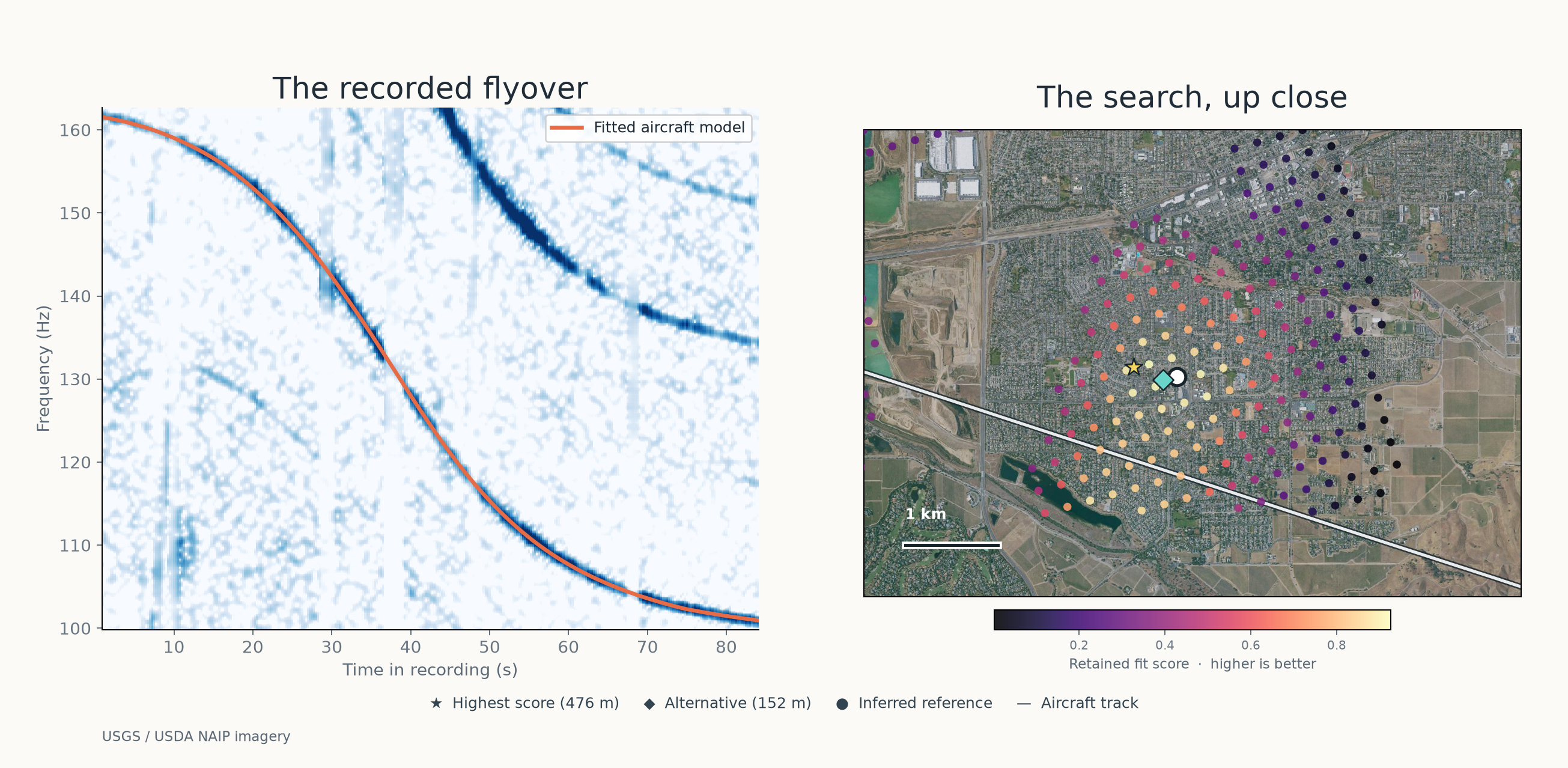
Historical example before the current aircraft-type policy: automatic MP3 analysis selected 466 aircraft and ranked 105 candidate locations. The first candidate was 476 m from reference in a constrained geographic search and clock window. Experiment and ranking.
Capabilities
Capability
What DOPPLERGEIST provides
Automatic acoustic discovery
Scans an entire recording for moving frequency tracks and groups related harmonics, without manually selecting event windows or frequency bands.
Historical aircraft data
Acquires and indexes ADSB.lol flight archives; caches reusable trajectory, terrain, and geoid inputs.
Location search
Compares predicted Doppler and sound-arrival patterns across candidate receiver locations, including evidence from multiple independent flyovers.
Geographic profiles
Search profiles for the contiguous United States, Germany, Spain, metropolitan France (including Corsica), and Italy (including Sicily and Sardinia), plus generated bounding envelopes for every other country and territory, grouped by continent (COUNTRIES.md), with optional user-provided regional bounds.
Local browser application
Recording uploads, persistent analysis jobs, per-curve spectrogram/audio evidence, false-positive review with user-assisted re-analysis, progress monitoring, and supported resume/cancellation workflows.
Research and reproducibility
Configured measurement/replay commands, documented experiments, diagnostic artifacts, and decision rules for unresolved searches.
The integrated application and command-line workflow are available on main. See how it works and validation and results for the distinction between a ranked hypothesis and an accepted location.
Quickstart
Install the published PyPI package with pipx. It requires Python 3.11+; Intel Macs require Python 3.11–3.13. Install FFmpeg separately and make sure that ffmpeg and ffprobe are on your PATH.
The full CLI and browser workflow require Linux or macOS. On native Windows,
the published wheels support discover only; analyze, serve, and job
depend on POSIX facilities and fail to start. Windows users can run the full
workflow inside WSL with Linux, Python, and FFmpeg installed there.
pipx install dopplergeist
dopplergeist --help
To install in an existing Python environment instead, use python -m pip install dopplergeist. The commands below work with either installation. See the PyPI and packaging guide.
Option A: use the browser interface
dopplergeist serve --jobs jobs --online --max-runtime 14400 --port 8765
Open http://127.0.0.1:8765 and upload a recording. For historical flight matching, supply a supported UTC time window for the first audio sample. The interface runs locally; --online permits downloading public aircraft and terrain data.
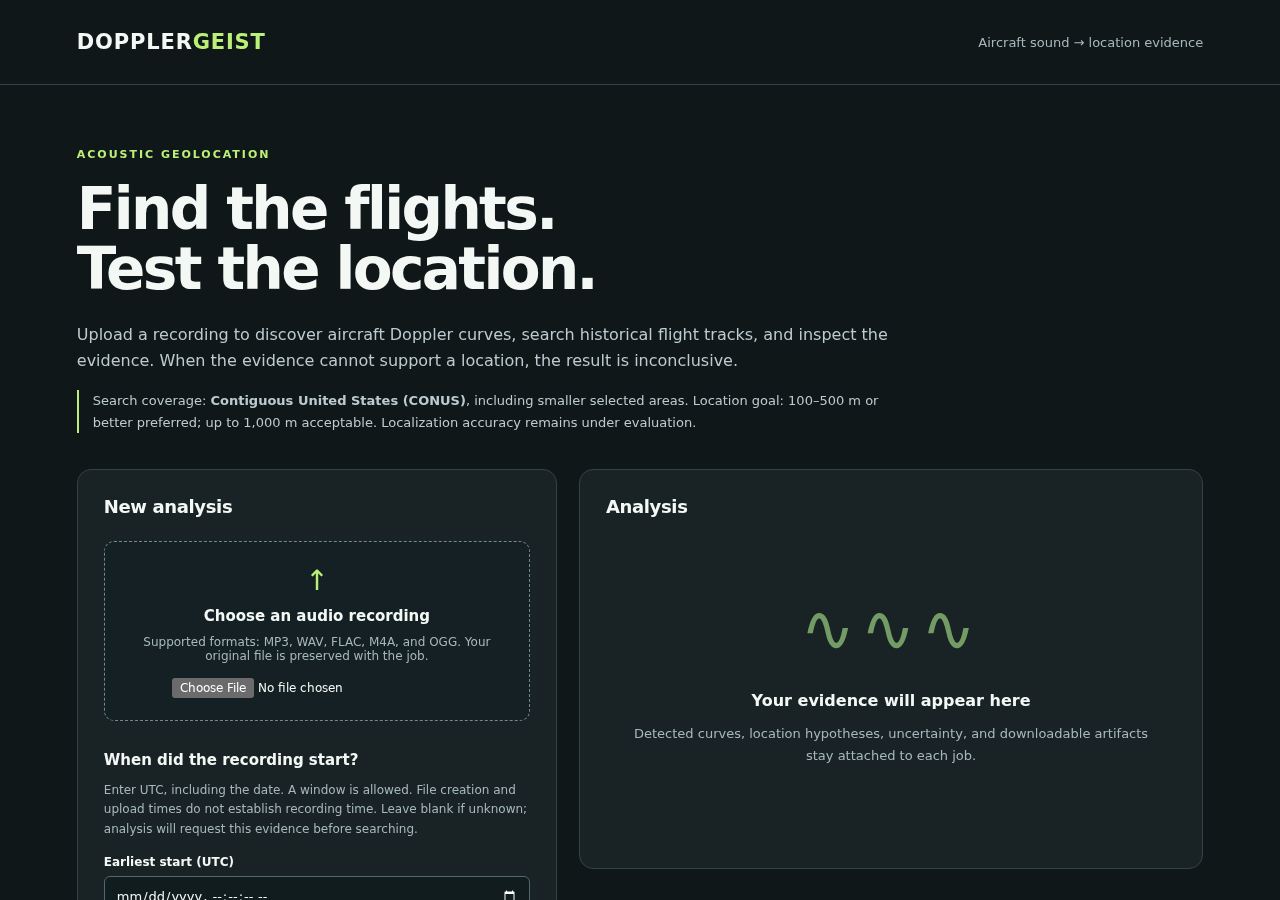
Actual local browser interface before an upload. The analysis panel fills after a job runs; see the real MP3 demonstration above for ranked locations.
Option B: analyze a recording from the CLI
dopplergeist analyze path/to/recording.mp3 --jobs jobs
This command creates a job and analyzes the audio. Historical flight matching requires --start-utc, --end-utc, and an evidence-based --time-source. Add --online to acquire missing public data. Without a reliable recording time, the job returns needs_input.
A full online regional analysis includes data acquisition and geographic search. The job limit defaults to one hour. Initial data acquisition can take longer. The example below uses sample times and Berlin bounds. Replace them with evidence for your recording and adjust --max-runtime for the expected workload:
dopplergeist analyze path/to/recording.mp3 \
  --start-utc "2026-01-01T00:00:00Z" \
  --end-utc "2026-01-01T00:10:00Z" \
  --time-source "replace with the source establishing the first-sample clock" \
  --country DE --bounds 13.0 52.0 14.0 53.0 \
  --online --max-runtime 21600
To check progress after the job ID is printed:
dopplergeist job JOB_ID --jobs jobs --watch
The progress percentage is stage-based and can remain unchanged during long tile subdivisions. Recent search-file activity is a liveness clue, not proof that the queue is shrinking or that a location was found.
The default country profile is US (contiguous United States). Other profiles include Germany (DE), Spain (ES), metropolitan France including Corsica (FR), and Italy including Sicily and Sardinia (IT). Spain, France, and Italy use broad geographic envelopes without country polygons. For regional searches, set independently justified --bounds WEST SOUTH EAST NORTH. The France profile excludes overseas territories. See country profiles and the browser workflow for configuration and job management.
Data requirements: Initial online acquisition may take hours and tens of gigabytes of disk space, depending on the recording time and search region. Downloads and caches are reusable; the application does not enforce an automatic disk-space cap.
Option C: discover acoustic events without flight data
Discovery uses the same detector as automatic analysis. It decodes the recording at two sample rates, groups related measured tracks into acoustic proposals, and retains the individual tracks for subsequent analysis. A proposal alone does not establish aircraft identity.
This scans the full recording locally without downloading ADS-B archives. Inspect results/my-discovery/summary.json and the saved discovery/ diagnostics. See Automatic audio discovery for detector details and options.
For configured research workflows, dopplergeist run and dopplergeist measure remain available; see Methodology.
Install from source (developers)
To work on the repository, clone the source and install it in a virtual environment. These commands use Linux or macOS paths:
A compatible C compiler enables optional native acceleration. Python fallbacks are available. See Setup, Performance, and Docker for more options.
How it works
Detect the signal. Decode the recording, identify moving spectral tracks, and group harmonics that may belong to one flyover.
Prepare flight history. Retrieve or load aircraft trajectories for the recording's supported time window, tracking gaps in available data.
Predict the audio. Model Doppler shifts and sound-arrival delays from flight paths, receiver geometry, and acoustic propagation.
Rank locations. Compare modeled and observed signals across geographic candidates and multiple flyovers; preserve alternative explanations when evidence is insufficient.
The software records diagnostic evidence and can return an inconclusive result rather than selecting an unsupported coordinate. The underlying models are described in Methodology and Confidence and decision rules.
Frequently asked questions
Is Colsto's airplane Doppler geolocation code available?
DOPPLERGEIST is an independent implementation, inspired by the approach in that video. It contains independently written code and is not affiliated with Colsto. If you want to experiment with aircraft Doppler signatures and historical flight-track matching, you can install and run DOPPLERGEIST locally.
Can I geolocate an MP3 recording?
DOPPLERGEIST accepts MP3 recordings and can automatically detect candidate aircraft Doppler events. With a justified recording-time window and appropriate flight data, it can search and rank possible recording locations. A successful location determination is not guaranteed.
Do I need to know when the recording was made?
Yes, for historical flight matching. The software needs a defensible UTC time or bounded time window for the first audio sample. Without that information, it can still analyze the sound, but geographic matching returns needs_input.
Can DOPPLERGEIST run offline?
Yes, for acoustic discovery. Location search also works with appropriately configured historical flight and terrain data already available locally. The --online flag allows the program to acquire missing public data.
How accurate is DOPPLERGEIST?
In a constrained real-MP3 demonstration, the highest-ranked location was 476 m from an inferred reference, not a surveyed microphone position. Independent blind accuracy on real recordings has not yet been established. See validation and results for both successful fits and unsuccessful evaluations.
Can I upload an audio file in a browser?
Yes. Run dopplergeist serve after installation and open the local interface. Password-protected self-hosting through an HTTPS reverse proxy or Fly.io is also supported; see hosted setup.
Is DOPPLERGEIST free and open source?
DOPPLERGEIST is source-available, not OSI-approved open source. It is licensed under PolyForm Noncommercial 1.0.0, which permits use, modification, and distribution for permitted noncommercial purposes, subject to its terms. Commercial use outside those permissions requires separate authorization; see Commercial licensing.
Validation and results
DOPPLERGEIST has been exercised on synthetic fixtures, real aircraft recordings, historical flight tracks, and browser/API workflows. These experiments demonstrate components of the pipeline; no independently accepted blind real-recording localization has yet been established.
Selected and searched 466 nearby aircraft and returned 105 ranked locations; the first was 476 m from an inferred reference.
Fully automatic event selection, but a constrained region and approximate 10-second clock window; the reference is not surveyed truth and the result was inconclusive. Details.
Configured two-flyover real-audio replay
Leading location 43.86 m from a public reference.
Used source-informed events and geographic bounds; the reference is not surveyed, and the model did not accept a location. Clean replay.
40 real smartphone aircraft recordings
Automatic discovery produced candidate acoustic groups in 36 of 40 files.
These are acoustic proposals, not verified aircraft detections or geolocation successes. Discovery results.
Five public field recordings
Three returned rankings, with no retained candidate within 1 km of the publisher-reported sites; two returned no candidate.
Recorder clocks and exact microphone positions were not confirmed, so these are development outcomes rather than a calibrated accuracy benchmark. Experiment.
NASA and WSU measured-trajectory recordings
Produced mixed detection results and no validated automatic location.
Searches depend on acoustic evidence, reliable recording-time information, sufficient historical flight coverage, and physical-model support. A ranked score is not a calibrated location probability, and incomplete or competing hypotheses may lead to an inconclusive decision. Full experimental conditions, negative findings, and reproducibility records remain available in the linked reports.
Performance engineering
Optional native backends, reuse of acoustic calculations, and checkpointed search are implemented and measured. In one pinned bounded regional HTTP replay, optimizations reduced elapsed time from 62.03 seconds to 37.19 seconds (1.67×) without changing the compared scientific outputs. This is a workload-specific result, not a general national-search runtime claim. See measured performance and reproduction and data/search architecture.
Documentation and references
Local upload workflow — browser UI, API, job monitoring, limits, cancellation, and resume.
Methodology — Doppler geometry, trajectory fitting, and acoustic propagation.
DOPPLERGEIST is distributed under the PolyForm Noncommercial License 1.0.0 (PolyForm-Noncommercial-1.0.0). It is source-available, not OSI-approved open-source software. Noncommercial uses, modification, and distribution are permitted subject to the license. Commercial use not otherwise permitted requires authorization from the relevant rights holders. See Commercial licensing.
Recordings, aircraft archives, terrain datasets, and other third-party materials retain their own licenses, rights, and attribution requirements.
Contributing and development
Contributions, reproducible test recordings with appropriate permissions, documentation improvements, and independently verifiable evaluations are welcome. See CONTRIBUTING.md, the issue tracker, and the development discussion.
Created by Cinna Davis with extensive AI-assisted development. Thanks to @henriklied, @EirikAskheim, @kleindotc, and other contributors. Follow updates on X or LinkedIn.






 DOPPLERGEIST 是一个 Python 工具,用于推断一段录音是在哪里录制的。它从声音中找出经过飞机产生的多普勒频移,并与历史 ADS-B 飞行轨迹进行比对。它给出的是按可能性排序的推测结果,而不是确定的答案。