
Translations:
What is Regular Expression?

A regular expression is a group of characters or symbols which is used to find a specific pattern in a text.
A regular expression is a pattern that is matched against a subject string from
left to right. Regular expressions are used to replace text within a string,
validate forms, extract a substring from a string based on a pattern match,
and so much more. The term "regular expression" is a mouthful, so you will usually
find the term abbreviated to "regex" or "regexp".
Imagine you are writing an application and you want to set the rules for when a
user chooses their username. We want to allow the username to contain letters,
numbers, underscores and hyphens. We also want to limit the number of characters
in the username so it does not look ugly. We can use the following regular expression to
validate the username:
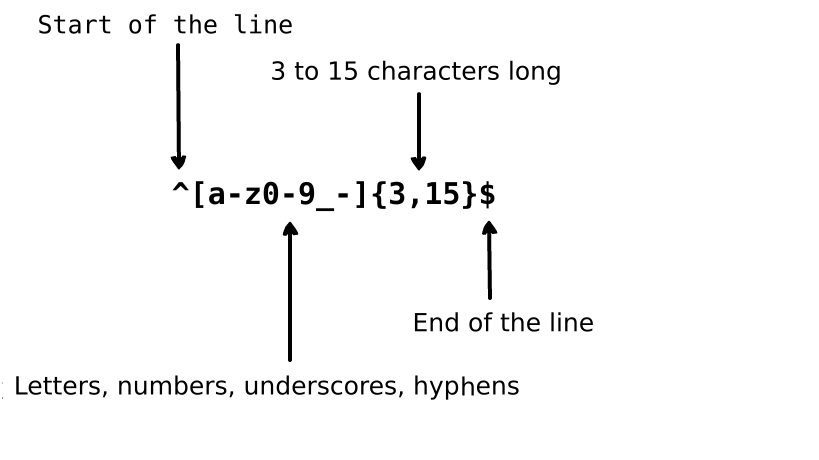
The regular expression above can accept the strings john_doe, jo-hn_doe and
john12_as. It does not match Jo because that string contains an uppercase
letter and also it is too short.
Table of Contents
1. Basic Matchers
A regular expression is just a pattern of characters that we use to perform a
search in a text. For example, the regular expression the means: the letter
t, followed by the letter h, followed by the letter e.
"the" => The fat cat sat on the mat.
Test the regular expression
The regular expression 123 matches the string 123. The regular expression is
matched against an input string by comparing each character in the regular
expression to each character in the input string, one after another. Regular
expressions are normally case-sensitive so the regular expression The would
not match the string the.
"The" => The fat cat sat on the mat.
Test the regular expression
Meta characters are the building blocks of regular expressions. Meta
characters do not stand for themselves but instead are interpreted in some
special way. Some meta characters have a special meaning and are written inside
square brackets. The meta characters are as follows:
| Meta character |
Description |
| . |
Period matches any single character except a line break. |
| [ ] |
Character class. Matches any character contained between the square brackets. |
| [^ ] |
Negated character class. Matches any character that is not contained between the square brackets |
| * |
Matches 0 or more repetitions of the preceding symbol. |
| + |
Matches 1 or more repetitions of the preceding symbol. |
| ? |
Makes the preceding symbol optional. |
| {n,m} |
Braces. Matches at least "n" but not more than "m" repetitions of the preceding symbol. |
| (xyz) |
Character group. Matches the characters xyz in that exact order. |
| | |
Alternation. Matches either the characters before or the characters after the symbol. |
| \ |
Escapes the next character. This allows you to match reserved characters [ ] ( ) { } . * + ? ^ $ \ | |
| ^ |
Matches the beginning of the input. |
| $ |
Matches the end of the input. |
2.1 The Full Stop
The full stop . is the simplest example of a meta character. The meta character .
matches any single character. It will not match return or newline characters.
For example, the regular expression .ar means: any character, followed by the
letter a, followed by the letter r.
".ar" => The car parked in the garage.
Test the regular expression
2.2 Character Sets
Character sets are also called character classes. Square brackets are used to
specify character sets. Use a hyphen inside a character set to specify the
characters' range. The order of the character range inside the square brackets
doesn't matter. For example, the regular expression [Tt]he means: an uppercase
T or lowercase t, followed by the letter h, followed by the letter e.
"[Tt]he" => The car parked in the garage.
Test the regular expression
A period inside a character set, however, means a literal period. The regular
expression ar[.] means: a lowercase character a, followed by the letter r,
followed by a period . character.
"ar[.]" => A garage is a good place to park a car.
Test the regular expression
2.2.1 Negated Character Sets
In general, the caret symbol represents the start of the string, but when it is
typed after the opening square bracket it negates the character set. For
example, the regular expression [^c]ar means: any character except c,
followed by the character a, followed by the letter r.
"[^c]ar" => The car parked in the garage.
Test the regular expression
2.3 Repetitions
The meta characters +, * or ? are used to specify how many times a
subpattern can occur. These meta characters act differently in different
situations.
2.3.1 The Star
The * symbol matches zero or more repetitions of the preceding matcher. The
regular expression a* means: zero or more repetitions of the preceding lowercase
character a. But if it appears after a character set or class then it finds
the repetitions of the whole character set. For example, the regular expression
[a-z]* means: any number of lowercase letters in a row.
"[a-z]*" => The car parked in the garage #21.
Test the regular expression
The * symbol can be used with the meta character . to match any string of
characters .*. The * symbol can be used with the whitespace character \s
to match a string of whitespace characters. For example, the expression
\s*cat\s* means: zero or more spaces, followed by a lowercase c,
followed by a lowercase a, followed by a lowercase t,
followed by zero or more spaces.
"\s*cat\s*" => The fat cat sat on the concatenation.
Test the regular expression
2.3.2 The Plus
The + symbol matches one or more repetitions of the preceding character. For
example, the regular expression c.+t means: a lowercase c, followed by
at least one character, followed by a lowercase t. It needs to be
clarified thatt is the last t in the sentence.
"c.+t" => The fat cat sat on the mat.
Test the regular expression
2.3.3 The Question Mark
In regular expressions, the meta character ? makes the preceding character
optional. This symbol matches zero or one instance of the preceding character.
For example, the regular expression [T]?he means: Optional uppercase
T, followed by a lowercase h, followed by a lowercase e.
"[T]he" => The car is parked in the garage.
Test the regular expression
"[T]?he" => The car is parked in the garage.
Test the regular expression
2.4 Braces
In regular expressions, braces (also called quantifiers) are used to
specify the number of times that a character or a group of characters can be
repeated. For example, the regular expression [0-9]{2,3} means: Match at least
2 digits, but not more than 3, ranging from 0 to 9.
"[0-9]{2,3}" => The number was 9.9997 but we rounded it off to 10.0.
Test the regular expression
We can leave out the second number. For example, the regular expression
[0-9]{2,} means: Match 2 or more digits. If we also remove the comma, the
regular expression [0-9]{3} means: Match exactly 3 digits.
"[0-9]{2,}" => The number was 9.9997 but we rounded it off to 10.0.
Test the regular expression
"[0-9]{3}" => The number was 9.9997 but we rounded it off to 10.0.
Test the regular expression
2.5 Capturing Groups
A capturing group is a group of subpatterns that is written inside parentheses
(...). As discussed before, in regular expressions, if we put a quantifier
after a character then it will repeat the preceding character. But if we put a quantifier
after a capturing group then it repeats the whole capturing group. For example,
the regular expression (ab)* matches zero or more repetitions of the character
"ab". We can also use the alternation | meta character inside a capturing group.
For example, the regular expression (c|g|p)ar means: a lowercase c,
g or p, followed by a, followed by r.
"(c|g|p)ar" => The car is parked in the garage.
Test the regular expression
Note that capturing groups do not only match, but also capture, the characters for use in
the parent language. The parent language could be Python or JavaScript or virtually any
language that implements regular expressions in a function definition.
2.5.1 Non-Capturing Groups
A non-capturing group is a capturing group that matches the characters but
does not capture the group. A non-capturing group is denoted by a ? followed by a :
within parentheses (...). For example, the regular expression (?:c|g|p)ar is similar to
(c|g|p)ar in that it matches the same characters but will not create a capture group.
"(?:c|g|p)ar" => The car is parked in the garage.
Test the regular expression
Non-capturing groups can come in handy when used in find-and-replace functionality or
when mixed with capturing groups to keep the overview when producing any other kind of output.
See also 4. Lookaround.
2.6 Alternation
In a regular expression, the vertical bar | is used to define alternation.
Alternation is like an OR statement between multiple expressions. Now, you may be
thinking that character sets and alternation work the same way. But the big
difference between character sets and alternation is that character sets work at the
character level but alternation works at the expression level. For example, the
regular expression (T|t)he|car means: either (an uppercase T or a lowercase
t, followed by a lowercase h, followed by a lowercase e) OR
(a lowercase c, followed by a lowercase a, followed by
a lowercase r). Note that I included the parentheses for clarity, to show that either expression
in parentheses can be met and it will match.
"(T|t)he|car" => The car is parked in the garage.
Test the regular expression
2.7 Escaping Special Characters
A backslash \ is used in regular expressions to escape the next character. This
allows us to include reserved characters such as { } [ ] / \ + * . $ ^ | ? as matching characters. To use one of these special character as a matching character, prepend it with \.
For example, the regular expression . is used to match any character except a
newline. Now, to match . in an input string, the regular expression
(f|c|m)at\.? means: a lowercase f, c or m, followed by a lowercase
a, followed by a lowercase t, followed by an optional .
character.
"(f|c|m)at\.?" => The fat cat sat on the mat.
Test the regular expression
2.8 Anchors
In regular expressions, we use anchors to check if the matching symbol is the
starting symbol or ending symbol of the input string. Anchors are of two types:
The first type is the caret ^ that checks if the matching character is the first
character of the input and the second type is the dollar sign $ which checks if a matching
character is the last character of the input string.
2.8.1 The Caret
The caret symbol ^ is used to check if a matching character is the first character
of the input string. If we apply the following regular expression ^a (meaning 'a' must be
the starting character) to the string abc, it will match a. But if we apply
the regular expression ^b to the above string, it will not match anything.
Because in the string abc, the "b" is not the starting character. Let's take a look
at another regular expression ^(T|t)he which means: an uppercase T or
a lowercase t must be the first character in the string, followed by a
lowercase h, followed by a lowercase e.
"(T|t)he" => The car is parked in the garage.
Test the regular expression
"^(T|t)he" => The car is parked in the garage.
Test the regular expression
2.8.2 The Dollar Sign
The dollar sign $ is used to check if a matching character is the last character
in the string. For example, the regular expression (at\.)$ means: a
lowercase a, followed by a lowercase t, followed by a .
character and the matcher must be at the end of the string.
"(at\.)" => The fat cat. sat. on the mat.
Test the regular expression
"(at\.)$" => The fat cat. sat. on the mat.
Test the regular expression
3. Shorthand Character Sets
There are a number of convenient shorthands for commonly used character sets/
regular expressions:
| Shorthand |
Description |
| . |
Any character except new line |
| \w |
Matches alphanumeric characters: [a-zA-Z0-9_] |
| \W |
Matches non-alphanumeric characters: [^\w] |
| \d |
Matches digits: [0-9] |
| \D |
Matches non-digits: [^\d] |
| \s |
Matches whitespace characters: [\t\n\f\r\p{Z}] |
| \S |
Matches non-whitespace characters: [^\s] |
4. Lookarounds
Lookbehinds and lookaheads (also called lookarounds) are specific types of
non-capturing groups (used to match a pattern but without including it in the matching
list). Lookarounds are used when a pattern must be
preceded or followed by another pattern. For example, imagine we want to get all
numbers that are preceded by the $ character from the string
$4.44 and $10.88. We will use the following regular expression (?<=\$)[0-9\.]*
which means: get all the numbers which contain the . character and are preceded
by the $ character. These are the lookarounds that are used in regular
expressions:
| Symbol |
Description |
| ?= |
Positive Lookahead |
| ?! |
Negative Lookahead |
| ?<= |
Positive Lookbehind |
| ?<! |
Negative Lookbehind |
4.1 Positive Lookahead
The positive lookahead asserts that the first part of the expression must be
followed by the lookahead expression. The returned match only contains the text
that is matched by the first part of the expression. To define a positive
lookahead, parentheses are used. Within those parentheses, a question mark with
an equals sign is used like this: (?=...). The lookahead expressions is written after
the equals sign inside parentheses. For example, the regular expression
(T|t)he(?=\sfat) means: match either a lowercase t or an uppercase
T, followed by the letter h, followed by the letter e. In parentheses we
define a positive lookahead which tells the regular expression engine to match The
or the only if it's followed by the word fat.
"(T|t)he(?=\sfat)" => The fat cat sat on the mat.
Test the regular expression
4.2 Negative Lookahead
Negative lookaheads are used when we need to get all matches from an input string
that are not followed by a certain pattern. A negative lookahead is written the same way as a
positive lookahead. The only difference is,

 这是一份免费、简明的指南,用通俗易懂的讲解和每个概念配套的可在线测试示例,帮你从零开始学习正则表达式(regex)。