


7.1K ·GitHub
What is this?
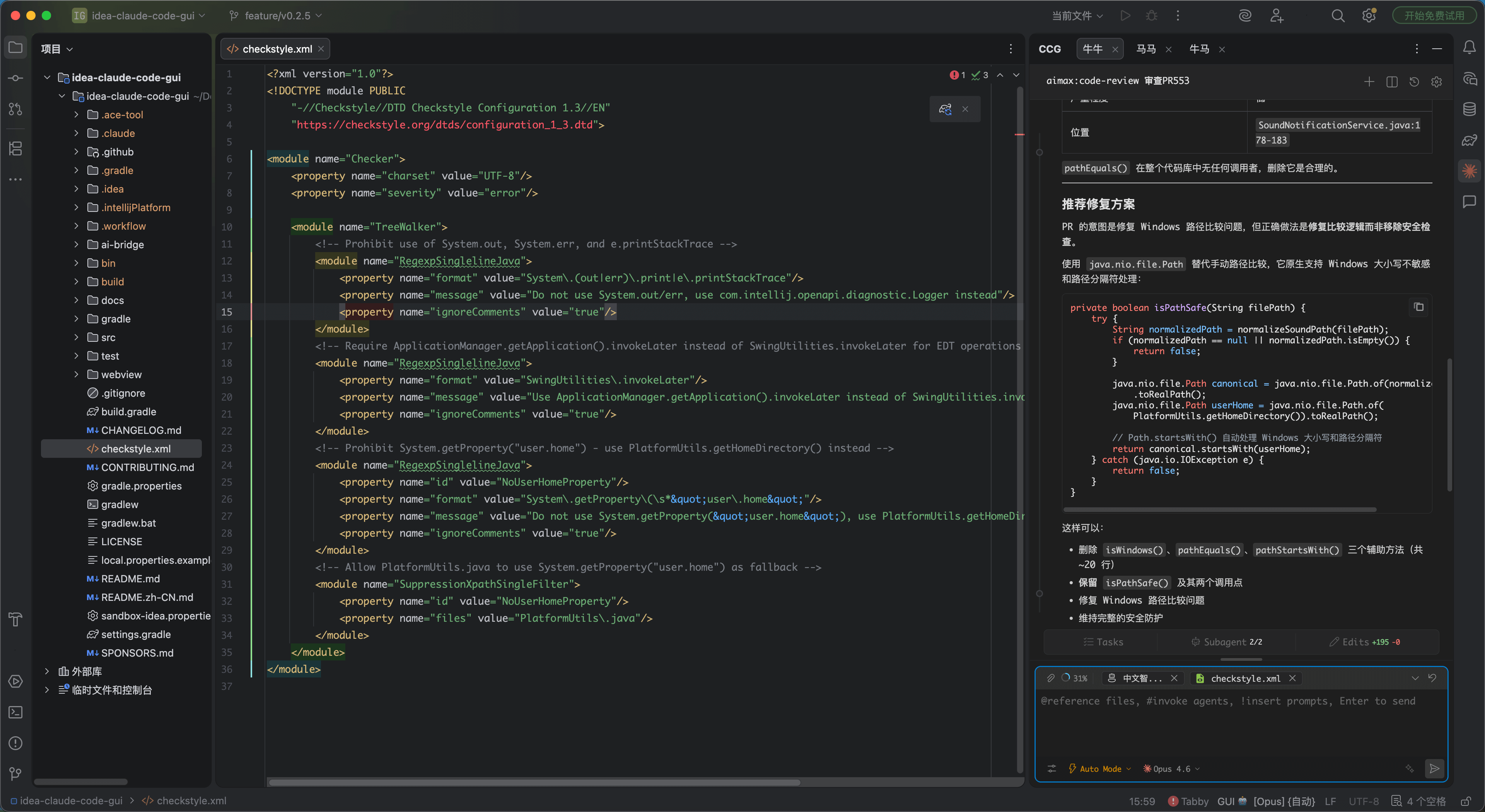
 CC GUI is an IntelliJ IDEA plugin that gives Claude Code, OpenAI Codex, and several other AI coding CLIs a visual chat-style interface inside the IDE, instead of using them in a terminal.
CC GUI is an IntelliJ IDEA plugin that gives Claude Code, OpenAI Codex, and several other AI coding CLIs a visual chat-style interface inside the IDE, instead of using them in a terminal.Is this a standalone app or a JetBrains plugin?It's a JetBrains IDE plugin (built for IntelliJ IDEA), not a separate desktop application; it wraps existing CLI coding agents in a GUI panel inside the IDE.
It's a JetBrains IDE plugin (built for IntelliJ IDEA), not a separate desktop application; it wraps existing CLI coding agents in a GUI panel inside the IDE.How do I install and run it?For regular use you install it as a plugin from the JetBrains marketplace per the project's Installation guide; for local development you install frontend dependencies, install ai-bridge dependencies, then run/debug and build the plugin from IDEA.
For regular use you install it as a plugin from the JetBrains marketplace per the project's Installation guide; for local development you install frontend dependencies, install ai-bridge dependencies, then run/debug and build the plugin from IDEA.Which AI coding CLIs does it support?It supports Claude Code, OpenAI Codex, Grok CLI, Kimi CLI, OpenCode, PI CLI, OMP CLI, and DeepSeek Harness, with several of these marked as Beta; you need the corresponding CLI/API access for whichever engine you choose.
It supports Claude Code, OpenAI Codex, Grok CLI, Kimi CLI, OpenCode, PI CLI, OMP CLI, and DeepSeek Harness, with several of these marked as Beta; you need the corresponding CLI/API access for whichever engine you choose.Are all the AI engines equally stable?Only Claude Code and OpenAI Codex appear to be fully supported; the other engines (Grok CLI, Kimi CLI, OpenCode, PI CLI, OMP CLI, DeepSeek Harness) are explicitly labeled Beta.
Only Claude Code and OpenAI Codex appear to be fully supported; the other engines (Grok CLI, Kimi CLI, OpenCode, PI CLI, OMP CLI, DeepSeek Harness) are explicitly labeled Beta.Does it work on any OS as long as I use IntelliJ IDEA?Yes — being an IntelliJ IDEA plugin, it runs cross-platform wherever IDEA runs (Windows, macOS, Linux); the project's own tags confirm all three OSes.
Yes — being an IntelliJ IDEA plugin, it runs cross-platform wherever IDEA runs (Windows, macOS, Linux); the project's own tags confirm all three OSes.Why was the project renamed from 'Claude Code GUI' to 'CC GUI'?To mitigate Claude trademark risks, the project was renamed and the logo updated to reduce Chinese-specific elements.
To mitigate Claude trademark risks, the project was renamed and the logo updated to reduce Chinese-specific elements.Does it do anything to keep the AI from making unsafe changes?Yes, it includes comprehensive permission management and security controls, plus scheduled security reviews (a /security-review audit before each minor release and a full claude-code-security audit every 10 minor versions).
Yes, it includes comprehensive permission management and security controls, plus scheduled security reviews (a /security-review audit before each minor release and a full claude-code-security audit every 10 minor versions).Can I reference files or images in a conversation?Yes, you can use @file references for precise code context and send images to describe requirements visually.
Yes, you can use @file references for precise code context and send images to describe requirements visually.What else does it offer beyond chatting with the AI?It includes an Agent system for automated tasks, slash commands like /init and /review, MCP server support, code diff comparison, session history/favorites/export, and provider management compatible with cc-switch.
It includes an Agent system for automated tasks, slash commands like /init and /review, MCP server support, code diff comparison, session history/favorites/export, and provider management compatible with cc-switch.What are similar projects?context-mode, superpowers-zh, ideavim, openpencil, claudecodeui, pstack, casbin-gateway, brag
context-mode, superpowers-zh, ideavim, openpencil, claudecodeui, pstack, casbin-gateway, brag