dsh-trading
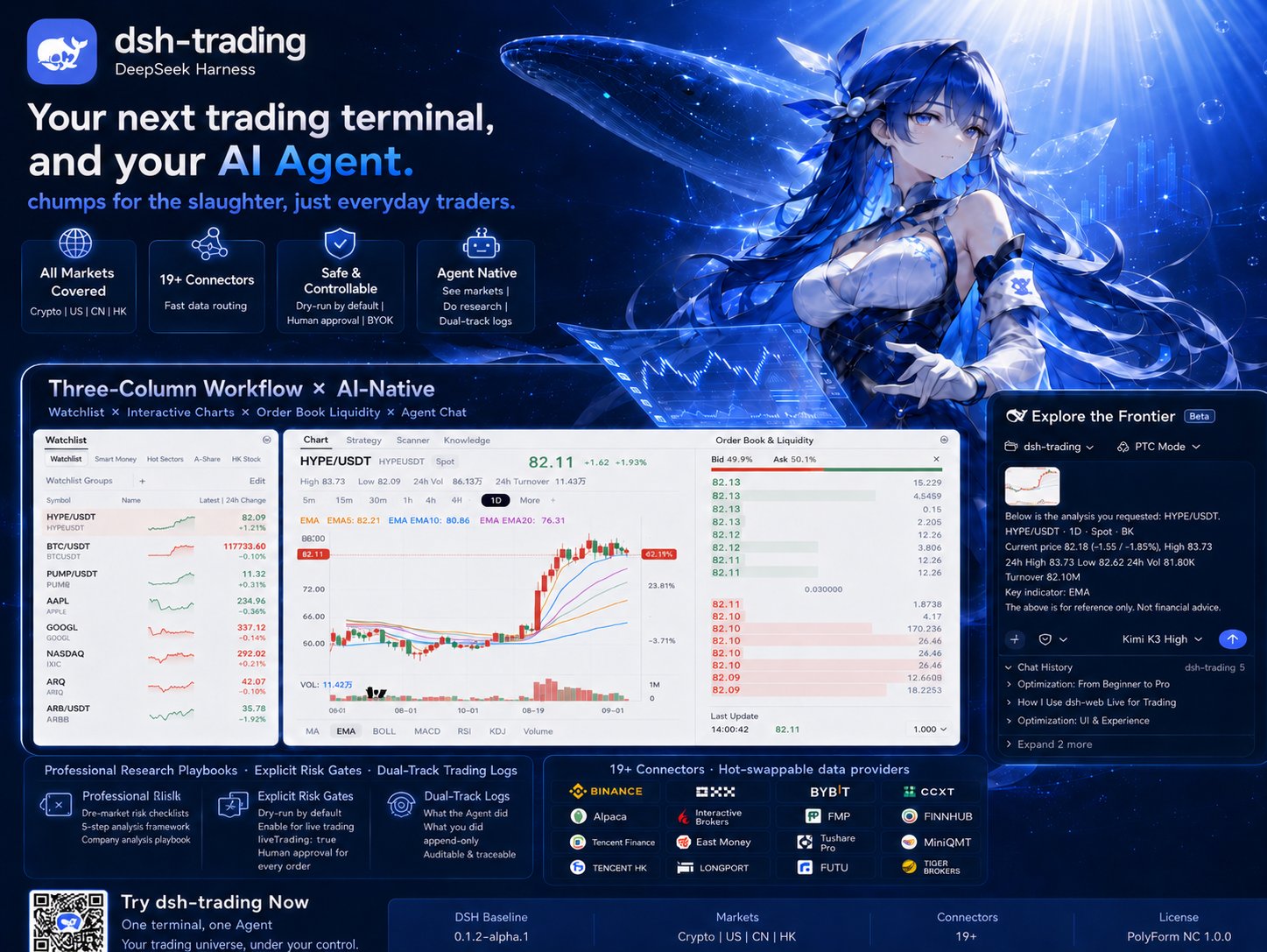
Your next trading terminal can also be your AI agent.
No chumps for the slaughter, just everyday traders.
First, a question for you:
Of the money you've lost trading, how much of it was lost before you had truly thought it through?
You chase a rally and become the exit liquidity. You buy the dip, and it keeps dipping. You cut the loss, and it bounces the moment you're out; you hold, and it grinds you into the deep red. (Veterans don't always dodge these either.)
Where does the problem lie? Not in luck. In discipline.
The market opens every day, and bulls and bears fight it out every day. The most dependable weapon a retail trader holds was never better information — it's discipline. A seasoned hunter waits nine-tenths of the time and strikes in the remaining tenth; most traders do the exact opposite — nine-tenths acting, one-tenth regretting.
That is why dsh-trading exists: an agent-native trading terminal built on DeepSeek Harness (DSH). A professional trading workflow, paired with an AI agent in sync with the market: quotes, news, and capital flow are all in its view; research follows institutional-grade playbooks; and before a real order goes out, every single one passes an approval gate that only your hand can click.
Crypto, US equities, China A-shares, Hong Kong stocks. One terminal. One agent. Nineteen-plus connectors. Zero vendor lock-in — every key stays on your machine.
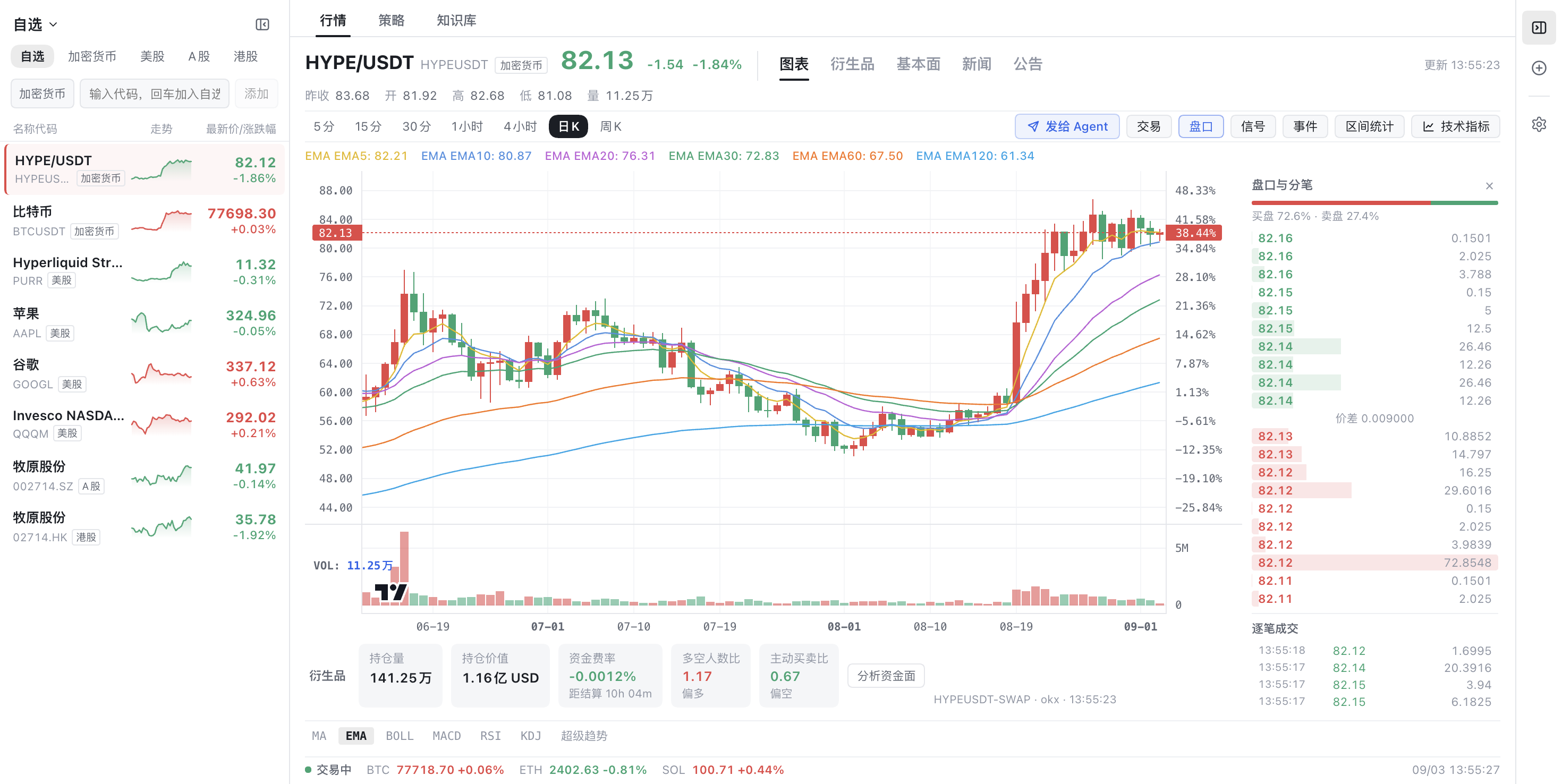
What does agent-native mean?
What do most "AI trading tools" look like? A chat box glued to the side of the chart.
Glued on, not grown in.
dsh-trading turns that relationship upside down: the agent is a first-class citizen of the terminal, and the terminal is the agent's body. Four things separate it from every chatbot you've used:
- Quotes, news, capital flow — the agent has it all. One click on Send to Agent, and the symbol you're watching — live quote, current candle, the chart series' time range with a fetch locator (so the agent pulls the same routed data itself and analyzes it in code), the computed readings of your active indicators, available chart screenshot and derivatives snapshot, plus freshly requested announcements, news and a bounded fundamentals summary — is packaged into the composer without sending. Missing sources are explicit; the agent is guided to verify original disclosures and fill gaps with native research tools. No more screenshot-copy-paste ritual.
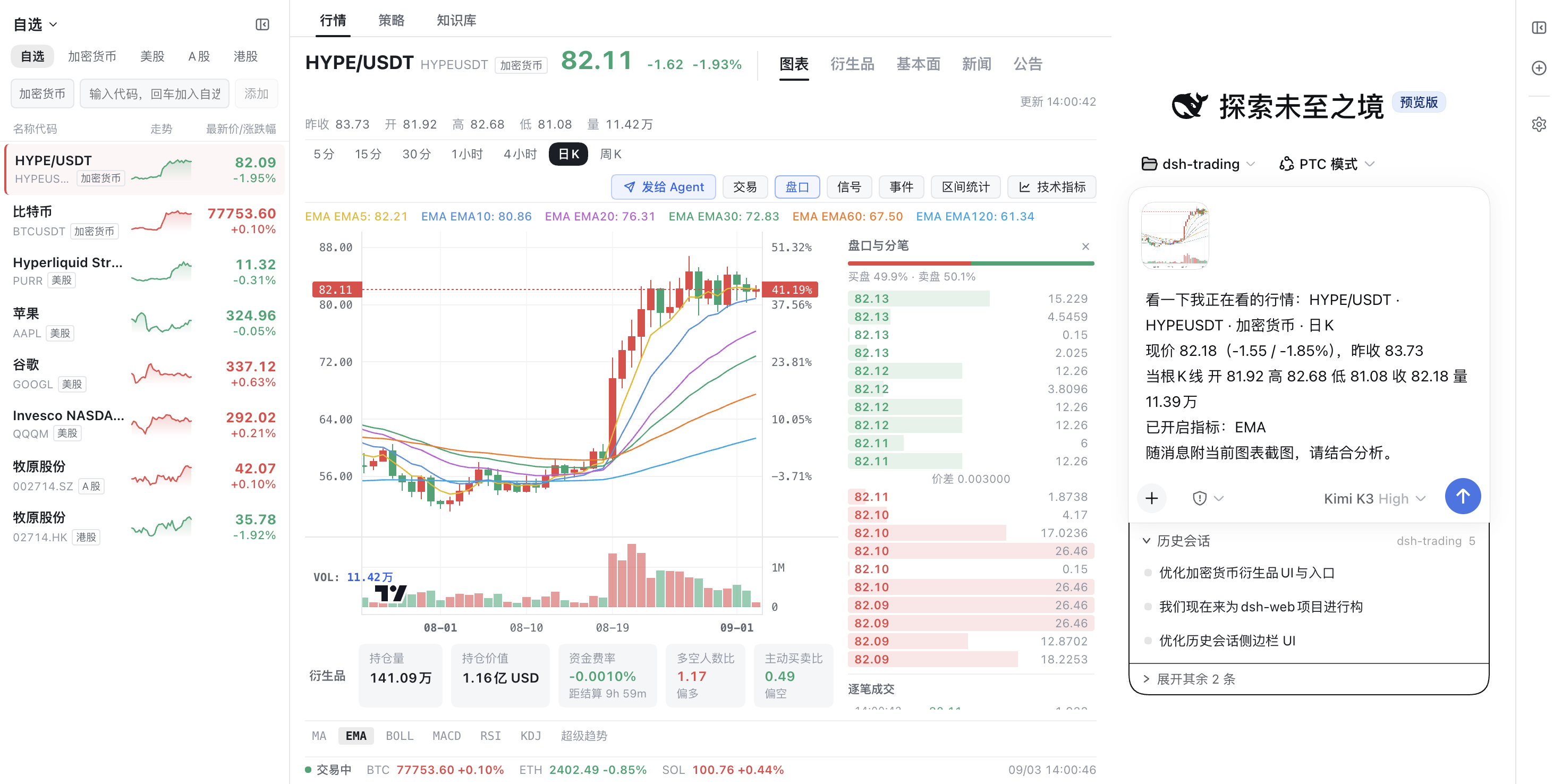
The agent can trade, but the gate is in your hands. Market data, order books, derivatives positioning, news, and order placement are all native tools. Yet every order defaults to dry-run simulation; live routing requires an explicit liveTrading: true opt-in, and then each order still passes through interactive human approval. In headless environments it fails closed. One rule: no move without the gate. Nothing executes behind your back.
The agent trained for this. Domain knowledge ships as bundled skills, not model improvisation: pre-trade risk checklists for every market (crypto · US · CN · HK), a five-step crypto instrument analysis framework, a full company analysis playbook, and a trading journal discipline that dual-tracks "what the agent did" versus "what you did" — append-only and auditable.
The risk checklist runs before every entry — a discipline most veterans never sustain in ten years (usually undone by "just this once").
- One master leading a role-based team.
master (大师) is the all-capable multi-agent team lead: it grounds every trade question in the unified holdings ledger (holdings_list / holdings_stage) and per-market balance tools, pulls the user knowledge base first, then decomposes the task and delegates specialist work to persona-pinned subagents — instrument analysis to the researcher (researcher_subagent), trading-plan drafting to the trader (trader_subagent), plan review to the risk reviewer (risk_reviewer_subagent) — dispatching project skills by task type (analysis frameworks, market risk checklists, strategy paradigms with strategy_backtest, dynamic packages for one-off cross-instrument aggregation) before cross-checking and integrating a single conclusion. Cross-market overviews and order execution it can do itself, still dry-run by default behind the approval gate; delegates deliver analysis text only — execution stays with the master behind the gate. Beneath it: trader (交易员) for trading plans and gated execution, instrument-researcher (标的分析研究员) for disclosures, fundamentals and valuation, risk-reviewer (风险审查员) for exposure, stress scenarios and rejection conditions. Every role prioritizes project knowledge, news/announcements and fundamentals tools. Research and risk retain read-only quotes/candles but mount no order/cancel connectors; subagents inherit the session toolset with a persona pinning their duties — shared host tools remain visible, so role scoping is not a separate security sandbox.
The base installer generates these four roles from enabled market bundles, including partial-market installations; the deployment default for new sessions is 大师 (master) — overridable per user in settings. Unmodified managed legacy market presets move to a sibling .legacy-backup root; custom, unstamped or extended directories remain untouched. No user preset data is deleted.
The terminal itself must be real software first
A shoddy terminal makes even the smartest agent an armchair general.
- Center-stage charting. Lightweight Charts v5 with multi-timeframe switching (5m to weekly); MA / EMA / BOLL / MACD / RSI / KDJ / SuperTrend, all visually editable; strategy signal markers, knowledge-event pins, and drag-to-measure range statistics.
- Real market depth. Live order book with buy/sell pressure bars, tick-by-tick trades, and a derivatives cockpit — open interest, funding rates with settlement countdown, long/short ratio, taker flow. Quote and fund-flow snapshots reach the agent through the unified send to agent button (fills the composer, never auto-sends).
- Cross-market watchlist. Crypto perps next to AAPL next to 牧原股份, with sparklines and real-time quotes. Your whole risk universe in one dock.
The operations surface is built in
- Usage statistics. A first-level Usage Statistics settings section folds each session's live token stream into a local ledger (
$DSH_HOME/dsh-usage/usage-ledger.json), probes every configured provider for balance and coding-plan quota, and prices today's DeepSeek spend against the published peak/off-peak book. Credentials are resolved host-side and never reach the browser.
- Plugin manager. The Plugins section gains a manager tab: install from an npm spec or a git URL, flip next-start enablement, check and apply verified updates (gated on each package's declared minimum DSH version), roll back conflicting installs, and hand failures to a repair conversation. Writes are loopback-only and ride the official CLI; the desktop build ships a
dsh shim so this works without a global install.
- Per-model capability declarations. Every custom
llm-pi-ai provider card carries a capability area: declare image input and reasoning efforts per model (including the exact wire value each level sends), or archive a provider to take its route down without touching its stored keys.
One terminal, every market
| Market |
Connectors |
| Crypto |
Binance, OKX (Paper/Live), Bybit, CCXT (100+ exchanges) |
| US Equities |
Yahoo Finance, Alpaca (Paper/Live), FMP, Finnhub, Polygon.io, Interactive Brokers |
| China A-Shares |
Tencent Finance, Eastmoney, Tushare Pro, AkShare, MiniQMT broker gateway |
| Hong Kong |
Tencent HK, Longbridge OpenAPI, Futu OpenD, Tiger OpenAPI |
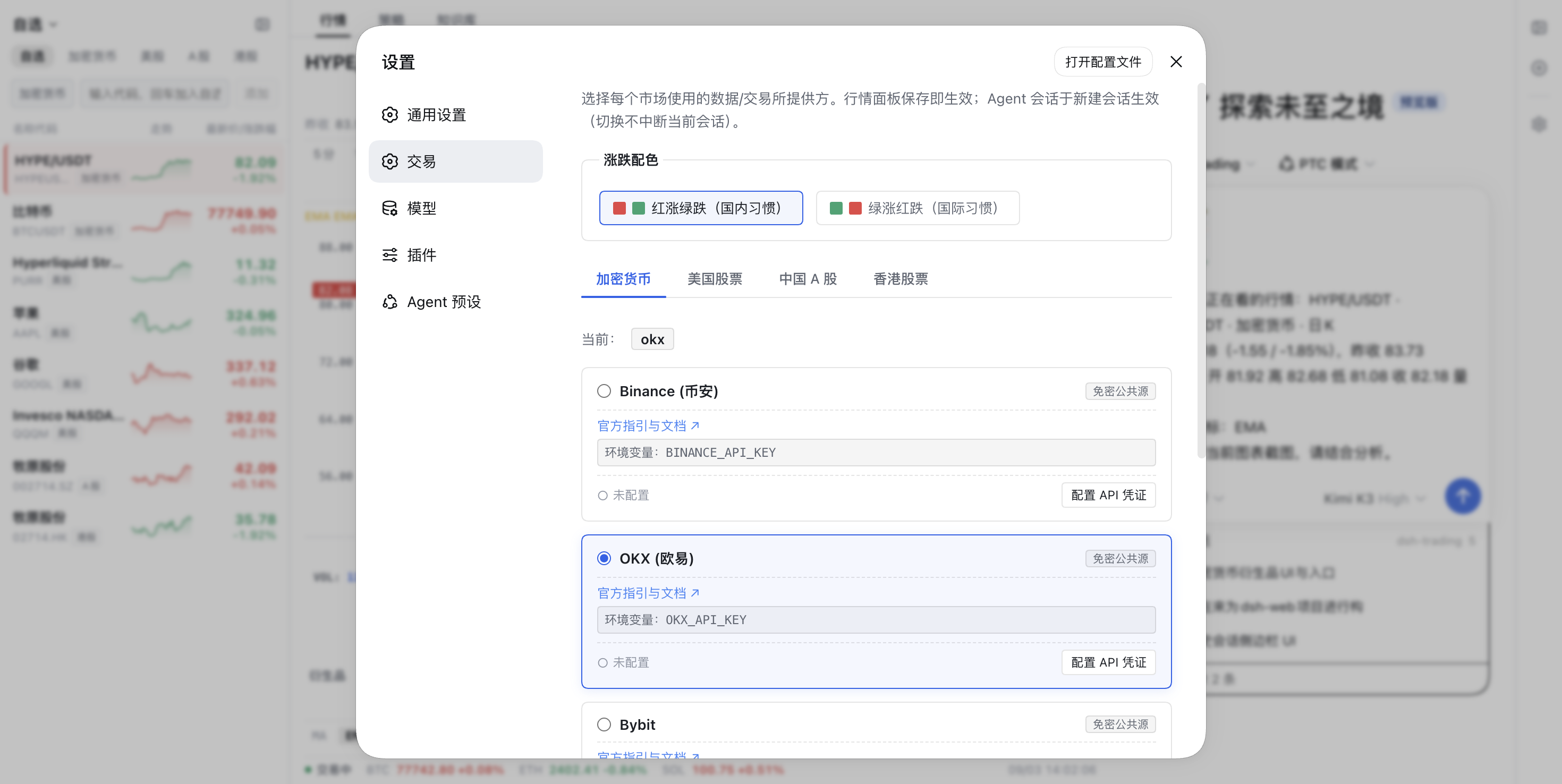
Hot-swappable data planes. Not happy with a data source? Swap it. Settings → Trading routes any market to any installed provider: the quote panel re-routes on save, agent sessions pick it up on their next turn — no restarts, no config archaeology.
Safety and privacy: discipline welded in, not preached
The formula of trading has always been: study + waiting + decisiveness + patience = survival.
The tool cannot wait for you, and it cannot be patient for you. But it can hold the gate in between:
- Dry-run by default. Every order/cancel tool simulates unless you explicitly flip
liveTrading: true.
- A human reviews every live order. DSH's approval layer intercepts live routing; headless mode fails closed.
- BYOK. API keys live in your environment variables or local config. Nothing is bundled, relayed, or uploaded.
- No data re-distribution. Market data is fetched for you, under each provider's ToS; nothing is cached for resale or sharing.
Without your signature, not a single cent moves.
Quick start
Three steps, and you're in:
# Install into a dedicated DSH profile (pick your markets)
# Trading lives in its own DSH home (~/.dsh-trading) so it never mixes with your
# main dsh web home (~/.dsh); every dsh-trading package resolves data paths via $DSH_HOME
export DSH_HOME=~/.dsh-trading
dsh plugin --profile trading-web add @dshtrading/base @dshtrading/crypto @dshtrading/us
# …or all four markets
dsh plugin --profile trading-web add @dshtrading/base @dshtrading/crypto @dshtrading/us @dshtrading/cn @dshtrading/hk

# Serve the browser UI in this profile (once): add the in-box web host layer
# right after the dsh core layer in the profile manifest
node -e "const f=(process.env.DSH_HOME||require('os').homedir()+'/.dsh')+'/profiles/trading-web/package.json',fs=require('fs'),m=JSON.parse(fs.readFileSync(f,'utf8'));m.dsh.profile.bundles.includes('@deepseek-ai/dsh-web-app')||m.dsh.profile.bundles.splice(1,0,'@deepseek-ai/dsh-web-app');fs.writeFileSync(f,JSON.stringify(m,null,2)+'\n')"

# Launch the terminal
dsh --profile trading-web
Open the printed URL: watchlist left, chart center, your agent right. New conversation → pick a market preset → first ask it what it sees.
The architecture at a glance
A layered Cordis microkernel ecosystem where markets compose instead of collide:
@dshtrading/base          ← core: account/order/quote contracts, approval gate, GUI shell
├── @dshtrading/crypto    ← Binance / OKX / Bybit / CCXT + skills + preset
├── @dshtrading/us        ← Yahoo / Alpaca / FMP / Finnhub / Polygon / IBKR + skills + preset
├── @dshtrading/cn        ← Tencent / Eastmoney / Tushare / AkShare / MiniQMT + skills + preset
└── @dshtrading/hk        ← Tencent HK / Longbridge / Futu / Tiger + skills + preset
Six invariants lock the ecosystem down: insert-only bundle patches · knowledge lives in skills, not code · dual-track order gates · shared code earns its place in base (≥2 markets) · zero data re-distribution · the GUI shell is replaceable, the data contracts are not.
Data sources & terms
| Market |
Default source |
Boundary |
| US |
Yahoo Finance / Alpaca |
Yahoo public endpoint (individual use); Alpaca official Paper/Live APIs |
| CN |
Tencent Finance / Eastmoney / HiThink (Fuyao) |
Public endpoints; HiThink REST API for fundamentals & auction data; live execution via local MiniQMT gateway |
| HK |
Tencent HK / Longbridge |
Public endpoint; licensed broker OpenAPI/Gateway for execution |
| Crypto |
Binance / OKX |
Official APIs; OKX paper trading with your own keys |
| Crypto fundamentals |
CoinCap |
Public REST, individual use only — no redistribution, no bulk scraping |
Documentation
Friendly Links
💬 QQ group: DSH Trading 交流群(群号 319737695) — questions, feedback, and everything dsh-trading. Scan with QQ to join:
One last word
Tools are dead things; discipline is alive. The finest terminal cannot press buy for you, and it should not — but it can make sure that every time your hand does move, the thinking has already happened.
Go experience it. Go make the mistakes. Go review your trades. The road is long — onwards, together.
This project is software, not investment advice. Markets carry risk — trade with care.
License
PolyForm Noncommercial 1.0.0 — free for personal study, research, and noncommercial use. Commercial use requires prior written authorization: open a GitHub issue or contact [email protected].
本项目采用 PolyForm Noncommercial 1.0.0 许可:非商业用途免费;商业用途须事先取得书面授权([email protected] 或 GitHub Issue)。





 dsh-trading 是一个基于 DeepSeek Harness(DSH)构建的面向代理的交易终端,把三栏 GUI(自选列表、图表、AI 代理)与一个能查看行情数据并下单交易的代理结合,交易须经人工批准,覆盖加密货币、美股、A 股和港股市场。