
Decentralized Multi-Agent Systems with Shared Context
Parallel agents coordinate asynchronously through a shared context and task queue to solve tasks faster and more accurately.
| 📄 Paper
| 🌐 Project Website
| 🤗 Trajectories
| 🧩 Plugin
| 🚀 Quickstart
| 📊 Results
|  Discord |
Open trajectories: We also release all 720 DeLM agent trajectories from our
Terminal-Bench 4.0 and DeepSWE v1.1 evaluations on
Hugging Face.
Agent plugin: Use DeLM's collaborating agents inside Codex and Claude Code with
delm-agent-plugin.
DeLM runs agents in parallel and lets them coordinate through a shared
context and task queue. Agents claim work, publish findings, and reuse each
other's files asynchronously. Each agent keeps its own workspace and produces a
complete solution.
- Decentralized coordination: peers share progress through the shared context, without a main agent relaying their work.
- Higher accuracy with lower latency: on the paper's 10-task Terminal-Bench 4.0 subset, DeLM with two agents averages +12.5 percentage points and 1.78× speedup over the base harnesses across two models.
- Two harnesses, one engine: this branch runs n=2 or n=4 with Codex or Claude Code, using independent Docker images and a shared evaluation pipeline.
Installation
Use Python 3.13+, Git, Linux Docker Engine with BuildKit, and Docker Compose
for tasks that include services. Agent CLIs and the
Humanize driver are installed inside the
images by the Dockerfiles. DeLM uses Humanize to run Codex and Claude Code sessions
and consume their streaming events.
git clone --branch main https://github.com/yuzhenmao/DeLM.git
cd DeLM
Use an idle host with capacity for all workers: each worker receives the official
task's full CPU, memory, and storage allocation. The runtime additionally reserves
4 GiB of host RAM. Service resources are reserved per worker's service group.
Quickstart
1. Fetch a task and build an image
python3.13 fetch_task.py retro-console-soc \
  --revision 452bf305c6daa62fc59061d22133a7cbc7c1572e

# Choose the harness you will run:
python3.13 build_task.py tasks/terminal-bench-4.0/retro-console-soc --harness codex
# Or:
python3.13 build_task.py tasks/terminal-bench-4.0/retro-console-soc --harness claude-code
Each build runs in the background and prints its output folder. Wait for
result.json; confirm returncode is 0 before launching. The stages field
records the base, runtime, verifier, and service build outcomes; a failure stops
the build and returns a nonzero code.
Both builds start from the unchanged official task image,
delm-task-<task>:base. They are independent: building Claude does not require
building Codex. Each image supports both worker counts.
Runtime versions and model defaults are defined in runtime/config.py.
The build script supplies those versions to both Dockerfiles. Locally built images
are checked against the task source before a run; rebuild older images with
build_task.py to add this source metadata. Rebuilding uses Docker's layer cache.
2. Choose authentication and launch
Use one of the following commands after building its matching image. API keys
must be raw, single-line files with mode 600 or stricter, stored outside the
checkout or inside ignored .local/. Replace the example credential paths with
your own. Launch from a clean, committed checkout.
Codex with an API key
python3.13 -B delm.py retro-console-soc --n 2 --harness codex \
  --auth-mode api-key --api-key-file /secure/openai.key \
  --series astra-api-n2 --repeat 1 --model gpt-6-astra --effort xhigh
Codex with a coding plan
Use an existing Codex ChatGPT login file, also private with mode 600 or stricter:
python3.13 -B delm.py retro-console-soc --n 2 --harness codex \
  --auth-mode coding-plan --auth-file ~/.codex/auth.json \
  --series astra-plan-n2 --repeat 1 --model gpt-6-astra --effort xhigh
Claude Code with an API key
python3.13 -B delm.py retro-console-soc --n 2 --harness claude-code \
  --auth-mode api-key --api-key-file /secure/anthropic.key \
  --series opus-api-n2 --repeat 1 --model claude-opus-5-5 --effort xhigh
Claude Code with a coding plan
Run claude setup-token on a machine where you can complete the subscription
login, then save only the returned OAuth token in a private file such as
/secure/claude.token (mode 600). This is a raw token file, not a Claude login
JSON file or an API key. See the official
subscription token instructions.
python3.13 -B delm.py retro-console-soc --n 2 --harness claude-code \
  --auth-mode coding-plan --auth-file /secure/claude.token \
  --series opus-plan-n2 --repeat 1 --model claude-opus-5-5 --effort xhigh
The token file is mounted read-only. The worker loads it into its own environment,
checks that Claude selected subscription OAuth, and omits the API-key helper.
Host logins and settings are not imported. An expired or invalid token fails the
run without switching to API billing; replace the token file when it expires.
Tokens are not included in command arguments or run metadata. CLI-reported cost
fields are not a subscription bill.
For four workers, change --n 2 to --n 4 and use a new --series name. Add
--dry-run to inspect the resolved plan without reading credentials, starting
containers, or calling a model. For tasks with services, supply positive
--service-cpus and --service-memory-mb reservations per worker.
3. Inspect trajectories and results
python3.13 inspect_run.py .local/runs/astra-api-n2/retro-console-soc/repeat-1
python3.13 -m reporting.report
The report is written to .local/reports/results.md. The reader supports both
worker counts, retains failed or incomplete runs, and leaves missing measurements
unknown. Use --runs-root and --output to select another collection or output
path. Reporting never modifies run records or invokes grading.
Results
Accuracy averages independently graded agent submissions; it is not best-of-n
success. See the paper's metric definitions
and full results for costs and other
baselines.
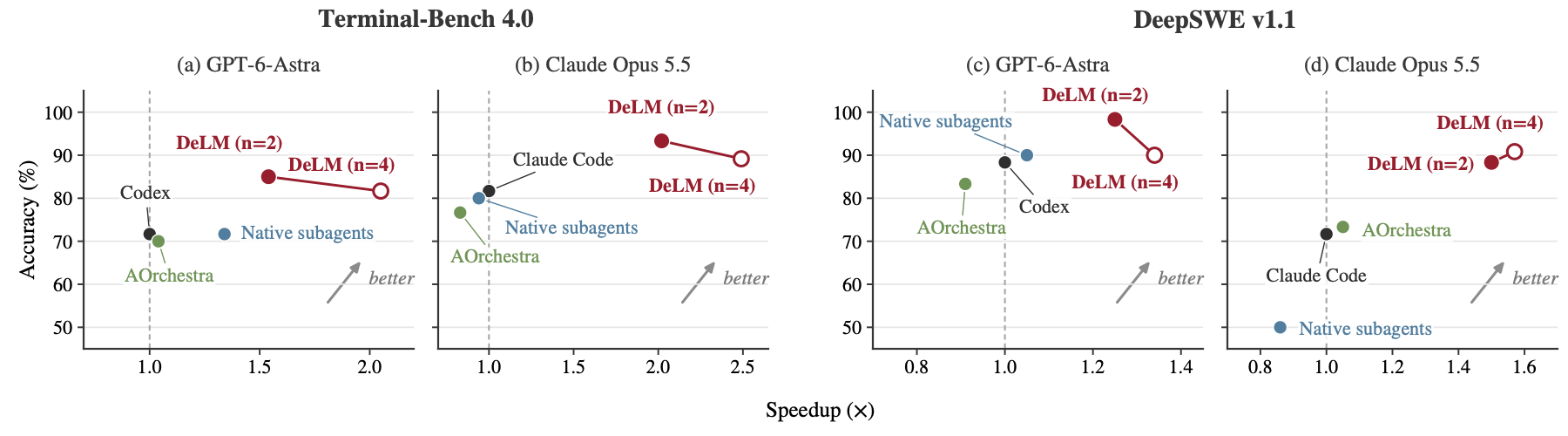
Terminal-Bench 4.0
Evaluation uses 10 selected long-horizon tasks, chosen by the latency of the
Codex baseline (see the paper's Appendix B). The table shows the single-agent
harness and DeLM configurations; the paper and website also include native-subagent
and AOrchestra baselines. Values are mean ± standard deviation over three runs,
and speedup is relative to the corresponding single-agent harness.
Show Terminal-Bench 4.0 results
| Model |
Method |
Accuracy (%) ↑ |
Latency (min) ↓ |
Speedup ↑ |
| GPT-6-Astra |
Codex |
71.67 ±11.55 |
26.91 ±0.91 |
1.00× |
| GPT-6-Astra |
DeLM (n=2) |
85.00 ±13.23 |
17.47 ±1.82 |
1.54× |
| GPT-6-Astra |
DeLM (n=4) |
81.67 ±12.33 |
13.16 ±1.43 |
2.05× |
| Claude Opus 5.5 |
Claude Code |
81.67 ±2.89 |
130.75 ±6.27 |
1.00× |
| Claude Opus 5.5 |
DeLM (n=2) |
93.33 ±3.33 |
64.77 ±5.03 |
2.02× |
| Claude Opus 5.5 |
DeLM (n=4) |
89.17 ±5.20 |
52.51 ±4.43 |
2.49× |
DeepSWE v1.1
Evaluation uses 10 selected long-horizon tasks, chosen by the latency of the
Codex baseline (see the paper's Appendix B). As in the Terminal-Bench table, the
rows compare each single-agent harness with DeLM at n=2 and n=4. Values are
mean ± standard deviation over three runs; latency is in minutes, and speedup is
relative to the corresponding single-agent harness.
Show DeepSWE v1.1 results
| Model |
Method |
Accuracy (%) ↑ |
Latency (min) ↓ |
Speedup ↑ |
| GPT-6-Astra |
Codex |
88.33 ±2.89 |
16.57 ±0.39 |
1.00× |
| GPT-6-Astra |
DeLM (n=2) |
98.33 ±2.89 |
13.29 ±0.98 |
1.25× |
| GPT-6-Astra |
DeLM (n=4) |
90.00 ±10.00 |
12.37 ±0.66 |
1.34× |
| Claude Opus 5.5 |
Claude Code |
71.67 ±2.89 |
49.58 ±3.11 |
1.00× |
| Claude Opus 5.5 |
DeLM (n=2) |
88.33 ±2.89 |
32.98 ±2.47 |
1.50× |
| Claude Opus 5.5 |
DeLM (n=4) |
90.83 ±8.78 |
31.61 ±0.96 |
1.57× |
SWE-bench Verified
All methods use Gemini 3 Flash. For this benchmark, DeLM is built on
AOrchestra's harness rather than Codex or Claude Code. Values are
mean ± standard deviation over three runs. Latency is in seconds, and speedup
is relative to Claude Code.
Show SWE-bench Verified results
| Model |
Method |
Accuracy (%) ↑ |
Latency (s) ↓ |
Speedup ↑ |
| Gemini 3 Flash |
Claude Code |
49.32 ±1.98 |
129.13 ±5.12 |
1.00× |
| Gemini 3 Flash |
mini-SWE-agent |
54.73 ±2.37 |
91.78 ±3.53 |
1.41× |
| Gemini 3 Flash |
AOrchestra |
55.26 ±2.03 |
89.94 ±3.07 |
1.44× |
| Gemini 3 Flash |
DeLM (n=2) |
63.72 ±2.29 |
71.86 ±2.88 |
1.80× |
| Gemini 3 Flash |
DeLM (n=4) |
66.08 ±1.86 |
61.01 ±2.63 |
2.12× |
ProgramBench
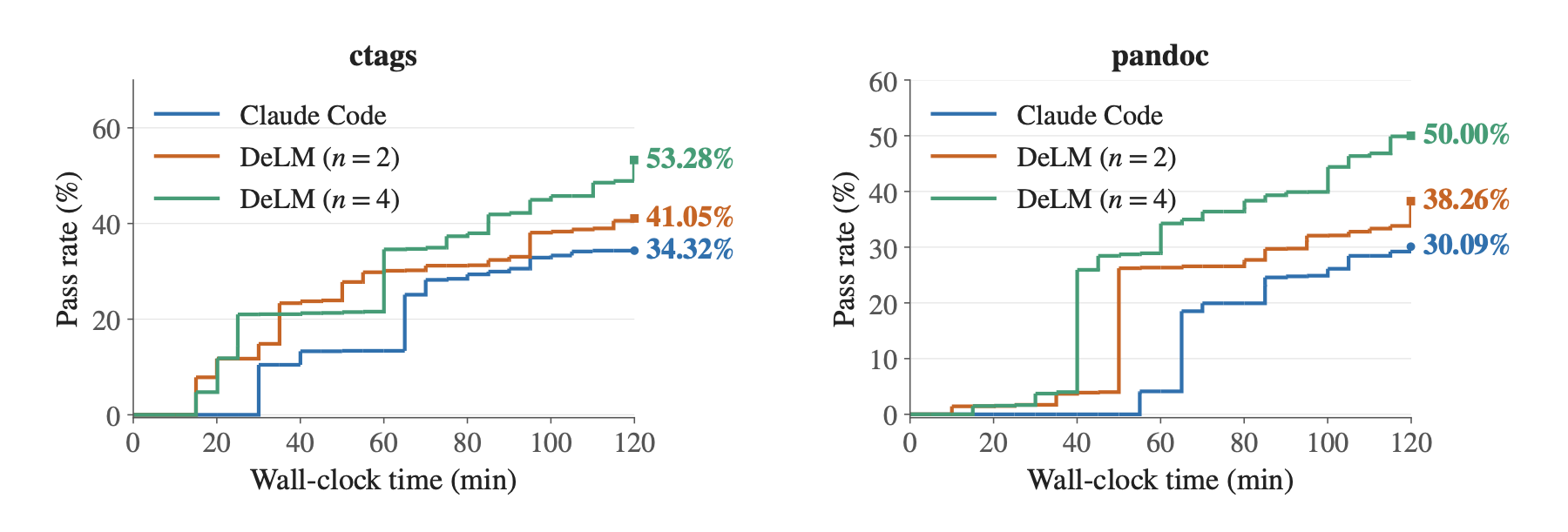
Claude Opus 5.5 with Claude Code as the harness, on ctags and pandoc under a
120-minute budget. The metric is the hidden-test pass rate, tracked as
development progresses; the table reports the pass rate at the end of the budget.
Show ProgramBench results
| Method |
ctags (%) ↑ |
pandoc (%) ↑ |
| Claude Code |
34.32 |
30.09 |
| DeLM (n=2) |
41.05 |
38.26 |
| DeLM (n=4) |
53.28 |
50.00 |
How it works
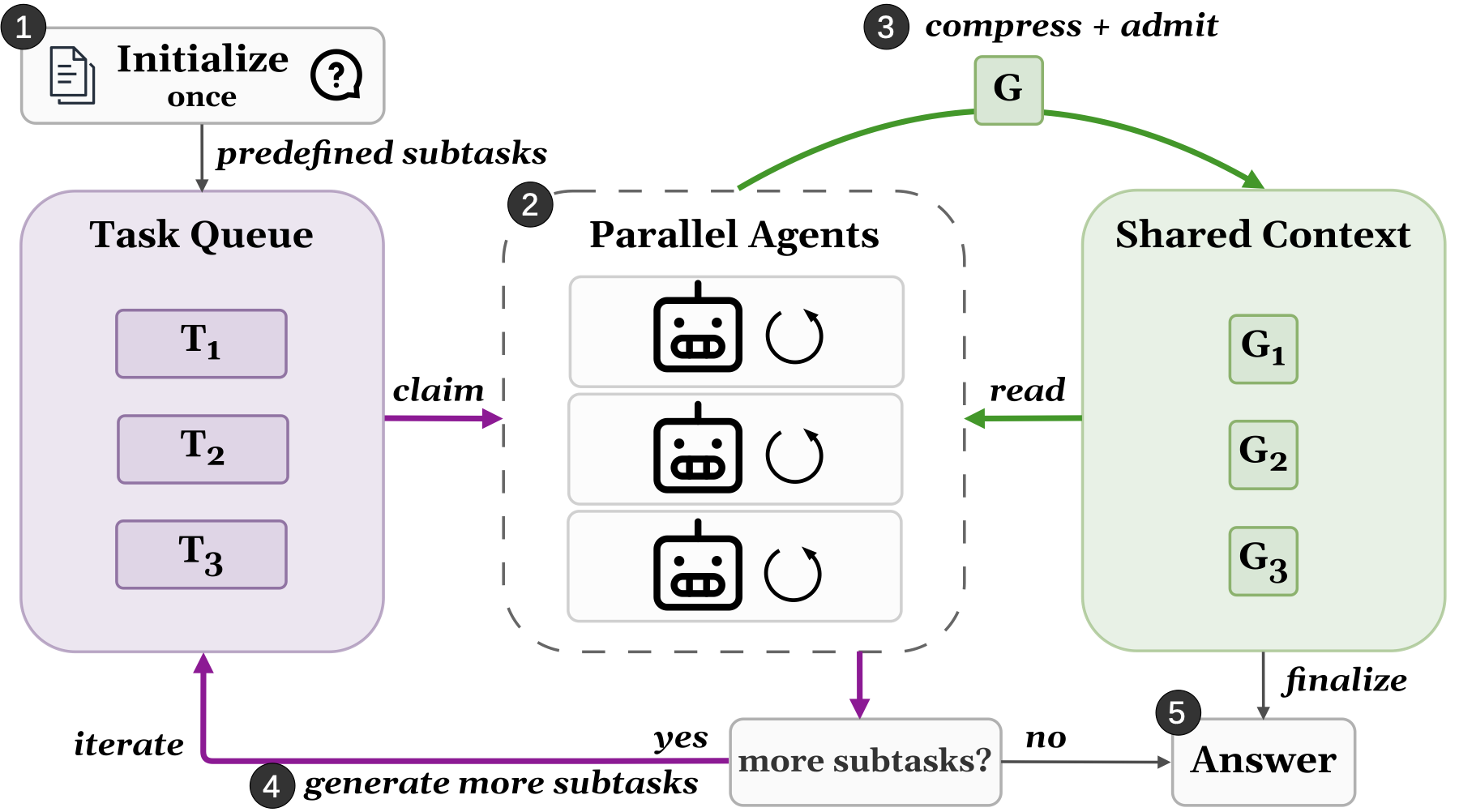
- Claim work. Agents claim open tasks from a common task queue, and any agent can add new tasks. The queue shows who owns each task, so agents can choose complementary work.
- Publish progress. Findings, failed approaches, and completed subtasks are added to an append-only shared context, with files attached by reference.
- Reuse and correct. Peers read relevant entries and import shared files into their own workspaces while continuing their work. Defects are reported as
FAIL entries and fixed by new entries rather than edits.
- Submit independently. Each worker produces a complete solution for the official verifier.
In this implementation, the shared board and HTTP client live in board/.
File application checks local edits and file authorship before copying a selected
batch. Conflicts reject the batch so the agent can inspect and reconcile the files
locally; the engine does not automatically merge conflicting edits.
Shared runtime for n=2 and n=4
| Setting |
Codex |
Claude Code |
| Pinned CLI |
0.153.4 |
2.1.280 |
| Default model |
gpt-6-astra |
claude-opus-5-5 |
| Reasoning effort |
xhigh |
xhigh |
| Authentication |
API key or coding plan |
API key or coding plan |
| Workers |
2 or 4 |
2 or 4 |
Both harnesses select authentication with --auth-mode api-key|coding-plan.
Coding-plan mode takes a Codex ChatGPT auth.json or a Claude setup-token file,
respectively, through --auth-file.
For either harness, --model MODEL_ID overrides the default model. Runtime and
trajectory checks verify the selected model. Reasoning effort remains xhigh;
there is no automatic model fallback or effort downgrade.
Both use Humanize commit
413d02e44d0cc0514b9f5bd3fcefea156b047a49
and the common
runtime/runner.py. Authentication, overwrite protection,
collection, and grading use the same implementation for both worker counts. The
roster and prompt depend on n: the n=2 and n=4 prompts in prompts/
assign different initial roles (see the paper's Appendix E), so changing n is
not a count-only prompt ablation. The n=2 prompt uses the same apply description
as the n=4 prompt.
Official task instructions, resources, verifiers, and model time limits are
preserved. After workers finish, the runner captures every submission, stops the
task environments, and grades serially. The extra 600-second process cleanup guard
does not extend model time. Failed and incomplete attempts remain in the records
and are not automatically retried or overwritten.
Directory Structure
.
├── delm.py                  # Public launcher and argument checks
├── fetch_task.py            # Download an official task at a pinned revision
├── build_task.py            # Build the task and selected harness image
├── inspect_run.py           # Inspect one saved run
├── Dockerfile.codex         # Independent Codex runtime
├── Dockerfile.claude        # Independent Claude Code runtime
├── runtime/                 # Shared engine, provider adapters, and native workers
├── board/                   # Shared context, task queue, and file protection
├── prompts/                 # n=2 and n=4 prompts and initial roles
├── benchmark/               # Task validation, services, collection, and grading
├── reporting/               # Read-only run readers and Markdown reports
├── LICENSE                  # MIT license
├── index.html               # Project website
└── website/                 # Project website assets
Downloaded tasks and runtime outputs are ignored by Git. Credentials,
trajectories, benchmark datasets, and archives are not committed.
CLI Reference
Launch options
python3.13 delm.py --help
python3.13 build_task.py --help
| Option |
Meaning |
task |
Fetched Terminal-Bench task name, such as retro-console-soc |
--n 2|4 |
Number of DeLM workers; default 2 |
--harness codex|claude-code |
Agent harness; default codex |
--series NAME |
Required experiment series with immutable settings |
--repeat N |
One repeat number, starting at 1; does not launch a loop |
--model MODEL |
Defaults to gpt-6-astra or claude-opus-5-5 |
--effort xhigh |
Reasoning effort; xhigh is the only supported value and the default |
--auth-mode api-key|coding-plan |
Explicit authentication choice; default api-key |
--api-key-file PATH |
Private raw key file for API-key mode |
--auth-file PATH |
Private Codex auth.json or raw Claude setup-token file for coding-plan mode |
--service-cpus N |
Additional CPU reservation per worker's service group |
--service-memory-mb N |
Additional RAM reservation per worker's service group |
--dry-run |
Print the resolved plan without launching |
A dry run still requires a credential path, but the file need not exist. Use
separate invocations with --repeat 2, --repeat 3, and so on for more repeats.
Changes to code, worker count, harness, authentication, model, service budgets, or
task image require a new series. Existing attempts are never overwritten.
Citation
@misc{mao2026delm,
  title         = {Decentralized Multi-Agent Systems with Shared Context},
  author        = {Yuzhen Mao and Jerry Gu and Aadi Chauhan and
                   Qizheng Zhang and Hangoo Kang and Azalia Mirhoseini},
  year          = {2026},
  eprint        = {2606.10662},
  archivePrefix = {arXiv},
  primaryClass  = {cs.MA},
  url           = {https://arxiv.org/abs/2606.10662}
}

 DeLM 是一个研究性实现,可并行运行多个编码智能体(基于 Codex 或 Claude Code 构建)。它们通过共享上下文和任务队列进行协作,相比单个智能体,能更快、更准确地解决软件工程任务。