📢 Cursor Pay-per-Use Official Membership — Limited Availability 🎉
$120 · 500 uses · 25-day warranty · Sign in and start using
- Usage-based billing: 1 credit per request by default; 2 credits per request in Thinking Mode. Every 10 million tokens also counts toward credit usage.
- Service period: 25 calendar days from purchase, with full warranty included.
- Supported models and features are listed in the image above.
[!IMPORTANT]
- Do not use Max Mode. It switches billing to the standard pay-as-you-go rate.
- Models 4.7, 5.5, and 5.4 are not supported in this package. Please check compatibility before purchasing.
- Credit exhaustion is outside the scope of the day-based warranty.
📢 Codex Official API Packages
| Package |
Daily Limit |
Weekly Limit |
Monthly Limit |
Price |
| Weekly Card (86 Promo) |
50 |
200 |
- |
$6 |
| 15-Day Standard Package |
100 |
300 |
500 |
$30 |
| 30-Day Stable Package |
200 |
500 |
1000 |
$55 |
| 30-Day Advanced Package |
400 |
1000 |
2000 |
$90 |
Why choose these packages?
- Stable, cost-conscious access with a direct connection to the official Codex API.
- One Pro account maps to one residential broadband IP; resources are purchased with real money, not low-quality shared accounts.
- Self-tested for nearly two weeks with cache optimization; GPT models and the image generation model (
image-2) are supported.
- Weekly card: $6 for up to 200 weekly uses (about
$0.03/use).
[!NOTE]
- One email address can use only one weekly card.
- Do not use jailbreak, adult-content, or reverse-engineering abuse; backend AI auditing may reject such requests.
- Need higher quotas, custom pay-as-you-go plans, or special requirements? Contact me directly.
Telegram: @yuaotian
⚠️ IMPORTANT NOTICE
This tool currently supports:
- ✅ Windows: Latest 2.x.x versions (Supported)
- ✅ Mac/Linux: Latest 2.x.x versions (Supported, feedback welcome)
Please check your Cursor version before using this tool.
🚀 One-Click Solution
Global Users
macOS
curl -fsSL https://raw.githubusercontent.com/yuaotian/go-cursor-help/refs/heads/master/scripts/run/cursor_mac_id_modifier.sh -o ./cursor_mac_id_modifier.sh && sudo bash ./cursor_mac_id_modifier.sh && rm ./cursor_mac_id_modifier.sh
Linux
curl -fsSL https://raw.githubusercontent.com/yuaotian/go-cursor-help/refs/heads/master/scripts/run/cursor_linux_id_modifier.sh | sudo bash
Note for Linux users: The script attempts to find your Cursor installation by checking common paths (/usr/bin, /usr/local/bin, $HOME/.local/bin, /opt/cursor, /snap/bin), using the which cursor command, and searching within /usr, /opt, and $HOME/.local. If Cursor is installed elsewhere or not found via these methods, the script may fail. Ensure Cursor is accessible via one of these standard locations or methods.
Windows
irm https://raw.githubusercontent.com/yuaotian/go-cursor-help/refs/heads/master/scripts/run/cursor_win_id_modifier.ps1 | iex
Tip (Windows): If you suspect a cached old script (mirror/proxy cache), append a timestamp query parameter to bypass cache:
irm "https://raw.githubusercontent.com/yuaotian/go-cursor-help/refs/heads/master/scripts/run/cursor_win_id_modifier.ps1?$(Get-Date -Format yyyyMMddHHmmss)" | iex
China Users (Recommended)
macOS
curl -fsSL https://wget.la/https://raw.githubusercontent.com/yuaotian/go-cursor-help/refs/heads/master/scripts/run/cursor_mac_id_modifier.sh -o ./cursor_mac_id_modifier.sh && sudo bash ./cursor_mac_id_modifier.sh && rm ./cursor_mac_id_modifier.sh
Linux
curl -fsSL https://wget.la/https://raw.githubusercontent.com/yuaotian/go-cursor-help/refs/heads/master/scripts/run/cursor_linux_id_modifier.sh | sudo bash
Windows
irm https://wget.la/https://raw.githubusercontent.com/yuaotian/go-cursor-help/refs/heads/master/scripts/run/cursor_win_id_modifier.ps1 | iex
Tip (Windows): If the mirror caches old content, append ?$(Get-Date -Format yyyyMMddHHmmss) to the URL:
irm "https://wget.la/https://raw.githubusercontent.com/yuaotian/go-cursor-help/refs/heads/master/scripts/run/cursor_win_id_modifier.ps1?$(Get-Date -Format yyyyMMddHHmmss)" | iex
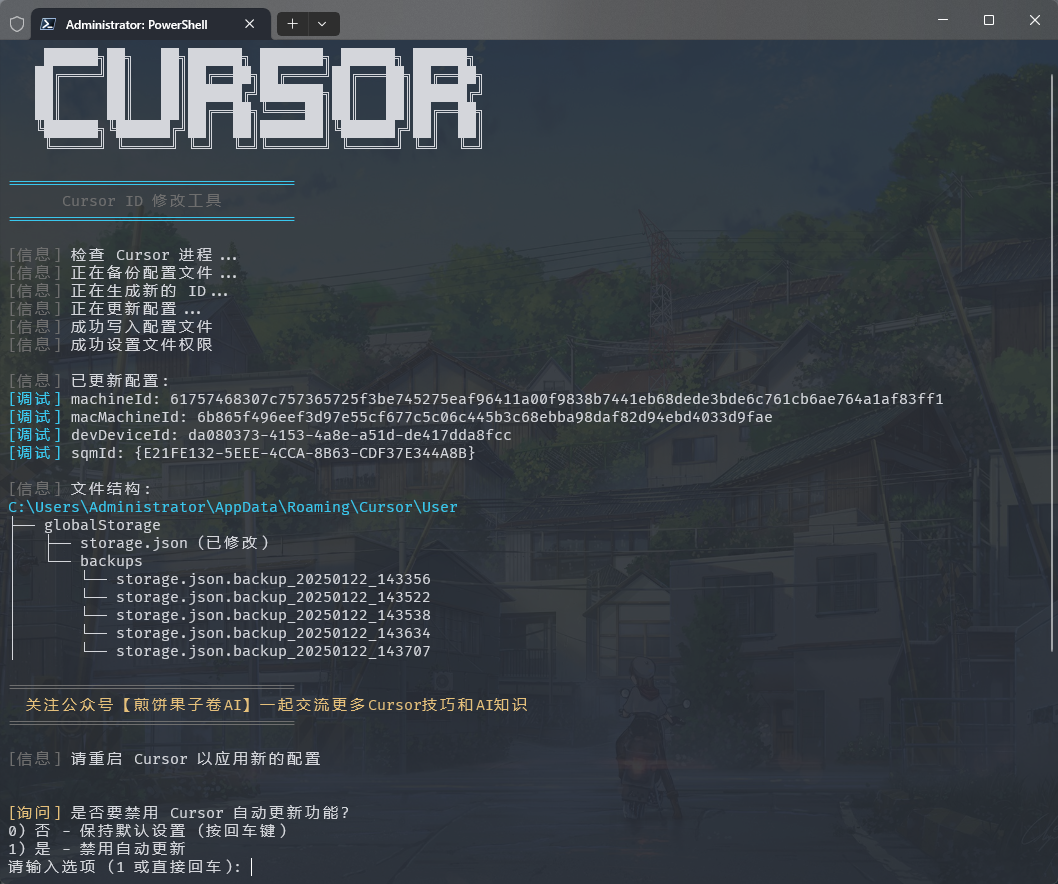
Windows Terminal Run and Configuration
How to Open Administrator Terminal in Windows:
Method 1: Using Win + X Shortcut
1. Press Win + X key combination
2. Select one of these options from the menu:
   - "Windows PowerShell (Administrator)"
   - "Windows Terminal (Administrator)"
   - "Terminal (Administrator)"
   (Options may vary depending on Windows version)
Method 2: Using Win + R Run Command
1. Press Win + R key combination
2. Type powershell or pwsh in the Run dialog
3. Press Ctrl + Shift + Enter to run as administrator
   or type in the opened window: Start-Process pwsh -Verb RunAs
4. Enter the reset script in the administrator terminal:

irm https://wget.la/https://raw.githubusercontent.com/yuaotian/go-cursor-help/refs/heads/master/scripts/run/cursor_win_id_modifier.ps1 | iex
For the enhanced version:
irm https://wget.la/https://raw.githubusercontent.com/yuaotian/go-cursor-help/refs/heads/master/scripts/run/cursor_win_id_modifier.ps1 | iex
Method 3: Using Search
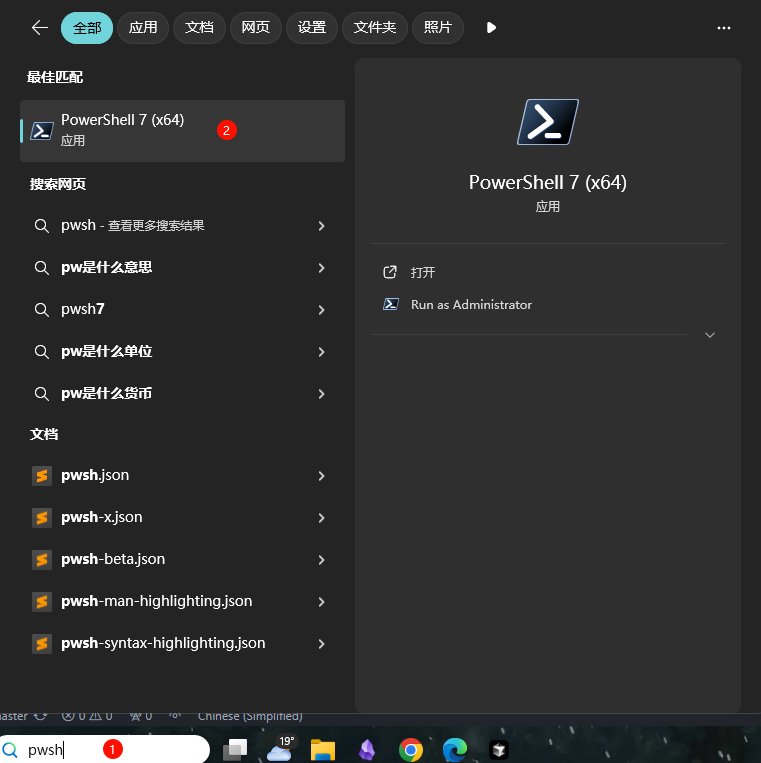
Type pwsh in the search box, right-click and select "Run as administrator"
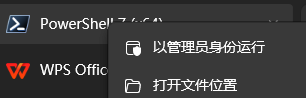
Enter the reset script in the administrator terminal:
irm https://wget.la/https://raw.githubusercontent.com/yuaotian/go-cursor-help/refs/heads/master/scripts/run/cursor_win_id_modifier.ps1 | iex
For the enhanced version:
irm https://wget.la/https://raw.githubusercontent.com/yuaotian/go-cursor-help/refs/heads/master/scripts/run/cursor_win_id_modifier.ps1 | iex
🔧 PowerShell Installation Guide
If PowerShell is not installed on your system, you can install it using one of these methods:
Method 1: Install via Winget (Recommended)
- Open Command Prompt or PowerShell
- Run the following command:
winget install --id Microsoft.PowerShell --source winget
Method 2: Manual Installation
Download the installer for your system:
Double-click the downloaded installer and follow the installation prompts
💡 If you encounter any issues, please refer to the Microsoft Official Installation Guide
Windows 安装特性:
- 🔍 Automatically detects and uses PowerShell 7 if available
- 🛡️ Requests administrator privileges via UAC prompt
- 📝 Falls back to Windows PowerShell if PS7 isn't found
- 💡 Provides manual instructions if elevation fails
That's it! The script will:
- ✨ Install the tool automatically
- 🔄 Reset your Cursor trial immediately
📦 Manual Installation
Download the appropriate file for your system from releases
Windows Packages
- 64-bit:
cursor-id-modifier_windows_x64.exe
- 32-bit:
cursor-id-modifier_windows_x86.exe
macOS Packages
- Intel:
cursor-id-modifier_darwin_x64_intel
- M1/M2:
cursor-id-modifier_darwin_arm64_apple_silicon
Linux Packages
- 64-bit:
cursor-id-modifier_linux_x64
- 32-bit:
cursor-id-modifier_linux_x86
- ARM64:
cursor-id-modifier_linux_arm64
🔧 Technical Details
Configuration Files
The program modifies Cursor's storage.json config file located at:
- Windows:
%APPDATA%\Cursor\User\globalStorage\storage.json
- macOS:
~/Library/Application Support/Cursor/User/globalStorage/storage.json
- Linux:
~/.config/Cursor/User/globalStorage/storage.json
Modified Fields
The tool generates new unique identifiers for:
telemetry.machineIdtelemetry.macMachineIdtelemetry.devDeviceIdtelemetry.sqmId
Manual Auto-Update Disable
Windows users can manually disable the auto-update feature:
- Close all Cursor processes
- Delete directory:
C:\Users\username\AppData\Local\cursor-updater
- Create a file with the same name:
cursor-updater (without extension)
macOS/Linux users can try to locate similar cursor-updater directory in their system and perform the same operation.
Safety Features
- ✅ Safe process termination
- ✅ Atomic file operations
- ✅ Error handling and recovery
Registry Modification Notice
⚠️ Important: This tool modifies the Windows Registry
Modified Registry
- Path:
Computer\HKEY_LOCAL_MACHINE\SOFTWARE\Microsoft\Cryptography
- Key:
MachineGuid
Potential Impact
Modifying this registry key may affect:
- Windows system's unique device identification
- Device recognition and authorization status of certain software
- System features based on hardware identification
Safety Measures
Automatic Backup
- Original value is automatically backed up before modification
- Backup location:
%APPDATA%\Cursor\User\globalStorage\backups
- Backup file format:
MachineGuid.backup_YYYYMMDD_HHMMSS
Manual Recovery Steps
- Open Registry Editor (regedit)
- Navigate to:
Computer\HKEY_LOCAL_MACHINE\SOFTWARE\Microsoft\Cryptography
- Right-click on
MachineGuid
- Select "Modify"
- Paste the value from backup file
Important Notes
- Verify backup file existence before modification
- Use backup file to restore original value if needed
- Administrator privileges required for registry modification
📚 Recommended Reading
💬 Feedback & Suggestions
We value your feedback on the new enhanced script! If you've tried the cursor_win_id_modifier.ps1 script, please share your experience:
- 🐛 Bug Reports: Found any issues? Let us know!
- 💡 Feature Suggestions: Have ideas for improvements?
- ⭐ Success Stories: Share how the tool helped you!
- 🔧 Technical Feedback: Performance, compatibility, or usability insights
Your feedback helps us improve the tool for everyone. Feel free to open an issue or contribute to the project!
Support
If you find this helpful, consider buying me a spicy gluten snack (Latiao) as appreciation~ 💁☕️
微信赞赏

要到饭咧?啊咧?啊咧?不给也没事~ 请随意打赏
|
支付宝赞赏

如果觉得有帮助,来包辣条犒劳一下吧~
|
Alipay
1 Latiao = 1 AI thought cycle
|
WeChat

二维码7天内(7月15日前前)有效,过期请加微信或者公众号`煎饼果子卷AI`
|
💳 Payment Methods (Donate / Remove Ads)
- 🪙 USDT (Tether)
- 🔴 TRC-20 (Tron):
TFbJnoY5Lep5ZrDwBbT8rV1i8xR4ZhX53k
- 🟡 Polygon / BSC / Arbitrum:
0x44f8925b9f93b3d6da8d5ad26a3516e3e652cc88
- 🟦 Litecoin (LTC):
LVrigKxtWfPymMRtRqL3z2eZxfncR3dPV7
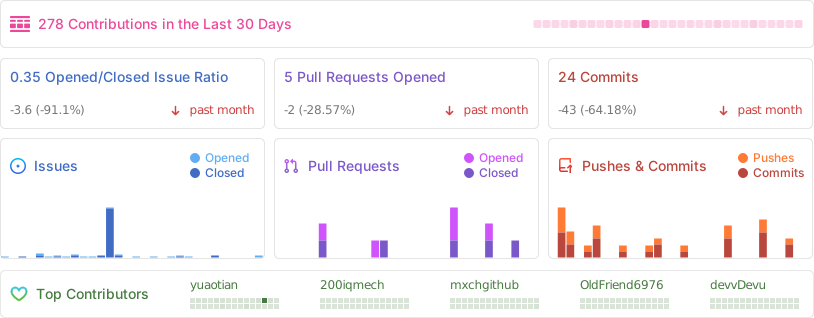
⭐ Project Stats
📄 License
MIT License
Copyright (c) 2024
Permission is hereby granted, free of charge, to any person obtaining a copy
of this software and associated documentation files (the "Software"), to deal
in the Software without restriction, including without limitation the rights
to use, copy, modify, merge, publish, distribute, sublicense, and/or sell
copies of the Software, and to permit persons to whom the Software is
furnished to do so, subject to the following conditions:
The above copyright notice and this permission notice shall be included in all
copies or substantial portions of the Software.







 一个命令行工具,当 Cursor 编辑器以“可疑活动”或试用次数已达上限等提示把你拦下时,它可以重置 Cursor 的免费试用,方法是让 Cursor 把你的电脑当成一台全新的设备。