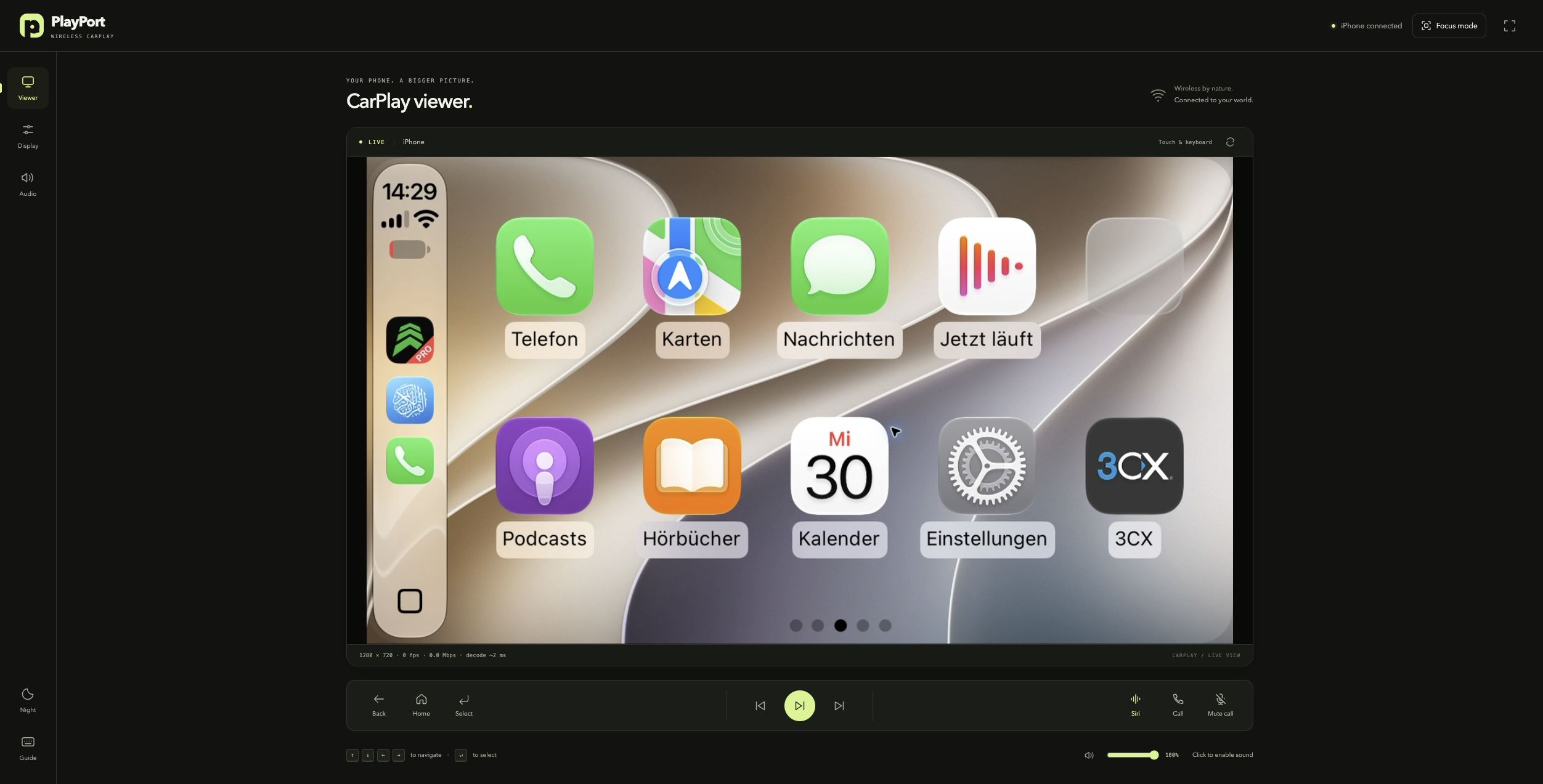
PlayPort runs the car side of CarPlay on a Mac. Your iPhone connects wirelessly (Bluetooth
bootstrap, then Wi-Fi), and every browser on the network can watch and control CarPlay — touch,
rotary knob, media keys, Siri and phone calls. No dongle, no head unit, no app install: open a
URL and drive.
Port notice. PlayPort's AirPlay, iAP2 and accessory-authentication code is ported from
DiPlay by shihabal3amri, itself based on
xcertplay by shilapi (both GPL-3.0). PlayPort replaces the
Android head-unit app with a JVM server and a WebCodecs browser client. It is an independent
project, not affiliated with or endorsed by the DiPlay or xcertplay authors.
Table of contents
How it works
          Bluetooth (first pairing)                     Wi-Fi / LAN
   ┌──────────────────────────────────┐   ┌─────────────────────────────────────────┐
   │  iAP2 identification             │   │  mDNS advertisement (_airplay._tcp)     │
   │  MFi authentication              │   │  AirPlay RTSP: pairing, /info, SETUP    │
   │  Wi-Fi credentials handoff       │   │  H.264 / HEVC video  +  RTP audio       │
   └──────────────────────────────────┘   │  HID input  +  iAP2 control tunnel      │
                                          └─────────────────────────────────────────┘
                        │                                     │
                        ▼                                     ▼
              ┌──────────────────────────────────────────────────────────┐
              │  PlayPort server (Kotlin/JVM + Ktor)                     │
              │  · :protocol — ported DiPlay stack (AirPlay, iAP2, MFi)  │
              │  · RTSP listener, mDNS, pairing store, BT bridge         │
              │  · decrypts media, never re-encodes it                   │
              └──────────────────────────────────────────────────────────┘
                        │  WebSocket: binary media + JSON control
                        ▼
              ┌──────────────────────────────────────────────────────────┐
              │  Browser client (TypeScript, no framework)               │
              │  · WebCodecs VideoDecoder → canvas  ·  AudioDecoder      │
              │  · pointer + keyboard → CarPlay HID                      │
              └──────────────────────────────────────────────────────────┘
The iPhone thinks it is talking to a car head unit: PlayPort advertises itself over Bonjour,
authenticates with an MFi identity, receives the encrypted H.264/HEVC screen and RTP audio, and
sends touch/knob/media HID reports back. The server passes the phone's encoded media straight to
the browser (no server-side decoding or re-encoding), and the browser decodes it with WebCodecs.
Features
- Wireless CarPlay — Bluetooth iAP2 bootstrap + Wi-Fi handoff, with a connection supervisor that
re-invites the phone whenever the link drops.
- Any browser is the screen — laptop, tablet, wall panel, another Mac. Multiple viewers at once.
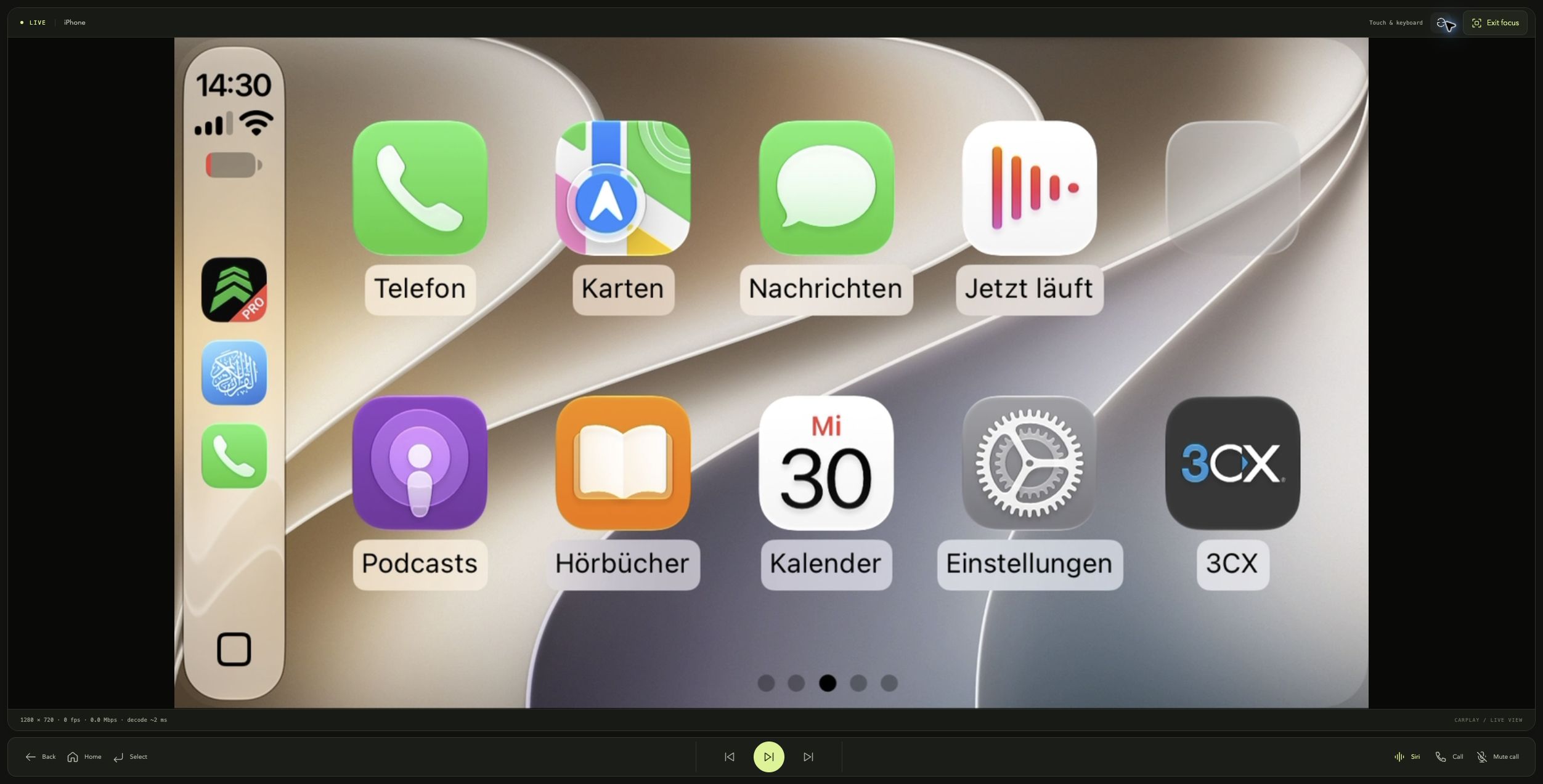
- Responsive viewer — grouped controls, dedicated display/audio panels, a connection guide,
and focus mode for a larger CarPlay screen.
- Touch and knob input — up to two touch contacts, keyboard as rotary knob, toolbar buttons for
Home/Back/Select, media transport and Siri.
- Calls and Siri — when the phone opens its speech/telephony stream, the browser asks for the
microphone and streams audio back (PCM, or Opus when requested).
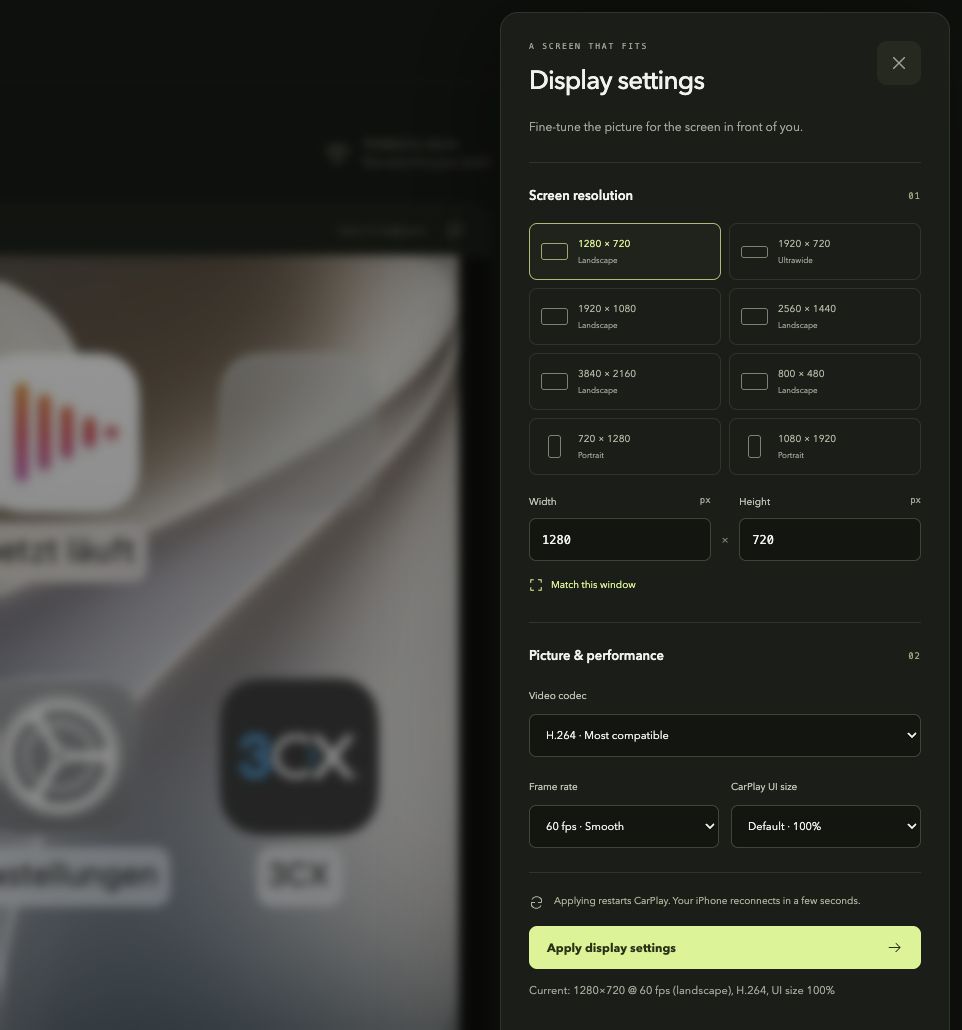
- Display control — live resolution, portrait/landscape, frame rate, CarPlay UI size and
H.264/HEVC selection, with presets from 800×480 up to 4K.
- Quality tuning — "Match this window" advertises your display's physical pixels for 1:1
sharpness; a stats HUD shows resolution, fps, bitrate, drops, decode queue and latency.
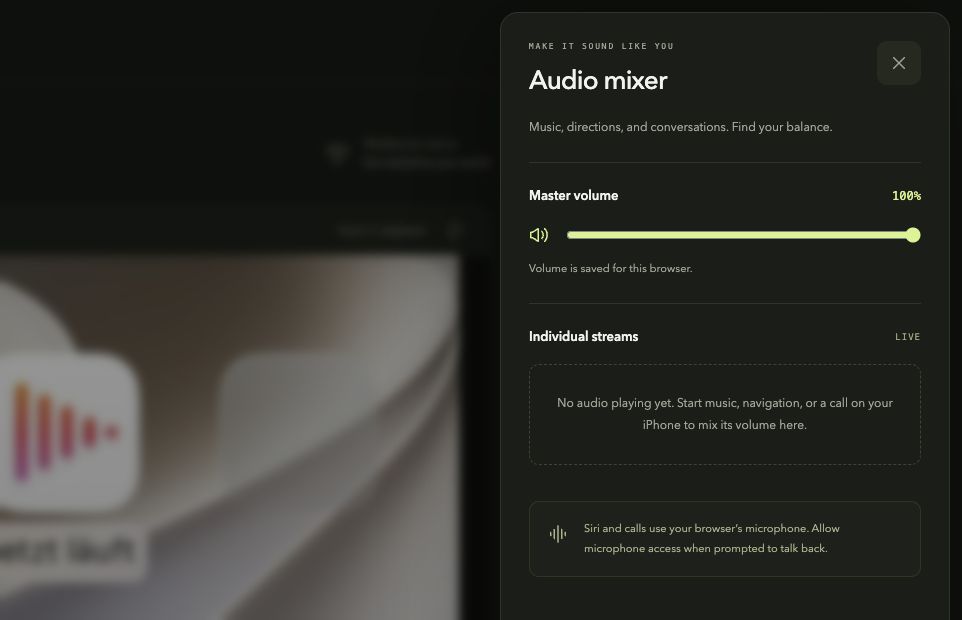
- Audio mixer — master plus per-stream volumes (media, navigation, Siri/calls).
- Persistent settings — display settings are saved to
~/.playport/config.json; audio levels
are saved in your browser.
- No cloud, no account — everything runs on your machine and your LAN.
Screenshots
| Display and quality |
Audio mixer (no active streams) |
 |
 |
| Focus mode |
Mobile viewer |
 |
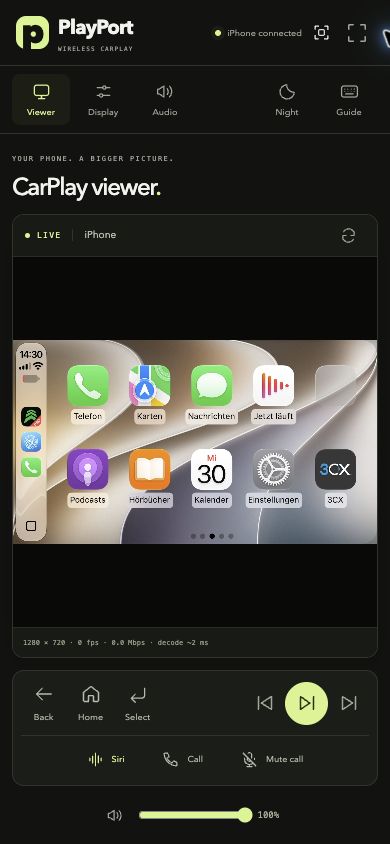 |
Requirements
| Component |
Requirement |
| Server |
macOS 13+ (developed and tested on macOS 27, Apple silicon) |
| Java |
JDK 21 (brew install openjdk@21) |
| Build tools |
Xcode Command Line Tools (xcode-select --install) for the Bluetooth bridge |
| Web client |
Node.js 20+ (only needed to build web/dist) |
| iPhone |
Any CarPlay-capable iPhone with Bluetooth and Wi-Fi |
| Network |
iPhone and Mac on the same Wi-Fi network; Bluetooth enabled on both |
Quick start
git clone https://github.com/youcci/playport.git
cd playport

# 1. Add the accessory identity (see the section below) — the server refuses to start without it
mkdir -p identity/offline-mfi
cp /path/to/identity.pk8 /path/to/certificate.p7b identity/offline-mfi/

# 2. Build everything
./gradlew build                      # protocol + server, runs 96 tests
(cd web && npm install && npm run build)

# 3. Build the Bluetooth bridge (macOS RFCOMM helper)
macos/bt-bridge/build.sh

# 4. Pair the iPhone once (keep Settings > Bluetooth open on the phone)
macos/bt-bridge/bt-bridge --scan
macos/bt-bridge/bt-bridge --pair AA:BB:CC:DD:EE:FF      # confirm the code on the iPhone

# 5. Prepare macOS
#    · System Settings → General → AirDrop & Handoff → turn OFF "AirPlay Receiver"
#    · System Settings → Privacy & Security → Bluetooth → enable your terminal app
#    · Allow incoming connections for java if the firewall asks

# 6. Run the server (use the Wi-Fi name the iPhone is on)
./gradlew :server:run --args="--wireless --wifi-ssid \"YOUR_WIFI\" --wifi-passphrase \"YOUR_PASSWORD\""
Open the https:// URL the server prints (it contains an access token) and accept the
self-signed certificate warning once. HTTPS is required because browsers only expose WebCodecs —
the video/audio decoders — in secure contexts. On the iPhone, accept the CarPlay prompt; if it asks
for a code, enter 3939. The dashboard appears in the browser as soon as the first video frame
arrives.
Accessory identity (required)
The iPhone will only start CarPlay with an authenticated accessory. On every connection it
requests the accessory certificate and sends a challenge; PlayPort signs it with the matching
private key. AirPlay setup uses the same identity. Without these two files the server exits at
startup, and there is no software workaround.
PlayPort does not ship this identity — it is third-party key material, it is not relicensed as
source code, and it must not be redistributed.
Where the files go
identity/offline-mfi/identity.pk8       # PKCS#8 EC P-256 private key
identity/offline-mfi/certificate.p7b    # accessory certificate (Apple Accessories CA)
identity/ is ignored by Git. To keep it somewhere else, pass --identity-dir /path/to/identity.
You can verify a pair at any time with the bundled test — it signs a challenge and checks it
against the certificate:
./gradlew :server:test --tests '*MfiIdentityTest*'
Where to normally find it
From a DiPlay release APK (easiest public source). DiPlay bundles an experimental identity
recovered from Carlinkit firmware and documents that it is extractable by design:
curl -L -o DiPlay.apk \
  https://github.com/shihabal3amri/DiPlay/releases/download/v0.2.7/DiPlay-0.2.7.apk
unzip -j DiPlay.apk 'assets/offline-mfi/*' -d identity/offline-mfi
See DiPlay's docs/THIRD_PARTY_NOTICES.md for provenance.
From Carlinkit C2Air firmware. The pair was originally recovered from public Allwinner V821
firmware. The reverse-engineering community documents how to dump and unpack these dongles —
for example ludwig-v/wireless-carplay-dongle-reverse-engineering
and the projects it links. Search the unpacked root filesystem for an Apple-issued X.509
certificate and a matching PKCS#8 EC key.
Your own MFi credentials. If you are an MFi licensee with an accessory identity, use your own
certificate and key. A physical MFi authentication coprocessor is not supported by this project.
A remote MFi server. If you run an authentication service, point PlayPort at it instead of a
local identity: --mfi-server https://host --mfi-token <token>.
Caveats. The publicly available identity is shared, experimental and not issued to
PlayPort. Apple can revoke it in any iOS update, and this is not an Apple-certified product.
Use it for personal experimentation, do not sell it, and do not commit or redistribute the key.
Display, orientation and quality
The phone renders CarPlay at whatever resolution PlayPort advertises, so the Display panel in
the browser is the quality control room:
- Landscape presets — 800×480, 1280×720, 1920×720, 1920×1080, 2560×1440, 3840×2160.
- Portrait presets — 720×1280, 1080×1920 (portrait is simply
height > width).
- CarPlay UI size — Smaller/Small/Default/Large requests a proportionally larger canvas, so
CarPlay draws finer controls (75–115%).
- Video codec — H.265/HEVC is sharper at the same bitrate and is offered when the browser can
decode it (probed with
VideoDecoder.isConfigSupported). The phone makes the final call.
- Frame rate — 60 fps for smoothness, 30 fps to spend more bitrate on detail.
- Match this window — advertises your window's physical pixels (
CSS × devicePixelRatio), so
the canvas maps 1:1 to the display. Best used fullscreen.
Applying a change restarts CarPlay (the phone reconnects in a few seconds). Values persist in
~/.playport/config.json. The same knobs exist as flags for a fixed setup:
./gradlew :server:run --args="--width 1920 --height 720 --fps 60 --ui-scale 85 --hevc"
Audio and microphone
Audio is passed through per stream (media, guidance, speech, telephony) and decoded in the browser
with a jitter buffer. The Audio panel has a master volume and per-stream sliders; the control
dock has Call (answer/end) and Mute call, and the sidebar has Night (day/night mode). When the phone
opens Siri or a call, the browser asks for microphone permission and sends audio back to the phone.
Controls
| Input |
Action |
| Touch / mouse drag |
CarPlay touch (two contacts supported) |
| Arrow keys |
Rotary knob (up/down/left/right) |
| Enter |
Select |
| Esc / Backspace |
Back |
| Space |
Play / pause |
| S |
Siri |
| Viewer controls |
Home, Back, Select, media transport, Siri, Call, Mute call, Night, Audio, Display, Refresh video, Focus mode, Fullscreen |
Use Guide for connection steps and keyboard shortcuts. Focus mode hides the header and
sidebar while keeping the CarPlay controls within reach.
Configuration
Every option can be given as a CLI flag; UI changes are saved to ~/.playport/config.json
(hand-editable — CLI flags always win). Run with --help for the full list.
| Flag |
Description |
Default |
--device-name <name> |
Name shown on the iPhone |
PlayPort |
--model, --manufacturer |
Strings advertised to the phone |
playport |
--airplay-port <n> |
AirPlay RTSP port |
7000 |
--http-port <n> |
Browser UI port (HTTPS) |
8080 |
--width, --height, --fps, --ui-scale, --hevc |
Display defaults |
1280×720@60, 100%, H.264 |
--rhd |
Right-hand-drive layout |
off |
--bind <address> |
Bind address |
auto-detect LAN |
--identity-dir <path> |
Directory containing offline-mfi/ |
./identity |
--state-dir <path> |
Identity, pairings, TLS, config |
~/.playport |
--mfi-server, --mfi-token |
Remote MFi service instead of local keys |
— |
--wireless |
Enable the Bluetooth/Wi-Fi bootstrap |
off |
--wifi-ssid, --wifi-passphrase, --wifi-channel, --wifi-security |
Network handed to the phone |
auto-detect SSID |
--bt-address <mac> |
iPhone Bluetooth address |
auto-discovered |
--bt-bridge <path> |
Bluetooth helper binary |
macos/bt-bridge/bt-bridge |
--mdns <backend> |
auto, dns-sd or jmdns |
auto (dns-sd on macOS) |
--http |
Serve plain HTTP (WebCodecs then only works on localhost) |
off |
--token <token> |
Fixed browser access token |
random per start |
Troubleshooting
| Symptom |
Cause and fix |
bt-bridge aborts immediately (SIGABRT) |
macOS Bluetooth privacy. System Settings → Privacy & Security → Bluetooth → enable your terminal app. |
| iPhone never appears in Bluetooth settings |
Expected — macOS hides iPhones. Pair with macos/bt-bridge/bt-bridge --pair <address> (with Settings → Bluetooth open on the phone). |
--pair hangs |
The device is already paired; just start the server, or use --force-pair to re-bond. |
no Wi-Fi network detected |
macOS hides the SSID from processes without Location Services, or the Wi-Fi is on another interface. Pass --wifi-ssid and --wifi-passphrase, or grant Location Services to your terminal. |
| Phone connects but video is black |
Open the https:// URL (WebCodecs needs a secure context) and hard-refresh. Press Fix video to force a keyframe. |
H.265/HEVC … cannot decode |
Your browser lacks HEVC. Switch the codec back to H.264 in the Display panel. |
| No CarPlay prompt on the iPhone |
Check the phone joined the same Wi-Fi. Remove stale entries in iPhone Settings → General → CarPlay, then let the supervisor retry (or restart the server). |
| Port 7000 already in use |
macOS AirPlay Receiver is on. System Settings → General → AirDrop & Handoff → turn it off. |
| Browser warns about the certificate |
Expected: the server generates a self-signed certificate in ~/.playport. Accept it once. |
| Stream resolution lower than requested |
The iPhone clamps to what its encoder supports; the header HUD shows what actually arrived. |
Security and privacy
- The server binds the AirPlay port to your LAN address; the browser UI is HTTPS with a
self-signed certificate and an access token (regenerated every start unless
--token is set).
- The MFi private key never leaves the machine and is never sent to the browser; it is only used to
sign the iPhone's challenge.
- State files live in
~/.playport with owner-only permissions where the filesystem supports it.
- Nothing is uploaded anywhere. Diagnostics are local. Pair records stay on your machine.
- Treat the machine as you would a car head unit: anyone on your LAN with the token can control
CarPlay while your iPhone is connected.
Project layout
protocol/   Kotlin/JVM library ported from DiPlay's shared module (AirPlay, iAP2, MFi, streams)
server/     Ktor server: RTSP + mDNS + Bluetooth bridge + WebSocket hub + display/mic/config APIs
web/        Vite + TypeScript browser client (WebCodecs video/audio, input, panels)
macos/      bt-bridge: Swift IOBluetooth RFCOMM helper for the wireless bootstrap
identity/   Accessory identity drop-in (gitignored — see above)
docs/       Logo and screenshots
Development
./gradlew build          # compiles both modules and runs the test suite (96 tests)
(cd web && npm run build)  # type-checks and bundles the browser client
(cd web && npm test)       # checks keyboard isolation and touch mapping
./gradlew :server:run --args="--help"
The protocol module is a faithful port of DiPlay's shared sources with Android dependencies
replaced by small JVM shims (platform/Log, network/TcpLiveness, transport/IphoneUsbException),
so future upstream fixes stay easy to merge. MfiIdentityTest validates the local identity against
its certificate; WireTest covers the browser wire framing.
Status and limitations
PlayPort is experimental. It has been validated on macOS with an iPhone (iOS 27) over Wi-Fi:
wireless bootstrap, MFi authentication, live video with touch input, display switching and
persistence. Tested with H.264; HEVC passthrough is implemented but depends on your browser.
- Not an Apple-certified product; the public identity is shared and can be revoked by Apple.
- Wired USB CarPlay is not supported; wireless only.
- Linux is not supported yet (the server and mDNS are portable; the Bluetooth bridge is macOS-only).
- Telephony buttons are implemented but their HID indexes are unverified in DiPlay — report if
Call does nothing during a call.
- H.265/HEVC requires a browser with HEVC WebCodecs support (Chrome/Edge on macOS, Safari 17+).
- iOS behavior can change with any update; this project may break without warning.
Credits and license
PlayPort is free software under the GNU General Public License v3.0 — see LICENSE.
As a derivative of DiPlay and xcertplay (both GPL-3.0), it must remain under the same license: you
may use, study, modify and share it, but distributed copies and modifications must keep this
license and make their source available.
- Protocol stack: DiPlay by shihabal3amri and
xcertplay by shilapi.
- The accessory identity discussed above was recovered from public Carlinkit C2Air firmware during
the DiPlay project's investigation and is not part of this repository.
- Interface inspiration: DiAuto (AGPL-3.0) — no code from
it is used here.
CarPlay, iPhone, AirPlay and MFi are trademarks of Apple Inc. PlayPort is an independent project;
no Apple affiliation or endorsement is implied.






 PlayPort 是一个运行在 Mac 上的服务器端 CarPlay 接收器,能把你网络里的任意浏览器变成无线 CarPlay 屏幕——触控、旋钮、媒体键、Siri 和通话都包括,不需要转接器,也不用装应用。