
Fireworks Open ELI5
English · 简体中文
An open, portable Agent Skill for turning difficult systems into truthful,
interactive visual stories. It compiles a versioned JSON story spec into one
deterministic, self-contained HTML file that works offline.
The project combines an ELI5 layer with inspectable technical truth: readers
can follow a real request or event through the system, inspect the evidence
behind each conclusion, explore failure behavior, annotate scenes, and export
the result without sending source material to a remote runtime.
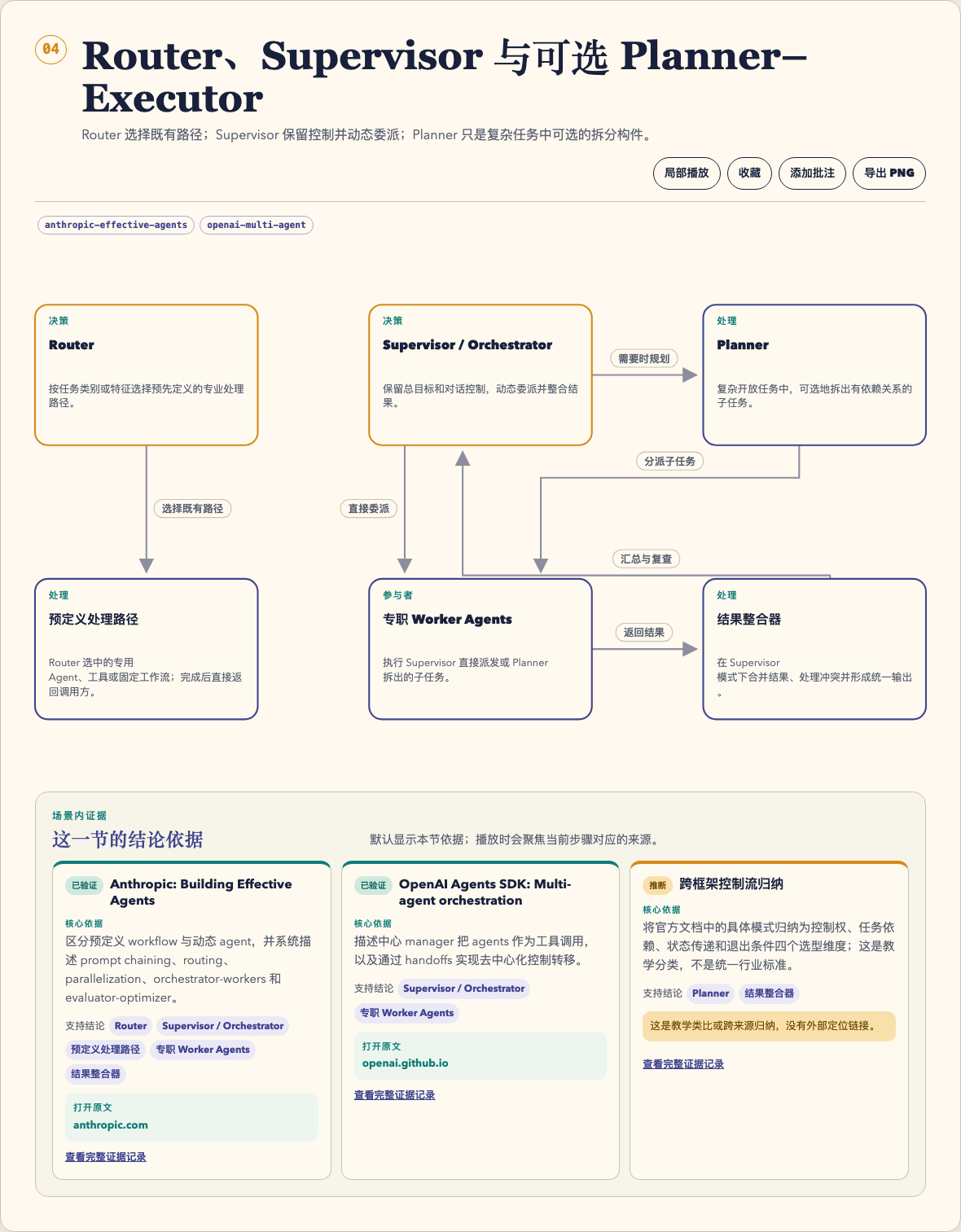
A generated Chinese scene showing the graph, local actions, and conclusion-level evidence together.
Why it is different
- Truth Ladder — separates analogy, technical mechanism, and caveats.
- Evidence at the claim — each scene can show source status, core text,
support scope, and a URL or explicit no-locator boundary.
- Four story grammars — concept, repository module, engineering tradeoff,
and incident, each with a dedicated summary view and semantic validator.
- Detailed playback — global or scene-local traces animate real nodes,
relationships, labels, arrow markers, evidence cards, and enter/hold/exit
phases while keeping the active scene in view.
- Failure lens and teach-back — impact, symptom, fallback, questions, and
answer reveals are part of the explainer rather than an appendix.
- Reader workspace — opt-in same-origin history, favorites, plain-text
annotations, and keyboard-accessible scene navigation.
- Local export — PDF, scene PNG, all-scene PPTX, Pages-compatible DOCX, and
optional verified native
.pages conversion.
- Portable by construction — no runtime packages, remote fonts, remote
resources, or network access during render.
Requirements
- Skill runtime: Node.js 18 or newer and local file access.
- Package dependencies: none. There is no
npm install, Python runtime,
remote font, or remote rendering service.
- Rendering: no browser or network connection is required.
- Reading and export: use a modern browser for the interactive HTML and
local PDF, PNG, PPTX, or DOCX export.
- Optional native
.pages export: macOS, Apple Pages, and the bundled
loopback helper.
The installer and the installed Skill have separate requirements. The
[email protected] CLI used by the release canary requires Node.js 22.20 or newer;
the installed Skill still runs on Node.js 18 or newer. Installation needs
one-time access to the public GitHub repository; the npx route also needs the
npm registry. A public install needs no GitHub account or token.
Install
Natural language (recommended)
Paste one of these requests into your agent. It should inspect SKILL.md,
refuse to overwrite an existing installation without permission, and report
the final location.
Codex
Install the fireworks-open-eli5 Agent Skill globally from
https://github.com/yizhiyanhua-ai/fireworks-open-eli5 using Codex's Skill
installer. The repository root (.) is the Skill directory and its installed
name must be fireworks-open-eli5. Review SKILL.md first, do not replace an
existing copy without asking, verify the installed path, and tell me whether
I need a new Codex task before using it.
Claude Code
Install the fireworks-open-eli5 Agent Skill globally for Claude Code from
https://github.com/yizhiyanhua-ai/fireworks-open-eli5. Review SKILL.md
first, use the Agent Skills CLI when available, and do not replace an existing
copy without asking. If the installer requirement is not met, report it
without changing my Node.js installation. Verify that Claude Code can
discover the Skill and report the installed path.
Install with npx
The open Agent Skills CLI supports both
Codex and Claude Code:
# Codex
npx skills@latest add yizhiyanhua-ai/fireworks-open-eli5 -g -a codex -y

# Claude Code
npx skills@latest add yizhiyanhua-ai/fireworks-open-eli5 -g -a claude-code -y

# Both agents
npx skills@latest add yizhiyanhua-ai/fireworks-open-eli5 -g -a codex -a claude-code -y
-g installs at user scope. Remove it for a project-local installation. Check
the result with npx skills@latest list -g --json, then start a fresh agent
task so the Skill is rediscovered. Review Skills before using them: they run
with the permissions of the host agent.
Quick start
node scripts/validate.mjs assets/example-spec.json
node scripts/render.mjs assets/example-spec.json example.html
node scripts/validate.mjs assets/example-spec.json example.html
The commands print compact JSON and exit nonzero on failure. Rendering is
create-only by default. Use --force only to intentionally replace a known
regular file; symbolic links are always rejected.
Run the complete contributor and distribution gate:
npm run check
This checks JavaScript syntax, focused tests, the canonical example, release
package contents, and a render/validate canary from an unpacked archive.
On Node.js 22.20 or newer, also exercise an isolated Codex and Claude Code
installation through the pinned Agent Skills CLI release:
npm run check:agent-install
Use as an Agent Skill
After installation, ask for an evidence-aware visual explanation, for example:
Explain how one queued job moves through this repository. Cite real files,
let me play the request path, and show what breaks when the lease expires.
Read SKILL.md for the agent workflow and
references/spec-contract.md for the version 1
story spec.
Story pipeline
question + audience + evidence
            │
            ▼
  versioned JSON story spec
            │ validate
            ▼
 deterministic HTML renderer
            │
            ├── offline interactive explainer
            ├── print / PDF
            ├── current-scene PNG
            ├── all-scene PPTX
            ├── Pages-compatible DOCX
            └── optional native Pages conversion
The JSON spec is the portable source of truth. The HTML contains its canonical
SHA-256, and the validator can byte-compare a supplied spec against a fresh
deterministic render.
Reader workspace
Every explainer has a directory drawer. Favorites appear first, followed by
independent tabs for the current outline, previously opened explainers, and
annotation browsing. A reader can play, favorite, annotate, or export one scene
without starting the global trace.
The local library is disabled until the reader selects Enable local
library. It records only explainers actually opened at the same scheme, host,
and port; it never scans the filesystem. Favorites and annotations are
browser-local, unencrypted, and removed when that origin's browser data is
cleared. They never modify the source JSON or generated HTML. file:// and
unavailable storage degrade to an in-memory session.
See references/library-and-export.md for
the persistence, privacy, accessibility, playback, and export contract.
Export
| Action |
Result |
Verification boundary |
| Print / PDF |
Browser print dialog |
The reader chooses Save as PDF when available |
| PNG |
1600×900 image of the selected scene |
PNG signature, dimensions, and scene evidence footer |
| PPTX |
One 16:9 slide per scene |
ZIP signature and required OOXML parts |
| DOCX |
One 16:9 page per scene |
ZIP signature and required OOXML parts |
| Native Pages |
A real .pages package saved by Apple Pages |
Must contain Index/Document.iwa and reopen in Pages |
PNG, PPTX, and DOCX are built locally in the browser without third-party
libraries. Native Pages conversion is never faked by renaming a DOCX. Serve a
trusted explainer directory with:
node scripts/serve.mjs --root /absolute/path/to/explainers --port 8772
The helper binds only to 127.0.0.1, verifies exact origin and a rotating
process token, bounds and validates the generated DOCX/PNG structure, serializes
conversion, and cleans task-specific temporary files. These controls protect
the browser action from cross-site requests; they are not authentication
against other local processes.
Security and privacy
The renderer reads local files and writes one local file. Generated HTML uses a
hash-whitelisted Content Security Policy, embeds no remote resources, and
contains no XHR, WebSocket, eval, or HTML-string DOM insertion. Its only
connection is a user-initiated same-origin request to the optional loopback
Pages helper. Cited HTTP(S) URLs are ordinary reader-facing links, never runtime
dependencies.
Annotations are capped and inserted as text. The validator rejects unsafe
source URLs, external resources, runtime tampering, spec-hash drift, and
unexpected CSP hashes. See SECURITY.md to report a vulnerability.
Project map
- SKILL.md — agent workflow and delivery boundary
assets/example-spec.json — complete Chinese DNS exampleassets/explainer-shell.html — offline visual and interaction shellscripts/render.mjs — deterministic rendererscripts/validate.mjs — spec and output validatorscripts/serve.mjs — loopback-only native Pages helperreferences/ — evidence, grammar, visual, reporting, workspace, and export
contractsevals/ — task-quality and trigger evaluation promptstests/ — Node built-in tests and adversarial fixtures
Contributing
Read CONTRIBUTING.md, then run:
npm run check
The release package uses an explicit allowlist and keeps private: true to
prevent accidental npm publication. This repository is intended to distribute
an Agent Skill, not an npm runtime library.
License and attribution
Apache-2.0. See LICENSE and NOTICE.
Fireworks Open ELI5 is an independent implementation inspired by the Anthropic
community eli5 skill and is not endorsed by Anthropic.

 Fireworks Open ELI5 是一个面向 Codex 和 Claude Code 的 Agent Skill,能把复杂系统变成有依据、可交互的可视化讲解。它把带版本号的 JSON 故事规范编译成一个确定性的、自包含的离线 HTML 文件。