



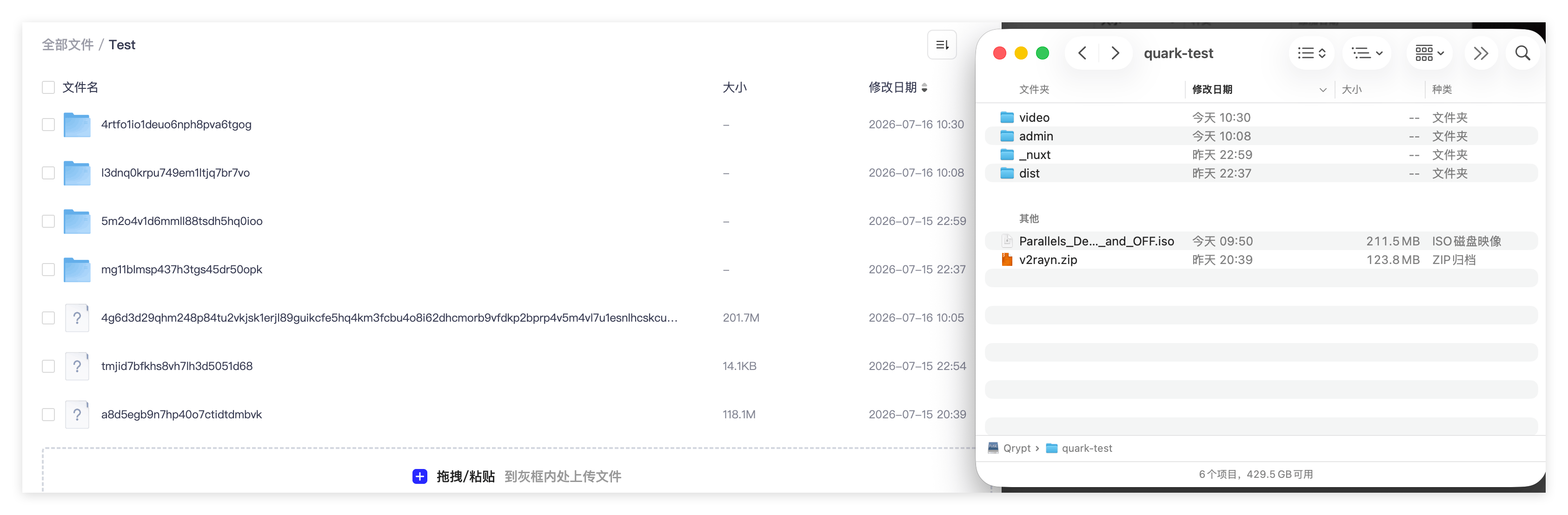
Что это такое?
 qrypt объединяет облачные хранилища (S3, WebDAV, SFTP, Aliyun Drive, Baidu Cloud, OneDrive, 115, Quark Drive) в одну зашифрованную локальную папку, так что удалённые файлы можно просматривать и редактировать так же, как файлы на локальном диске.
Это файловая система FUSE или просто инструмент синхронизации?В основном это виртуальная файловая система на основе FUSE, которую вы монтируете локально, но также есть режим без монтирования ('qrypt fs') для чтения и записи удалённых файлов напрямую — это удобно в скриптах или на серверах без FUSE.
В основном это виртуальная файловая система на основе FUSE, которую вы монтируете локально, но также есть режим без монтирования ('qrypt fs') для чтения и записи удалённых файлов напрямую — это удобно в скриптах или на серверах без FUSE.Как установить qrypt и начать им пользоваться?Запустите установщик для вашей платформы: Linux/macOS или Windows (права администратора не нужны), откройте новый терминал и проверьте установку командой 'qrypt version', затем создайте конфигурационный файл и используйте его для загрузки и чтения файлов; монтирование в локальную папку необязательно.
Запустите установщик для вашей платформы: Linux/macOS или Windows (права администратора не нужны), откройте новый терминал и проверьте установку командой 'qrypt version', затем создайте конфигурационный файл и используйте его для загрузки и чтения файлов; монтирование в локальную папку необязательно.Нужно ли устанавливать FUSE перед монтированием?FUSE нужен только для функции монтирования — macFUSE на macOS, libfuse3/fuse3 на Linux или WinFsp на Windows; команды 'fs' без монтирования работают без всего этого.
FUSE нужен только для функции монтирования — macFUSE на macOS, libfuse3/fuse3 на Linux или WinFsp на Windows; команды 'fs' без монтирования работают без всего этого.Шифруются ли мои данные до отправки в облако?Да, имена файлов и их содержимое шифруются локально до загрузки, и схема шифрования совместима с rclone crypt.
Да, имена файлов и их содержимое шифруются локально до загрузки, и схема шифрования совместима с rclone crypt.Какие облачные сервисы поддерживает qrypt?Поддерживаются S3, WebDAV, SFTP, OneDrive и китайские облачные диски: Aliyun Drive, Baidu Cloud, 115 и Quark Drive. Все они объединяются в одну локальную точку монтирования.
Поддерживаются S3, WebDAV, SFTP, OneDrive и китайские облачные диски: Aliyun Drive, Baidu Cloud, 115 и Quark Drive. Все они объединяются в одну локальную точку монтирования.Что происходит с файлами, которые я записываю, до их отправки в облако?Сначала запись попадает на локальный диск, а загрузка в облако происходит в фоновом режиме. Повторные чтения обслуживаются из локального кэша, поэтому работа быстрее и не нужно каждый раз ждать сеть.
Сначала запись попадает на локальный диск, а загрузка в облако происходит в фоновом режиме. Повторные чтения обслуживаются из локального кэша, поэтому работа быстрее и не нужно каждый раз ждать сеть.Может ли qrypt отправлять загрузки прямо на мой облачный диск?Да, его функция Offline Download позволяет передать magnet-ссылки или прямые загрузки, и облачный диск сам скачает файлы.
Да, его функция Offline Download позволяет передать magnet-ссылки или прямые загрузки, и облачный диск сам скачает файлы.В каких он темах?sftp-client, onedrive, fuse, cloud-storage, webdav, s3, storage, cli-tool, encryption, go, command-line-tool, privacy
sftp-client, onedrive, fuse, cloud-storage, webdav, s3, storage, cli-tool, encryption, go, command-line-tool, privacy- Автор
- yinzhenyu-su
- Размер
- 8.7 MB
- Звёзды
- 186
- Обновлён
- КоммитNov 16Релизv0.7.0Nov 16
- Возраст
- 4 мес
- Коммиты · 90 дней