
xmake
A cross-platform build utility based on Lua
Modern C/C++ build tool: Simple, Fast, Powerful dependency package integration
Support this project
Support this project by becoming a sponsor. Your logo will show up here with a link to your website. 🙏
Introduction (中文)
What is Xmake?
- Xmake is a cross-platform build utility based on the Lua scripting language.
- Xmake is very lightweight and has no dependencies outside of the standard library.
- Uses the
xmake.lua file to maintain project builds with a simple and readable syntax.
Xmake can be used to directly build source code (like with Make or Ninja), or it can generate project source files like CMake or Meson. It also has a built-in package management system to help users integrate C/C++ dependencies.
Xmake = Build backend + Project Generator + Package Manager + [Remote|Distributed] Build + Cache
Although less precise, one can still understand Xmake in the following way:
Xmake ≈ Make/Ninja + CMake/Meson + Vcpkg/Conan + distcc + ccache/sccache
If you want to know more, please refer to the Documentation, GitHub or Gitee. You are also welcome to join our community.
The official Xmake repository can be found at xmake-io/xmake-repo.

Installation
With cURL
curl -fsSL https://xmake.io/shget.text | bash
With Wget
wget https://xmake.io/shget.text -O - | bash
With PowerShell
irm https://xmake.io/psget.text | iex
Other installation methods
If you don't want to use the above scripts to install Xmake, visit the Installation Guide for other installation methods (building from source, package managers, etc.).
Simple Project Description
target("console")
    set_kind("binary")
    add_files("src/*.c")
Creates a new target console of kind binary, and adds all the files ending in .c in the src directory.
Package dependencies
add_requires("tbox 1.6.*", "zlib", "libpng ~1.6")
Adds a requirement of tbox v1.6, zlib (any version), and libpng v1.6.
The official xmake package repository exists at: xmake-repo

Command line interface reference
The below assumes you are currently in the project's root directory.
Build a project
$ xmake
Run target
$ xmake run console
Debug target
$ xmake run -d console
Run test
$ xmake test
$ xmake f -p [windows|linux|macosx|android|iphoneos ..] -a [x86|arm64 ..] -m [debug|release]
$ xmake
$ xmake f --menu
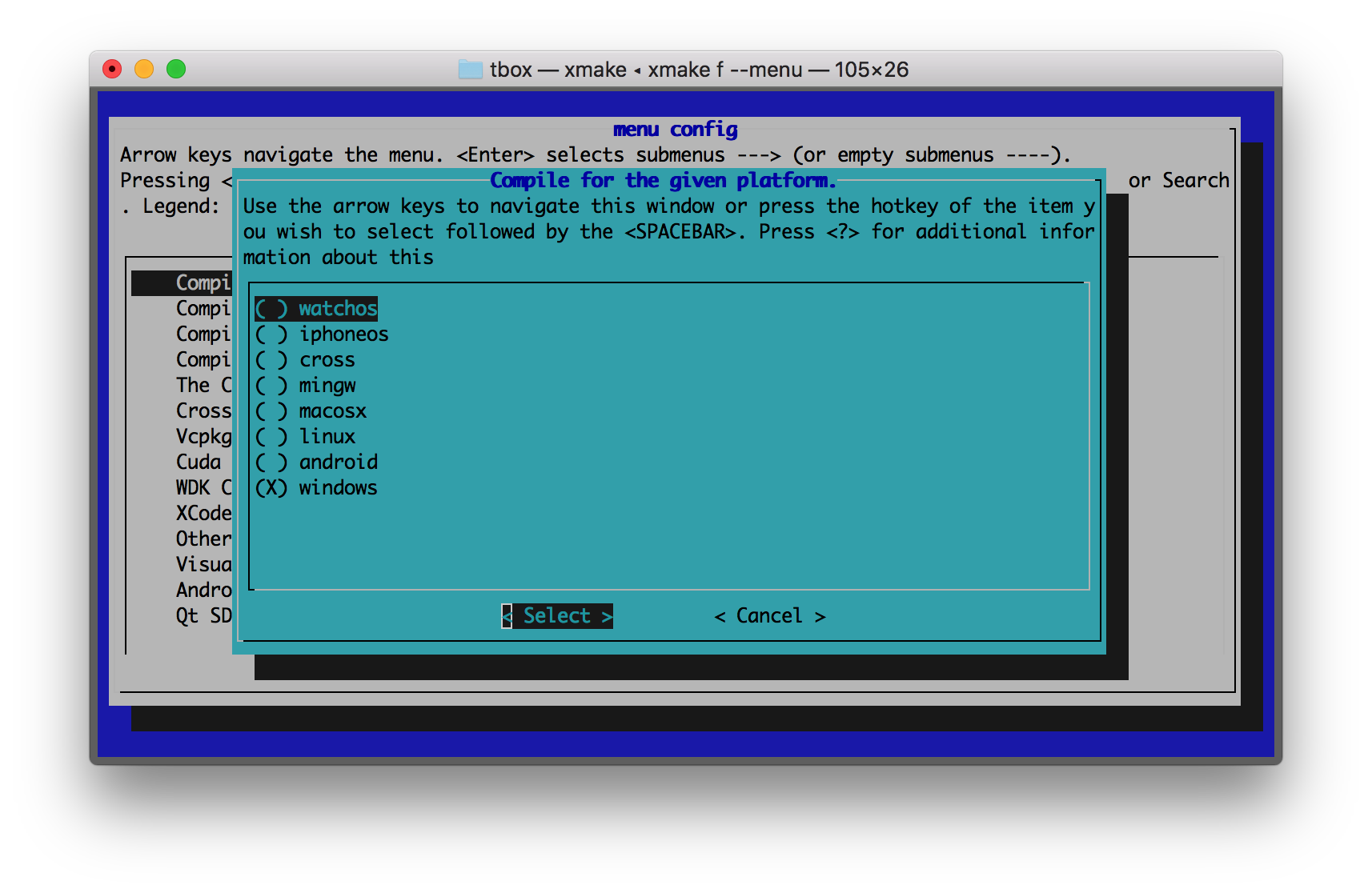
- Windows (x86, x64, arm, arm64, arm64ec)
- macOS (i386, x86_64, arm64)
- Linux (i386, x86_64, arm, arm64, riscv, mips, 390x, sh4 ...)
- FreeBSD (i386, x86_64)
- NetBSD (i386, x86_64)
- OpenBSD (i386, x86_64)
- DragonflyBSD (i386, x86_64)
- Solaris (i386, x86_64)
- Android (x86, x86_64, armeabi, armeabi-v7a, arm64-v8a)
- iOS (armv7, armv7s, arm64, i386, x86_64)
- WatchOS (armv7k, i386)
- AppleTVOS (armv7, arm64, i386, x86_64)
- AppleXROS (arm64, x86_64)
- MSYS (i386, x86_64)
- MinGW (i386, x86_64, arm, arm64)
- Cygwin (i386, x86_64)
- Wasm (wasm32, wasm64)
- Haiku (i386, x86_64)
- Harmony (x86_64, armeabi-v7a, arm64-v8a)
- Cross (cross-toolchains ..)
$ xmake show -l toolchains
xcode         Xcode IDE
msvc          Microsoft Visual C/C++ Compiler
clang-cl      LLVM Clang C/C++ Compiler compatible with msvc
yasm          The Yasm Modular Assembler
clang         A C language family frontend for LLVM
go            Go Programming Language Compiler
dlang         D Programming Language Compiler (Auto)
dmd           D Programming Language Compiler
ldc           The LLVM-based D Compiler
gdc           The GNU D Compiler (GDC)
gfortran      GNU Fortran Programming Language Compiler
flang         LLVM Fortran Compiler
zig           Zig Programming Language Compiler
zigcc         Use zig cc/c++ as C/C++ Compiler
sdcc          Small Device C Compiler
cuda          CUDA Toolkit (nvcc, nvc, nvc++, nvfortran)
ndk           Android NDK
rust          Rust Programming Language Compiler
swift         Swift Programming Language Compiler
llvm          A collection of modular and reusable compiler and toolchain technologies
cross         Common cross compilation toolchain
nasm          NASM Assembler
gcc           GNU Compiler Collection
mingw         Minimalist GNU for Windows
gnu-rm        GNU Arm Embedded Toolchain
envs          Environment variables toolchain
fasm          Flat Assembler
tinycc        Tiny C Compiler
emcc          A toolchain for compiling to asm.js and WebAssembly
icc           Intel C/C++ Compiler
ifort         Intel Fortran Compiler
ifx           Intel LLVM Fortran Compiler
muslcc        The musl-based cross-compilation toolchain
fpc           Free Pascal Programming Language Compiler
wasi          WASI-enabled WebAssembly C/C++ toolchain
nim           Nim Programming Language Compiler
dotnet        .NET SDK Toolchain
circle        A new C++20 compiler
armcc         ARM Compiler Version 5 of Keil MDK
armclang      ARM Compiler Version 6 of Keil MDK
c51           Keil development tools for the 8051 Microcontroller Architecture
icx           Intel LLVM C/C++ Compiler
dpcpp         Intel LLVM C++ Compiler for data parallel programming model based on Khronos SYCL
masm32        The MASM32 SDK
iverilog      Icarus Verilog
verilator     Verilator open-source SystemVerilog simulator and lint system
cosmocc       build-once run-anywhere
hdk           Harmony SDK
ti-c2000      TI-CGT C2000 compiler
ti-c6000      TI-CGT C6000 compiler
iararm        IAR ARM C/C++ Compiler
kotlin-native Kotlin Native Programming Language Compiler
filc          A memory safe implementation of the C and C++ programming languages (https://fil-c.org/)
ascendc       Huawei Ascend C (bisheng compiler driver)
Supported languages
- C and C++
- Objective-C and Objective-C++
- Swift
- Assembly
- Golang
- Rust
- Dlang
- Fortran
- Cuda
- Zig
- Vala
- Pascal
- Nim
- Verilog
- FASM
- NASM
- YASM
- MASM32
- Cppfront
- Kotlin
- C#
- Ascend C
Features
Xmake exhibits:
- Simple yet flexible configuration grammar.
- Quick, dependency-free installation.
- Easy compilation for most all supported platforms.
- Supports cross-compilation with intelligent analysis of cross toolchain information.
- Extremely fast parallel compilation support.
- Supports C++ modules (new in C++20).
- Supports cross-platform C/C++ dependencies with built-in package manager.
- Multi-language compilation support including mixed-language projects.
- Rich plug-in support with various project generators (ex. Visual Studio/Makefiles/CMake/
compile_commands.json)
- REPL interactive execution support
- Incremental compilation support with automatic analysis of header files
- Built-in toolchain management
- A large number of expansion modules
- Remote compilation support
- Distributed compilation support
- Local and remote build cache support
Supported Project Types
Xmake supports the below types of projects:
- Static libraries
- Shared libraries
- Console/CLI applications
- CUDA programs
- Qt applications
- WDK drivers (umdf/kmdf/wdm)
- WinSDK applications
- MFC applications
- Darwin applications (with metal support)
- Frameworks and bundles (in Darwin)
- SWIG modules (Lua, Python, ...)
- LuaRocks modules
- Protobuf programs
- Lex/Yacc programs
- Linux kernel modules
Package management
Download and build
Xmake can automatically fetch and install dependencies!
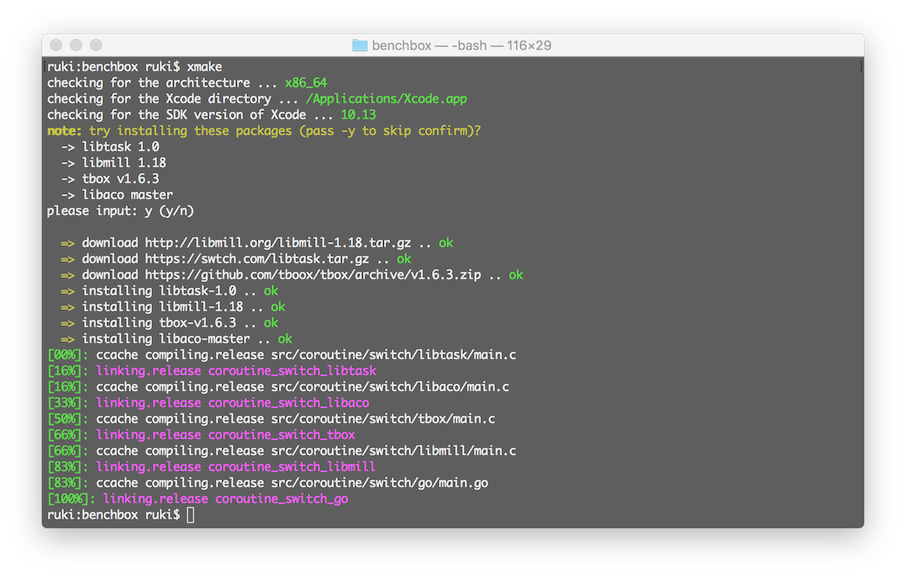
Supported package repositories
- Official package repository xmake-repo (tbox >1.6.1)
- Official package manager Xrepo
- User-built repositories
- Conan (conan::openssl/1.1.1g)
- Conda (conda::libpng 1.3.67)
- Vcpkg (vcpkg:ffmpeg)
- Homebrew/Linuxbrew (brew::pcre2/libpcre2-8)
- Pacman on archlinux/msys2 (pacman::libcurl)
- Apt on ubuntu/debian (apt::zlib1g-dev)
- Clib (clib::clibs/[email protected])
- Dub (dub::log 0.4.3)
- Portage on Gentoo/Linux (portage::libhandy)
- Nimble for nimlang (nimble::zip >1.3)
- Cargo for rust (cargo::base64 0.13.0)
- Zypper on openSUSE (zypper::libsfml2 2.5)
- NuGet (nuget::Humanizer.Core 2.14.1)
Package management features
- The official repository provides nearly 500+ packages with simple compilation on all supported platforms
- Full platform package support, support for cross-compiled dependent packages
- Support package virtual environment using
xrepo env shell
- Precompiled package acceleration for Windows (NT)
- Support self-built package repositories and private repository deployment
- Third-party package repository support for repositories such as: vcpkg, conan, conda, etc.
- Supports automatic pulling of remote toolchains
- Supports dependency version locking
Processing architecture
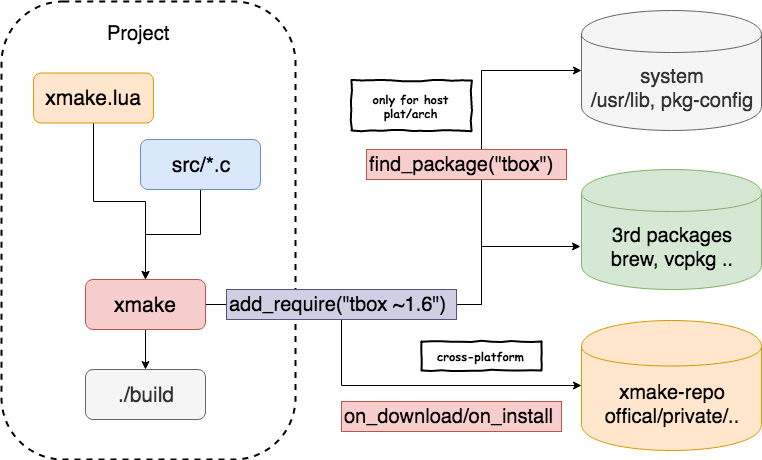
Below is a diagram showing roughly the architecture of Xmake, and thus how it functions.
Distributed Compilation
- Cross-platform support.
- Support for MSVC, Clang, GCC and other cross-compilation toolchains.
- Support for building for Android, Linux, Windows NT, and Darwin hosts.
- No dependencies other than the compilation toolchain.
- Support for build server load balancing scheduling.
- Support for real time compressed transfer of large files (lz4).
- Almost zero configuration cost, no shared filesystem required, for convenience and security.
For more details see: Distributed Compilation
Remote Compilation
For more details see: Remote Compilation
Local/Remote Build Cache
For more details see: Build Cache Acceleration
Benchmark
Xmake's speed on is par with Ninja! The test project: xmake-core
Multi-task parallel compilation
| buildsystem |
Termux (8core/-j12) |
buildsystem |
MacOS (8core/-j12) |
| xmake |
24.890s |
xmake |
12.264s |
| ninja |
25.682s |
ninja |
11.327s |
| cmake(gen+make) |
5.416s+28.473s |
cmake(gen+make) |
1.203s+14.030s |
| cmake(gen+ninja) |
4.458s+24.842s |
cmake(gen+ninja) |
0.988s+11.644s |
Single task compilation
| buildsystem |
Termux (-j1) |
buildsystem |
MacOS (-j1) |
| xmake |
1m57.707s |
xmake |
39.937s |
| ninja |
1m52.845s |
ninja |
38.995s |
| cmake(gen+make) |
5.416s+2m10.539s |
cmake(gen+make) |
1.203s+41.737s |
| cmake(gen+ninja) |
4.458s+1m54.868s |
cmake(gen+ninja) |
0.988s+38.022s |
More Examples
Debug and release profiles
add_rules("mode.debug", "mode.release")

target("console")
    set_kind("binary")
    add_files("src/*.c")
    if is_mode("debug") then
        add_defines("DEBUG")
    end
Custom scripts
target("test")
    set_kind("binary")
    add_files("src/*.c")
    after_build(function (target)
        print("hello: %s", target:name())
        os.exec("echo %s", target:targetfile())
    end)
Automatic integration of dependent packages
Download and use packages in xmake-repo or third-party repositories:
add_requires("tbox >1.6.1", "libuv master", "vcpkg::ffmpeg", "brew::pcre2/libpcre2-8")
add_requires("conan::openssl/1.1.1g", {alias = "openssl", optional = true, debug = true})
target("test")
    set_kind("binary")
    add_files("src/*.c")
    add_packages("tbox", "libuv", "vcpkg::ffmpeg", "brew::pcre2/libpcre2-8", "openssl")
In addition, we can also use the xrepo command to quickly install dependencies.
Qt QuickApp Program
target("test")
    add_rules("qt.quickapp")
    add_files("src/*.cpp")
    add_files("src/qml.qrc")
Cuda Program
target("test")
    set_kind("binary")
    add_files("src/*.cu")
    add_cugencodes("native")
    add_cugencodes("compute_75")
WDK/UMDF Driver Program
target("echo")
    add_rules("wdk.driver", "wdk.env.umdf")
    add_files("driver/*.c")
    add_files("driver/*.inx")
    add_includedirs("exe")

target("app")
    add_rules("wdk.binary", "wdk.env.umdf")
    add_files("exe/*.cpp")
For more WDK driver examples (UMDF/KMDF/WDM), please visit WDK Program Examples
Darwin Applications
target("test")
    add_rules("xcode.application")
    add_files("src/*.m", "src/**.storyboard", "src/*.xcassets")
    add_files("src/Info.plist")
Framework and Bundle Program (Darwin)
target("test")
    add_rules("xcode.framework") -- or xcode.bundle
    add_files("src/*.m")
    add_files("src/Info.plist")
OpenMP Program
add_requires("libomp", {optional = true})
target("loop")
    set_kind("binary")
    add_files("src/*.cpp")
    add_rules("c++.openmp")
    add_packages("libomp")
Zig Program
target("test")
    set_kind("binary")
    add_files("src/main.zig")
fetch a special version of LLVM
Require the Clang version packaged with LLM-10 to compile a project.
add_requires("llvm 10.x", {alias = "llvm-10"})
target("test")
    set_kind("binary")
    add_files("src/*.c")
    set_toolchains("llvm@llvm-10")
We can also pull a specified cross-compilation toolchain in to compile the project.
add_requires("muslcc")
target("test")
    set_kind("binary")
    add_files("src/*.c")
    set_toolchains("@muslcc")
We can also use the specified muslcc cross-compilation toolchain to compile and integrate all dependent packages.
add_requires("muslcc")
add_requires("zlib", "libogg", {system = false})

set_toolchains("@muslcc")

target("test")
    set_kind("binary")
    add_files("src/*.c")
    add_packages("zlib", "libogg")
Plugins
Generate IDE project file plugin(makefile, vs2002 - vs2026 .. )
$ xmake project -k vsxmake -m "debug,release" # New vsproj generator (Recommended)
$ xmake project -k vs -m "debug,release"
$ xmake project -k cmake
$ xmake project -k ninja
$ xmake project -k compile_commands
Run a custom lua script plugin
$ xmake l ./test.lua
$ xmake l -c "print('hello xmake!')"
$ xmake l lib.detect.find_tool gcc
$ xmake l
> print("hello xmake!")
> {1, 2, 3}
< {
    1,
    2,
    3
  }
To see a list of builtin plugins, please visit Builtin plugins.
Please download and install other plugins from the plugins repository xmake-plugins.
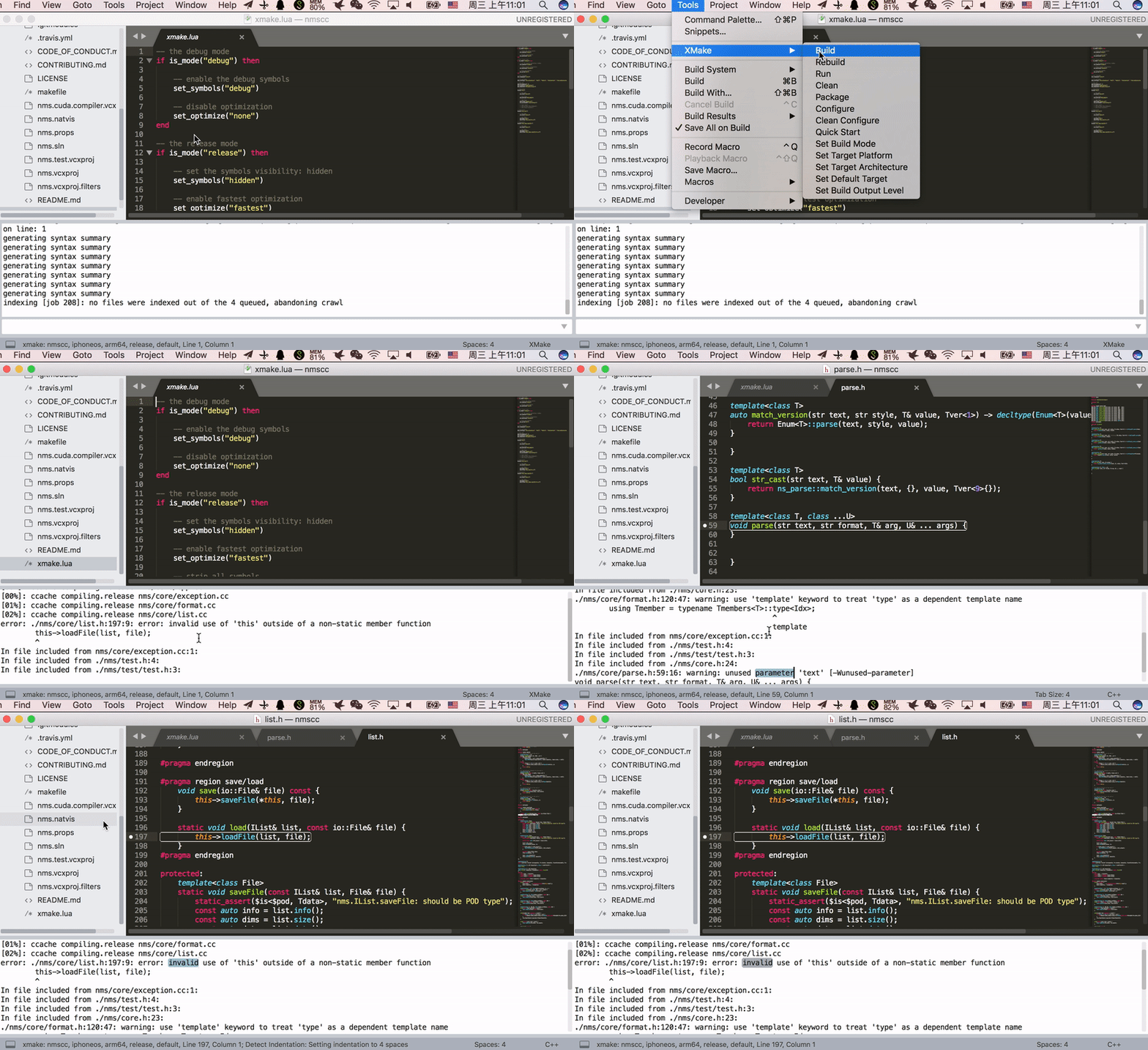
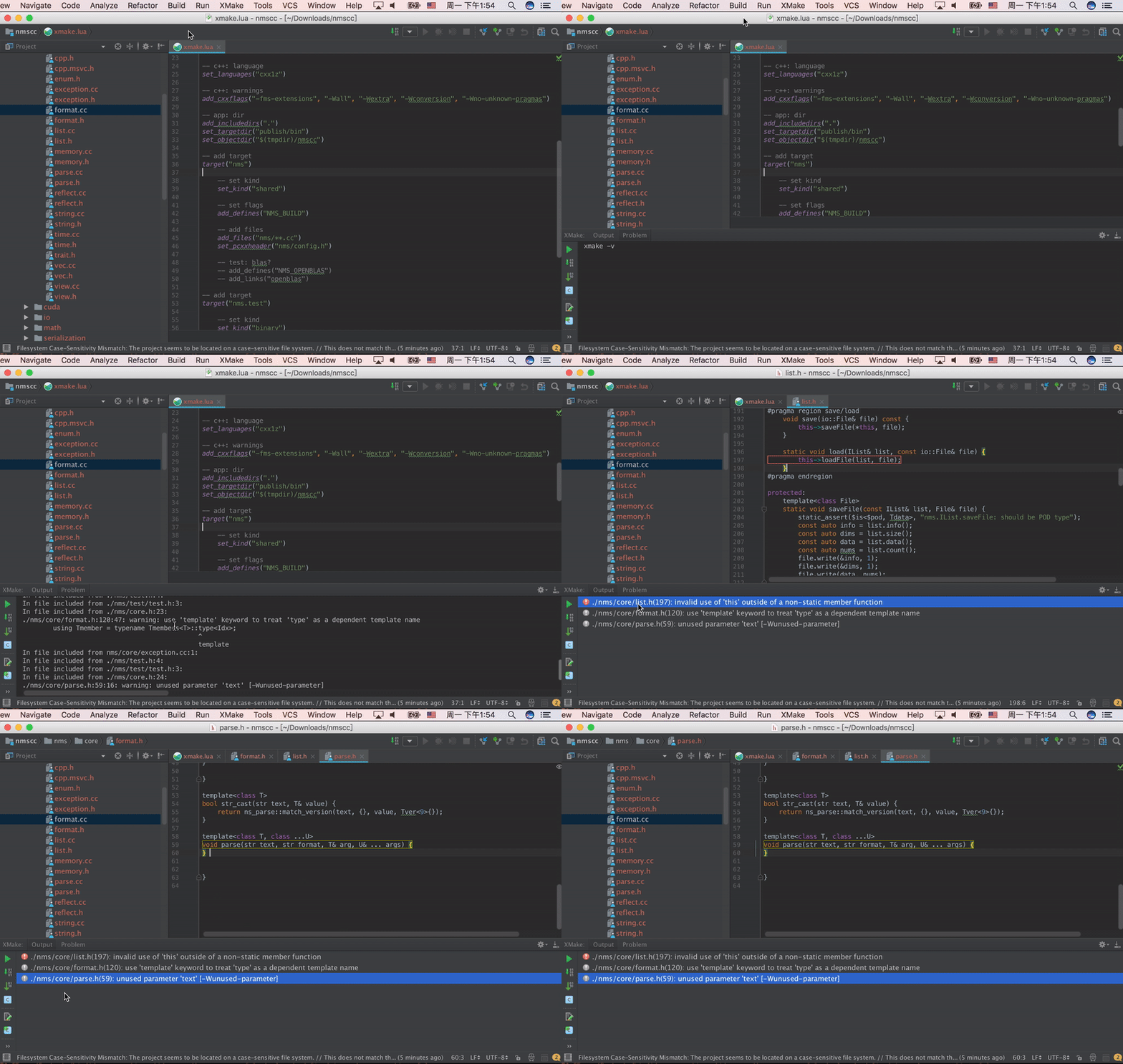
IDE/Editor Integration
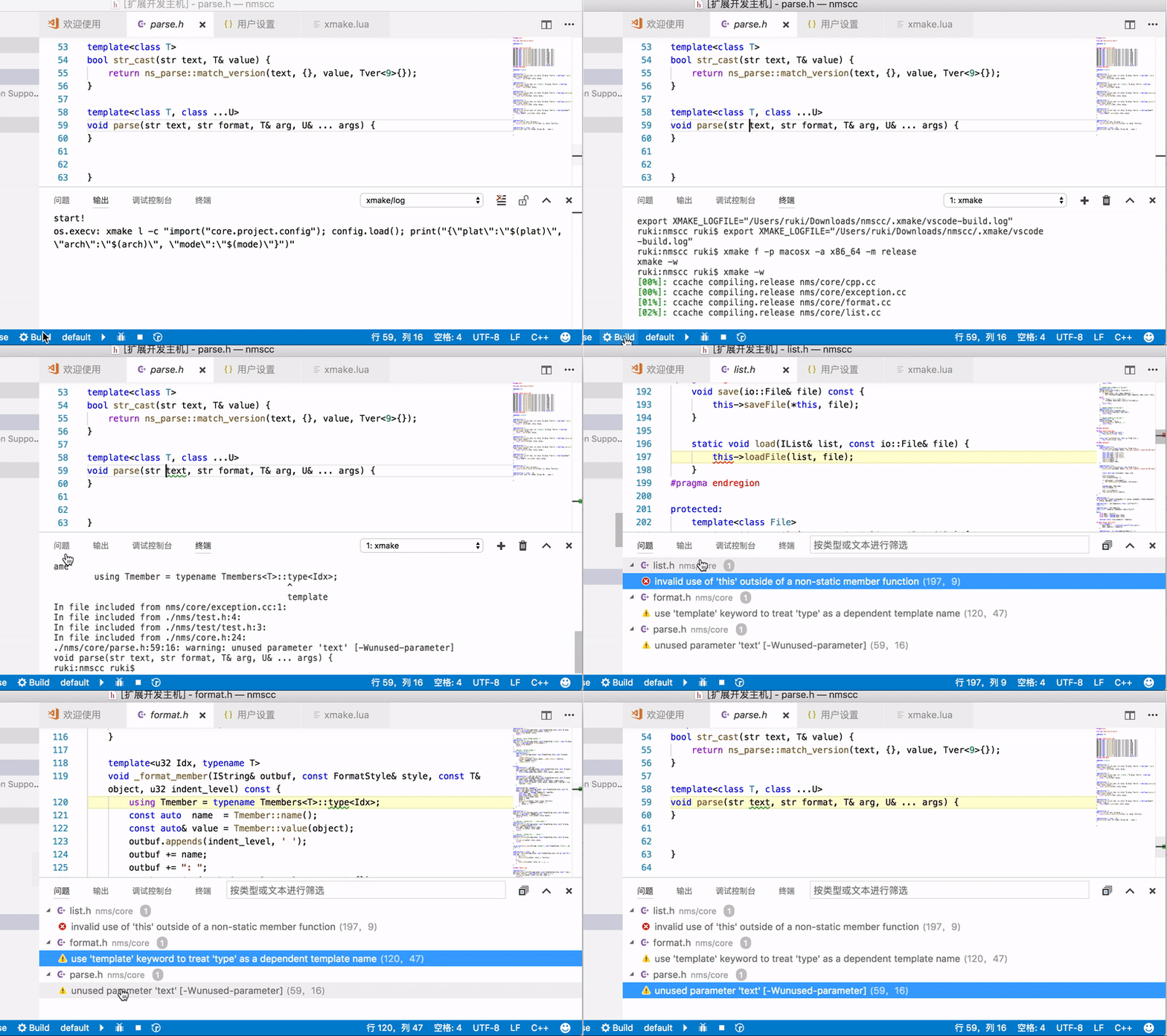
Xmake Gradle Plugin (JNI)
We can use the xmake-gradle plugin to compile JNI libraries via gradle.
plugins {
  id 'org.tboox.gradle-xmake-plugin' version '1.1.5'
}

android {
    externalNativeBuild {
        xmake {
            path "jni/xmake.lua"
        }
    }
}
The xmakeBuild task will be injected into the assemble task automatically if the gradle-xmake-plugin has been applied.
$ ./gradlew app:assembleDebug
> Task :nativelib:xmakeConfigureForArm64
> Task :nativelib:xmakeBuildForArm64
>> xmake build
[ 50%]: cache compiling.debug nativelib.cc
[ 75%]: linking.debug libnativelib.so
[10











 Xmake 是一个跨平台构建工具,面向 C/C++ 及其他语言,由 Lua 脚本驱动,将构建工具、项目生成器和包管理器整合在一起。