Why Did You Render



why-did-you-render by Welldone Software monkey patches React to notify you about potentially avoidable re-renders. (Works with React Native as well.)
For example, if you pass style={{width: '100%'}} to a big memo component it would always re-render on every element creation:
<MemoBigList style={{width: '100%'}}/>
It can also help you to simply track when and why a certain component re-renders.
[!CAUTION]
The library was not tested with React Compiler at all. I believe it's completely incompatible with it.
[!CAUTION]
Not all re-renders are "bad". Sometimes shenanigan to reduce re-renders can either hurt your App's performance or have a negligible effect, in which case it would be just a waste of your efforts, and complicate your code. Try to focus on heavier components when optimizing and use the React DevTools Profiler to measure the effects of any changes.
[!NOTE]
I've joined the React team, specifically working on React tooling. This role has opened up exciting opportunities to enhance the developer experience for React users— and your input could offer valuable insights to help me with this effort. Please join the conversation in the discussion thread!
Setup
The latest version of the library was tested (unit tests and E2E) with React@19 only.
npm install @welldone-software/why-did-you-render --save-dev
or
yarn add @welldone-software/why-did-you-render -D
Set the library to be the React's importSource and make sure preset-react is in development mode.
This is because React 19 requires using the automatic JSX transformation.
['@babel/preset-react', {
  runtime: 'automatic',
  development: process.env.NODE_ENV === 'development',
  importSource: '@welldone-software/why-did-you-render',
}]
React Native
Bare workflow
Add the plugin as listed below and start react-native packager as usual. Default env for babel is "development". If you do not use expo when working with react-native, the following method will help you.
module.exports = {
  presets: ['module:metro-react-native-babel-preset'],

  env: {
    development: {
      plugins: [['@babel/plugin-transform-react-jsx', {
        runtime: 'automatic',
        development: process.env.NODE_ENV === 'development',
        importSource: '@welldone-software/why-did-you-render',
      }]],
    },
  },
}
Expo managed
You can pass params to @babel/preset-react through babel-preset-expo
// babel.config.js
module.exports = function (api) {
  api.cache(true);
  return {
    presets: [
      [
        "babel-preset-expo",
        {
          jsxImportSource: "@welldone-software/why-did-you-render",
        },
      ],
    ],
  };
};
Notice: Create React App (CRA) ^4 uses the automatic JSX transformation.
See the following comment on how to do this step with CRA
Create a wdyr.js file and import it as the very first import in your application.
wdyr.js:
import React from 'react';

if (process.env.NODE_ENV === 'development') {
  const whyDidYouRender = require('@welldone-software/why-did-you-render');
  whyDidYouRender(React, {
    trackAllPureComponents: true,
  });
}
[!CAUTION]
The library should NEVER be used in production because:
- It significantly slows down React
- It monkey patches React and can result in unexpected behavior
In Typescript, call the file wdyr.ts and add the following line to the top of the file to import the package's types:
/// <reference types="@welldone-software/why-did-you-render" />
Import wdyr as the first import (even before react-hot-loader if you use it):
index.js:
import './wdyr'; // <--- first import

import 'react-hot-loader';

import React from 'react';
import ReactDOM from 'react-dom';
// ...
import {App} from './app';
// ...
ReactDOM.render(<App/>, document.getElementById('root'));
If you use trackAllPureComponents, all pure components (React.PureComponent or React.memo) will be tracked.
Otherwise, add whyDidYouRender = true to ad-hoc components to track them. (f.e Component.whyDidYouRender = true)
More information about what is tracked can be found in Tracking Components.
Can't see any WDYR logs? Check out the troubleshooting section or search in the issues.
Custom Hooks
Also, tracking custom hooks is possible by using trackExtraHooks. For example if you want to track useSelector from React Redux:
wdyr.js:
import React from 'react';

// For react-native you might want to use
// the __DEV__ flag instead of process.env.NODE_ENV === 'development'
if (process.env.NODE_ENV === 'development') {
  const whyDidYouRender = require('@welldone-software/why-did-you-render');
  const ReactRedux = require('react-redux');
  whyDidYouRender(React, {
    trackAllPureComponents: true,
    trackExtraHooks: [
      [ReactRedux, 'useSelector']
    ]
  });
}
Notice that there's currently a problem with rewriting exports of imported files in webpack. A quick workaround can help with it: #85 - trackExtraHooks cannot set property.
Read More
Integration With Other Libraries
Sandbox
You can test the library in the official sandbox.
And another official sandbox with hooks tracking
Tracking Components
You can track all pure components (React.PureComponent or React.memo) using the trackAllPureComponents: true option.
You can also manually track any component you want by setting whyDidYouRender on them like this:
class BigList extends React.Component {
  static whyDidYouRender = true
  render(){
    return (
      //some heavy render you want to ensure doesn't happen if its not necessary
    )
  }
}
Or for functional components:
const BigListPureComponent = props => (
  <div>
    //some heavy component you want to ensure doesn't happen if its not necessary
  </div>
)
BigListPureComponent.whyDidYouRender = true
You can also pass an object to specify more advanced tracking settings:
EnhancedMenu.whyDidYouRender = {
  logOnDifferentValues: true,
  customName: 'Menu'
}
logOnDifferentValues:
Normally, only re-renders that are caused by equal values in props / state trigger notifications:
render(<Menu a={1}/>)
render(<Menu a={1}/>)
This option will trigger notifications even if they occurred because of different props / state (Thus, because of "legit" re-renders):
render(<Menu a={1}/>)
render(<Menu a={2}/>)
customName:
Sometimes the name of the component can be missing or very inconvenient. For example:
withPropsOnChange(withPropsOnChange(withStateHandlers(withPropsOnChange(withState(withPropsOnChange(lifecycle(withPropsOnChange(withPropsOnChange(onlyUpdateForKeys(LoadNamespace(Connect(withState(withState(withPropsOnChange(lifecycle(withPropsOnChange(withHandlers(withHandlers(withHandlers(withHandlers(Connect(lifecycle(Menu)))))))))))))))))))))))
Options
Optionally you can pass in options as the second parameter. The following options are available:
include: [RegExp, ...] (null by default)exclude: [RegExp, ...] (null by default)trackAllPureComponents: falsetrackHooks: truetrackExtraHooks: []logOwnerReasons: truelogOnDifferentValues: falsehotReloadBufferMs: 500onlyLogs: falsecollapseGroups: falsetitleColordiffNameColordiffPathColortextBackgroundColornotifier: ({Component, displayName, hookName, prevProps, prevState, prevHookResult, nextProps, nextState, nextHookResult, reason, options, ownerDataMap}) => voidgetAdditionalOwnerData: (element) => {...}
include / exclude
(default: null)
You can include or exclude tracking of components by their displayName using the include and exclude options.
For example, the following code is used to track all redundant re-renders that are caused by older React-Redux:
whyDidYouRender(React, { include: [/^ConnectFunction/] });
Notice: exclude takes priority over both include and manually set whyDidYouRender =
trackAllPureComponents
(default: false)
You can track all pure components (both React.memo and React.PureComponent components)
Notice: You can exclude the tracking of any specific component with whyDidYouRender = false
trackHooks
(default: true)
You can turn off tracking of hooks changes.
Understand and fix hook issues.
(default: [])
Track custom hooks:
whyDidYouRender(React, {
  trackExtraHooks: [
    // notice that 'useSelector' is a named export
    [ReactRedux, 'useSelector'],
  ]
});
This feature is rewriting exports of imported files. There is currently a problem with that approach in webpack. A workaround is available here: #85 - trackExtraHooks cannot set property
logOwnerReasons
(default: true)
One way of fixing re-render issues is preventing the component's owner from re-rendering.
This option is true by default and it lets you view the reasons why an owner component re-renders.
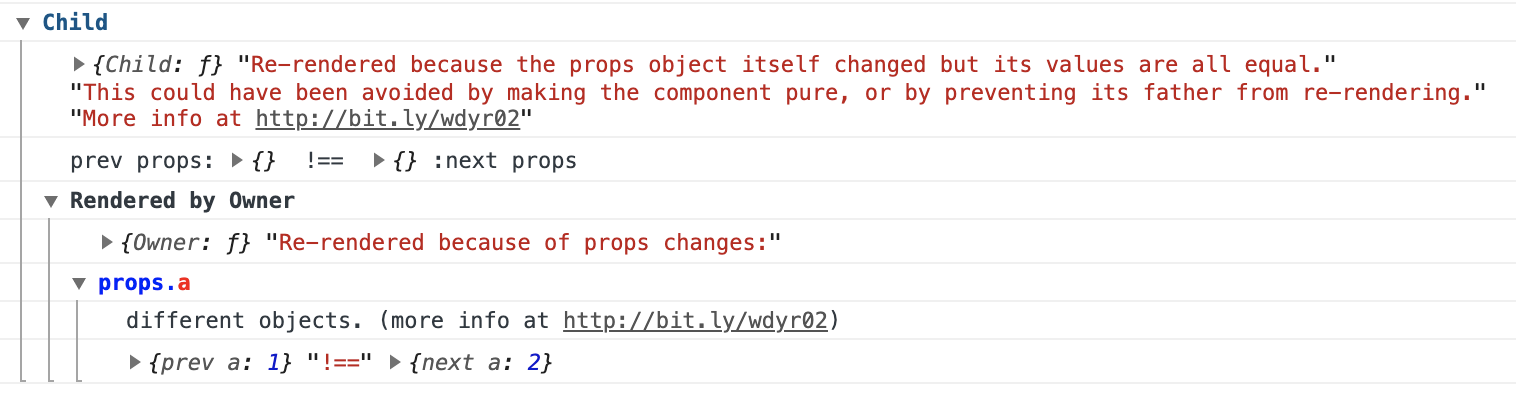
logOnDifferentValues
(default: false)
Normally, you only want logs about component re-renders when they could have been avoided.
With this option, it is possible to track all re-renders.
For example:
render(<BigListPureComponent a={1}/>)
render(<BigListPureComponent a={2}/>)
// will only log if you use {logOnDifferentValues: true}
hotReloadBufferMs
(default: 500)
Time in milliseconds to ignore updates after a hot reload is detected.
When a hot reload is detected, we ignore all updates for hotReloadBufferMs to not spam the console.
onlyLogs
(default: false)
If you don't want to use console.group to group logs you can print them as simple logs.
collapseGroups
(default: false)
Grouped logs can be collapsed.
titleColor / diffNameColor / diffPathColor / textBackgroundColor
(default titleColor: '#058')
(default diffNameColor: 'blue')
(default diffPathColor: 'red')
(default textBackgroundColor: 'white)
Controls the colors used in the console notifications
notifier
(default: defaultNotifier that is exposed from the library)
You can create a custom notifier if the default one does not suite your needs.
getAdditionalOwnerData
(default: undefined)
You can provide a function that harvests additional data from the original react element. The object returned from this function will be added to the ownerDataMap which can be accessed later within your notifier function override.
Troubleshooting
No tracking
- If you are in production, WDYR is probably disabled.
- Maybe no component is tracked
- If you only track pure components using
trackAllPureComponents: true then you would only track either (React.PureComponent or React.memo), maybe none of your components are pure so none of them will get tracked.
- Maybe you have no issues
Try causing an issue by temporary rendering the whole app twice in it's entry point:
index.js:
const HotApp = hot(App);
HotApp.whyDidYouRender = true;
ReactDOM.render(<HotApp/>, document.getElementById('root'));
ReactDOM.render(<HotApp/>, document.getElementById('root'));
Custom Hooks tracking (like useSelector)
There's currently a problem with rewriting exports of imported files in webpack. A quick workaround can help with it: #85 - trackExtraHooks cannot set property.
React-Redux connect HOC is spamming the console
Since connect hoists statics, if you add WDYR to the inner component, it is also added to the HOC component where complex hooks are running.
To fix this, add the whyDidYouRender = true static to a component after the connect:
  const SimpleComponent = ({a}) => <div data-testid="foo">{a.b}</div>)
  // not before the connect:
  // SimpleComponent.whyDidYouRender = true
  const ConnectedSimpleComponent = connect(
    state => ({a: state.a})
  )(SimpleComponent)
  // after the connect:
  SimpleComponent.whyDidYouRender = true
Sourcemaps
To see the library's sourcemaps use the source-map-loader.
Credit
Inspired by the following previous work:
License
This library is MIT licensed.
🔼Back to top!

 Why Did You Render(WDYR)会对 React 进行猴子补丁(monkey-patch),在控制台中记录某个组件何时以及为何重新渲染,即使它新的 props/state 与旧的相等(例如传入一个新创建的内联对象 style={{width: '100%'}})。