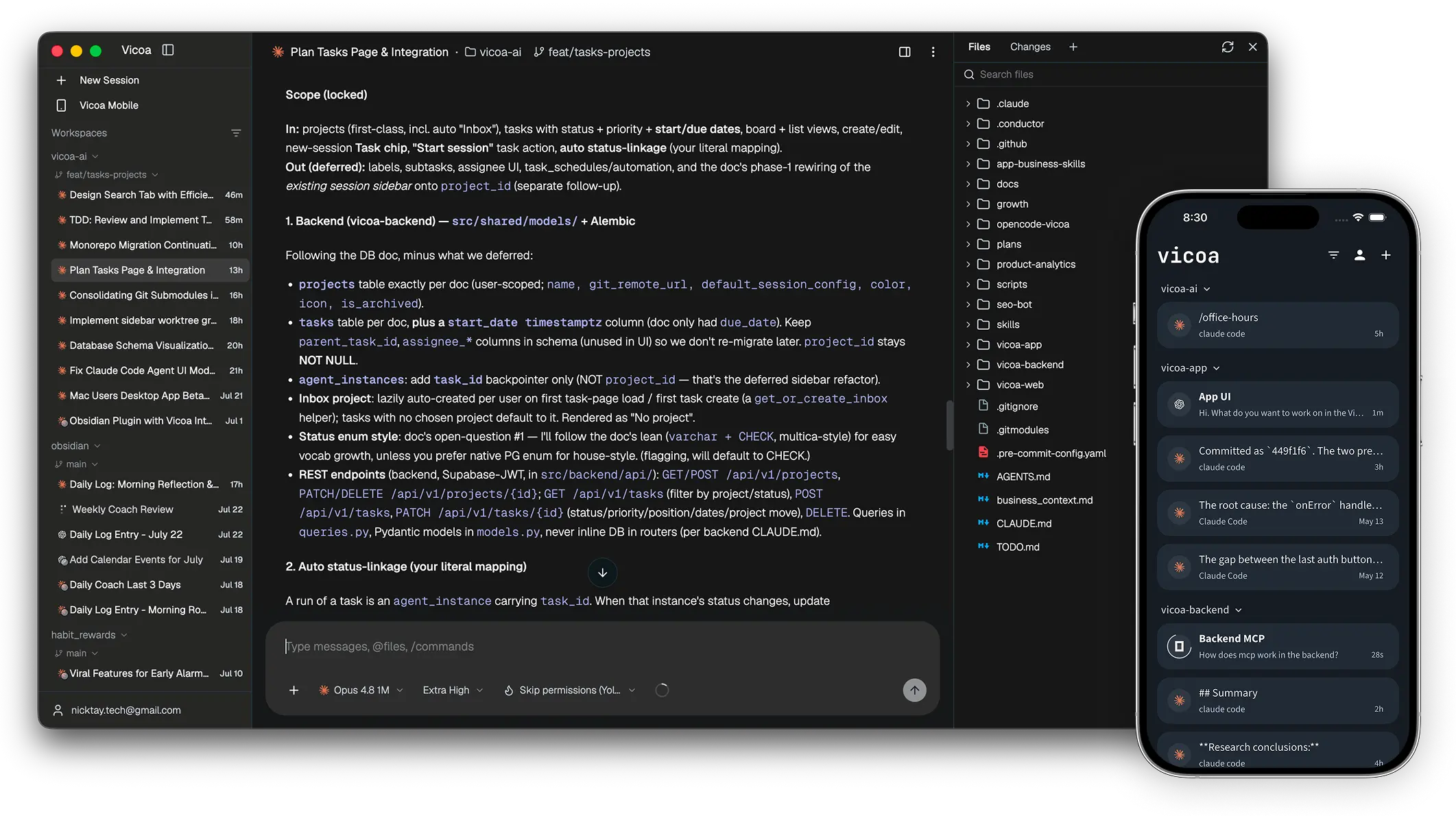
Start at your desk. Steer from your pocket.
Run a team of coding agents
Claude Code, Codex, Cursor, Pi, Kimi, and more
- Supported Agents: Claude Code, Codex, OpenCode, Gemini, Cursor, GitHub Copilot, Kimi, Hermes, Pi, Oh My Pi. Run them side by side in one workspace
- Parallel worktrees: each agent on its own git worktree and branch, so several can work the same repo at once without stepping on each other.
- One command center: every session's status in a single list, so you steer the whole fleet from one place instead of hunting terminal tabs.
- Any machine: your Mac, a Windows laptop, a Linux machine, a VPS, a remote server: connect them all and pick where each session runs.
- Bring your own key: your existing subscription or API keys
Steer from any device.
The session you started on your laptop, in your pocket.
- iOS and Android apps: the same session on a native mobile apps
- Notifications: get notified when an agent needs a decision or finishes
- Vibe code anywhere: prompt your coding agents on your project from your phone, all sessons are synced
- @files and /commands: fuzzy file mentions and the agent's own slash commands work from web, mobile and CLI alike
- Dictation: talk to your coding agents
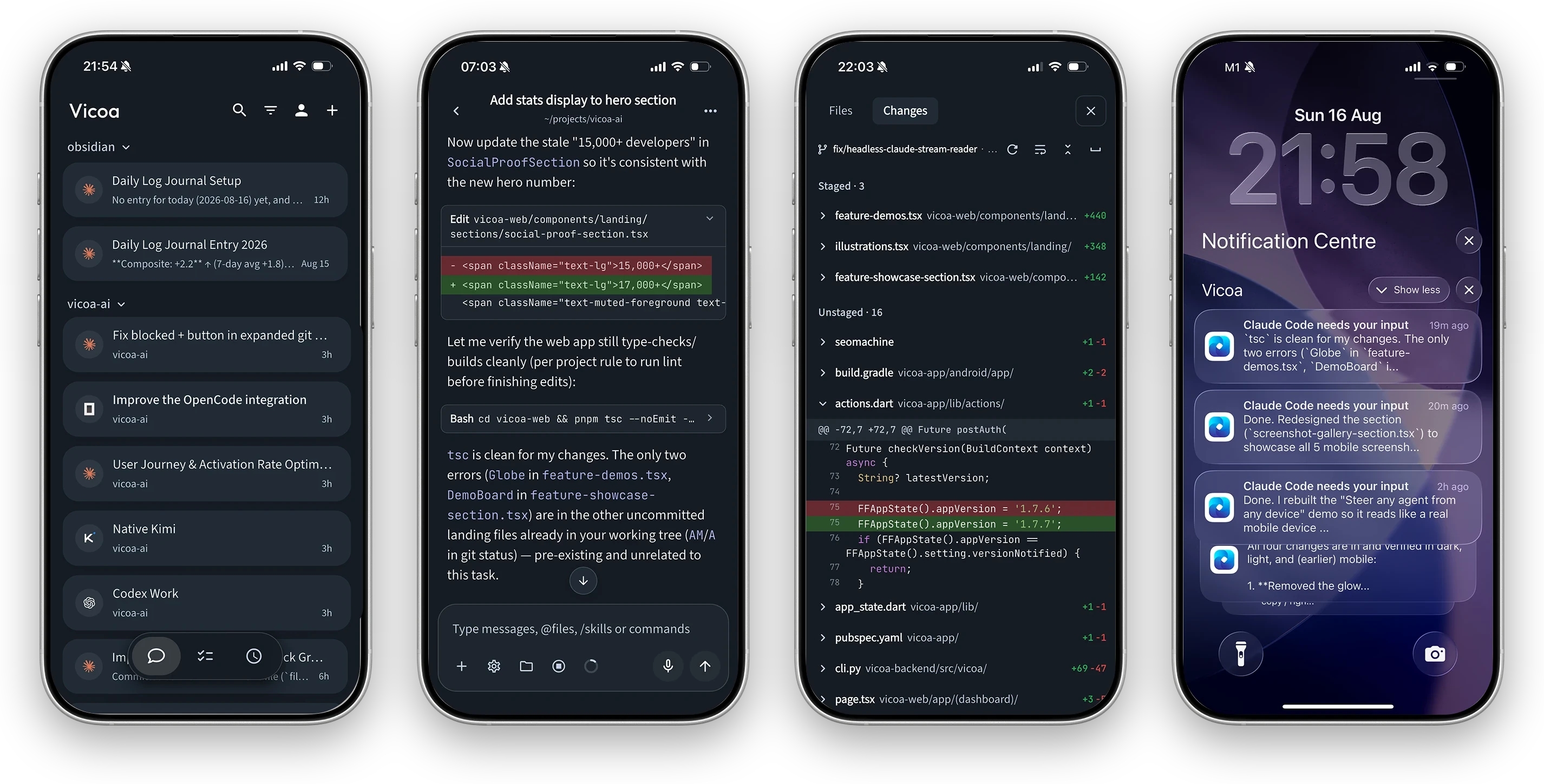
A real mobile coding app, not a chat tab: sessions, conversation, live git diffs, and push notifications.
More Features
- Inline diffs: per-file changes and commit history, reviewable on a desktop and phone
- File browser: the tree beside the conversation
- Terminal: run commands next to the chat.
- Mobile Live preview: open a local dev website and preview it from your phone in desktop mode.
- Task management: plan work on a board, then start a session straight from a task, or let agent pick up automatically with automations.
- Automations: cron schedules get things done on their own
- Skills: view, install and remove the agent skills.
- CLI: sessions, chat history, tasks, and automations are supported via CLI, so your agents can drive Vicoa the same way you do.
- and more ...
Get started
Download
Vicoa Desktop for macOS, Windows, or Linux. It connects the computer
it runs on and detects installed agents.
The one prerequisite: the machine that runs agents needs at least one
supported agent CLI installed and signed in.
Prefer the terminal?
npm i -g @vicoa/cli     # Node.js 18+; on Intel Macs or old glibc, use: pip install vicoa
vicoa                   # start a session, or `vicoa daemon` to just connect this machine
Your first session in three minutes
1. Install and sign in. Open Vicoa Desktop and sign in.
2. Start some agents. Click New Session, pick the machine, the agent, and enter your first prompt.
3. Steer from your phone. Install the Vicoa mobile app and sign in with the same account — running sessions sync automatically.


Full walkthrough: Set up Vicoa ·
Start a remote session
Supported agents
Vicoa launches the agent harness and CLIs you already have installed and
authenticated, on your machine, with your credentials.
Claude Code, Codex, Pi, and Oh My Pi have native integrations; the rest connect over the
Agent Client Protocol (ACP).
Documentation
What's in this repository
This is Vicoa, open source: the complete, self-hostable stack:
- CLI and local daemon: starts and runs coding agents on a machine
- Backend: backend API and realtime server for auth, sessions, messages, tasks,
automations. Self-hostable with Postgres.
- Clients: web app, desktop app, mobile app (iOS / Android).
Vicoa is BYO-key: you bring your own agent and model subscriptions or API keys
Self-hosting
Run the whole stack yourself with Docker:
cp .env.example .env                                  # passwords and public URLs
./backend/scripts/generate-jwt-keys.sh selfhost/keys
docker compose -f docker-compose.selfhost.yml up -d
The full walkthrough is in SELF_HOSTING.md.
Architecture
     Web  ·  Desktop (macOS/Windows)  ·  iOS  ·  Android  ·  CLI
                            │
                            ▼
  ┌──────────────┐   ┌────────────────┐   ┌──────────────────┐
  │   Next.js    │──>│    FastAPI     │──>│    PostgreSQL    │
  │  dashboard   │<──│  backend + WS  │<──│                  │
  └──────────────┘   └───────┬────────┘   └──────────────────┘
                             │  sessions and messages over WebSocket
                     ┌───────┴───────┐
                     │ vicoa daemon  │  runs on your machine, next to your code
                     └───────┬───────┘
                             │  spawns
                     ┌───────┴─────────────────────────────────┐
                     │ Claude Code · Codex · OpenCode · Gemini │
                     │ Cursor · Copilot · Kimi · Hermes        │
                     │ Pi · Oh My Pi                           │
                     └─────────────────────────────────────────┘
| Layer |
Stack |
| Web |
Next.js 15 + React 19, shadcn/ui, Fumadocs for the docs |
| Desktop |
Electron, running the web UI and supervising a bundled daemon |
| Mobile |
Flutter (iOS / Android) |
| Backend |
Python 3.10+ / FastAPI: a user-facing REST API, plus an agent-facing REST + WebSocket server |
| Database |
PostgreSQL via SQLAlchemy and Alembic |
| Agent runtime |
The local vicoa daemon, spawning any of the agent CLIs above |
Development
Start with the Contributing.md.
Quick repository layout:
vicoa/
├── backend/              # Python: FastAPI backend + REST servers + CLI & daemon
│       └── vicoa/        # the `vicoa` CLI and the local daemon
├── apps/
│   ├── web/              # Next.js dashboard (also the desktop renderer) + docs
│   ├── desktop/          # Electron desktop app
│   └── mobile/           # Flutter app (iOS / Android)
Common commands:
# backend, CLI and daemon (Python)
cd backend
make dev-install
./dev-start.sh

make lint && make test

# web and docs (Next.js)
cd apps/web && pnpm install && pnpm dev

# desktop app (Electron); see apps/desktop/README.md
cd apps/desktop && pnpm install && pnpm dev

# mobile app (Flutter)
cd apps/mobile && flutter pub get && flutter run
- Discord: Join the community on Discord for help and discussion.
- Twitter / X: Follow @vicoaai for updates and announcements.
- Feedback & ideas: We ship fast. Missing something? Request a feature, include your platform, versions, and a reproduction (see CONTRIBUTING.md).
- Security issues: don't file a public issue; follow SECURITY.md.
- Show support: Star this repo to follow along with our daily ships.
License
Vicoa is open source under AGPLv3 license.
 Vicoa
Vicoa





 Vicoa 是一个开源的 AI 编排器,让你在桌面、手机或 VPS 上运行和管理一支编程智能体团队(Claude Code、Codex、Cursor 等),会话跨设备同步。