What is this?
 x-ui is a self-hosted web panel for managing an Xray proxy server: multi-user, multi-protocol inbounds (vmess, vless, trojan, shadowsocks, dokodemo-door, socks, http) administered from a browser.
x-ui is a self-hosted web panel for managing an Xray proxy server: multi-user, multi-protocol inbounds (vmess, vless, trojan, shadowsocks, dokodemo-door, socks, http) administered from a browser.So it lives on my server and I manage it from a browser?Right — it runs on your own server, not on client devices: a Go backend with a JavaScript web UI you reach through a browser, while your devices connect to the Xray inbounds it creates.
Right — it runs on your own server, not on client devices: a Go backend with a JavaScript web UI you reach through a browser, while your devices connect to the Xray inbounds it creates.How do I get it onto my server?Download the latest release archive (amd64 on typical servers), upload it to /root/ and install as root. Alternatively use the community Docker image and instructions provided by Chasing66.
Download the latest release archive (amd64 on typical servers), upload it to /root/ and install as root. Alternatively use the community Docker image and instructions provided by Chasing66.What kind of server do I need for this?Any Linux distribution the README lists as supported: CentOS 7+, Ubuntu 16+ or Debian 8+, with root access. For HTTPS access to the panel you also want your own domain plus an SSL certificate.
Any Linux distribution the README lists as supported: CentOS 7+, Ubuntu 16+ or Debian 8+, with root access. For HTTPS access to the panel you also want your own domain plus an SSL certificate.Is anything in it still half-finished?The Telegram bot is marked in development and not usable yet, and GitHub issues are closed, so support is DIY. Migration from v2-ui carries inbound accounts only — not panel settings or passwords.
The Telegram bot is marked in development and not usable yet, and GitHub issues are closed, so support is DIY. Migration from v2-ui carries inbound accounts only — not panel settings or passwords.Can I control how much traffic each user burns?Yes — the panel tracks per-user traffic and lets you cap traffic and set expiry dates for accounts. It also shows overall system status, and you can plug in a custom xray config template for advanced setups.
Yes — the panel tracks per-user traffic and lets you cap traffic and set expiry dates for accounts. It also shows overall system status, and you can plug in a custom xray config template for advanced setups.How does the one-click SSL certificate work?A built-in script requests wildcard Let's Encrypt certificates through the Cloudflare DNS API: you supply your Cloudflare email and Global API Key, the domain must already resolve via Cloudflare, and certs land in /root/cert with auto-renewal.
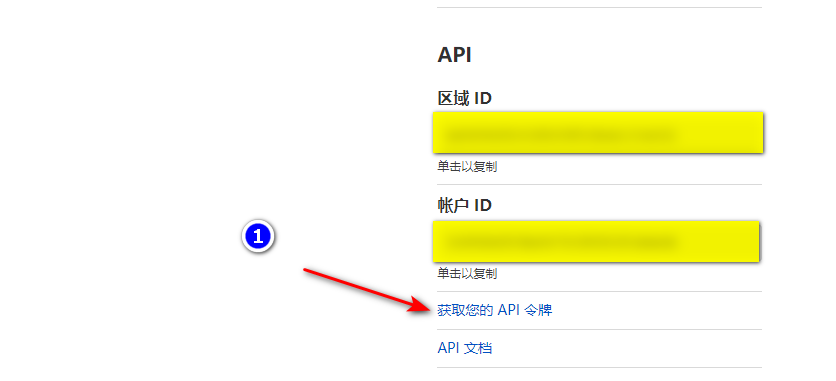
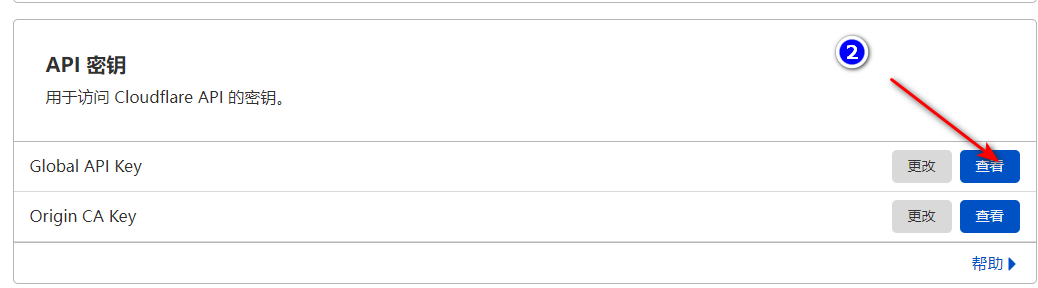
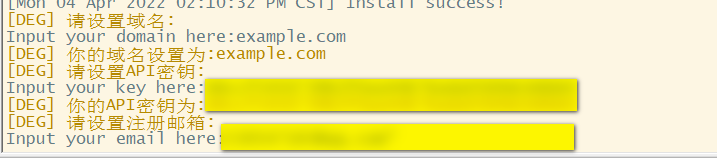
A built-in script requests wildcard Let's Encrypt certificates through the Cloudflare DNS API: you supply your Cloudflare email and Global API Key, the domain must already resolve via Cloudflare, and certs land in /root/cert with auto-renewal.I'm on v2-ui — how painful is switching?Install x-ui on the same server and run the migration: it moves all inbound account data, but panel settings and the username/password stay behind. Afterwards stop v2-ui and restart x-ui, or the two will clash on ports.
Install x-ui on the same server and run the migration: it moves all inbound account data, but panel settings and the username/password stay behind. Afterwards stop v2-ui and restart x-ui, or the two will clash on ports.What are similar projects?nyx, v2ray-agent, vpn-configs-for-russia, 3X-UI_KIT, CFNext, clash, edgetunnel, V2rayU
nyx, v2ray-agent, vpn-configs-for-russia, 3X-UI_KIT, CFNext, clash, edgetunnel, V2rayUWhich topics is it in?xray-core, letsencrypt, xray, trojan, v2ray, shadowsocks, admin-dashboard, webui, censorship-circumvention, cloudflare, proxy, monitoring
xray-core, letsencrypt, xray, trojan, v2ray, shadowsocks, admin-dashboard, webui, censorship-circumvention, cloudflare, proxy, monitoring