Sonic


Sonic is a fast, lightweight and schema-less search backend. It ingests search texts and identifier tuples that can then be queried against in a microsecond's time.
Sonic can be used as a simple alternative to super-heavy and full-featured search backends such as Elasticsearch in some use-cases. It is capable of normalizing natural language search queries, auto-completing a search query and providing the most relevant results for a query. Sonic is an identifier index, rather than a document index; when queried, it returns IDs that can then be used to refer to the matched documents in an external database.
A strong attention to performance and code cleanliness has been given when designing Sonic. It aims at being crash-free, super-fast and puts minimum strain on server resources (our measurements have shown that Sonic - when under load - responds to search queries in the μs range, eats ~30MB RAM and has a low CPU footprint; see our benchmarks).
Tested at Rust version: rustc 1.98.0 (88d9e12ae 2026-08-18)
🇫🇷 Crafted in Nantes, France.
📰 The Sonic project was initially announced in a post on my personal journal.

« Sonic » is the mascot of the Sonic project. I drew it to look like a psychedelic hipster hedgehog.
Who uses it?
 |
 |
| Crisp |
Scrumpy |
👋 You use Sonic and you want to be listed there? Contact me.
Demo
Sonic is integrated in all Crisp search products on the Crisp platform. It is used to index half a billion objects on a $5/mth 1-vCPU SSD cloud server (as of 2019). Crisp users use it to search in their messages, conversations, contacts, helpdesk articles and more.
You can test Sonic live on: Crisp Helpdesk, and get an idea of the speed and relevance of Sonic search results. You can also test search suggestions from there: start typing at least 2 characters for a word, and get suggested a full word (press the tab key to expand suggestion). Both search and suggestions are powered by Sonic.

Sonic fuzzy search in helpdesk articles at its best. Lookup for any word or group of terms, get results instantly.
Features
- Search terms are stored in collections, organized in buckets; you may use a single bucket, or a bucket per user on your platform if you need to search in separate indexes.
- Search results return object identifiers, that can be resolved from an external database if you need to enrich the search results. This makes Sonic a simple word index, that points to identifier results. Sonic doesn't store any direct textual data in its index, but it still holds a word graph for auto-completion and typo corrections.
- Search query typos are corrected if there are not enough exact-match results for a given word in a search query, Sonic tries to correct the word and tries against alternate words. You're allowed to make mistakes when searching.
- Insert and remove items in the index; index-altering operations are light and can be committed to the server while it is running. A background tasker handles the job of consolidating the index so that the entries you have pushed or popped are quickly made available for search.
- Auto-complete any word in real-time via the suggest operation. This helps build a snappy word suggestion feature in your end-user search interface.
- Full Unicode compatibility on 80+ most spoken languages in the world. Sonic removes useless stop words from any text (eg. 'the' in English), after guessing the text language. This ensures any searched or ingested text is clean before it hits the index; see languages.
- Simple protocol (Sonic Channel), that let you search your index, manage data ingestion (push in the index, pop from the index, flush a collection, flush a bucket, etc.) and perform administrative actions. Sonic Channel was designed to be lightweight on resources and simple to integrate with; read protocol specification.
- Easy-to-use libraries, that let you connect to Sonic from your apps; see libraries.
How to use it?
Installation
Sonic is built in Rust. To install it, either download a version from the Sonic releases page, use cargo install or pull the source code from master.
👉 Install from packages:
Sonic provides pre-built packages for Debian-based systems (Debian, Ubuntu, etc.).
Important: Sonic only provides 64 bits packages targeting Debian 12 for now (codename: bookworm). You might still be able to use them on other Debian versions, as well as Ubuntu (although they rely on a specific glibc version that might not be available on older or newer systems).
First, add the Sonic APT repository (eg. for Debian bookworm):
echo "deb [signed-by=/usr/share/keyrings/valeriansaliou_sonic.gpg] https://packagecloud.io/valeriansaliou/sonic/debian/ bookworm main" > /etc/apt/sources.list.d/valeriansaliou_sonic.list
curl -fsSL https://packagecloud.io/valeriansaliou/sonic/gpgkey | gpg --dearmor -o /usr/share/keyrings/valeriansaliou_sonic.gpg
apt-get update
Then, install the Sonic package:
apt-get install sonic
Then, edit the pre-filled Sonic configuration file:
nano /etc/sonic.cfg
Finally, restart Sonic:
service sonic restart
👉 Install from source:
If you pulled the source code from Git, you can build it using cargo:
cargo build --locked --release
You can find the built binaries in the ./target/release directory.
Install build-essential, clang, libclang-dev, libc6-dev, g++ and llvm-dev to be able to compile the required RocksDB dependency.
Note that the following optional features can be enabled upon building Sonic: allocator-jemalloc, tokenizer-chinese and tokenizer-japanese (some might be already enabled by default).
👉 Install from Cargo:
You can install Sonic directly with cargo install:
cargo install sonic-server
Ensure that your $PATH is properly configured to source the Crates binaries, and then run Sonic using the sonic command.
Install build-essential, clang, libclang-dev, libc6-dev, g++ and llvm-dev to be able to compile the required RocksDB dependency.
👉 Install from Docker Hub:
You might find it convenient to run Sonic via Docker. You can find the pre-built Sonic image on Docker Hub as valeriansaliou/sonic.
First, pull the valeriansaliou/sonic image:
docker pull valeriansaliou/sonic:v1.8.1
Then, seed it a configuration file and run it (replace /path/to/your/sonic/config.cfg with the path to your configuration file):
docker run -p 1491:1491 -v /path/to/your/sonic/config.cfg:/etc/sonic/config.toml -v /path/to/your/sonic/store/:/var/lib/sonic/store/ valeriansaliou/sonic:v1.4.9
In the configuration file, ensure that:
channel.inet is set to 0.0.0.0:1491 (this lets Sonic be reached from outside the container)store.kv.path is set to /var/lib/sonic/store/kv/ (this lets the external KV store directory be reached by Sonic)store.fst.path is set to /var/lib/sonic/store/fst/ (this lets the external FST store directory be reached by Sonic)
Sonic will be reachable from tcp://localhost:1491.
👉 Install from another source (non-official):
Other installation sources are available:
Note that those sources are non-official, meaning that they are not owned nor maintained by the Sonic project owners. The latest Sonic version available on those sources might be outdated, in comparison to the latest version available through the Sonic project.
Configuration
Use the sample config.cfg configuration file and adjust it to your own environment.
If you are looking to fine-tune your configuration, you may read our detailed configuration documentation.
Run Sonic
Sonic can be run as such:
./sonic -c /path/to/config.cfg
Both searches and object management (i.e. data ingestion) is handled via the Sonic Channel protocol only. As we want to keep things simple with Sonic (similarly to how Redis does it), Sonic does not offer a HTTP endpoint or similar; connecting via Sonic Channel is the way to go when you need to interact with the Sonic search database.
Sonic distributes official libraries, that let you integrate Sonic to your apps easily. Click on a library below to see library integration documentation and code.
If you are looking for details on the raw Sonic Channel TCP-based protocol, you can read our detailed protocol documentation. It can prove handy if you are looking to code your own Sonic Channel library.
📦 Sonic Channel Libraries
1️⃣ Official Libraries
Sonic distributes official Sonic integration libraries for your programming language (official means that those libraries have been reviewed and validated by a core maintainer):
You can find below a list of Sonic integrations provided by the community (many thanks to them!):
- Rust:
- Python:
- Ruby:
- Go:
- PHP:
- Java:
- Deno:
- Bun:
- Elixir:
- Crystal:
- Nim:
- .NET:
ℹ️ Cannot find the library for your programming language? Build your own and be referenced here! (contact me)
Which text languages are supported?
Sonic supports a wide range of languages in its lexing system. If a language is not in this list, you will still be able to push this language to the search index, but stop-words will not be eluded, which could lead to lower-quality search results.
The languages supported by the lexing system are:
- 🇿🇦 Afrikaans
- 🇸🇦 Arabic
- 🇦🇲 Armenian
- 🇦🇿 Azerbaijani
- 🇧🇩 Bengali
- 🇧🇬 Bulgarian
- 🇲🇲 Burmese
- 🏳 Catalan
- 🇨🇳 Chinese (Simplified)
- 🇹🇼 Chinese (Traditional)
- 🇭🇷 Croatian
- 🇨🇿 Czech
- 🇩🇰 Danish
- 🇳🇱 Dutch
- 🇬🇧 English
- 🏳 Esperanto
- 🇪🇪 Estonian
- 🇫🇮 Finnish
- 🇫🇷 French
- 🇬🇪 Georgian
- 🇩🇪 German
- 🇬🇷 Greek
- 🇮🇳 Gujarati
- 🇮🇱 Hebrew
- 🇮🇳 Hindi
- 🇭🇺 Hungarian
- 🇮🇩 Indonesian
- 🇮🇹 Italian
- 🇯🇵 Japanese
- 🇮🇳 Kannada
- 🇰🇭 Khmer
- 🇰🇷 Korean
- 🏳 Latin
- 🇱🇻 Latvian
- 🇱🇹 Lithuanian
- 🇮🇳 Malayalam
- 🇮🇳 Marathi
- 🇳🇵 Nepali
- 🇮🇷 Persian
- 🇵🇱 Polish
- 🇵🇹 Portuguese
- 🇮🇳 Punjabi
- 🇷🇺 Russian
- 🇷🇸 Serbian
- 🇸🇰 Slovak
- 🇸🇮 Slovene
- 🇪🇸 Spanish
- 🇸🇪 Swedish
- 🇵🇭 Tagalog
- 🇮🇳 Tamil
- 🇹🇭 Thai
- 🇹🇷 Turkish
- 🇺🇦 Ukrainian
- 🇵🇰 Urdu
- 🇻🇳 Vietnamese
- 🏴 Welsh
- 🇮🇱 Yiddish
- 🇿🇦 Zulu
Only a subset of those languages support stemming. Sonic uses Snowball stemming algorithms via the waken_snowball crate. See the crate’s documentation for a list of supported languages.
How fast & lightweight is it?
Sonic was built for Crisp from the start. As Crisp was growing and indexing more and more search data into a full-text search SQL database, we decided it was time to switch to a proper search backend system. When reviewing Elasticsearch (ELS) and others, we found those were full-featured heavyweight systems that did not scale well with Crisp's freemium-based cost structure.
At the end, we decided to build our own search backend, designed to be simple and lightweight on resources.
You can run function-level benchmarks with the command: cargo bench --features benchmark
👩🔬 Benchmark #1
➡️ Scenario
We performed an extract of all messages from the Crisp team used for Crisp own customer support.
We want to import all those messages into a clean Sonic instance, and then perform searches on the index we built. We will measure the time that Sonic spent executing each operation (ie. each PUSH and QUERY commands over Sonic Channel), and group results per 1,000 operations (this outputs a mean time per 1,000 operations).
➡️ Context
Our benchmark is ran on the following computer:
- Device: MacBook Pro (Retina, 15-inch, Mid 2014)
- OS: MacOS 10.14.3
- Disk: 512GB SSD (formatted under the AFS file system)
- CPU: 2.5 GHz Intel Core i7
- RAM: 16 GB 1600 MHz DDR3
Sonic is compiled as following:
- Sonic version: 1.0.1
- Rustc version:
rustc 1.35.0-nightly (719b0d984 2019-03-13)
- Compiler flags:
release profile (-03 with lto)
Our dataset is as such:
- Number of objects: ~1,000,000 messages
- Total size: ~100MB of raw message text (this does not account for identifiers and other metas)
➡️ Scripts
The scripts we used to perform the benchmark are:
- PUSH script: sonic-benchmark_batch-push.js
- QUERY script: sonic-benchmark_batch-query.js
⏬ Results
Our findings:
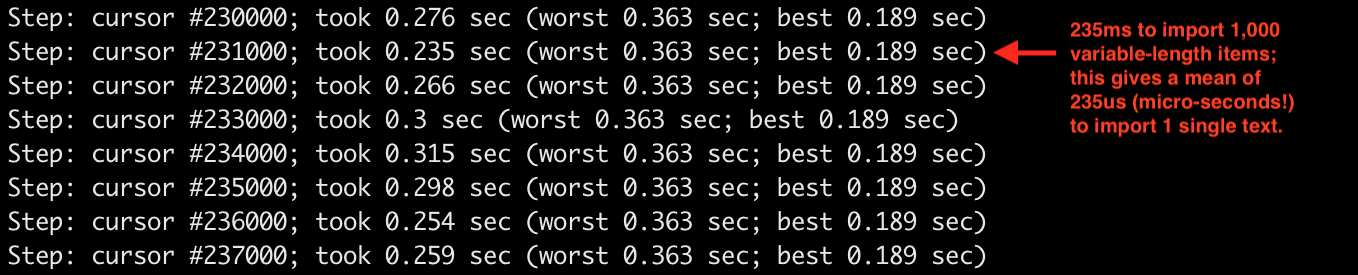
- We imported ~1,000,000 messages of dynamic length (some very long, eg. emails);
- Once imported, the search index weights 20MB (KV) + 1.4MB (FST) on disk;
- CPU usage during import averaged 75% of a single CPU core;
- RAM usage for the Sonic process peaked at 28MB during our benchmark;
- We used a single Sonic Channel TCP connection, which limits the import to a single thread (we could have load-balanced this across as many Sonic Channel connections as there are CPUs);
- We get an import RPS approaching 4,000 operations per second (per thread);
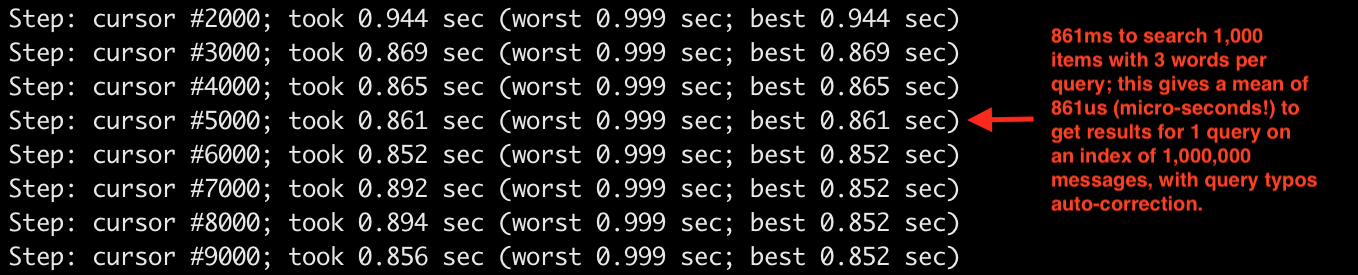
- We get a search query RPS approaching 1,000 operations per second (per thread);
- On the hyper-threaded 4-cores CPU used, we could have parallelized operations to 8 virtual cores, thus theoretically increasing the import RPS to 32,000 operations / second, while the search query RPS would be increased to 8,000 operations / second (we may be SSD-bound at some point though);
Compared results per operation (on a single object):
We took a sample of 8 results from our batched operations, which produced a total of 1,000 results (1,000,000 items, with 1,000 items batched per measurement report).
This is not very scientific, but it should give you a clear idea of Sonic performances.
Time spent per operation:
| Operation |
Average |
Best |
Worst |
| PUSH |
275μs |
190μs |
363μs |
| QUERY |
880μs |
852μs |
1ms |
Batch PUSH results as seen from our terminal (from initial index of: 0 objects):
Batch QUERY results as seen from our terminal (on index of: 1,000,000 objects):
Limitations
- Indexed data limits: Sonic is designed for large search indexes split over thousands of search buckets per collection. An IID (ie. Internal-ID) is stored in the index as a 32 bits number, which theoretically allow up to ~4.2 billion objects to be indexed (ie. OID) per bucket. We've observed storage savings of 30% to 40%, which justifies the trade-off on large databases (versus Sonic using 64 bits IIDs). Also, Sonic only keeps the N most recently pushed results for a given word, in a sliding window way (the sliding window width can be configured).
- Search query limits: Sonic Natural Language Processing system (NLP) does not work at the sentence-level, for storage compactness reasons (we keep the FST graph shallow as to reduce time and space complexi

 Sonic 是一个用 Rust 编写的快速、轻量、无需固定数据结构的搜索后端,可以替代 Elasticsearch 这类重量级系统,设计目标是在微秒级内响应搜索请求。