






中文文档
1.x Docs
2.x Docs
2.x Demo
Note: 1.x is not maintained. please migrate your version as soon as possible
Install
npm install better-scroll -S # install 2.x,with full-featured plugin.

npm install @better-scroll/core # only CoreScroll
import BetterScroll from 'better-scroll'

let bs = new BetterScroll('.wrapper', {
  movable: true,
  zoom: true
})

import BScroll from '@better-scroll/core'

let bs = new BScroll('.wrapper', {})
CDN
BetterScroll with full-featured plugin.
<script src="https://unpkg.com/better-scroll@latest/dist/better-scroll.js"></script>

<!-- minify -->
<script src="https://unpkg.com/better-scroll@latest/dist/better-scroll.min.js"></script>
let wrapper = document.getElementById("wrapper")
let bs = BetterScroll.createBScroll(wrapper, {})
Only CoreScroll
<script src="https://unpkg.com/@better-scroll/core@latest/dist/core.js"></script>

<!-- minify -->
<script src="https://unpkg.com/@better-scroll/core@latest/dist/core.min.js"></script>
let wrapper = document.getElementById("wrapper")
let bs = new BScroll(wrapper, {})
BetterScroll is a plugin which is aimed at solving scrolling circumstances on the mobile side (PC supported already). The core is inspired by the implementation of iscroll, so the APIs of BetterScroll are compatible with iscroll on the whole. What's more, BetterScroll also extends some features and optimizes for performance based on iscroll.
BetterScroll is implemented with plain JavaScript, which means it's dependency free.
Getting started
The most common application scenario of BetterScroll is list scrolling. Let's see its HTML:
<div class="wrapper">
  <ul class="content">
    <li>...</li>
    <li>...</li>
    ...
  </ul>
  <!-- you can put some other DOMs here, it won't affect the scrolling
</div>
In the code above, BetterScroll is applied to the outer wrapper container, and the scrolling part is content element. Pay attention that BetterScroll handles the scroll of the first child element (content) of the container (wrapper) by default, which means other elements will be ignored. However, for BetterScroll v2.0.4, content can be specified through the specifiedIndexAsContent option. Please refer to the docs for details.
The simplest initialization code is as follow:
import BScroll from '@better-scroll/core'
let wrapper = document.querySelector('.wrapper')
let scroll = new BScroll(wrapper)
BetterScroll provides a class whose first parameter is a plain DOM object when instantiated. Certainly, BetterScroll inside would try to use querySelector to get the DOM object.
Many developers have used BetterScroll, but the most common problem they have met is:
I have initiated BetterScroll, but the content can't scroll.
The phenomenon is 'the content can't scroll' and we need to figure out the root cause. Before that, let's take a look at the browser's scrolling principle: everyone can see the browser's scroll bar. When the height of the page content exceeds the viewport height, the vertical scroll bar will appear; When the width of page content exceeds the viewport width, the horizontal bar will appear. That is to say, when the viewport can't display all the content, the browser would guide the user to scroll the screen with scroll bar to see the rest of content.
The principle of BetterScroll is samed as the browser. We can feel about this more obviously using a picture:
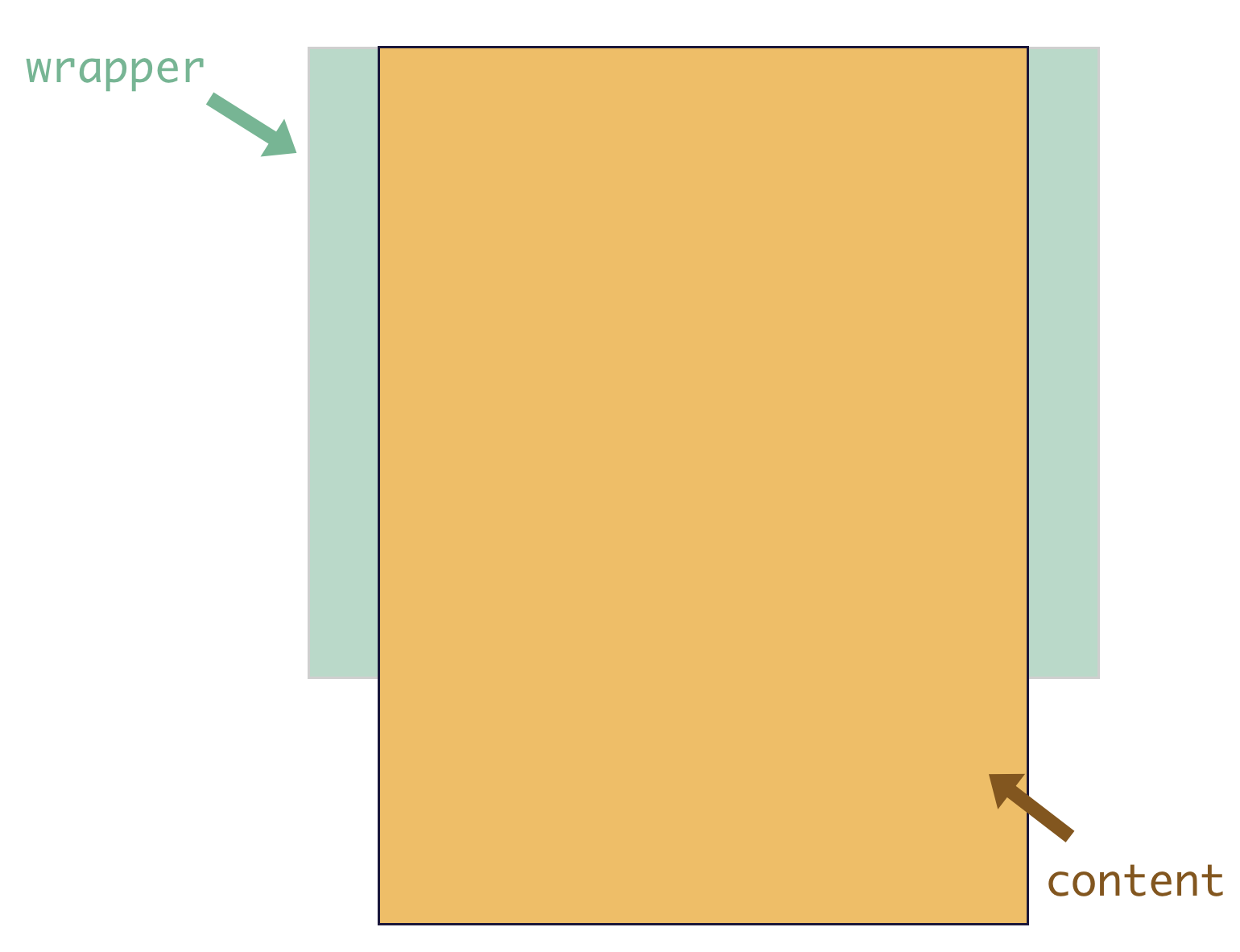
The green part is the wrapper, also known as the parent container, which has fixed height. The yellow part is the content, which is the first child element of the parent container and whose height would grow with the size of its content. Then, when the height of the content doesn't exceed the height of the parent container, the content would not scroll. Once exceeded, the content can be scrolled. That is the principle of BetterScroll.
Plugins
Enhance the ability of BetterScroll core scroll through plugins, such as
import BScroll from '@better-scroll/core'
import PullUp from '@better-scroll/pull-up'

let bs = new BScroll('.wrapper', {
  pullUpLoad: true
})
Please see for details, Plugins.
I wrote an article When BetterScroll meets Vue (in Chinese). I also hope that developers can contribute to share the experience of using BetterScroll with other frameworks.
A fantastic mobile ui lib implement by Vue: cube-ui
Contributing
Online one-click setup
You can use Gitpod(An Online Open Source VS Code like IDE which is free for Open Source) for contributing. With a single click it will launch a workspace and automatically:
- clone the
better-scroll repo.
- install all of the dependencies.
- run
yarn vue:dev,
- run
yarn docs:build and yarn docs:dev.

If you want to learn how to use BetterScroll in the real project,you can learn my two practical courses(in Chinese)。
High imitating starvation takeout practical course base on Vue.js
Project demo address

Music App advanced practical course base on Vue.js
Project demo address


 BetterScroll 是一个 JavaScript 插件,用来解决移动端网页上的滚动问题;PC 浏览器也支持。