




exodium README

The project's README from github.com/tvollstaedt/exodium. As one markdown file: README.md.

Exodium

Exodium

A cross-platform launcher for the eXoDOS collections. Browse, download, and play DOS, Windows 3.x, Windows 9x, and ScummVM games on Linux, macOS, and Windows.

Latest release License: MIT Platform Built with Tauri Rust + TypeScript

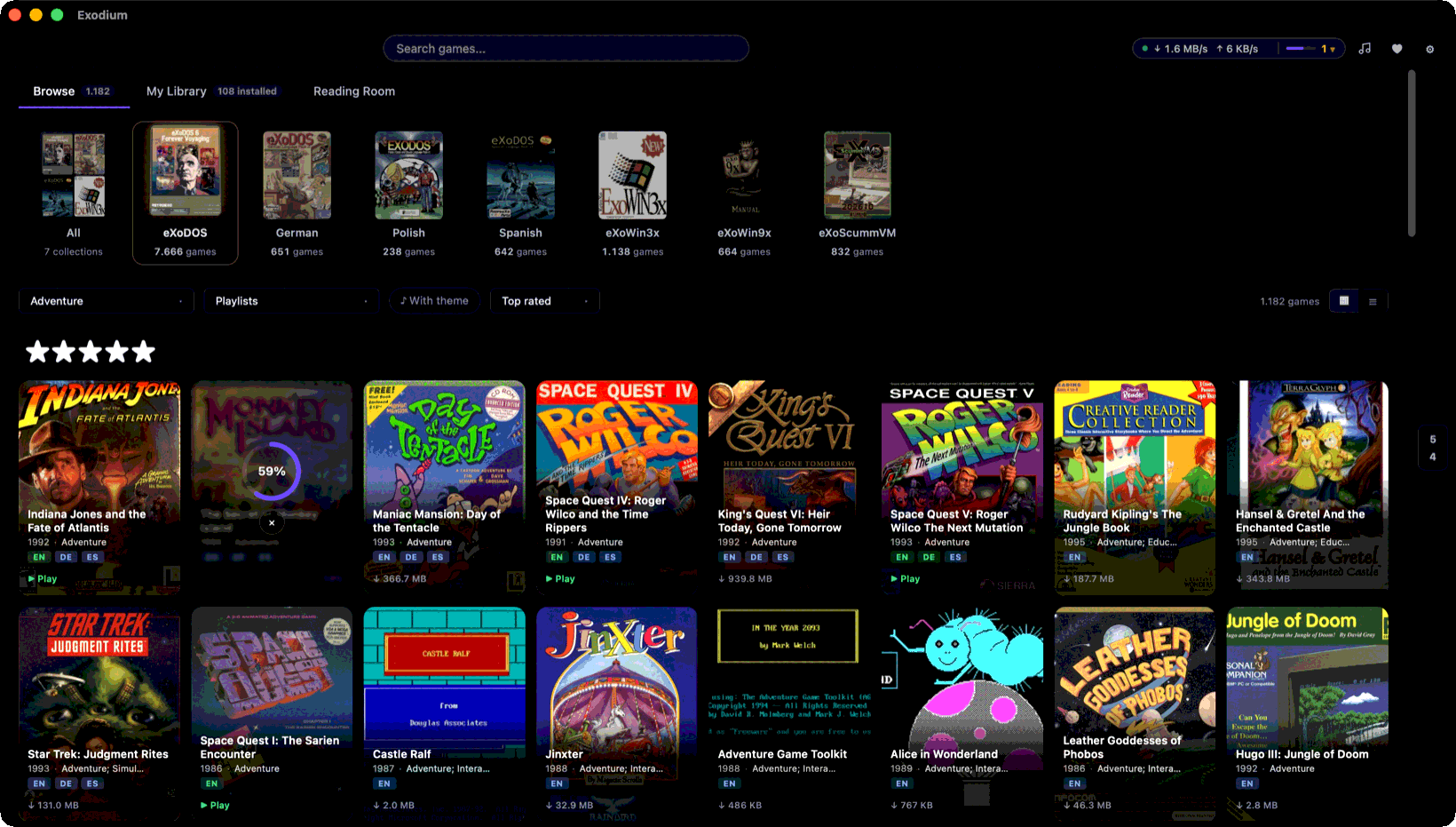
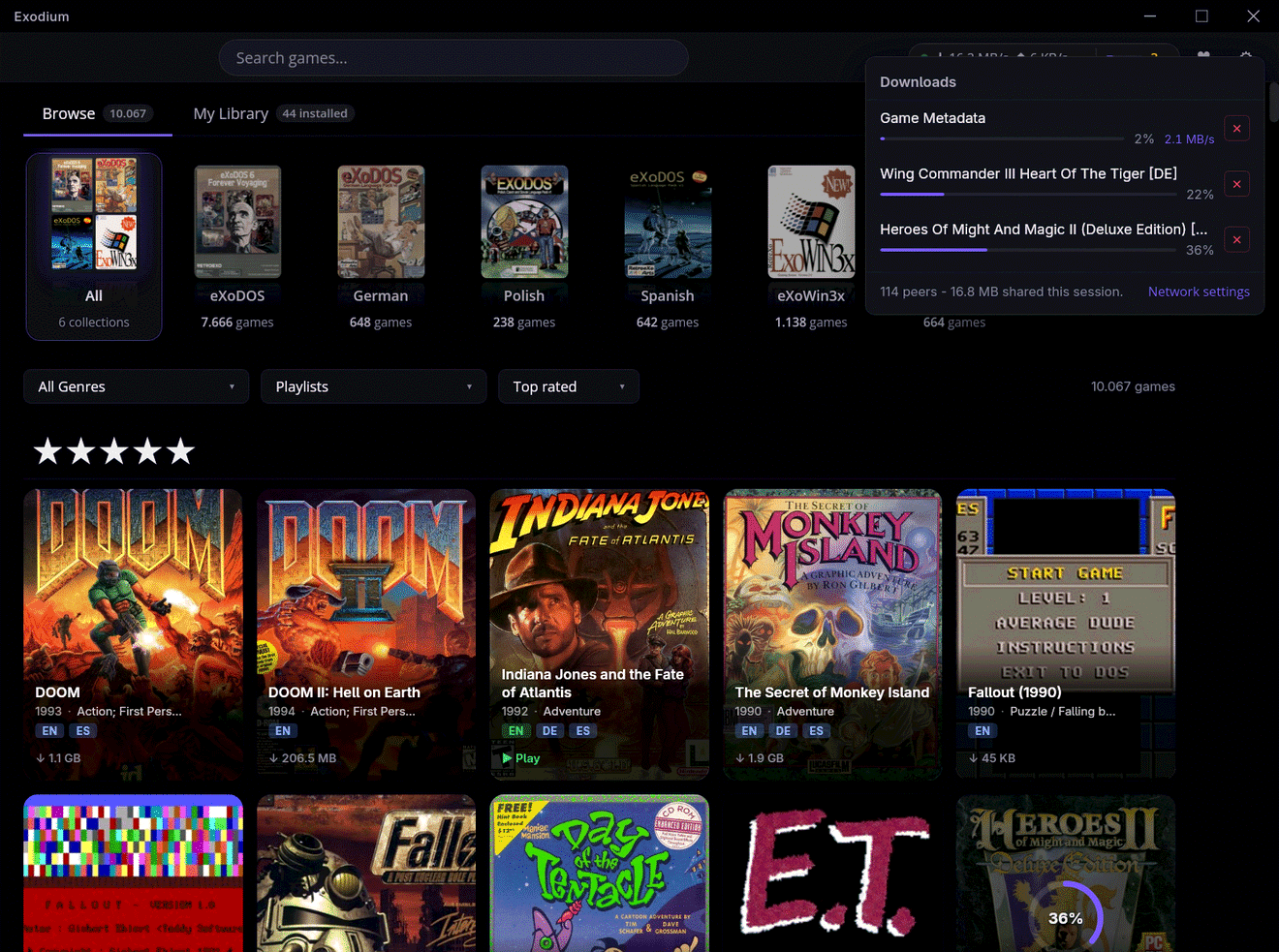
Browse view with the collection shelf, cover-art grid, and a download in progress


Quick start

  1. Download the latest release for your platform: Windows (.exe) · macOS (.dmg) · Linux (.AppImage) · all downloads
  2. Install and launch - see Installation for platform notes.
  3. Pick a games folder in the setup wizard - this is where downloaded games are stored.
  4. Browse and play - hit download on any game; it streams from the eXo torrents and launches in the emulator it was configured for.

A tribute to eXoDOS

Exodium would not exist without the extraordinary work of the eXoDOS project and its creator, eXo. Over many years, eXo and the eXoDOS community have painstakingly collected, configured, and preserved over 9,000 DOS games, each one pre-configured to run out of the box. The result is an irreplaceable archive of gaming history.

Exodium is a frontend client for that collection. It does not host or distribute any game files; it uses the eXoDOS torrents that you seed yourself. If you find value in Exodium, please consider supporting the eXoDOS project directly at retro-exo.com.


What it does

eXoDOS ships with a Windows-only LaunchBox frontend and requires downloading the full ~500 GB torrent to browse the catalogue. Exodium replaces that frontend with a small native app for Linux, macOS, and Windows.

Available now

Compatibility note: DOS and Windows 3.x games run under the bundled DOSBox Staging, ScummVM games under the pinned ScummVM build Exodium fetches for them. A handful are tuned for DOSBox-ECE specials such as 3dfx Voodoo settings or the GunStick light gun and may look or behave slightly differently than under the original Windows eXoDOS setup. Windows 9x games need DOSBox-X or 86Box, which Exodium fetches with your first Windows 9x download.

Planned


Screenshots

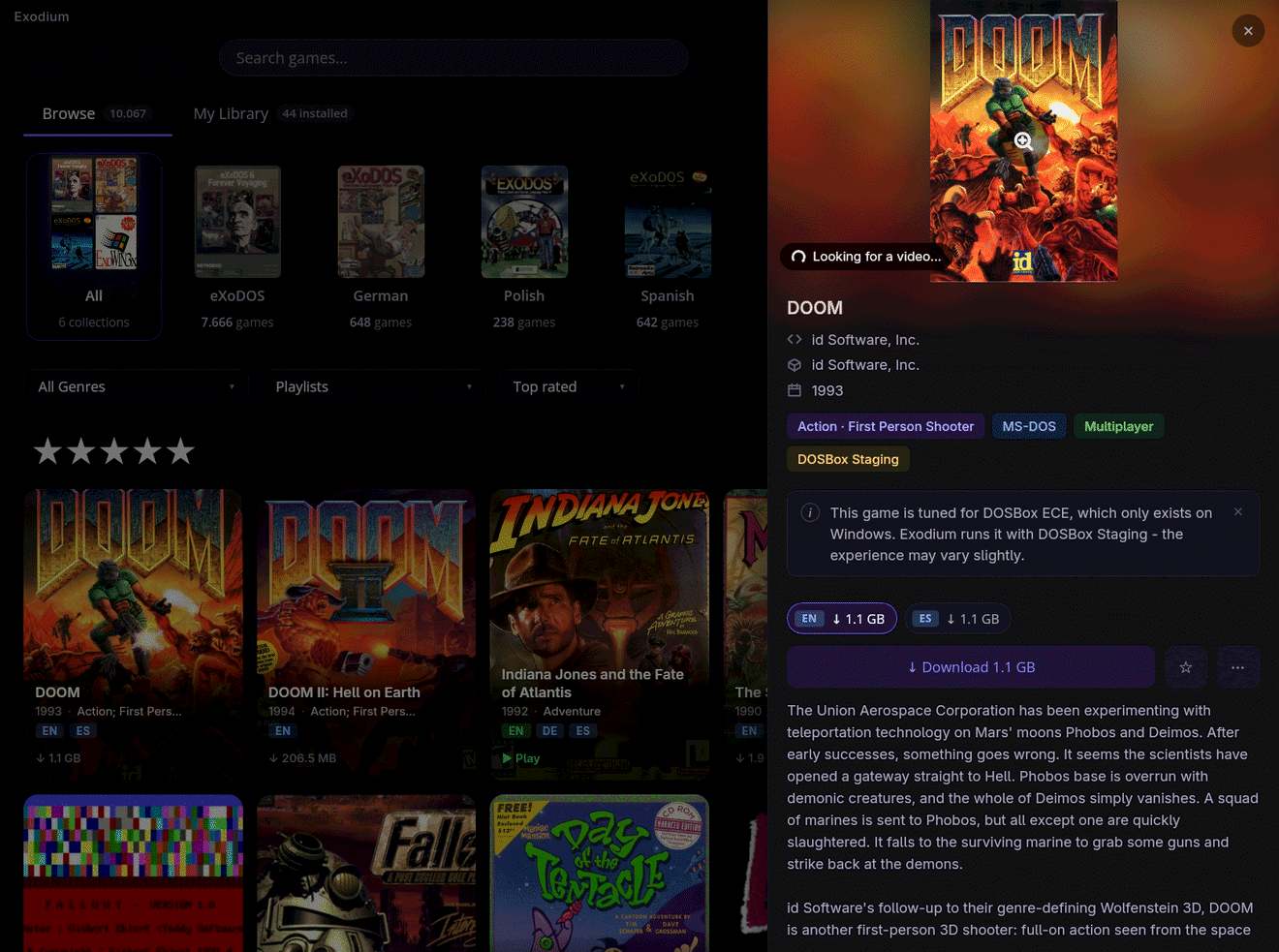
Game detail panel for DOOM with cover art, metadata, and language variants

Game detail panel with description, metadata, and one download size per available language.

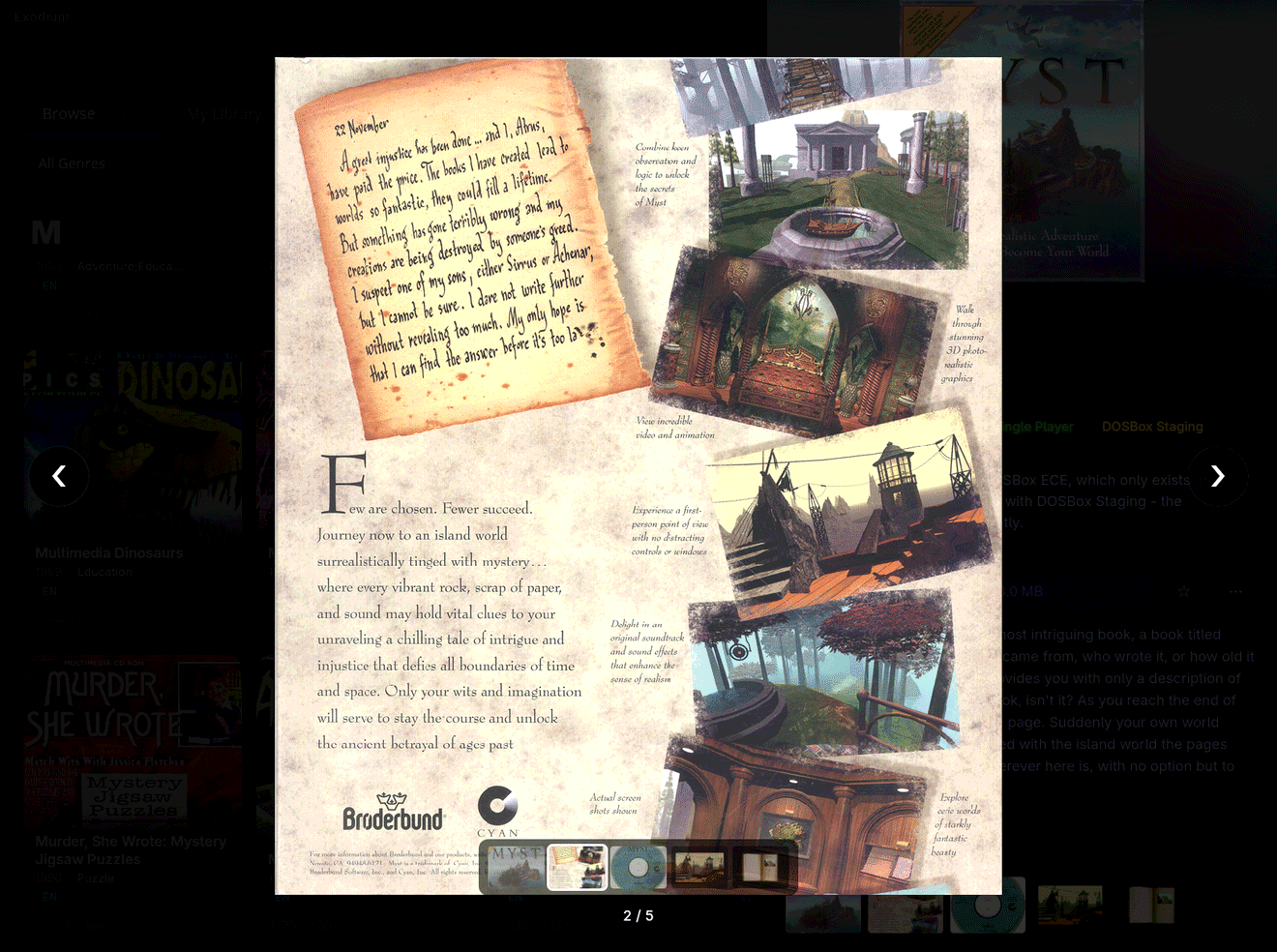
Media gallery lightbox showing a magazine ad, with a thumbnail strip below it

Per-game media gallery. Flip through original box scans, magazine ads, and in-game shots.

Downloads sheet with three games in progress, peer count, and sharing status

Several games download at once, straight from the eXoDOS torrents, with the peer count and how much you have shared back.


Installation

Download the binary for your platform from the latest release.

macOS

Because Exodium is not yet signed with an Apple Developer ID, macOS Gatekeeper will block it on first launch with "Exodium is damaged and cannot be opened". To bypass this, run the following once after dragging the app to Applications:

xattr -cr /Applications/Exodium.app

This removes the quarantine attribute that macOS adds to downloaded files. The app is otherwise unmodified - the binary itself is built and distributed directly from this repo's CI pipeline.

Linux

Install the .deb (Debian/Ubuntu) or run the .AppImage directly (any distro). The AppImage needs chmod +x first.

Windows

One installer is provided: Exodium_<version>_x64-setup.exe (NSIS). It is currently unsigned, so Windows will block it by default. Trusted code signing is planned for a future release. (Releases up to v0.8.3 also shipped an .msi; it was dropped because the auto-updater delivers NSIS updates, and Windows cannot cleanly update an MSI install with an NSIS installer.)

Install: NSIS .exe + Unblock-File

  1. Download Exodium_<version>_x64-setup.exe.

  2. Open PowerShell and unblock the downloaded file:

    Unblock-File "$HOME\Downloads\Exodium_<version>_x64-setup.exe"
    
  3. Run the installer normally. SmartScreen may still show a warning - click "More info" → "Run anyway".

If Unblock-File is unavailable, right-click the .exe → Properties → tick "Unblock" at the bottom of the General tab → OK.

If downloads are stuck at 0%: check %APPDATA%\Exodium\logs\exodium.log for error details. Firewall issues are one possible cause - allow both "Private" and "Public" networks for Exodium under Windows Security → Firewall & network protection → Allow an app through firewall.


Tech stack

Layer Technology
Shell Tauri v2 (frameless window, decorations: false)
Frontend SolidJS + TypeScript + Vite
UI Components Ark UI headless (@ark-ui/solid)
Backend Rust
Database SQLite via rusqlite (WAL mode, pre-built and shipped with the app)
Torrent librqbit with selective file downloads

Development

Prerequisites

DOSBox Staging is downloaded automatically by init-dev. No manual installation needed.

First-time setup

pnpm install

# Download thumbnails and the DOSBox binary (one-time, ~2-5 GB depending on language packs)
pnpm run init-dev

pnpm tauri dev

init-dev is idempotent - already-downloaded files and existing thumbnails are skipped. Use --force to regenerate thumbnails. Data is cached at ~/.exodium-dev/ (override with XDO_DEV_DATA=/your/path).

Language pack options:

pnpm run init-dev --glp     # German Language Pack (~23 GB)
pnpm run init-dev --slp     # Spanish Language Pack (~3.8 GB)
pnpm run init-dev --plp     # Polish Language Pack (~800 MB)
pnpm run init-dev --all-packs

Useful scripts

Command Description
pnpm tauri dev Start the app in development mode
pnpm run init-dev First-time setup: DOSBox binary + thumbnails
pnpm run get-dosbox Download DOSBox Staging binary only
pnpm test Run frontend tests (Vitest)
pnpm run test:all Frontend + Rust tests

Regenerating the game database

The pre-built SQLite database (metadata/exodium.db.gz) ships with the app. To regenerate it from the bundled XML sources:

cd src-tauri
cargo run --example generate_db
gzip -k ../metadata/exodium.db

Project structure

exodium/
├── src/                    SolidJS frontend
│   ├── api/tauri.ts        Typed invoke() wrappers
│   ├── components/         GameCard, GameDetailPanel, SearchBar, WindowFrame, ...
│   ├── pages/              Intro, Setup, Library
│   └── stores/             games, downloads, thumbnails
├── src-tauri/
│   └── src/
│       ├── examples/       generate_db build tool (not shipped)
│       ├── commands/       Tauri commands (games, setup, updates)
│       ├── db/             SQLite schema + queries
│       ├── import/         LaunchBox XML parser
│       └── torrent/        librqbit download manager
├── metadata/               Bundled XML sources + pre-built DB (.gz)
├── scripts/
│   ├── init-dev.sh         First-time dev setup
│   └── gen_thumbnails.py   Resize + rename box art from XODOSMetadata.zip
├── manifest.json           Update-check manifest (torrent infohashes + thumbnail pack info)
├── thumbnails/eXoDOS/      Shortcode-keyed game thumbnails (gitignored, generated by init-dev)
└── torrents/               .torrent files for every collection

Support

Found a bug or have a question? Open an issue - include exodium.log from the app's log folder (Settings → Open log folder) for download or launch problems.

If Exodium is useful to you, consider donating via GitHub Sponsors or Ko-fi. Donations go toward OS code-signing certificates (Apple Developer ID, Windows signing) so the install warnings on macOS and Windows can go away.


License

MIT - see LICENSE.

Exodium does not include any game files, ROM images, or copyrighted eXoDOS assets. All game data is downloaded via the official eXoDOS torrents.

exodium (tvollstaedt/exodium)

Searching Database…

Что это?Exodium — кроссплатформенный нативный фронтенд для коллекции DOS-игр eXoDOS, позволяющий просматривать и стримить более 9000 сохранённых DOS-игр без предварительной загрузки всего торрента на ~500 ГБ.
Это игровой лаунчер или игры в него включены?Это только лаунчер и фронтенд — он стримит отдельные игры по запросу из раздаваемых вами самими торрент-раздач eXoDOS и не хранит и не распространяет никаких игровых файлов.
Как установить и начать пользоваться?Скачайте релиз для своей ОС (Windows .exe, macOS .dmg, Linux .AppImage или .deb), установите, затем через мастер настройки выберите папку с играми — после этого листайте каталог и запускайте загрузку любой игры, чтобы стримить и запускать её.
Нужно ли устанавливать DOSBox или ScummVM самому?Нет — DOSBox Staging, закреплённая сборка ScummVM и (для игр Windows 9x) DOSBox-X или 86Box загружаются автоматически самим Exodium, отдельно ничего ставить не нужно.
Установщики готовы к использованию без предупреждений?Не полностью — macOS Gatekeeper блокирует неподписанное приложение при первом запуске и требует ручного снятия карантина, а NSIS-установщик Windows тоже не подписан, поэтому SmartScreen показывает предупреждение; нормальная подпись кода планируется, но пока не сделана.
Что с играми Windows 9x, которым нужна другая настройка, чем DOS-играм?Игры Windows 9x не работают под DOSBox — Exodium загружает настоящую среду Windows 95/98 через DOSBox-X или 86Box, которые автоматически подтягиваются при первой загрузке игры Windows 9x.
Поддерживаются ли и игры на ScummVM?Да, каждая игра eXoScummVM запускается на той самой сборке ScummVM, к которой eXo её изначально привязал, с выбором издания, звукового железа и субтитров.
Зачем делать Exodium вместо простого использования оригинального фронтенда eXoDOS на LaunchBox?Оригинальный фронтенд eXoDOS работает только на Windows и заставляет скачать весь торрент на ~500 ГБ, прежде чем вы сможете даже просматривать список; Exodium заменяет его небольшим нативным приложением для Linux, macOS и Windows, которое стримит игры по отдельности.
Что Exodium показывает помимо простого запуска игры?К каждой игре прилагаются руководства, сканы коробок, скриншоты, реклама и превью-видео прямо из архивов коллекции, плюс проигрыватель тем, который стримит её музыку и в режиме Browse работает как музыкальный автомат.
Size
209.5 MB
Stars
332
Age
6mo
Commits · 90 Days