简体中文 · English
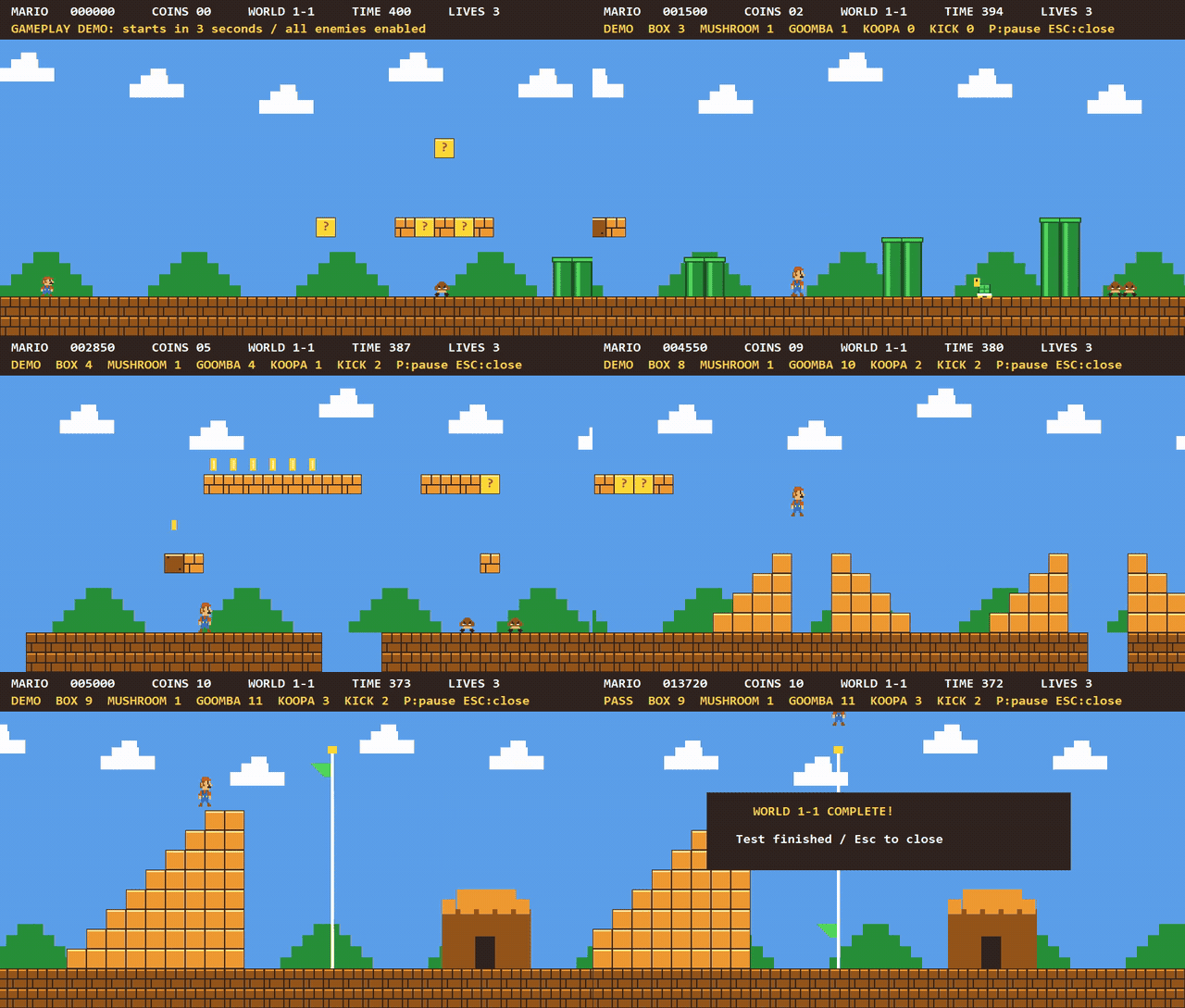
Mario example built with the BitKindle toolchain
Actual gameplay recording · Built-in automated player completes the level · Preview at 2× speed
Build and run instructions
Overview
BitKindle includes the complete sources for the A0/A1 assemblers, C0 transitional compiler, self-hosted C1 compiler written in C, runtime library, and PE linker.
Building requires no MSVC, GCC, Clang, Windows SDK, or external linker, and downloads no dependencies. PowerShell 5.1 decodes the seed and orchestrates the build. After decoding, every machine-code binary, object file, and EXE is generated by previously built custom tools.
Bootstrap pipeline
flowchart LR
    S["Hexadecimal seed<br/>3,584 bytes"] --> A["A0 → A1<br/>Custom assemblers"]
    A --> C["C0 → Bridge stages<br/>Transitional compilers"]
    C --> O["Progressive C1 extensions<br/>Object-file support"]
    O --> L["Custom PE linker"]
    O --> H["Final C1 + runtime"]
    L --> H
    H --> G1["Self-compiled generation 1"]
    G1 --> G2["Self-compiled generation 2"]
    G1 -. "Byte-identical" .-> G2
See BOOTSTRAP.md for stage dependencies and WALKTHROUGH.md for building individual stages with build-stage.ps1.
Quick start
Requires Windows x64 and Windows PowerShell 5.1 (powershell.exe); the verified environment is Windows 10 x64. Place the complete source tree in a writable local directory with a short path, preserving the name and hierarchy of src/. Reserve 5 GiB for the full test run.
Run from the release root:
powershell.exe -NoProfile -NonInteractive -ExecutionPolicy Bypass -File .\build-all.ps1
The default builds the compiler, linker, and C89/C99 runtimes, without running regression tests. After a successful build, compile and run hello:
$snapshot = './src/bootstrap-c99'
& "$snapshot/compile-program.ps1" -Source "$snapshot/examples/hello.c" `
    -Output './work/my-hello.exe' -BuildDirectory "$snapshot/build-from-seed" -Standard c89
if (!$?) { throw 'Compilation failed' }
& './work/my-hello.exe'
Expected output: hello.
Build modes
Append a mode option to the build command. All three modes build from the seed and check self-compilation identity and the compiler baseline. -All and -Full are mutually exclusive.
| Option |
Build and test scope |
| None |
Toolchain and runtimes; no regression tests |
-All |
Default mode plus compilation of hello, the argument example, minicurl, and Mario; does not run examples or regression tests |
-Full |
Stage regressions, full audit, three supplemental suites, hello and argument examples, and minicurl local HTTP tests; Mario has separate build and test entry points |
Logs and results are in work/release-run/. For default and -All, RESULT.json reports Status=BUILT and TestsRun=false. A successful -Full reports Status=PASS, TestsRun=true, and prints PASS release build and verification. An output directory alone is not evidence of success.
build-all.ps1 refuses to run if src/bootstrap-c99/build-from-seed/ or work/release-run/ already exists. Before rebuilding or changing modes, clean the default outputs or use a fresh source copy.
Examples
| Example |
Features and interfaces |
Documentation |
| Hello / command-line arguments |
C runtime, startup, argc/argv |
Compilation and usage |
| minicurl |
HTTP/TLS through system WinHTTP; retrieve content and save it to a file |
Source and usage |
| Mario first level |
Side scrolling, keyboard input, collisions, timers, and GDI double buffering; graphics drawn in C |
Build and controls |
With an existing toolchain, build examples individually using their documentation. Run them manually after building:
# GUI platform game
& './src/examples/mario/build/mario.exe'

# Optional online demo; requires working Windows networking and certificates
& './src/examples/minicurl/minicurl.exe' -o './work/example.html' 'https://example.com/'
Mario is an educational gameplay recreation; its documentation describes differences from the original.
Build artifacts and interfaces
The primary tools are:
src/bootstrap-c99/build-from-seed/
├── host/c1-stage2.exe    # C compiler
└── link-stage2.exe      # Custom Windows x64 PE linker
C1 reads C source from standard input and writes PE or .c1o object bytes to standard output. For ordinary programs, compile-program.ps1 configures headers, the runtime, and linker arguments.
See USAGE.md for multiple source files, command-line arguments, Windows DLL imports, and GUI subsystem selection.
Supported scope
- C89 and many C99 features: VLAs, complex arithmetic, type-generic mathematics, universal character names, inline, compound literals, designated initializers, variadic macros,
long long, _Bool, and hexadecimal floating constants. See Implementation notes for language and library behavior.
- Object files and linker: a custom
.c1o format producing Windows x64 PE files, with explicit DLL imports and console/GUI subsystems.
- Compatibility boundaries: no claim of complete C99 conformance, all C99 translation capacities, or optional floating-point Annex F/G support.
long double uses binary64. General Windows SDK headers, COFF .obj/.lib, and external-toolchain compatibility are outside the current scope. Existing open-source C projects may need adaptation.
Self-compilation identity and functional tests are not a complete correctness proof or standards certification. See Limits for capacities and restrictions.
Technical documentation
Cleaning and rebuilding
Close examples, wait for builds and tests to finish, and back up any artifacts or logs you need before running:
# Preview, clean, then rebuild from the seed
powershell.exe -NoProfile -NonInteractive -ExecutionPolicy Bypass -File .\clean-all.ps1 -WhatIf
powershell.exe -NoProfile -NonInteractive -ExecutionPolicy Bypass -File .\clean-all.ps1
powershell.exe -NoProfile -NonInteractive -ExecutionPolicy Bypass -File .\build-all.ps1
Cleanup is limited to these default output locations; it does not remove source or documentation or change system settings:
src/bootstrap-c99/build-from-seed/work/release-run/work/walkthrough/src/examples/minicurl/build/src/examples/minicurl/minicurl.exesrc/examples/mario/build/
Do not store handwritten files there. These directories are removed in full, including any .c1-build-* children. Manage custom build directories, USAGE examples, and .c1-build-* directories outside this list yourself; the script does not empty all of work/.
The script checks cleanup paths and uses paths in SOURCES.json to protect source files; it does not check source hashes. It stops at out-of-scope paths, symbolic links, or junctions. Do not run it concurrently with a build. If locked files cause partial cleanup failure, release them and retry.
License
Source code and accompanying project documentation use the MIT License. Windows, PowerShell, and system DLLs are supplied by the user's system and are not part of the project's MIT-licensed source.





 BitKindle 是一套完整的 Windows x64 C 编译工具链,包括汇编器、C 编译器、运行时库和 PE 链接器。它从一个 3,584 字节的机器码种子开始自举,不需要预先安装任何编译器或 SDK。