



Что это такое?
 BitKindle — это полноценная цепочка инструментов C для Windows x64: ассемблеры, компилятор C, библиотека времени выполнения и PE-компоновщик. Она собирает сама себя, начиная с затравки из машинного кода размером 3 584 байта, и не требует уже установленного компилятора или SDK.
Это один исполняемый файл компилятора или полноценная цепочка инструментов?Это полноценная цепочка инструментов: BitKindle включает полные исходники ассемблеров A0/A1, переходного компилятора C0, самохостящегося компилятора C1, библиотеку времени выполнения и собственный PE-компоновщик.
Это полноценная цепочка инструментов: BitKindle включает полные исходники ассемблеров A0/A1, переходного компилятора C0, самохостящегося компилятора C1, библиотеку времени выполнения и собственный PE-компоновщик.Нужно ли сначала установить MSVC, GCC или Windows SDK?Нет. Для сборки не нужны MSVC, GCC, Clang или Windows SDK, и никакие зависимости не скачиваются. Нужен только Windows PowerShell 5.1, который декодирует затравку и управляет сборкой.
Нет. Для сборки не нужны MSVC, GCC, Clang или Windows SDK, и никакие зависимости не скачиваются. Нужен только Windows PowerShell 5.1, который декодирует затравку и управляет сборкой.Полностью ли компилятор соответствует стандарту C99?Нет. Он поддерживает C89 и многие возможности C99 (VLA, комплексную арифметику, составные литералы и др.), но не заявляет полного соответствия C99. Кроме того, он не умеет связываться с общими заголовками Windows SDK и со стандартными файлами COFF .obj/.lib.
Нет. Он поддерживает C89 и многие возможности C99 (VLA, комплексную арифметику, составные литералы и др.), но не заявляет полного соответствия C99. Кроме того, он не умеет связываться с общими заголовками Windows SDK и со стандартными файлами COFF .obj/.lib.На какой версии Windows это работает?Нужна Windows x64 с Windows PowerShell 5.1. Проверенная среда — Windows 10 x64.
Нужна Windows x64 с Windows PowerShell 5.1. Проверенная среда — Windows 10 x64.Вся система распространяется под лицензией MIT?Исходный код и документация распространяются под лицензией MIT. Однако Windows, PowerShell и системные DLL, которые используются при сборке и запуске, берутся из системы пользователя и на них эта лицензия не распространяется.
Исходный код и документация распространяются под лицензией MIT. Однако Windows, PowerShell и системные DLL, которые используются при сборке и запуске, берутся из системы пользователя и на них эта лицензия не распространяется.Для чего нужна затравка размером 3 584 байта?Это минимальная отправная точка из машинного кода, которую PowerShell декодирует первой. Затем все последующие ассемблеры, этапы компилятора и компоновщик собираются инструментами, созданными этой затравкой, без участия какого-либо внешнего компилятора.
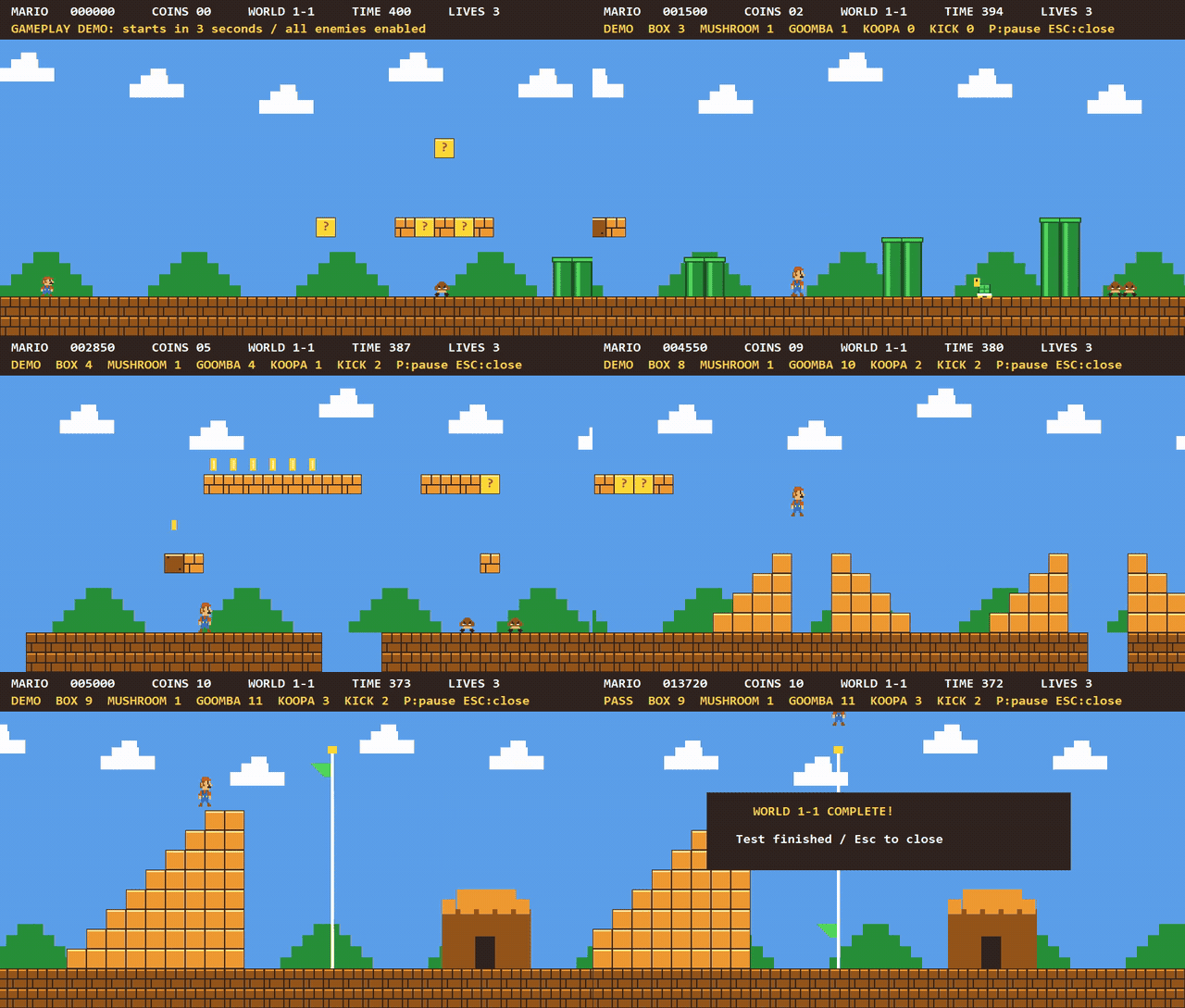
Это минимальная отправная точка из машинного кода, которую PowerShell декодирует первой. Затем все последующие ассемблеры, этапы компилятора и компоновщик собираются инструментами, созданными этой затравкой, без участия какого-либо внешнего компилятора.Какие примеры программ входят в состав BitKindle?Демо hello-world/argv, minicurl (загружает содержимое по HTTP/TLS через WinHTTP) и игра в духе Mario с боковой прокруткой, управлением с клавиатуры, столкновениями и графикой GDI, полностью написанная на C.
Демо hello-world/argv, minicurl (загружает содержимое по HTTP/TLS через WinHTTP) и игра в духе Mario с боковой прокруткой, управлением с клавиатуры, столкновениями и графикой GDI, полностью написанная на C.Может ли BitKindle подключаться к обычным библиотекам Windows?Он создаёт PE-файлы Windows x64 с явными импортами DLL, используя собственный формат объектов .c1o, но не поддерживает общие заголовки Windows SDK и стандартные файлы COFF .obj/.lib. Поэтому существующие проекты C с открытым исходным кодом, возможно, придётся адаптировать.
Он создаёт PE-файлы Windows x64 с явными импортами DLL, используя собственный формат объектов .c1o, но не поддерживает общие заголовки Windows SDK и стандартные файлы COFF .obj/.lib. Поэтому существующие проекты C с открытым исходным кодом, возможно, придётся адаптировать.Сколько места на диске нужно для полной сборки?Для полного режима сборки и тестирования -Full требуется около 5 GiB свободного места. Кроме того, запускаются регрессионные тесты этапов и дополнительные наборы тестов примеров.
Для полного режима сборки и тестирования -Full требуется около 5 GiB свободного места. Кроме того, запускаются регрессионные тесты этапов и дополнительные наборы тестов примеров.В каких он темах?from-scratch, educational, toolchain, build-tool, powershell, low-level, systems-programming, tls, native, compiler, http, c
from-scratch, educational, toolchain, build-tool, powershell, low-level, systems-programming, tls, native, compiler, http, c