
c64-keyboard-font README

The project's README from github.com/szabadkai/c64-keyboard-font. As one markdown file: README.md.

C64 Keyboard

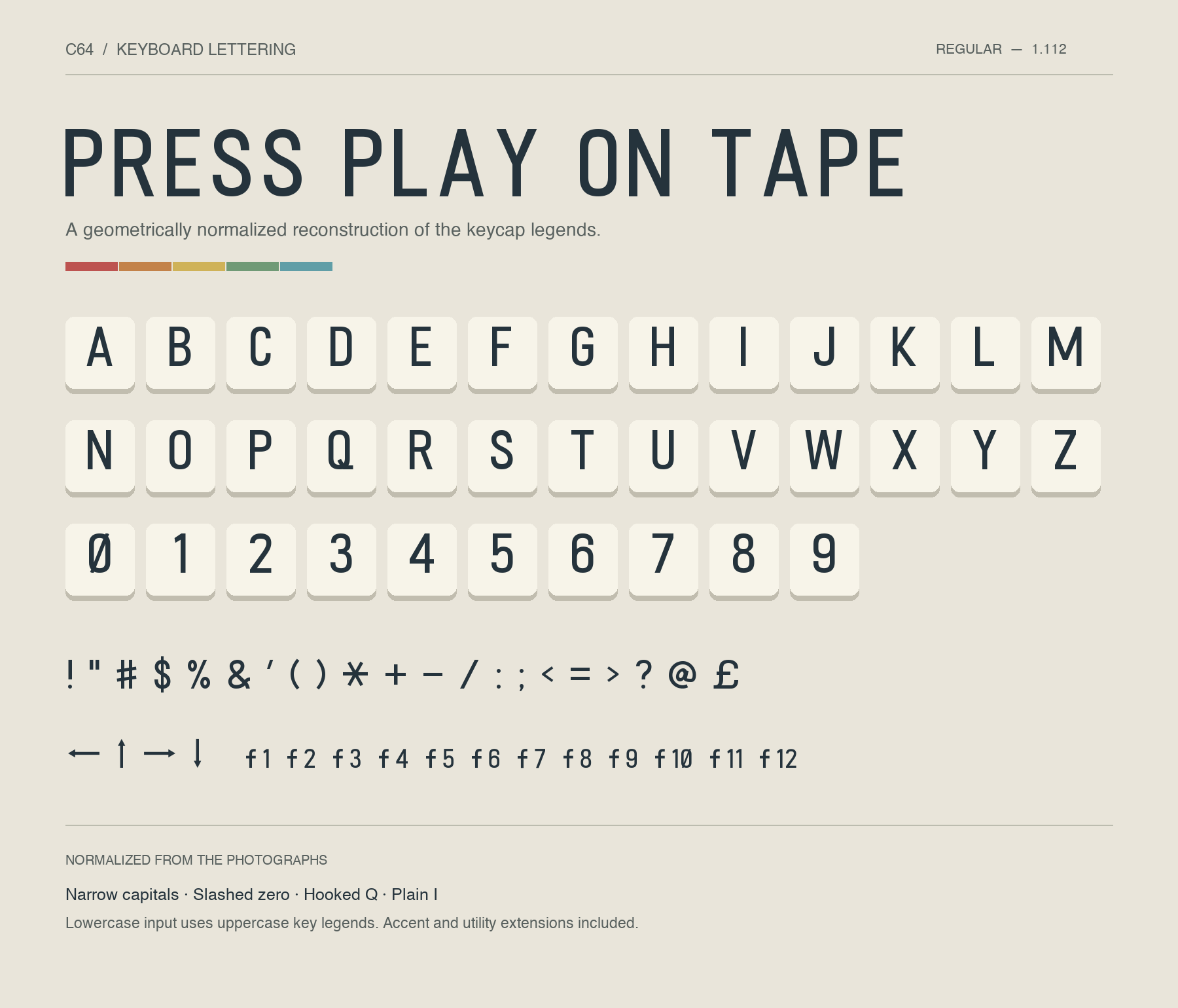
A font recreated from photographs of classic Commodore 64 keycaps, with cleaned-up shapes and consistent proportions.

C64 Keyboard font preview

Try it in your browser · Download TTF · OTF · Webfont · Complete package

Use it

Install the TTF or OTF, then select C64 Keyboard in your application.

To try it out, open the online preview, or download and extract the complete package and open preview.html. Click a function-key or PETSCII button to insert its symbol into the type tester, then copy the text into your application and select C64 Keyboard.

If you have an earlier version installed, replace it with version 1.112 and restart applications that still show the old font. The former U+E000 symbol and the U+E020–U+E028 key-name legends are no longer included.

Included

Lowercase input displays as uppercase. This recreates printed key legends, including smooth geometric reconstructions of the PETSCII graphics, rather than the screen bitmap font.

The source keyboard

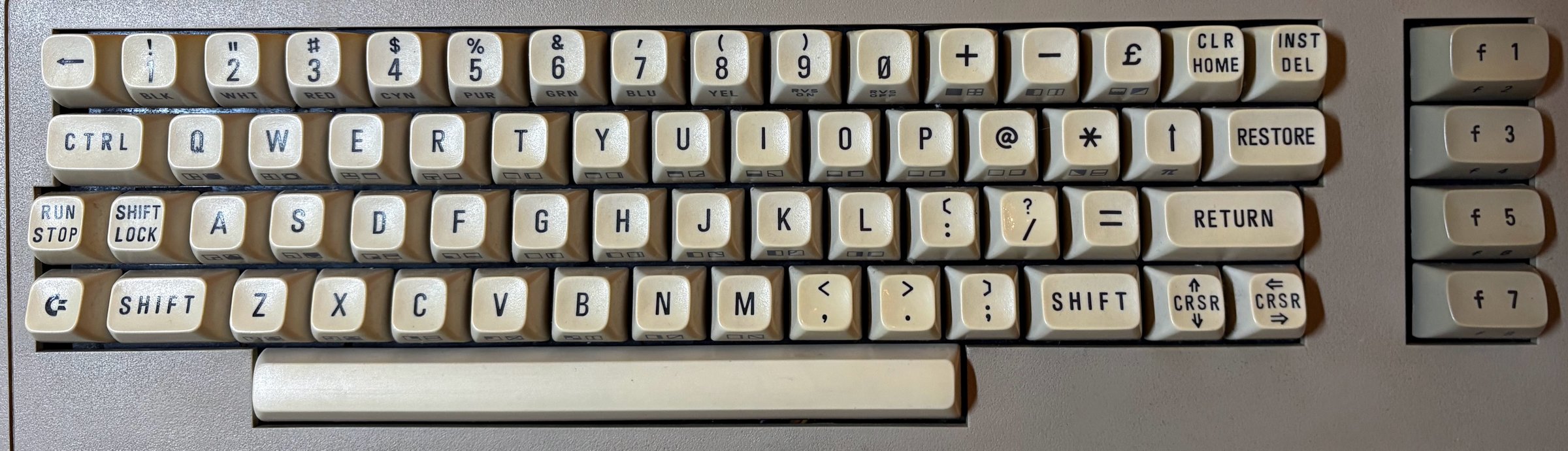
The Central European Commodore 64 keyboard the font was reconstructed from

The lettering comes from my own Commodore 64, a Central European unit. Its keycaps are the reference for every letter, number, and symbol in the font.

PETSCII front legends

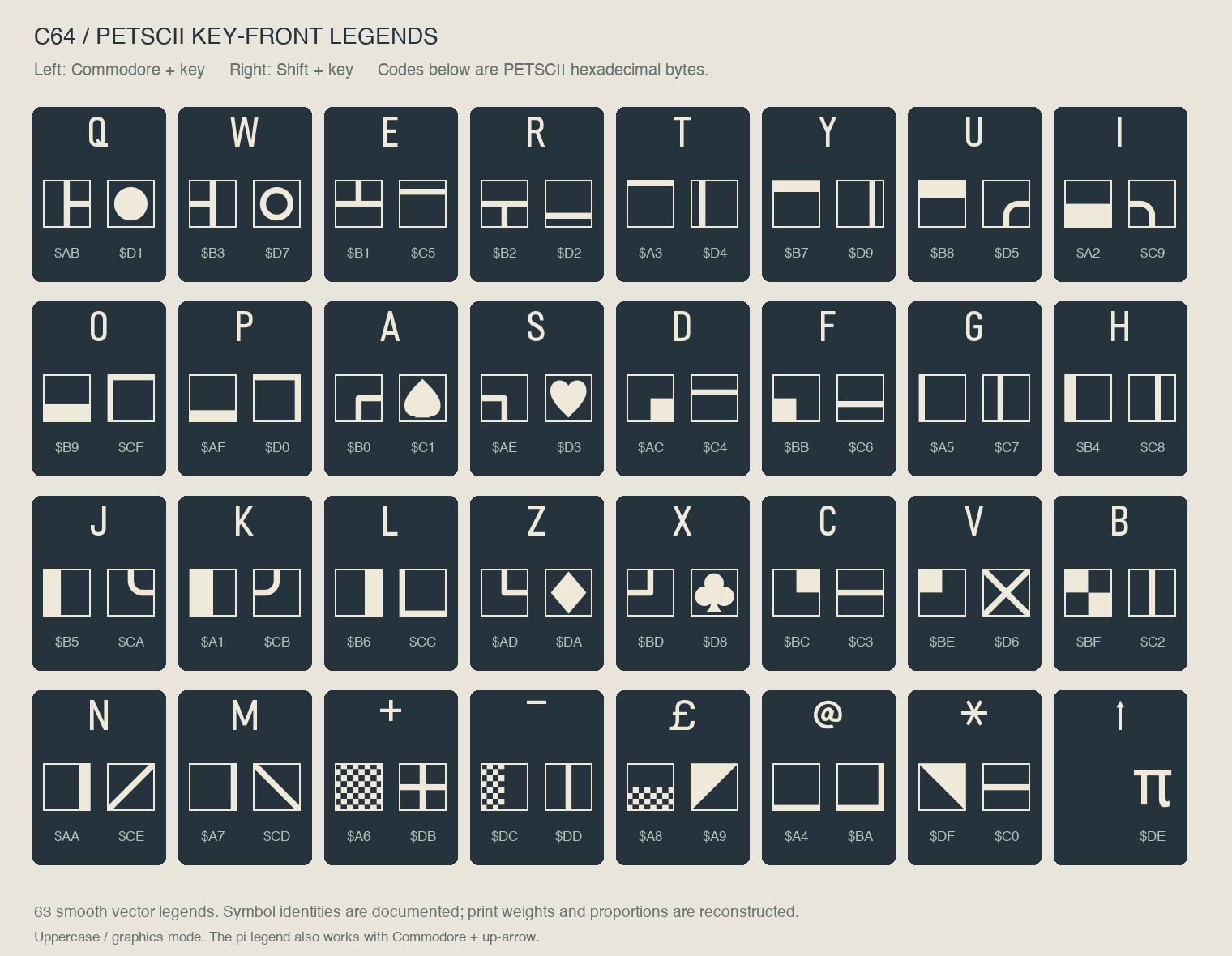
PETSCII reference sheet

Open the online preview or preview.html and use the PETSCII buttons to insert the symbols, then copy them from the type tester. Left legends correspond to Commodore + key, right legends to Shift + key in uppercase/graphics mode. Pi on the up-arrow key also works with Commodore.

These are reconstructed outlines: identities and key assignments come from the Ultimate Commodore 64 Reference; frame thickness, curves, and print proportions are inferred from the keyboard photograph. They are not exact photo traces. Pi is unframed as on the key.

The preview handles the special character codes for you. Copied symbols need this font to display correctly. See the PETSCII key map and encoding guide for codes and keyboard combinations.

Editable outlines are in glyphs/, with build tools in scripts/.

Build instructions · Version history

License

To the extent possible under law, Levente Szabadkai dedicates the copyright and related rights he holds in this repository to the public domain under CC0 1.0 Universal. This covers the font files, editable outlines and traces, build scripts, preview, documentation, mappings, and specimen images. You may use, modify, and redistribute these contributions, including commercially, without attribution.

The close-up photographs used for tracing are not included. CC0 does not grant rights held by others in the historical keycap designs or any trademarks. C64 Keyboard is an independent, unofficial reconstruction and is not endorsed by Commodore.

c64-keyboard-font (szabadkai/c64-keyboard-font)

Searching Database…

这是什么?C64 Keyboard 是一款字体,重现了真实 Commodore 64 键盘上印制的字母和符号图例,依据实际键帽的照片描摹并清理而成。它以桌面 TTF/OTF 文件、网页字体、可编辑轮廓和用于预览字形的字样页形式发布。
它是照片直接描摹,还是重绘的字体?它是经过清理的重建,而不是逐字描摹:字形被平滑成一致的比例,连 PETSCII 图形符号也是依据键帽照片推断出的几何重建,而非精确的照片描摹。
怎么安装和使用它?安装 TTF 或 OTF 文件并在应用中选择“C64 Keyboard”,也可以什么都不装,直接在在线浏览器预览里试用,或者下载完整压缩包在本地打开 preview.html。
如果已经装了旧版本,需要做什么特别的操作吗?需要——请替换为 1.112 版,并重启所有仍显示旧字体的应用。本版本移除了两个旧字形(原先的 U+E000 符号和 U+E020–U+E028 键名图例)。
能在网站上作为网页字体使用吗?可以。TTF 和 OTF 之外还附带网页字体版本,项目还提供在线浏览器预览,让你在下载任何东西之前就能测试字形。
这款字体包含哪些字符和符号?大写字母、数字、标点、箭头、£ 和 π,包括匈牙利字符在内的部分带变音符的字母,功能键标签 f1-f12,以及全部 63 个 PETSCII 图形正面图例。小写输入会显示为大写。
怎么输入 PETSCII 图形符号?打开在线预览或 preview.html,点击 PETSCII 按钮把符号插入试字区,然后在选中该字体的情况下把文本复制到你自己的应用里。左侧图例对应 Commodore+按键,右侧图例对应 Shift+按键。
这些字形究竟来自哪里?它们描摹自作者自己的那台 Commodore 64,一台中欧地区机型——其实体键帽是字体中每个字母、数字和符号的直接参照。
我可以自己编辑或扩展这款字体吗?可以。可编辑轮廓放在 glyphs/ 文件夹里,配套的构建工具在 scripts/ 中,仓库还包含构建说明和版本历史,供任何想修改它的人使用。
Creator
szabadkai
Size
11.4 MB
Stars
634
Age
12d
Commits · 90 Days