Что это такое?
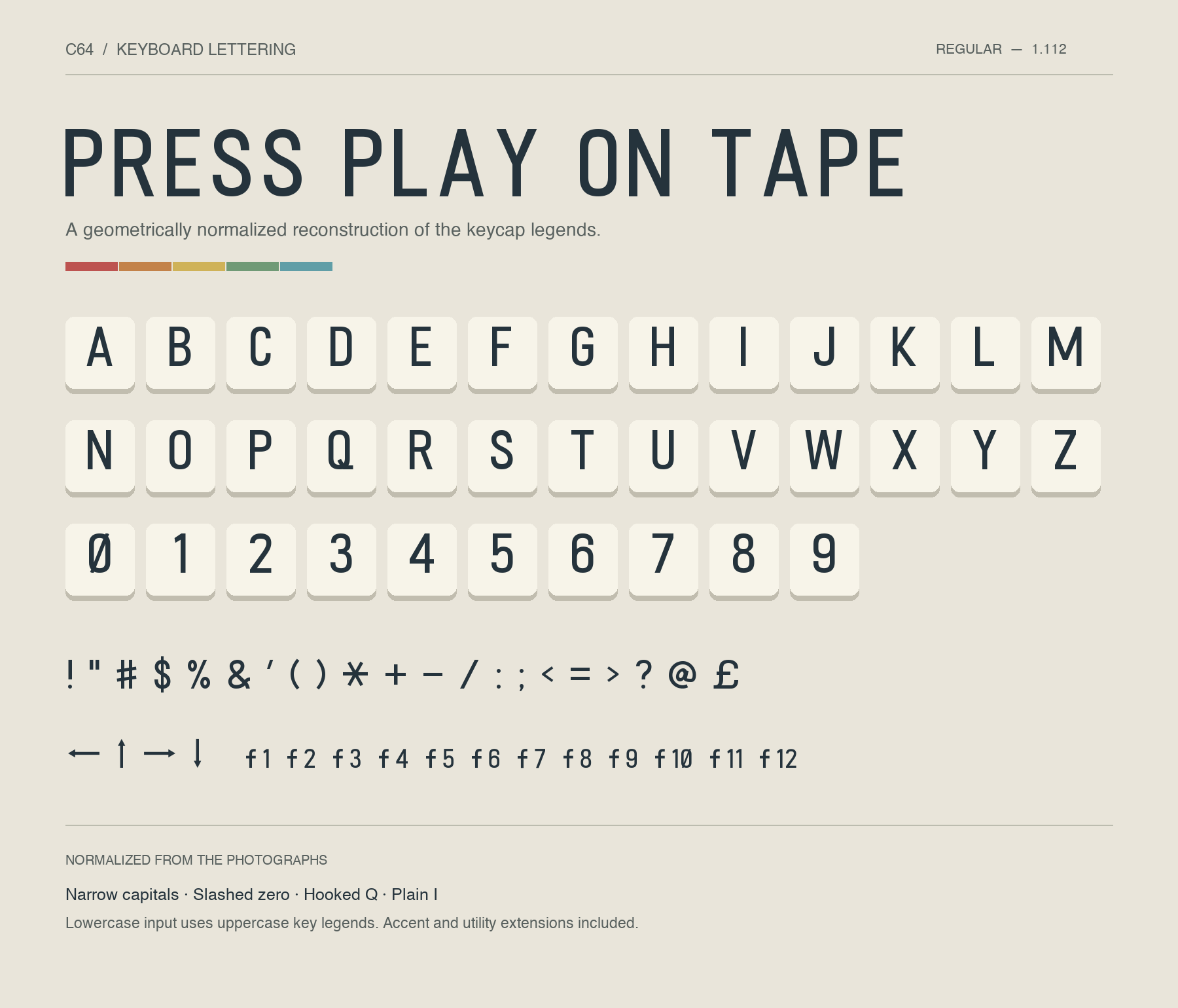
 C64 Keyboard — шрифт, воссоздающий напечатанные обозначения букв и символов с настоящей клавиатуры Commodore 64, обведённые и вычищенные по фотографиям реальных клавиш. Он поставляется как настольные файлы TTF/OTF, веб-шрифт, редактируемые контуры и образец для предпросмотра глифов.
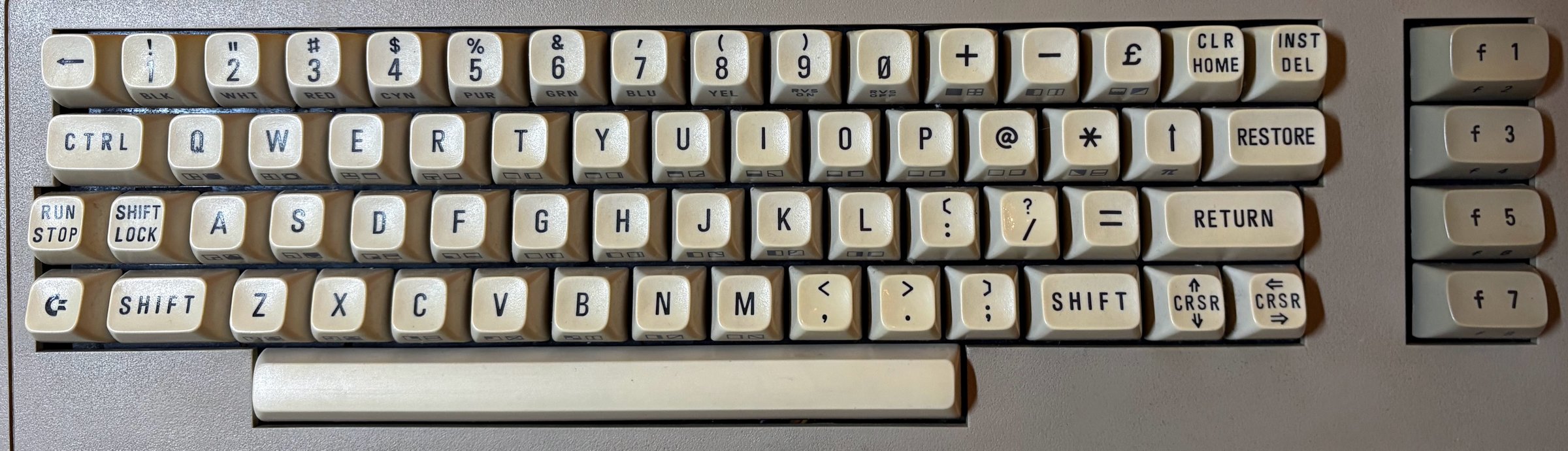
C64 Keyboard — шрифт, воссоздающий напечатанные обозначения букв и символов с настоящей клавиатуры Commodore 64, обведённые и вычищенные по фотографиям реальных клавиш. Он поставляется как настольные файлы TTF/OTF, веб-шрифт, редактируемые контуры и образец для предпросмотра глифов.Это прямая обводка с фото или перерисованный шрифт?Это вычищенная реконструкция, а не буквальная обводка: формы сглажены до согласованных пропорций, и даже графические глифы PETSCII — геометрические реконструкции, выведенные из фотографии клавиш, а не точные обводки с фото.
Это вычищенная реконструкция, а не буквальная обводка: формы сглажены до согласованных пропорций, и даже графические глифы PETSCII — геометрические реконструкции, выведенные из фотографии клавиш, а не точные обводки с фото.Как его установить и использовать?Установите файл TTF или OTF и выберите C64 Keyboard в своём приложении, либо не устанавливайте ничего и попробуйте шрифт вживую в онлайн-превью в браузере, либо скачайте полный пакет и откройте preview.html локально.
Установите файл TTF или OTF и выберите C64 Keyboard в своём приложении, либо не устанавливайте ничего и попробуйте шрифт вживую в онлайн-превью в браузере, либо скачайте полный пакет и откройте preview.html локально.Нужно ли что-то особенное, если уже установлена более старая версия?Да — замените её на версию 1.112 и перезапустите все приложения, которые всё ещё показывают старый шрифт. Два старых глифа (прежний символ U+E000 и обозначения имён клавиш U+E020–U+E028) в этой версии удалены.
Да — замените её на версию 1.112 и перезапустите все приложения, которые всё ещё показывают старый шрифт. Два старых глифа (прежний символ U+E000 и обозначения имён клавиш U+E020–U+E028) в этой версии удалены.Можно ли использовать это на сайте как веб-шрифт?Да, версия веб-шрифта идёт в комплекте с TTF и OTF, а проект также предлагает живое превью в браузере, чтобы протестировать глифы до скачивания чего-либо.
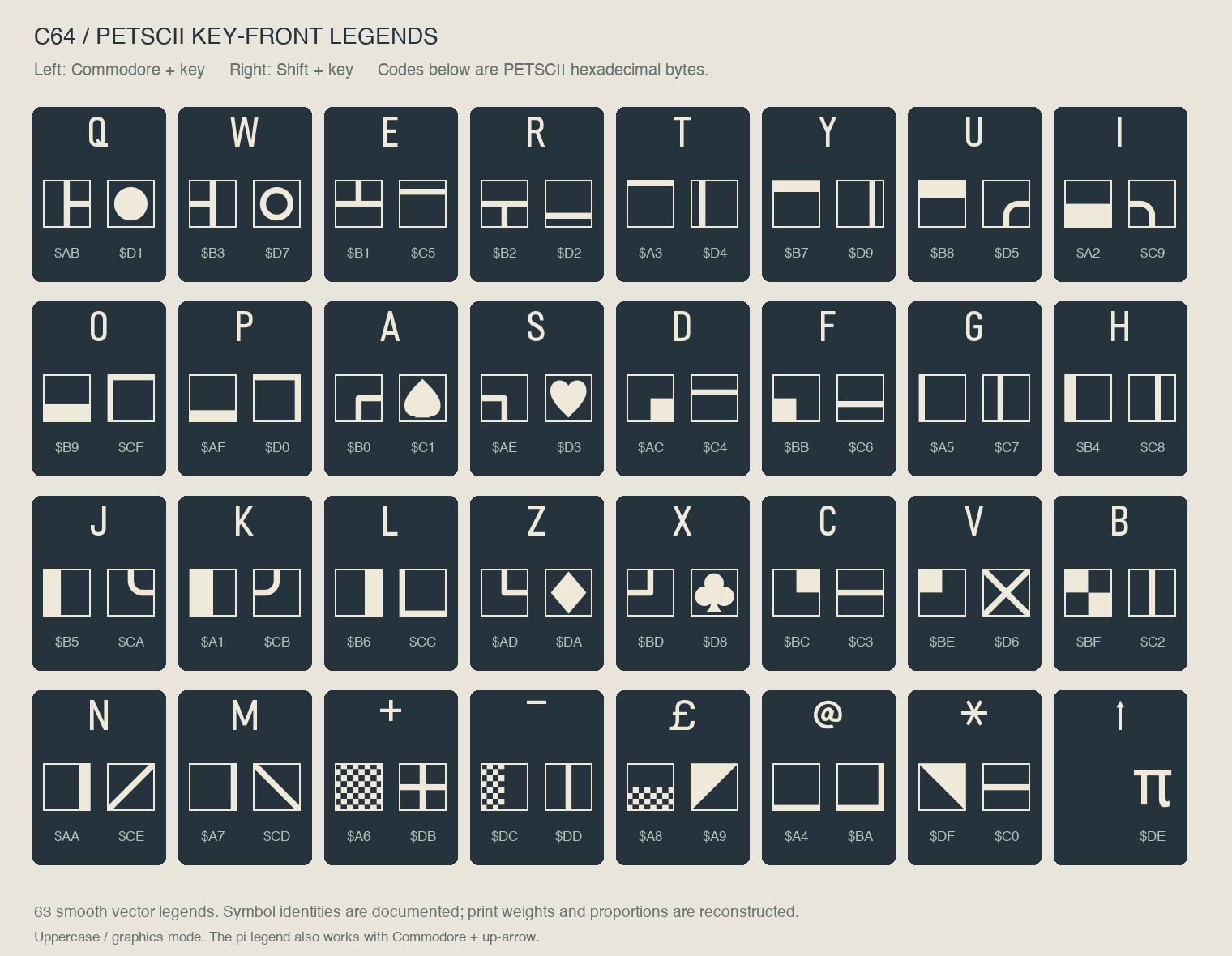
Да, версия веб-шрифта идёт в комплекте с TTF и OTF, а проект также предлагает живое превью в браузере, чтобы протестировать глифы до скачивания чего-либо.Какие буквы и символы включает шрифт?Прописные буквы, цифры, знаки препинания, стрелки, £ и π, отдельные буквы с диакритикой, включая венгерские, обозначения функциональных клавиш f1-f12 и все 63 графических обозначения PETSCII на лицевой стороне клавиш. Строчный ввод отображается прописными буквами.
Прописные буквы, цифры, знаки препинания, стрелки, £ и π, отдельные буквы с диакритикой, включая венгерские, обозначения функциональных клавиш f1-f12 и все 63 графических обозначения PETSCII на лицевой стороне клавиш. Строчный ввод отображается прописными буквами.Как набирать графические символы PETSCII?Откройте онлайн-превью или preview.html, нажимайте кнопки PETSCII, чтобы вставлять символы в тестовый набор текста, затем скопируйте текст в своё приложение с выбранным шрифтом. Левые обозначения соответствуют Commodore+клавиша, правые — Shift+клавиша.
Откройте онлайн-превью или preview.html, нажимайте кнопки PETSCII, чтобы вставлять символы в тестовый набор текста, затем скопируйте текст в своё приложение с выбранным шрифтом. Левые обозначения соответствуют Commodore+клавиша, правые — Shift+клавиша.Откуда на самом деле взяты начертания букв?Они сняты с собственного Commodore 64 автора — экземпляра центральноевропейского рынка; его физические клавиши стали прямым образцом для каждой буквы, цифры и символа шрифта.
Они сняты с собственного Commodore 64 автора — экземпляра центральноевропейского рынка; его физические клавиши стали прямым образцом для каждой буквы, цифры и символа шрифта.Можно ли самому редактировать или расширять шрифт?Да, редактируемые контуры лежат в папке glyphs/ вместе с инструментами сборки в scripts/, а в репозитории есть инструкции по сборке и история версий для всех, кто хочет его изменять.
Да, редактируемые контуры лежат в папке glyphs/ вместе с инструментами сборки в scripts/, а в репозитории есть инструкции по сборке и история версий для всех, кто хочет его изменять.What are similar projects?source-han-sans, Macintosh-Skeletal-Filled, libron, awesome-design, inter, Iosevka, Hack, devicon
source-han-sans, Macintosh-Skeletal-Filled, libron, awesome-design, inter, Iosevka, Hack, devicon