swag
🌍 English ∙ 简体中文 ∙ Português






Swag converts Go annotations to Swagger Documentation 2.0. We've created a variety of plugins for popular Go web frameworks. This allows you to quickly integrate with an existing Go project (using Swagger UI).
Contents
Getting started
Add comments to your API source code, See Declarative Comments Format.
Install swag by using:
go install github.com/swaggo/swag/cmd/swag@latest
To build from source you need Go (1.19 or newer).
Alternatively you can run the docker image:
docker run --rm -v $(pwd):/code ghcr.io/swaggo/swag:latest
Or download a pre-compiled binary from the release page.
- Run
swag init in the project's root folder which contains the main.go file. This will parse your comments and generate the required files (docs folder and docs/docs.go).
swag init
Make sure to import the generated docs/docs.go so that your specific configuration gets init'ed. If your General API annotations do not live in main.go, you can let swag know with -g flag.
import _ "example-module-name/docs"
swag init -g http/api.go
- (optional) Use
swag fmt format the SWAG comment. (Please upgrade to the latest version)
swag fmt
swag cli
swag init -h
NAME:
   swag init - Create docs.go

USAGE:
   swag init [command options] [arguments...]

OPTIONS:
   --quiet, -q                            Make the logger quiet. (default: false)
   --generalInfo value, -g value          Go file path in which 'swagger general API Info' is written (default: "main.go")
   --dir value, -d value                  Directories you want to parse,comma separated and general-info file must be in the first one (default: "./")
   --exclude value                        Exclude directories and files when searching, comma separated
   --propertyStrategy value, -p value     Property Naming Strategy like snakecase,camelcase,pascalcase (default: "camelcase")
   --output value, -o value               Output directory for all the generated files(swagger.json, swagger.yaml and docs.go) (default: "./docs")
   --outputTypes value, --ot value        Output types of generated files (docs.go, swagger.json, swagger.yaml) like go,json,yaml (default: "go,json,yaml")
   --parseVendor                          Parse go files in 'vendor' folder, disabled by default (default: false)
   --parseDependency, --pd                Parse go files inside dependency folder, disabled by default (default: false)
   --parseDependencyLevel, --pdl          Enhancement of '--parseDependency', parse go files inside dependency folder, 0 disabled, 1 only parse models, 2 only parse operations, 3 parse all (default: 0)
   --markdownFiles value, --md value      Parse folder containing markdown files to use as description, disabled by default
   --codeExampleFiles value, --cef value  Parse folder containing code example files to use for the x-codeSamples extension, disabled by default
   --parseInternal                        Parse go files in internal packages, disabled by default (default: false)
   --generatedTime                        Generate timestamp at the top of docs.go, disabled by default (default: false)
   --parseDepth value                     Dependency parse depth (default: 100)
   --requiredByDefault                    Set validation required for all fields by default (default: false)
   --instanceName value                   This parameter can be used to name different swagger document instances. It is optional.
   --overridesFile value                  File to read global type overrides from. (default: ".swaggo")
   --parseGoList                          Parse dependency via 'go list' (default: true)
   --tags value, -t value                 A comma-separated list of tags to filter the APIs for which the documentation is generated.Special case if the tag is prefixed with the '!' character then the APIs with that tag will be excluded
   --templateDelims value, --td value     Provide custom delimiters for Go template generation. The format is leftDelim,rightDelim. For example: "[[,]]"
   --collectionFormat value, --cf value   Set default collection format (default: "csv")
   --state value                          Initial state for the state machine (default: ""), @HostState in root file, @State in other files
   --parseFuncBody                        Parse API info within body of functions in go files, disabled by default (default: false)
   --help, -h                             show help (default: false)
swag fmt -h
NAME:
   swag fmt - format swag comments

USAGE:
   swag fmt [command options] [arguments...]

OPTIONS:
   --dir value, -d value          Directories you want to parse,comma separated and general-info file must be in the first one (default: "./")
   --exclude value                Exclude directories and files when searching, comma separated
   --generalInfo value, -g value  Go file path in which 'swagger general API Info' is written (default: "main.go")
   --help, -h                     show help (default: false)
Supported Web Frameworks
How to use it with Gin
Find the example source code here.
Finish the steps in Getting started
- After using
swag init to generate Swagger 2.0 docs, import the following packages:
import "github.com/swaggo/gin-swagger" // gin-swagger middleware
import "github.com/swaggo/files" // swagger embed files
- Add General API annotations in
main.go code:
// @title           Swagger Example API
// @version         1.0
// @description     This is a sample server celler server.
// @termsOfService  http://swagger.io/terms/

// @contact.name   API Support
// @contact.url    http://www.swagger.io/support
// @contact.email  [email protected]

// @license.name  Apache 2.0
// @license.url   http://www.apache.org/licenses/LICENSE-2.0.html

// @host      localhost:8080
// @BasePath  /api/v1

// @securityDefinitions.basic  BasicAuth

// @externalDocs.description  OpenAPI
// @externalDocs.url          https://swagger.io/resources/open-api/
func main() {
	r := gin.Default()

	c := controller.NewController()

	v1 := r.Group("/api/v1")
	{
		accounts := v1.Group("/accounts")
		{
			accounts.GET(":id", c.ShowAccount)
			accounts.GET("", c.ListAccounts)
			accounts.POST("", c.AddAccount)
			accounts.DELETE(":id", c.DeleteAccount)
			accounts.PATCH(":id", c.UpdateAccount)
			accounts.POST(":id/images", c.UploadAccountImage)
		}
    //...
	}
	r.GET("/swagger/*any", ginSwagger.WrapHandler(swaggerFiles.Handler))
	r.Run(":8080")
}
//...
Additionally some general API info can be set dynamically. The generated code package docs exports SwaggerInfo variable which we can use to set the title, description, version, host and base path programmatically. Example using Gin:
package main

import (
	"github.com/gin-gonic/gin"
	"github.com/swaggo/files"
	"github.com/swaggo/gin-swagger"

	"./docs" // docs is generated by Swag CLI, you have to import it.
)

// @contact.name   API Support
// @contact.url    http://www.swagger.io/support
// @contact.email  [email protected]

// @license.name  Apache 2.0
// @license.url   http://www.apache.org/licenses/LICENSE-2.0.html
func main() {

	// programmatically set swagger info
	docs.SwaggerInfo.Title = "Swagger Example API"
	docs.SwaggerInfo.Description = "This is a sample server Petstore server."
	docs.SwaggerInfo.Version = "1.0"
	docs.SwaggerInfo.Host = "petstore.swagger.io"
	docs.SwaggerInfo.BasePath = "/v2"
	docs.SwaggerInfo.Schemes = []string{"http", "https"}

	r := gin.New()

	// use ginSwagger middleware to serve the API docs
	r.GET("/swagger/*any", ginSwagger.WrapHandler(swaggerFiles.Handler))

	r.Run()
}
- Add API Operation annotations in
controller code
package controller

import (
    "fmt"
    "net/http"
    "strconv"

    "github.com/gin-gonic/gin"
    "github.com/swaggo/swag/example/celler/httputil"
    "github.com/swaggo/swag/example/celler/model"
)

// ShowAccount godoc
// @Summary      Show an account
// @Description  get string by ID
// @Tags         accounts
// @Accept       json
// @Produce      json
// @Param        id   path      int  true  "Account ID"
// @Success      200  {object}  model.Account
// @Failure      400  {object}  httputil.HTTPError
// @Failure      404  {object}  httputil.HTTPError
// @Failure      500  {object}  httputil.HTTPError
// @Router       /accounts/{id} [get]
func (c *Controller) ShowAccount(ctx *gin.Context) {
  id := ctx.Param("id")
  aid, err := strconv.Atoi(id)
  if err != nil {
    httputil.NewError(ctx, http.StatusBadRequest, err)
    return
  }
  account, err := model.AccountOne(aid)
  if err != nil {
    httputil.NewError(ctx, http.StatusNotFound, err)
    return
  }
  ctx.JSON(http.StatusOK, account)
}

// ListAccounts godoc
// @Summary      List accounts
// @Description  get accounts
// @Tags         accounts
// @Accept       json
// @Produce      json
// @Param        q    query     string  false  "name search by q"  Format(email)
// @Success      200  {array}   model.Account
// @Failure      400  {object}  httputil.HTTPError
// @Failure      404  {object}  httputil.HTTPError
// @Failure      500  {object}  httputil.HTTPError
// @Router       /accounts [get]
func (c *Controller) ListAccounts(ctx *gin.Context) {
  q := ctx.Request.URL.Query().Get("q")
  accounts, err := model.AccountsAll(q)
  if err != nil {
    httputil.NewError(ctx, http.StatusNotFound, err)
    return
  }
  ctx.JSON(http.StatusOK, accounts)
}
//...
swag init
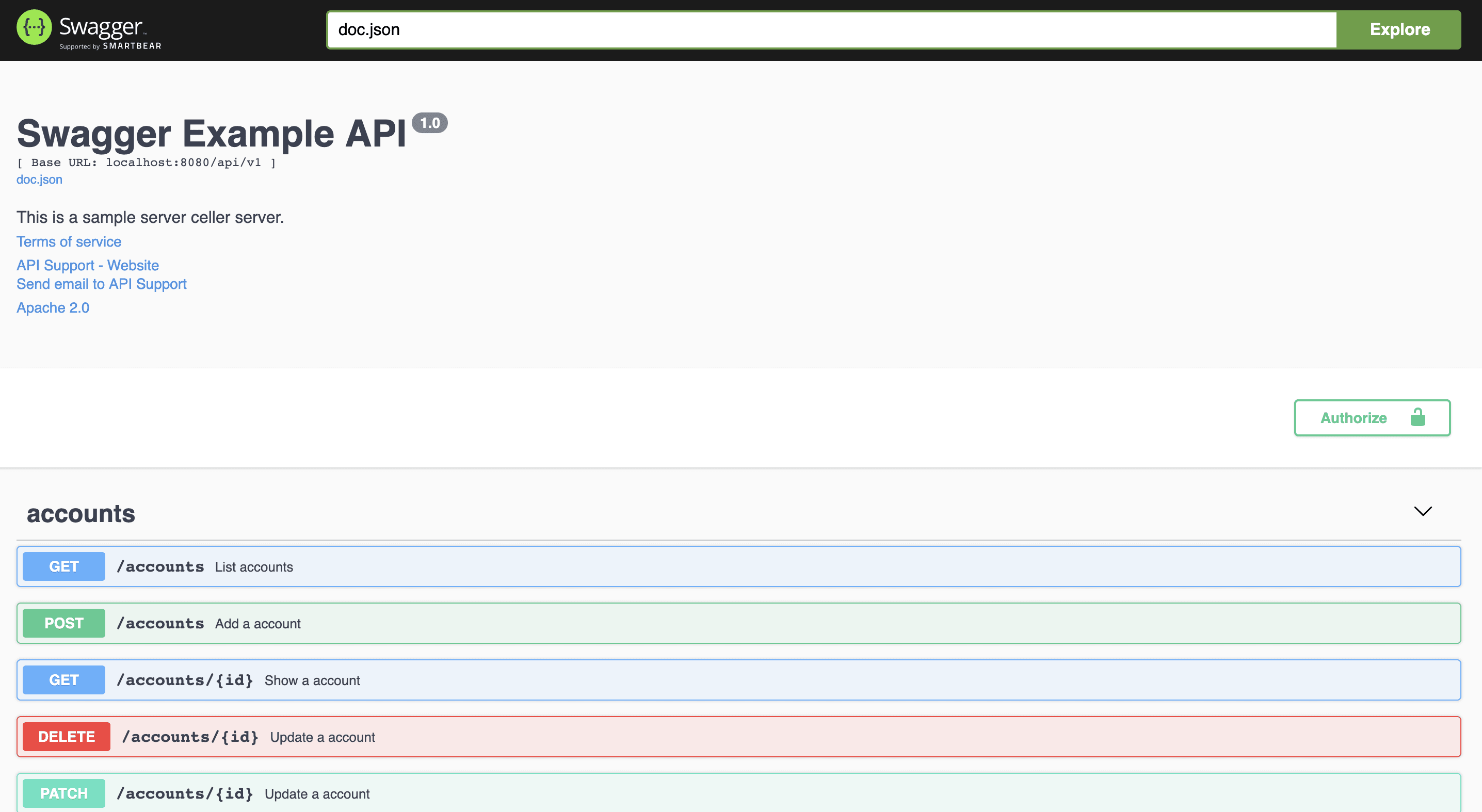
- Run your app, and browse to http://localhost:8080/swagger/index.html. You will see Swagger 2.0 Api documents as shown below:
The Swag Comments can be automatically formatted, just like 'go fmt'.
Find the result of formatting here.
Usage:
swag fmt
Exclude folder:
swag fmt -d ./ --exclude ./internal
When using swag fmt, you need to ensure that you have a doc comment for the function to ensure correct formatting.
This is due to swag fmt indenting swag comments with tabs, which is only allowed after a standard doc comment.
For example, use
// ListAccounts lists all existing accounts
//
//  @Summary      List accounts
//  @Description  get accounts
//  @Tags         accounts
//  @Accept       json
//  @Produce      json
//  @Param        q    query     string  false  "name search by q"  Format(email)
//  @Success      200  {array}   model.Account
//  @Failure      400  {object}  httputil.HTTPError
//  @Failure      404  {object}  httputil.HTTPError
//  @Failure      500  {object}  httputil.HTTPError
//  @Router       /accounts [get]
func (c *Controller) ListAccounts(ctx *gin.Context) {
Implementation Status
Swagger 2.0 document
- Basic Structure
- API Host and Base Path
- Paths and Operations
- Describing Parameters
- Describing Request Body
- Describing Responses
- MIME Types
- Authentication
- Basic Authentication
- API Keys
- Adding Examples
- File Upload
- Enums
- Grouping Operations With Tags
- Swagger Extensions
General API Info
Example
celler/main.go
| annotation |
description |
example |
| title |
Required. The title of the application. |
// @title Swagger Example API |
| version |
Required. Provides the version of the application API. |
// @version 1.0 |
| description |
A short description of the application. |
// @description This is a sample server celler server. |
| tag.name |
Name of a tag. |
// @tag.name This is the name of the tag |
| tag.description |
Description of the tag |
// @tag.description Cool Description |
| tag.docs.url |
Url of the external Documentation of the tag |
// @tag.docs.url https://example.com |
| tag.docs.description |
Description of the external Documentation of the tag |
// @tag.docs.description Best example documentation |
| termsOfService |
The Terms of Service for the API. |
// @termsOfService http://swagger.io/terms/ |
| contact.name |
The contact information for the exposed API. |
// @contact.name API Support |
| contact.url |
The URL pointing to the contact information. MUST be in the format of a URL. |
// @contact.url http://www.swagger.io/support |
| contact.email |
The email address of the contact person/organization. MUST be in the format of an email address. |
// @contact.email [email protected] |
| license.name |
Required. The license name used for the API. |
// @license.name Apache 2.0 |
| license.url |
A URL to the license used for the API. MUST be in the format of a URL. |
// @license.url http://www.apache.org/licenses/LICENSE-2.0.html |
| host |
The host (name or ip) serving the API. |
// @host localhost:8080 |
| BasePath |
The base path on which the API is served. |
// @BasePath /api/v1 |
| accept |
A list of MIME types the APIs can consume. Note that Accept only affects operations with a request body, such as POST, PUT and PATCH. Value MUST be as described under Mime Types. |
// @accept json |
| produce |
A list of MIME types the APIs can produce. Value MUST be as described under Mime Types. |
// @produce json |
| query.collection.format |
The default collection(array) param format in query,enums:csv,multi,pipes,tsv,ssv. If not set, csv is the default. |
// @query.collection.format multi |
| schemes |
The transfer protocol for the operation that separated by spaces. |
// @schemes http https |
| externalDocs.description |
Description of the external document. |
// @externalDocs.description OpenAPI |
| externalDocs.url |
URL of the external document. |
// @externalDocs.url https://swagger.io/resources/open-api/ |
| x-name |
The extension key, must be start by x- and take only json value |
// @x-example-key {"key": "value"} |
Using markdown descriptions
When a short string in your documentation is insufficient, or you need images, code examples and things like that you may want to use markdown descriptions. In order to use markdown descriptions use the following annotations.
| annotation |
description |
example |
| title |
Required. The title of the application. |
// @title Swagger Example API |
| version |
Required. Provides the version of the application API. |
// @version 1.0 |
| description.markdown |
A short description of the application. Parsed from the api.md file. This is an alternative to @description |
// @description.markdown No value needed, this parses the description from api.md |
| tag.name |
Name of a tag. |
// @tag.name This is the name of the tag |
| tag.description.markdown |
Description of the tag this is an alternative to tag.description. The description will be read from a file named like tagname.md |
// @tag.description.markdown |
| tag.x-name |
The extension key, must be start by x- and take only string value |
// @x-example-key value |
API Operation
Example
celler/controller

 Swag 是一个面向 Go 的命令行工具,能把源代码里的注释标注转换成 Swagger 2.0 API 文档。它内置了对常见 Go Web 框架的集成,这样文档就能通过 Swagger UI 直接从你的应用里提供。