Free, local stem separation. No account. No upload. No subscription.
JOIN THE COMMUNITY
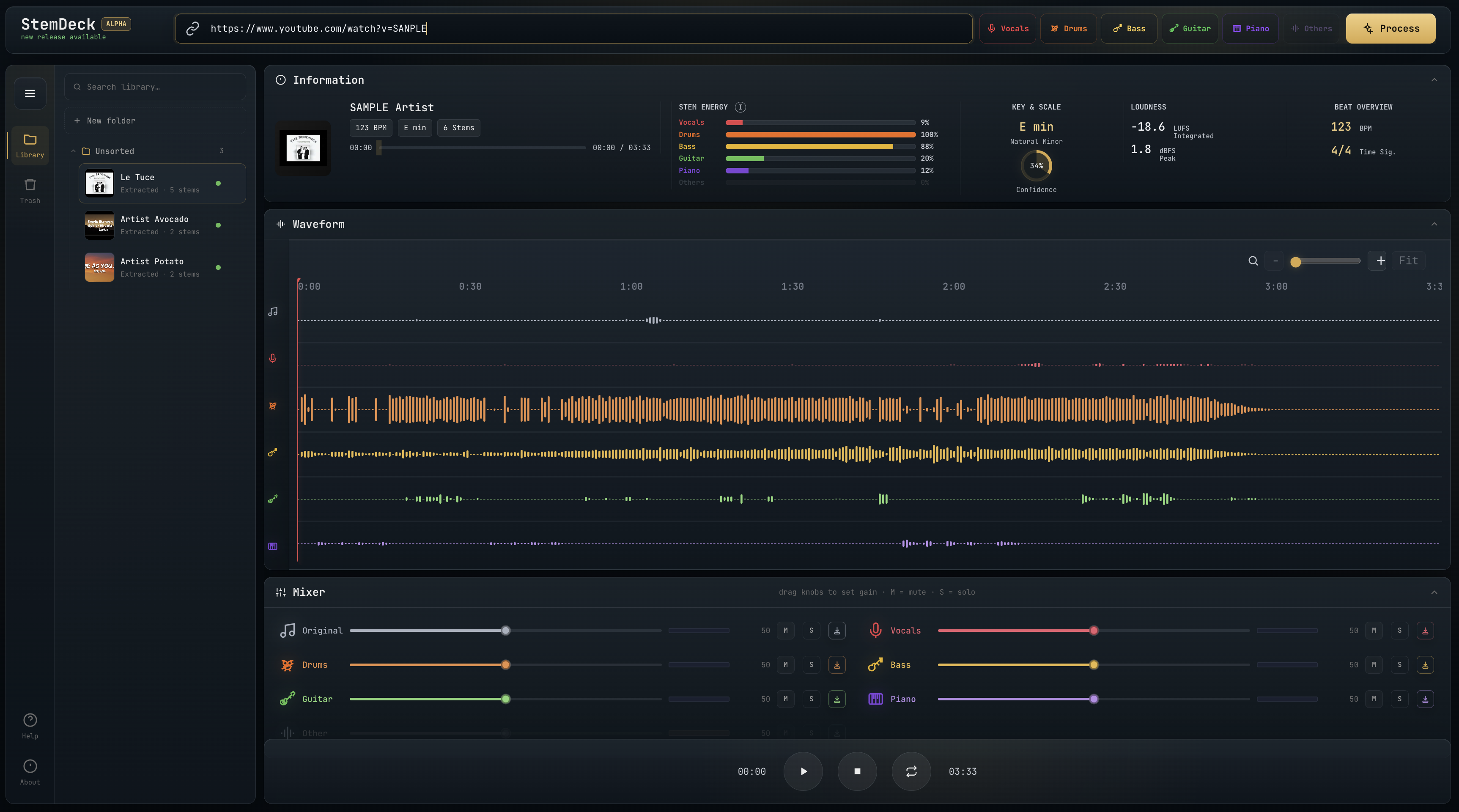
Drop in an MP3, WAV, FLAC, OGG/Opus, MP4, or M4A file, or paste a YouTube URL, and StemDeck splits the audio into up to six stems (vocals, drums, bass, guitar, piano, other). Play them back in a DAW-style multitrack mixer: mute, solo, balance levels, zoom the waveform, loop a region, and export individual stems or a custom mix. Everything runs locally on your own machine.
What is this? StemDeck is a stem separation tool, not a downloader. Its main job is processing audio you already own: drag an MP3, WAV, FLAC, OGG, or M4A onto the import bar and go. YouTube support is a convenience for content you have the right to process. StemDeck does not store, cache, or redistribute any downloaded content. Everything happens locally and nothing leaves your machine.
StemDeck is a free, open alternative to cloud stem-splitters like Moises and LALAL.AI: no account, no quota, no uploads, no subscription. If you want stems for personal study and prefer to keep things local and free, StemDeck has you covered. If you need the polish, a mobile app, or deeper musician tooling, the commercial products are a better fit.
Star History
We Recommend
StemDeck is free and does not accept any money, sponsorship, or funding from anyone listed below. I share these makers and artists and communities purely for the joy of pointing you toward wonderful people doing beautiful work. Go meet them ❤️
6-stem separation via Demucs htdemucs_6s, with auto-detection of the best Torch device (CUDA on NVIDIA, MPS on Apple Silicon, CPU fallback).
YouTube and local file import. Paste a YouTube URL or drop an MP3, WAV, FLAC, OGG/Opus, MP4, or M4A directly onto the import bar.
DAW-style waveform editor with min/max sample rendering across all stems, shared normalization, zoom in/out/Fit, loop drag on the ruler, gold playhead overlay, and stem-aligned lanes.
Stem subset extraction. Click stem chips to choose which stems to keep. Clicking from "all selected" snaps to "only this one"; subsequent clicks add or remove.
"Original" backing track. When you pick a subset, a 7th lane contains the complement (full song minus selected stems), perfect for A/B reference without doubling.
Downloadable selected mix. A single mix.wav of just your selected stems, summed via ffmpeg amix.
Per-stem mixer with volume fader, mute, solo, and "monitor" (solo-only) per stem. State syncs between the preview mixer and the stems sidebar.
Live VU meters per stem. Post-gain RMS via Web Audio analysers with peak hold and slow falloff.
Song analysis including BPM (librosa beat tracker), key, scale, and confidence (Albrecht-Shanahan profiles), integrated LUFS (BS.1770), and sample peak in dBFS.
Cancellable jobs. Cancel mid-pipeline and the runner terminates the active subprocess immediately, deletes the partial job dir, and returns to ready.
Library panel with folder-based track organisation, drag-and-drop, search, and trash.
Honest Comparison
StemDeck is not trying to compete with commercial stem-separation products. It covers the core use case well and stops there. This table exists so you can make an informed choice rather than discover the gaps after the fact.
StemDeck
Moises / LALAL.AI / similar
Price
Free, forever
Freemium; credits or subscription required for regular use
Hosting
Runs entirely on your machine
Cloud; audio must be uploaded to their servers
Account / login
None
Required
Internet required
Only for YouTube download and first model fetch (~170 MB, cached after)
Always; no offline use
Privacy
Audio never leaves your machine
Audio is uploaded and processed on third-party servers
Data retention
You control it; delete anytime
Governed by their privacy policy and retention period
Stem model
Demucs htdemucs_6s (open source, Meta AI)
Proprietary models, regularly updated, generally higher quality
Stem count
6 (vocals, drums, bass, guitar, piano, other)
Up to 10 depending on service and plan
Input formats
YouTube URL, MP3, WAV, FLAC, OGG/Opus, MP4, M4A
MP3, WAV, FLAC, M4A, and more depending on service
Processing speed
Depends on your hardware; fast with a GPU, slow on CPU only
Fast regardless of your hardware (runs on their servers)
Batch processing
One job at a time
Yes, on paid plans
Mobile app
No
iOS and Android
Extra features
No (no pitch shift, chord detection, lyrics, click track, BPM tap)
Yes, varies by product
Polish
Functional, hobby-grade UI
Polished, production-grade apps
Source code
Open source, forkable, self-hostable
Closed source
If you need speed, quality, mobile access, or the extra musician tooling, the commercial products are worth the money. If you want stems for personal study, prefer to keep audio private, or just want something that runs locally with no strings attached, StemDeck is enough.
Download
Pre-built installers and zips are attached to each GitHub Release.
macOS
DMG
GPU
Chip
StemDeck-macOS-arm64.dmg
Apple Silicon (MPS)
M1 and later
StemDeck-macOS-x64.dmg
CPU only
Intel
Open the DMG, drag StemDeck to Applications, and launch it. On first launch the setup screen downloads the Python runtime (500 MB), FFmpeg, and the Demucs model (170 MB). Subsequent launches skip setup and start in seconds. No Python or system dependencies required.
macOS may show a Gatekeeper prompt on first open — right-click the app and choose Open to bypass it.
Windows
Zip
GPU
Approx. size
StemDeck-Windows-x64.zip
CPU only
~700 MB
StemDeck-Windows-x64.NVIDIA.zip
NVIDIA CUDA
~1.6 GB
Extract the zip anywhere, run StemDeck.exe. FFmpeg, the Demucs model, config, and logs live in a data/ folder next to StemDeck.exe, not in AppData; move or copy the whole extracted folder anywhere and it keeps working. On first launch the app verifies the bundled Python runtime and downloads FFmpeg and the Demucs model (170 MB) into that folder. Subsequent launches skip this and start in seconds. Everything is self-contained; no Python or system dependencies required. Your job/library data stays in its usual location (`/Documents/StemDeck` by default) and is relocatable anytime from Settings → StemData location.
Technologies
StemDeck is built on Python 3.12 managed via uv, with a FastAPI backend serving REST and Server-Sent Events. Stem separation uses Demucs (htdemucs_6s), Meta AI's open-source 6-stem neural network. The optional on-demand lead/backing vocal split runs the UVR-MDX-NET Karaoke 2 model via audio-separator, trained as part of the Ultimate Vocal Remover project by Anjok07. YouTube audio is fetched via yt-dlp; transcoding and mixing use FFmpeg. BPM detection and key analysis run on librosa; loudness measurement uses pyloudnorm (ITU-R BS.1770). The macOS and Windows desktop shells are Tauri v2 (Rust/WKWebView on macOS, Rust/WebView2 on Windows). The frontend is vanilla JS with the Web Audio API, no framework and no build step; waveforms are rendered on <canvas> using min/max sample rendering.
Thanks to the creators and maintainers of all the open-source libraries that make StemDeck possible.
Build from Source
macOS Native App
Requires Rust, Node.js, and Python 3.12. Builds a self-contained .app that downloads its own runtime on first launch.
# First time only — add the cross-compilation targets
rustup target add aarch64-apple-darwin   # Apple Silicon
rustup target add x86_64-apple-darwin    # Intel

# Build Apple Silicon
ARCH=arm64 scripts/macos/make-runtime-pack.sh
ARCH=arm64 scripts/macos/make-app.sh
ARCH=arm64 scripts/macos/make-dmg.sh

# Build Intel (requires Rosetta 2 and an x86_64 Python)
ARCH=x64 scripts/macos/make-runtime-pack.sh
ARCH=x64 scripts/macos/make-app.sh
ARCH=x64 scripts/macos/make-dmg.sh
The .app lands at desktop/src-tauri/target/<target>/release/bundle/macos/StemDeck.app. The DMG lands at .build/macos-dist/StemDeck-macOS-<arch>.dmg.
To run a fresh build directly without the DMG:
open desktop/src-tauri/target/aarch64-apple-darwin/release/bundle/macos/StemDeck.app
If macOS blocks the app with a Gatekeeper prompt, run:
Note: To test a clean first-launch during development, you can wipe previous app data first: rm -rf ~/Library/Application\ Support/StemDeck. Don't do this on a real install.
Web Server (macOS / Linux / Windows with Python 3.12+)
Prerequisites
Python 3.12 or newer, ffmpeg on your PATH, and uv. Around 170 MB of free disk for the Demucs model, which downloads automatically on first run.
setup uses Homebrew on macOS and apt-get on Debian/Ubuntu. For other Linux distros, install ffmpeg and uv manually, then run uv sync followed by ./run.sh start.
git clone https://github.com/stemdeckapp/stemdeck stemdeck && cd stemdeck
uv sync
uv run uvicorn app.main:app --reload --timeout-graceful-shutdown 5
--timeout-graceful-shutdown bounds how long uvicorn waits for open
connections when you stop it. StemDeck keeps a long-lived SSE stream open
for the import queue while a browser tab is on the app, so without it
Ctrl-C waits for that stream instead of exiting.
Docker
docker compose -f build/docker-compose.yml up --build
Stems land in ./jobs/ on the host. Demucs weights are cached in a named volume so they don't re-download on rebuild. Note: no GPU passthrough on macOS Docker.
A prebuilt image is published to GHCR. Tags: edge (rolling, rebuilt on every merge to main), latest (newest stable release), and X.Y.Z (pinned to a release).
On a Linux host with an NVIDIA GPU (driver + NVIDIA Container Toolkit installed), add --runtime=nvidia -e NVIDIA_VISIBLE_DEVICES=all and StemDeck auto-detects CUDA. The image already bundles CUDA-enabled torch, so no separate CUDA install is needed.
Unraid
StemDeck is available in Unraid Community Applications: open Apps, search "StemDeck", and install. Map the two volumes to persistent appdata paths:
The library is persistent by default (STEMDECK_PERSIST_LIBRARY=1), so tracks are never auto-deleted. For GPU acceleration, install the Nvidia Driver plugin, then set the container's Extra Parameters to --runtime=nvidia (the NVIDIA_VISIBLE_DEVICES and NVIDIA_DRIVER_CAPABILITIES variables are already in the template). CPU-only works with no extra configuration.
run.sh control script
./run.sh setup      # one-shot: install ffmpeg + uv, then uv sync
./run.sh start      # boots uvicorn in the background
./run.sh stop       # graceful shutdown
./run.sh restart    # stop + start
./run.sh status     # is it running?
How to Use
On the import bar, click stem chips to choose which stems to extract (defaults to all 6).
Paste a YouTube URL or drop an audio file (MP3, WAV, FLAC, OGG, MP4, M4A), then click Process.
When done, the studio dashboard appears. If you picked a subset, the first lane is Original (full song minus your selection); the rest are your isolated stems.
Mix: Play/Pause/Stop controls the master transport. M mutes a stem, S solos it (additive; multiple solos stay audible), Monitor solos only that stem and clears others. The volume fader moves 1:1 with drag; double-click resets to 0 dB; Shift+wheel gives coarse adjustment and plain wheel gives fine. The Reset, Mute, and Solo toolbar buttons act on all stems at once.
Drag on the ruler to define a loop region; click Loop to enable. Use + / - /
stemdeck (stemdeckapp/stemdeck)
Choose a tag and it will appear here. With no tags selected, all catalog projects are shown.
Searching Database…
Choose a tag and it will appear here. With no tags selected, all catalog projects are shown.
Что это такое?StemDeck — это бесплатный инструмент с открытым исходным кодом для разделения трека на дорожки (stems): загружаете песню, а программа раскладывает её на отдельные дорожки — вокал, ударные, бас, гитару, фортепиано и остальное. Это удобно для репетиций, расшифровки, ремиксов и другой работы со звуком, и всё происходит прямо на вашем компьютере.
Это программа для компьютера или она работает в браузере?И то и другое. Есть готовые приложения для macOS и Windows на базе Tauri v2, а также режим веб-сервера (FastAPI + SSE) и Docker-образ, которые можно запустить локально или разместить на своём сервере — управление везде идёт через один и тот же интерактивный веб-интерфейс.
Как её запустить?Скачайте DMG (macOS) или zip (Windows) со страницы GitHub Releases и запустите. При первом запуске будут загружены встроенная среда Python (~500 МБ), FFmpeg и модель Demucs (~170 МБ); после этого ничего дополнительно устанавливать не нужно — ни Python, ни системных зависимостей.
Чем она уступает платным сплиттерам?Одновременно выполняется только одна задача, мобильного приложения нет, а таких функций, как изменение тональности, распознавание аккордов или тексты песен, не предусмотрено. Открытая модель Demucs даёт 6 дорожек любительского качества — ниже уровня отточенных коммерческих сервисов.
Можно просто вставить ссылку на YouTube или нужны свои файлы?И так и так — можно вставить ссылку на YouTube или перетащить на панель импорта локальный файл MP3, WAV, FLAC, OGG, MP4 или M4A. Но это сплиттер, а не загрузчик: он ничего не хранит и не распространяет, поэтому работайте только с тем контентом, на обработку которого у вас есть право.
Мой звук куда-то загружается?С вашего компьютера ничего не уходит: разделение, микширование и анализ выполняются локально, без аккаунта и без загрузок в сеть. Интернет нужен только для импорта с YouTube и разовой загрузки модели ~170 МБ.
Какие дорожки он умеет извлекать?До шести: вокал, ударные, бас, гитара, фортепиано и остальное — с помощью открытой модели Demucs htdemucs6s от Meta AI. Есть ещё дополнительное разделение на главный и бэк-вокал по запросу — через модель UVR-MDX-NET Karaoke 2.
Что можно делать с дорожками после разделения?Микшировать их в многоканальном виде в стиле DAW — с фейдерами громкости, mute, solo, зацикливанием и зумом волновой формы, а затем экспортировать отдельные дорожки или свой микс в .wav. Анализ песни определяет BPM, тональность и лад, интегральную громкость LUFS и пиковый уровень семпла (sample peak).
Чем это отличается от Moises или LALAL.AI?StemDeck бесплатный, с открытым исходным кодом и полностью локальный — без аккаунта, квот и загрузок в облако. Коммерческие приложения — это облачные freemium-сервисы с большим числом дорожек, дополнительными инструментами для музыкантов, мобильными приложениями и более вылизанным интерфейсом, к тому же они работают быстро независимо от вашего железа.
Можно запустить её на сервере или NAS?Да — готовый Docker-образ опубликован на GHCR (теги edge, latest и закреплённые версии релизов), а StemDeck есть в магазине Unraid Community Applications. На Linux-хосте с NVIDIA Container Toolkit внутри Docker доступно даже ускорение на CUDA.














 StemDeck — это бесплатный инструмент с открытым исходным кодом для разделения трека на дорожки (stems): загружаете песню, а программа раскладывает её на отдельные дорожки — вокал, ударные, бас, гитару, фортепиано и остальное. Это удобно для репетиций, расшифровки, ремиксов и другой работы со звуком, и всё происходит прямо на вашем компьютере.