





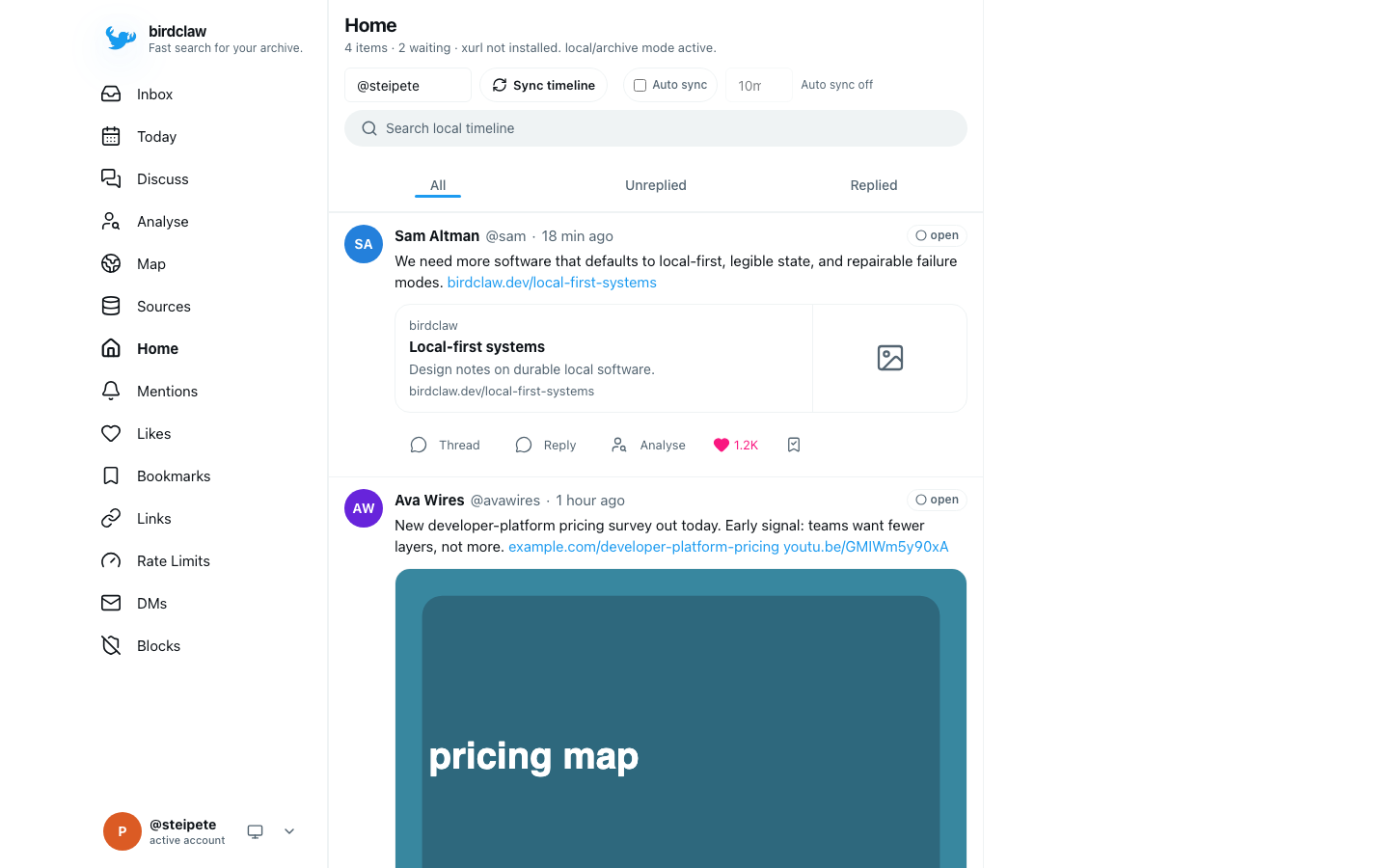
Birdclaw imports Twitter/X archives into local SQLite, adds explicit cached live reads, and exposes the result through a web app, CLI, and optional read-only MCP server. It is for people who want their own searchable history, DMs, saved posts, and follow graph without a cloud backend.
Install
Homebrew is the shortest path on macOS and Linux:
brew install steipete/tap/birdclaw
The package is also published on npm:
npm install -g birdclaw
The npm and Homebrew installs retain the public Node.js >=26.5.1 <27 contract. Source development uses one checksum-pinned Bun 1.4.0-canary.1 build and keeps Node as a tested compatibility lane. See the installation guide for setup and the Bun canary reference for exact checksums, constraints, and rollback boundaries.
Quick start
Create a self-contained demo, search it locally, then open the web app:
birdclaw init --demo
birdclaw search tweets "local-first" --limit 3 --json
birdclaw serve
Open http://localhost:3000. The demo seeds sample tweets, DMs, profiles, and links without credentials or network requests.
Use your archive
A Twitter/X archive establishes the account identity for a new real database and imports tweets, DMs, likes, bookmarks, profiles, media, and follow edges:
birdclaw import archive ~/Downloads/twitter-archive.zip --json
birdclaw import x-json ~/Downloads/saved-tweets.jsonl --json
Imports are idempotent and merge destination-only rows by default. Selected re-imports and exact replacement are documented in Archive import.
Birdclaw stores its database, configuration, and media under ~/.birdclaw. Set BIRDCLAW_HOME to use another root.
Add live data
Archive and local search work without an X login. Live sync delegates to xurl or an existing private bird installation and only runs when requested:
birdclaw sync timeline --limit 100 --refresh --json
birdclaw sync bookmarks --mode auto --limit 100 --refresh --json
Import an archive before the first live sync on a new database. The sign-in guide explains xurl setup and transport selection; the sync guide covers caching, pagination, and rate limits.
Work locally
SQLite is the canonical store. Archive imports and live transports converge on the same tables, and FTS5 powers local tweet and DM search.
| Surface |
What it provides |
Guide |
| Web app |
Home, mentions, saved posts, DMs, inbox, moderation, and network views |
Quickstart |
| CLI |
Search, sync, moderation, research, JSON output, and scheduled jobs |
CLI reference |
| Backup |
Deterministic JSONL shards that round-trip through Git |
Backup |
| MCP |
Read-only cached tweet search and thread tools behind a dedicated token |
MCP server |
Local reads do not trigger network traffic by default. The web server listens on loopback, live writes can be disabled with BIRDCLAW_DISABLE_LIVE_WRITES=1, and the MCP endpoint remains off until its token and public URL are configured.
Bird is optional: xurl supports ordinary live workflows and moderation, while native web access handles DM requests using AUTH_TOKEN and CT0 session cookies. Neither native request access nor xurl moderation needs a browser process. See running without bird.
For an archive-only server, set BIRDCLAW_DEPLOYMENT_READ_ONLY=1 before birdclaw serve. This opt-in mode serves an initialized archive through strict readers, disables web mutations and automatic sync, and hides unavailable controls. See read-only archive deployments for its authentication and storage requirements.
Configuration
~/.birdclaw/config.json selects default accounts, transport preferences, mention sources, and backup behavior. Command flags override environment variables, which override the config file.
See Configuration for the complete file and environment reference. Product boundaries live in VISION.md, and storage and transport details live in Data and architecture.
Development
./scripts/bun-canary.sh install --frozen-lockfile
./scripts/bun-canary.sh run --bun check
./scripts/bun-canary.sh run --bun test
./scripts/bun-canary.sh run --bun build
Vite generates the compact app/favicon logo from the original artwork during configuration. The derivative lives in .generated/birdclaw-brand/ and is emitted with a content hash; the full-resolution documentation image remains unchanged. Sharp is a build-only dependency.
The CLI build bundles the Effect modules it uses to reduce process startup work. Other direct dependencies remain external, and the installed package keeps the same Node and Bun runtime contracts.
The wrapper installs and verifies the exact Rust-port canary recorded in toolchains/bun-canary.conf; it refuses a newer rolling canary with a different checksum or revision. CI also runs Bun/Istanbul and Node/V8 coverage, dual-runtime installed-package smoke, and Playwright against the Bun production server.
License
MIT. Created by Peter Steinberger. Birdclaw is not affiliated with X Corp.

 Birdclaw 会把你的 Twitter/X 存档导入到本地 SQLite 数据库中,并让你通过网页应用、CLI,或可选的只读 MCP 服务器来搜索和浏览。