Wi‑Fi Calling Location Gateway
[!IMPORTANT]
This project is intended for authorized devices, networks, and test environments only. It does not prove that your carrier has enabled Wi‑Fi Calling, and it is not a substitute for real call verification; WLOC target locations must never be treated as emergency-call location. Follow local law, carrier terms, and Apple device-management requirements.
English
Introduction
Wi‑Fi Calling Location Gateway brings two previously separate flows together on one router:
- Wi‑Fi Calling Gateway selects a sing-box node for designated LAN devices and keeps the ePDG/IPsec channel (UDP 500/4500) independent.
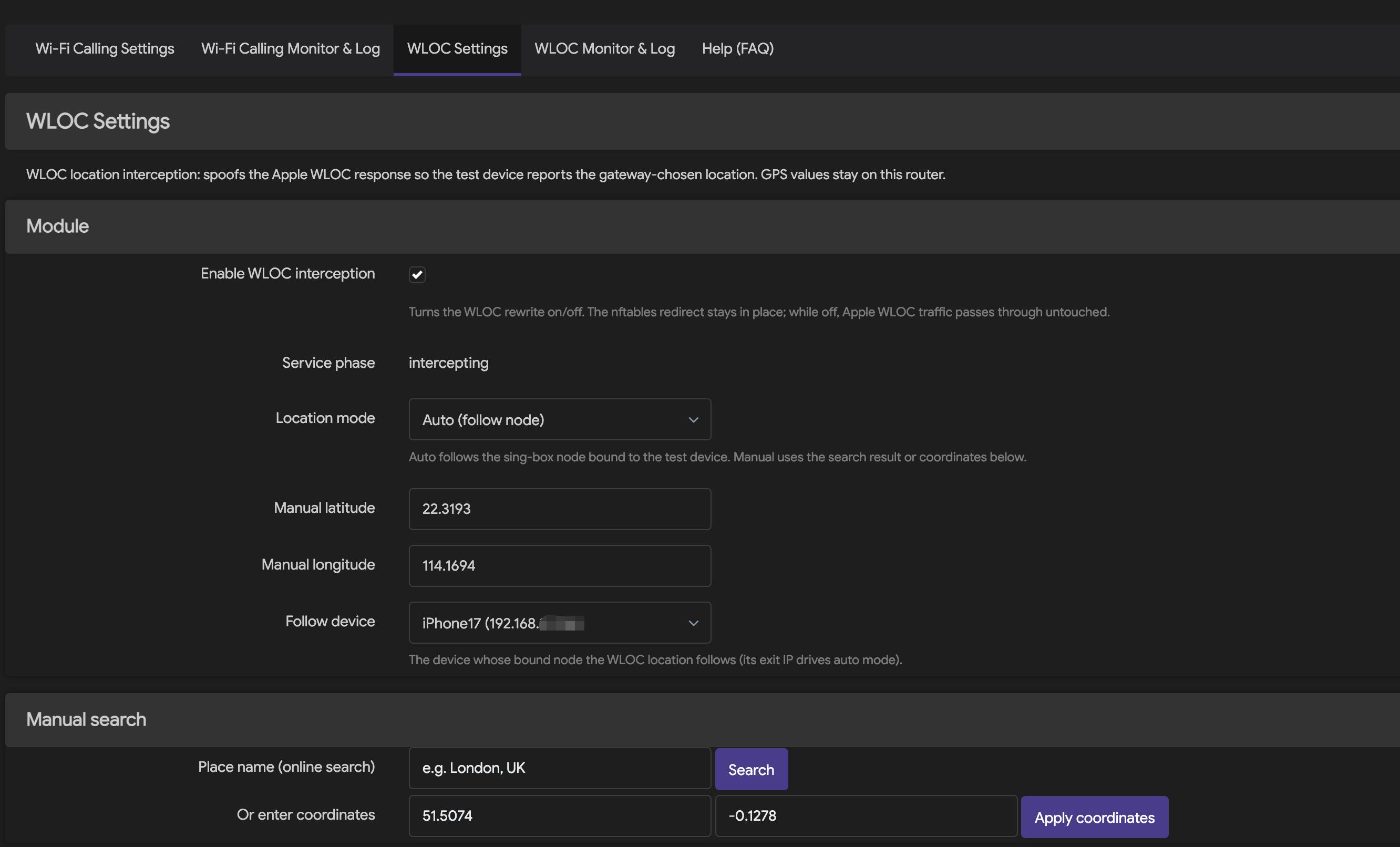
- The WLOC service handles only TCP 443 traffic from the designated test device to the Apple WLOC hosts. In auto mode it resolves the target region from the exit IP of the node bound to that device; in manual mode it uses administrator-chosen coordinates.
- The LuCI interface provides nodes, device policies, auto/manual location, certificate installation, runtime status, and a sanitized event log.
The core boundary of the project is "independent, precise, and revertible": WLOC uses its own process, UCI config, Unix socket, nftables table, and logs. It never takes over the Gateway's nftables table and never intercepts UDP 500/4500. When the protocol is unknown, Geo data is invalid, or the service is unhealthy, no default fake coordinates are produced.
Features
- Statically linked Rust daemon optimized for OpenWrt musl targets and small release size.
- Auto-follows the country, city, timezone, and coordinates of the node bound to the device; in auto mode periodic health checks re-probe only when the cached exit evidence expires and update Geo only when the exit IP changes. Manual mode is independent of the Gateway IP and never performs IP checks. A one-click "Refresh IP" button re-probes immediately after a node switch.
- Manual place search, latitude/longitude entry, and saved location presets.
- The certificate link and scoped dual-stack TPROXY rules are generated from the router's actual LAN/device state at runtime — no more hardcoded 192.168.31.x, and no global DNS hijack for other LAN devices.
- Locally generated, persisted WLOC root CA with an iPhone
.mobileconfig install entry and fingerprint verification.
- The "Add LAN device" dialog lists connected LAN devices (DHCP leases + ARP cache); picking one fills in the device name and the real IP automatically.
- Bounded TLS, HTTP/2, and WLOC protocol handling; upstream certificate and hostname verification is never downgraded.
- DNS/nftables isolation scoped to "designated device + authorized hosts + TCP 443".
- Root-only Unix socket control API with an rpcd-authorized LuCI bridge.
- Wi‑Fi Calling tunnel status, WLOC current target, and sanitized event log.
- WireGuard nodes are fully supported: pre-shared keys, standard
[Interface]/[Peer] config import, real-handshake health checks, and
WLOC follow-device exit probing through sing-box endpoints.
- Only the proxy nodes referenced by active device policies are compiled
into
sing-box.json and loaded into memory - unreferenced WireGuard
tunnels and protocol stacks stay off, so memory scales with the nodes
actually in use rather than the total configured (measured on AX6S:
sing-box RSS ~19-23 MB → ~15 MB).
- Per-node nodeTest button: run a fresh proxy-path test on demand through
the already-running Gateway sing-box. Every protocol reports reachability
and total request latency without creating a second sing-box process; the
result banner stays until closed.
- Background node quality polling runs about every 30 seconds, re-probes each
node at most once per 60 seconds, and publishes the result to LuCI with
browser-cache bypassing. Manual nodeTest always bypasses this cache.
- A dedicated Service Status page (Services > Service Status) reports
both services at a glance - daemon processes, config validity, nftables
rules, build patches, and node health - refreshed every 10 seconds.
- IPK (OpenWrt 24.10 / iStoreOS 24.10) and native APK v3 (OpenWrt 25.12) packaging.
- Pinned SDK/toolchain digests, offline locked builds, dependency audit, coverage gate, and Docker boot verification.
How it works
%%{init: {"flowchart": {"toolbar": false}}}%%
flowchart TD
    I["Authorized test iPhone"] -->|"Wi‑Fi Calling · UDP 500/4500"| G["Wi‑Fi Calling Gateway"]
    G --> N["Bound sing-box node"]
    I -->|"Apple WLOC · TCP 443"| D["Precise DNS / nftables isolation"]
    D --> R["wloc-service · Rust"]
    R -->|"TLS + HTTP/2, strict upstream validation"| A["Apple WLOC"]
    R --> P["Exit probe"]
    P --> N
    P --> X["Geo resolution & cache"]
    X --> R
    L["LuCI / rpcd"] -->|"root-only UDS API"| R
A location update roughly goes through these steps:
- The router feeds only the assigned test device's Apple WLOC requests into the standalone service.
- Auto mode probes the real exit through the device's bound sing-box node; manual mode reads locally stored coordinates.
- The Geo layer validates country code, coordinate ranges, timezone, expiry, and provider responses — it never fabricates a result when data is unavailable.
- The service rewrites a response only when the authorized protocol structure, resource limits, TLS/ALPN, and safety state all hold; otherwise it passes the original response through or withdraws the redirect.
- LuCI shows the target location and network evidence; raw WLOC responses, node credentials, call content, and message content are never logged.
More detail: WLOC Service API, Threat model, and fail-open constraints.
Implementation
| Layer |
Implementation |
Key constraints |
| Service runtime |
Rust 2021, Tokio, static musl ELF |
Rust 1.90; release LTO, opt-level=z, panic abort |
| TLS / HTTP |
rustls, ring, tokio-rustls, h2 |
TLS 1.2/1.3, ALPN h2, strict upstream cert & hostname validation |
| WLOC protocol |
standalone clean-room protocol model with bounded parsing |
Unknown, malformed, or oversized content is never guessed or partially rewritten |
| Control plane |
wloc.service/v1, 4-byte BE framing, JSON, Unix socket |
16 KiB max frame, 2s total timeout, socket 0600, no TCP management port |
| Exit & location |
sing-box exit probe, Geo primary/fallback + cache, manual coordinates |
Invalid or stale data never falls back to default coordinates |
| OpenWrt integration |
procd, UCI, rpcd, dnsmasq, firewall4/nftables |
WLOC keeps its own table; never touches the Gateway table or UDP 500/4500 |
| Admin UI |
LuCI JavaScript |
Auto/manual switch, certificate, status, and log; sensitive fields sanitized |
| Build & release |
OpenWrt SDK / Docker images pinned by digest |
locked/offline compile, SHA-256, architecture tag cannot masquerade as all |
Support and validation status
"Installable" is not the same as "verified with a real iPhone / Wi‑Fi Calling". The table separates the evidence levels:
| Platform |
Arch |
Package manager |
Current evidence |
Status |
| Redmi AX6S · ImmortalWrt 24.10.6 |
MediaTek MT7622 / AArch64 |
opkg |
r13 service installed; one WIFICalling sing-box remained running, WLOC was intercepting, crash-recovery re-interception was observed, and post-test available memory remained above 32 MiB |
Docker + router + iPhone WLOC passed |
| OpenWrt 24.10.8 |
x86_64 |
opkg / IPK |
Docker boot of init/ubus, integrated package install, service start, socket and v1 status checks |
Install matrix passed |
| iStoreOS 24.10.5 |
x86_64 |
opkg / IPK |
Same as above |
Install matrix passed |
| OpenWrt 25.12.3 |
x86_64 |
apk / APK v3 |
Same, using native APK v3, not a renamed IPK |
Install matrix passed |
| Other OpenWrt / ImmortalWrt versions or CPUs |
— |
— |
No device/SDK evidence yet |
Not verified |
The runtime packages contain architecture-specific ELF files and must match the router CPU architecture. x86_64 packages are built with pinned SDKs; AX6S uses a separate AArch64 cortex-a53 toolchain. The formal Docker matrix installs both runtime variants for all three targets (six assets, eight runtime cases). Docker verifies install and boot; the AX6S row adds real router and iPhone WLOC evidence.
Installation
Prerequisites
- firewall4/nftables, LuCI, and rpcd available. Standard additionally requires a firmware/feed
sing-box; Lite bundles its own runtime.
- A fixed DHCP address for the test iPhone and a correct node binding in the Gateway.
- Router config backed up; WARP, Shadowrocket, or any other VPN on the phone stays off during router WLOC testing.
- Install this project's CA only on the dedicated test device and verify the certificate fingerprint.
1. Choose the right package
Release v1.3.0-r13 provides two installation variants for each of three targets. Both belong to this project and contain the same WCG, WLOC, control tools, LuCI and saved UCI schema:
- Standard:
wificalling-location-gateway_1.3.0-r13_aarch64_cortex-a53.ipk, wificalling-location-gateway_1.3.0-r13_x86_64.ipk, wificalling-location-gateway-1.3.0-r13.apk
- Lite:
wificalling-location-gateway-lite_1.3.0-r13_aarch64_cortex-a53.ipk, wificalling-location-gateway-lite_1.3.0-r13_x86_64.ipk, wificalling-location-gateway-lite-1.3.0-r13.apk
r13 changes
- Every TPROXY install refreshes the upstream map; disable/enable and sing-box crash recovery can no longer leave interception silently broken.
- Disabled WLOC is genuinely fail-open: the boot script withdraws the DNS hijack, TPROXY, and upstream map when the switch is off, and disabling restarts dnsmasq immediately.
- Auto mode enables on clean OpenWrt: the exit probe is a bounded native HTTP client (no curl dependency) and
probe_interval is clamped to the validator window.
- LuCI fixes: nodeTest success renders as alive, the Clear-log button works, the health page survives probe errors, and static-IP device detection gets its ARP ACL.
Choose Standard when the firmware already supplies a suitable /usr/bin/sing-box. Choose Lite for constrained gateways such as AX6S: it stores a hash-pinned compressed sing-box in flash, transparently expands one shared copy into /tmp, and keeps only the single-worker/moderate-GC runtime profile without an artificial heap ceiling. Standard and Lite conflict intentionally and must not be installed together. Both preserve /etc/config/wificalling-gateway and /etc/config/wloc-service.
The variant suffix changes runtime ownership only; it does not create a separate product or restore split component packages.
Two ways to install:
Method A — package feed (recommended): add the signed feed and opkg install directly:
# Import the feed signing key (one-time)
wget -O /etc/opkg/keys/f7050198aa77cf15 \
  https://raw.githubusercontent.com/smthdagg/Smthdagg-Repo-feeds/main/wloc.pub
# Add the feed and install
echo "src/gz wloc https://smthdagg.github.io/Smthdagg-Repo-feeds/wificalling-location-gateway" \
  >> /etc/opkg/customfeeds.conf
opkg update && opkg install wificalling-location-gateway
Method B — manual download: grab the matching file from
Releases
and verify it against SHA256SUMS from the same release directory first.
Full instructions for both methods live in the
feed repository
(including the manual .apk install commands for OpenWrt 25.x).
2. Redmi AX6S (Lite recommended)
opkg install /tmp/wificalling-location-gateway-lite_1.3.0-r13_aarch64_cortex-a53.ipk
Back up both UCI files first. On storage-constrained AX6S units, stop the services and remove the old integrated and sing-box packages before installing Lite; do not delete the saved UCI files. The r13 Lite package replaces the separate sing-box package and owns its transparent wrapper. /tmp is RAM: prefer the signed-feed upgrade (opkg update && opkg upgrade wificalling-location-gateway-lite), and when installing a local IPK, delete it right after installation (opkg install /tmp/x.ipk && rm -f /tmp/x.ipk) — leftover files in /tmp can push available memory below the cold-start memory gate.
3. OpenWrt 24.10 / iStoreOS 24.10 (IPK)
opkg install /tmp/wificalling-location-gateway_1.3.0-r13_x86_64.ipk
# Or use the corresponding Lite asset when a bundled, bounded runtime is preferred.
4. OpenWrt 25.12 (native APK v3)
apk add --allow-untrusted /tmp/wificalling-location-gateway-1.3.0-r13.apk
--allow-untrusted applies only to locally built packages that are not yet signed in a repository. Formal releases use repository signing; never rename an IPK into an APK.
5. Verify the services
test -S /var/run/wloc-service/control.sock
/usr/sbin/wloc-ctl status
/etc/init.d/wificalling-gateway status
logread -e wloc-service
The status response must contain "api_version":"wloc.service/v1". If the LuCI menu did not refresh, clear the browser cache and log back in instead of reinstalling packages for other architectures.
Usage order
Configure in this order to avoid mixing network and location problems:
- Import or add nodes in Wi‑Fi Calling Settings, then Save & Apply.
- In Device Policies, add the test iPhone with a fixed LAN IP, routing mode, and bound node; Save & Apply again.
- Enable Wi‑Fi Calling on the iPhone and watch for UDP 4500
ASSURED in Wi‑Fi Calling Monitor & Log; always confirm with a real call in/out.
- In WLOC Settings, copy the router-generated profile link and install it from Safari on the iPhone.
- On the iPhone, enable full trust for
wloc-service root CA under Settings → General → About → Certificate Trust Settings, and verify the fingerprint.
- Turn on WLOC interception and choose Auto (follow node) or a manual location; Save & Apply.
- Toggle airplane mode / Wi‑Fi or reopen Maps/Weather to trigger a location request.
- Check the mode, country, city, timezone, coordinates, Geo state, and update time in WLOC Monitor & Log.
Step-by-step guides:
Building and verifying from source
Rust quality gate
./scripts/ci/verify.sh
This entry runs formatting, Clippy, unit/integration tests, Rust line coverage (minimum 80%), dependency audit, license policy, secret scan, release size, and repository contract checks. The formal 1.0 baseline is 69 Python tests passing, Rust line coverage ≥ 80%, and a release verification binary of about 0.97 MB.
AX6S / AArch64 cross build
OPENWRT_BIN_NAME=wloc-service \
OPENWRT_CROSS_CACHE_DIR=/tmp/wloc-rust-openwrt \
./scripts/ci/verify-rust-openwrt.sh
This pins the OpenWrt 24.10.8 mediatek/mt7622 toolchain, Rust version, and SHA-256, and verifies the AArch64 ELF, static linking, and size. See Rust OpenWrt cross-build notes.
./scripts/openwrt/build-x86_64-runtime.sh \
  --out-dir "$PWD/dist/runtime/x86_64"

./scripts/openwrt/build-release-packages.sh \
  --version 1.3.0 \
  --release 9 \
  --arch x86_64 \
  --service-bin "$PWD/dist/runtime/x86_64/wloc-service" \
  --ctl-bin "$PWD/dist/runtime/x86_64/wloc-ctl" \
  --gateway-ipk /absolute/path/wificalling-location-gateway_1.3.0-r1_aarch64_cortex-a53.ipk \
  --gateway-sha256 <verified-sha256> \
  --out-dir "$PWD/dist/openwrt-release"
Four-environment Docker install & start matrix for all release packages
./scripts/openwrt/verify-docker-matrix.sh \
  --dist-dir "$PWD/dist/wloc-openwrt-release-r13"
Builds use the official OpenWrt SDK pinned by digest; after dependency preparation, product compilation runs locked/offline with read-only sources in a network-disabled container. Full boundaries and results: OpenWrt packaging and Docker matrix.
Language composition
A GitHub Linguist byte snapshot of the current main branch (2026-08-19). The router product runtime is mainly Rust, with JavaScript driving the LuCI admin UI and Shell handling OpenWrt lifecycle and network integration; Python is mostly used for reproducible builds, fixture governance, and CI.
pie showData
    title GitHub Linguist language snapshot
    "Rust · 46.36%" : 435146
    "JavaScript · 26.18%" : 245706
    "Shell · 17.28%" : 162237
    "Python · 9.93%" : 93223
The numbers drift as main updates; whether LuCI JavaScript, docs, and generated/excluded files count depends on GitHub Linguist rules. Do not judge the project's primary language by helper-tool bytes alone.
Project structure
src/                         Rust service, protocol, TLS/H2, exit & Geo modules
openwrt/                     procd/UCI, LuCI/rpcd, and OpenWrt package definitions
scripts/openwrt/             cross builds, dual-format packaging, Docker matrix
scripts/ci/                  coverage, security, dependency, and repository gates
tests/                       Rust, Python, JavaScript, and network-model tests
fixtures/                    synthetic/sanitized fixture contracts and validators
docs/                        API, security, deployment, testing, bilingual guides
.handoffs/                   reproducible multi-agent handoff records
Security, privacy, and rollback
- The CA private key lives only on the router (mode 0600); it must never be committed to Git, support packages, or logs.
- No node secrets, tokens, raw captures, device identifiers, precise user locations, or raw WLOC responses are committed.
- Only the designated test device and an explicit host scope are allowed; normal HTTPS, other LAN devices, and UDP 500/4500 are not part of the WLOC data plane.
- When upstream validation, ALPN, resource limits, or Geo checks fail, the service must not keep running with a "looks successful" default location.
- On disable, the WLOC redirect is withdrawn first, then the engine is drained and stopped; before recovery, confirm the standalone nftabl








 一个面向 OpenWrt/ImmortalWrt 路由器的一体化网关:一个 Rust 守护进程把指定测试设备的 Wi-Fi Calling(无线通话)流量经由选定的 sing-box 节点转发,并改写 Apple WLOC 的定位响应,使其与该节点所在地区一致,全部操作都可以在 LuCI 网页界面里完成。