
Lightspeed
Run thousands of agents. Efficient, durable, auditable.
Lightspeed is open-source infrastructure for running managed agent fleets as durable workflows.
"Managed agents" is an emerging pattern that separates the core agent loops from the VM or sandbox they use. Agents survive restarts, can run for months, and stay cheap when idle. When they
need an operating system, they borrow a real machine for as long as the task
requires.
Lightspeed's Rust core runs on Temporal today and stores
production data in Postgres with optional S3. The frontend is TypeScript and
React.
Why Lightspeed?
Lightspeed aims for the capability of Claude Code, Codex, and OpenClaw without
requiring one operating system per agent.
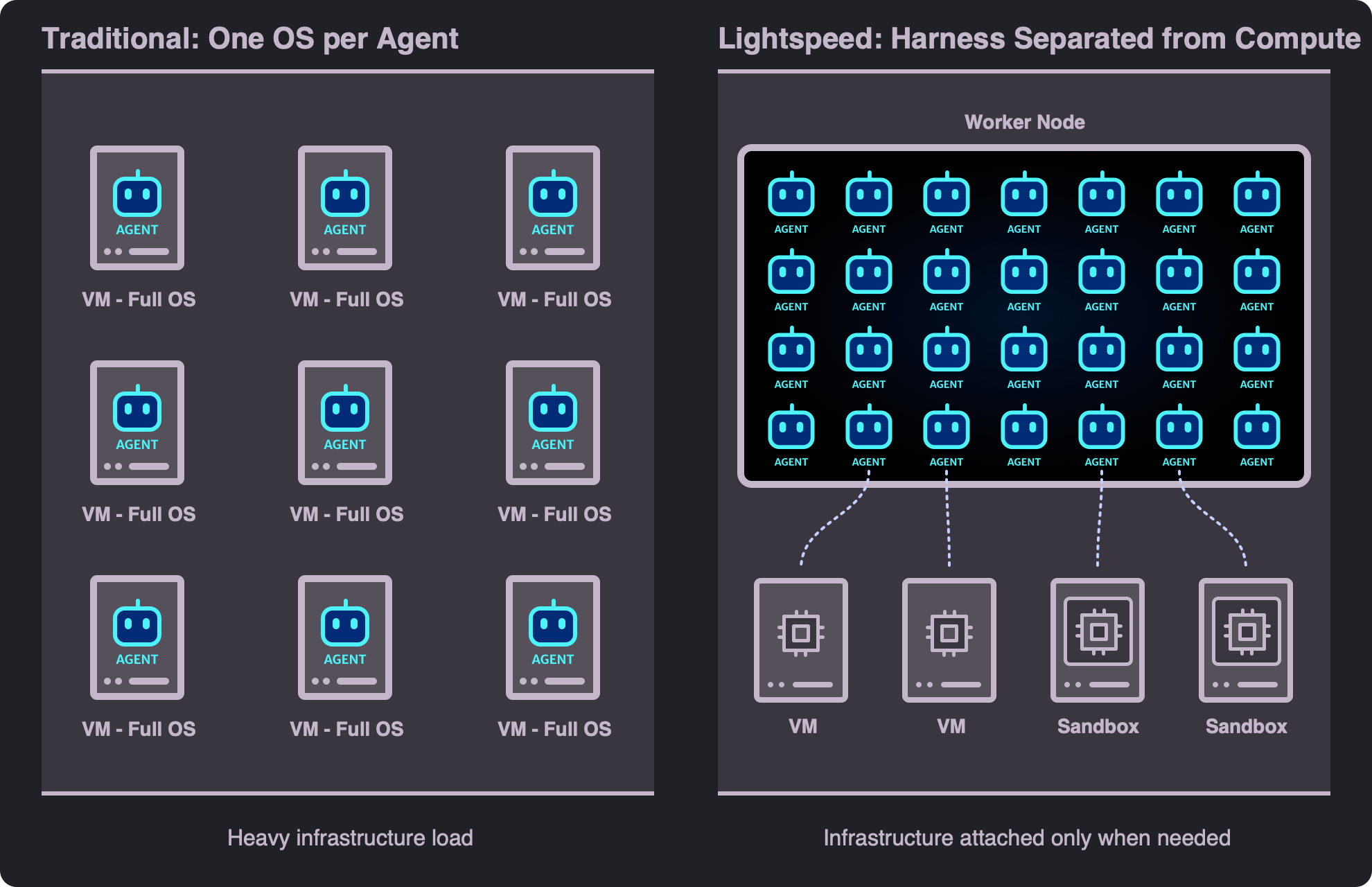
Most frontier harnesses live inside a guest OS, which makes them difficult to scale and secure. Hence the emerging pattern to
"separate the harness from compute" or the brain and hands split. This is especially
useful in enterprises with more stringent supervision and scaling requirements.
So, in Lightspeed, the harness (the agent loop, context, and session state) runs as a lightweight
durable workflow. Shells, code execution, and full filesystems run on machines
attached only when needed. One worker can therefore manage hundreds of agents.
What you can build with Lightspeed:
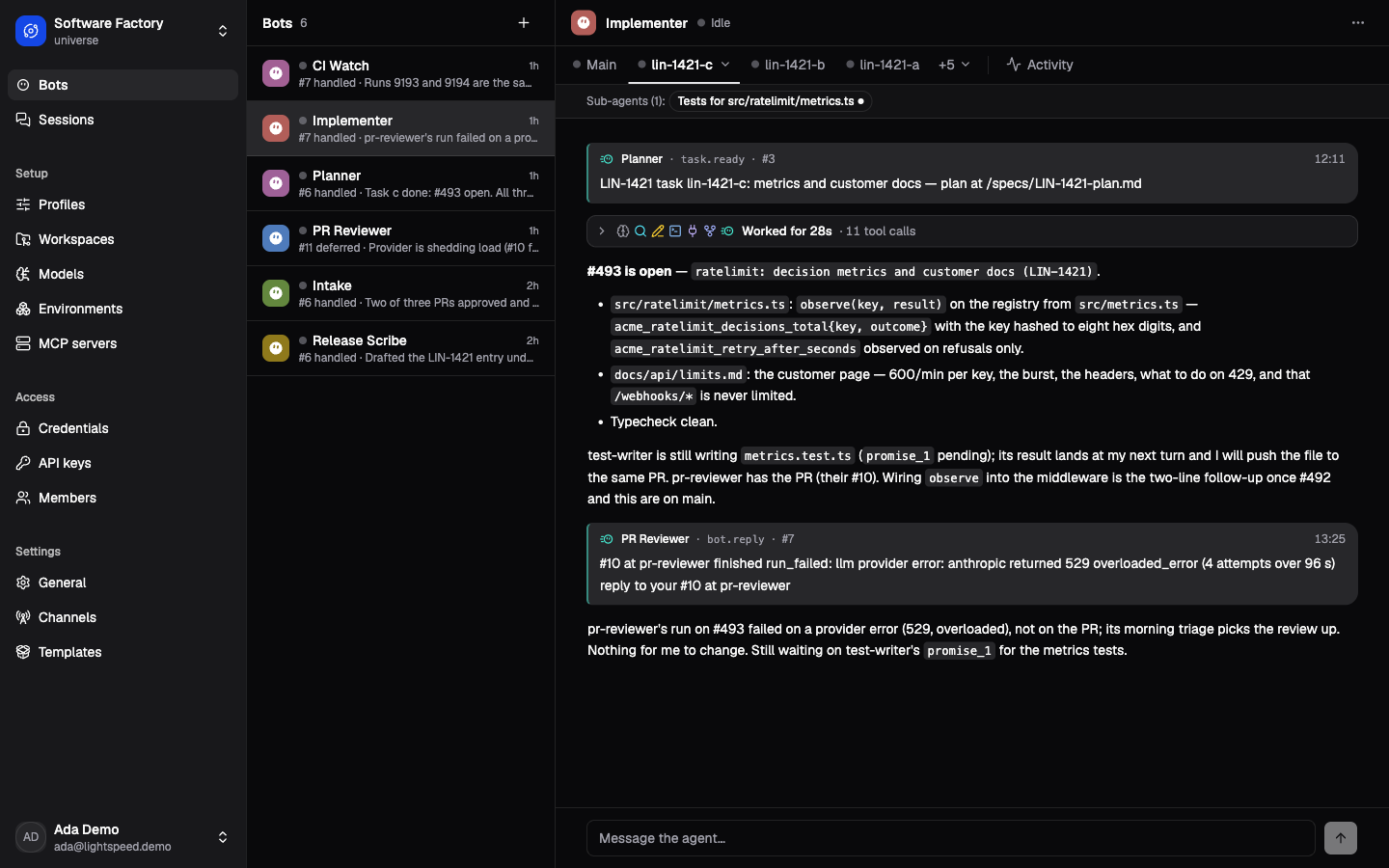
- Personal assistants for thousands of users without one idle VM per user
(Assistant Demo)
- Autonomous software factories that coordinate agents to build, test, and
critique features for weeks at a time
(Software Factory Demo)
- On-call operations agents that investigate alerts, propose fixes, and
report back through chat
(Technical Support Demo)
- Research agents that spin up compute for long-running experiments, stay live for days, and supervise progress
- and more...
Quick start
You need Rust with edition 2024 support, Node.js 24 or newer, and Docker with
Compose. Then start the complete
local product:
./dev.sh
You can set the LLM API keys directly in the UI. But you can also set them via environment variable:
cp .env.example .env
# Set OPENAI_API_KEY or ANTHROPIC_API_KEY in .env
# Then restart ./dev.sh
When the readiness checks pass in the CLI, open
http://localhost:5173/app/ and sign in with the
development account printed by the launcher. The defaults are
[email protected] and lightspeed-dev-password.
The launcher installs dependencies, starts local infrastructure and application
processes, applies migrations, and waits until the product is ready.
For other development profiles, service addresses, resets, and live tests, see
the local development guide. See
Environment variables for environment variables.
Features
Lightspeed covers the table stakes of a modern agent harness. Everything below works today.
Models & providers
- OpenAI and Anthropic: support for reasoning, compaction, tools,
files, images, OAuth, and multiple credentials
- Media from tools: images and PDFs returned by MCP servers, read from
files, or handed up by sub-agents reach the model natively
- OpenAI-compatible providers: OpenRouter, DeepSeek, vLLM, Ollama, and
similar servers, each configured with its own endpoint and credential
- Prompt caching: automatic cache breakpoints and stable cache keys
Agent capabilities
- Virtual file system: agents read and edit persistent files without an
OS attached
- Web access: provider-hosted search/fetch for Anthropic Messages,
hosted search for OpenAI Responses
- Environment attachments: a session attaches the machines it may use
- Skills are sourced from either virtual file system or the attached environment or both
- MCP: connect local or remote servers with API keys
or OAuth; you can let the model provider handle the MCP tool calls or let Lightspeed manage them (including progressive discovery through tool search)
- Sub-agents: delegate work to supervised child agents with configurable profiles and limits
- Agent profiles: reusable session setups, shared across clients and sub-agents
Bots & channels
- Bots: create always-on agents that wake up for scheduled tasks,
incoming webhooks, data changes, or chat messages; session instructions
identify their conversation, thread kind, and original routing key
- Bot federation: bots talk to each other and coordinate work
- Triggers: bots can create and manage their own schedules, webhooks,
and pollers
- Chat channels: talk to bots via Telegram and WhatsApp
Durability & scale
- Long-running agents: sessions last weeks to months and survive restarts
- Active-run control: cancel or steer a run, or queue the next message
- Session fork & clone primitives: share stored history for branches or start from copied configuration
- Workflow-backed plugins: external Temporal workflows can extend session with various tools and custom logic
- One backend binary: run every role in one process or scale them
independently across Temporal workers
Borrowed compute
- Dedicated VMs: attach an existing machine or provision one through the
included Incus provider
- Bring your own compute:
lightspeed-envd is the daemon that connects a running system with Lightspeed. Run it anywhere with a
registration key and it dials in and registers itself, so NATed VMs,
Kubernetes pods, and benchmark sandboxes need no inbound address
- Power states and idle policy: environments pause, suspend, or stop when
idle, then wake automatically when needed
- VFS–environment transfer: materialize and capture files or trees on Linux
and macOS, with whole-file reuse, bounded streaming, and atomic replacement
- Environment jobs: run downloads, experiments, or delegated coding work in the background and check the results later
Security & auth
- Encrypted secrets: credentials are encrypted at rest, with automatic OAuth token refresh
- Credential injection: environments and jobs receive secrets without exposing them to the model
- Multi-tenant by default: isolate tenants in universes on one deployment or run dedicated per-tenant deployments
Design
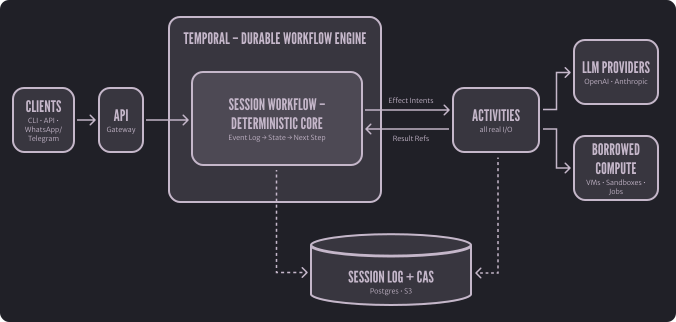
In Lightspeed, every agent is driven by an event-sourced, deterministic core. The runtime replays the session log, decides the next step, and emits effect intents that adapters execute against LLM providers and tools. The core itself performs no I/O, which makes it a natural fit for durable workflow engines.
Two more decisions make this practical inside a workflow engine:
- Minimal provider abstraction. The core extracts only the facts needed to make decisions; provider-native data stays opaque and blob-backed.
- Offloading to CAS. Large payloads live in content-addressed storage, keeping workflow histories small. Blobs nothing reaches any more are collected after a grace period, so deleting sessions frees their storage.
The architecture walkthrough
introduces the system. Continue with the
agent loop and durability,
context and storage, and
tools and controller workflows
to understand better how everything works and fits together.
Development checks
cargo test
npm run check
See Testing and evaluation
for focused checks, replay coverage, live-test prerequisites, and model evaluations.
Documentation
Preview the Starlight manual with npm run dev:docs.
Contributing
See CONTRIBUTING.md
License
Apache 2.0

 Lightspeed 是一套开源基础设施,用于把成群的 AI 代理当作持久化工作流来运行:代理会话在重启后依然存活,可以连续运行数周到数月,空闲时几乎不花钱,只有任务真正需要时才借用一台真实的机器。