📚 Table of Contents
🆕 Recent Updates
- 🩺 Claude service health - Added a
Claude Status widget with live severity, a cached 48-hour incident-history strip, stale-data fallback, and graceful ? output when status data is unavailable.
- 🙈 Unified conditional hiding - Numeric, Git, JJ, usage, cache, and other widgets now share an
h checklist for supported hide conditions, with automatic migration of existing settings and optional merge-target hiding for decorative text or symbols.
- 🔢 Configurable number formatting - Numeric widgets can use precise, compact, or whole-number styles per widget or globally by token, speed, percent, memory, and cost type, while advanced configs can set decimal precision explicitly.
- 📜 Faster, reliable large-session rendering - Transcript-backed token, duration, speed, compaction, effort, and session-name metrics now stream JSONL records through one shared scan instead of loading an entire transcript into a single string, while no-active-block results are briefly cached to avoid repeated full-history scans.
- ⚠️ Git conflict display controls - Git Conflicts can hide when the count is zero or show either
⚠0 or a customizable clean glyph when the tree is conflict-free.
- 🩹 Self-healing usage locks - Usage widgets ignore impossible fetch-lock deadlines more than 24 hours ahead, allowing poisoned locks caused by clock jumps or old test artifacts to recover on the next render.
- 🧹 Bounded Git cache cleanup - Failed persistent Git-cache writes clean up their temporary file and reuse one stable fallback name, preventing Windows file locks from leaking thousands of orphaned temp files.
- 📊 Consistent timer bars - Block Timer, Block Reset Timer, and Weekly Reset Timer now round progress-bar fill to the nearest cell, matching the other progress widgets.
v2.2.27 - Portable configuration import and export
- 📦 Config import/export - Export the current TUI configuration to JSON, validate and preview imports, then replace all settings or merge only supplied fields while preserving local installation metadata and leaving the result unsaved for review.
v2.2.25 - v2.2.26 - Fable usage, migrated usage API support, compaction accuracy, and rendering reliability
- 🪄 Weekly Fable usage - Added a
Weekly Fable Usage widget with percentage, progress-bar, remaining-mode, and time-cursor controls.
- 📊 Reshaped usage API support - Session and all-model weekly usage can fall back to the newer
limits[] response, while Sonnet, Opus, and Fable weekly widgets read authoritative weekly_scoped entries so migrated accounts do not show stale or frozen values.
- 🧠 Correct post-compaction context - Context length and percentage widgets reset immediately from
compact_boundary.postTokens after /compact, then switch to the first new turn instead of retaining the pre-compaction size.
- 🧹 Reliable hidden-widget separators - Manual separators now look past widgets that render empty, preserve the intended visible boundary, and inherit colors from the actual preceding visible widget.
- ⚡ Non-blocking Git PR/CI refreshes - Git PR and CI widgets render from a versioned disk cache while stale data refreshes in the background, preventing slow
gh calls from blocking the status line.
v2.2.22 - v2.2.24 - Powerline flex mode, cache/CI/sandbox visibility, layout controls, composable metrics, and safer config

- ⏳ Prompt cache timer - Added a
Cache Timer widget with live HOT state, TTL countdown, configurable 5-minute/1-hour windows, and customizable state glyphs.
- ✅ GitHub CI status - Added a
Git CI Status widget that summarizes failing, pending, and successful checks for the current branch's pull request.
- 🔒 Sandbox status - Added a
Sandbox Status widget with glyph, text, and Nerd Font formats that follows Claude Code's layered sandbox setting on each refresh.
- ↔️ One-sided default padding - Default widget padding can now apply to both sides, the left only, or the right only in standard and Powerline layouts.
- ⚡ Powerline flex mode - Flex separators now work in Powerline mode, letting Powerline status lines right-align content or absorb available width.
- 🌗 Per-widget dim styling - The color editor can dim an entire widget or only parenthesized text, with reset and clear-all actions covering dim state.
- 🧯 Safer settings recovery - Invalid
settings.json files are left untouched, defaults render in memory, and the status line shows an invalid-config warning.
- 🧭 Selective Powerline alignment - Press
x in the line editor to let a widget and the rest of its line keep their natural widths while earlier Powerline columns stay auto-aligned.
- 📏 Git widget width limits -
Git Branch and Git Root Dir can cap their visible width with ellipsis-safe truncation while preserving hyperlink targets.
- 🔣 Current directory glyphs -
Current Working Dir can prepend an optional custom glyph, including in raw-value mode.
- 🧠 Configurable context fallback -
CCSTATUSLINE_CONTEXT_SIZE_FALLBACK overrides the default 200k last-resort context window when Claude Code and the model name do not report one.
- 🧩 Composable compaction metrics -
Compaction Counter can render count, auto, manual, unknown, or reclaimed-token values independently for custom layouts.
- 🏷️ CLI version flag -
ccstatusline --version now prints the installed package version and exits.
- 🛡️ Guarded invalid-config saves - The TUI warns when it loaded defaults for an invalid settings file and requires confirmation before replacing that file.
- 🔄 Usage display and cache fixes - Used/remaining direction now works in every percentage mode, account switches invalidate cached usage, and fetch locks no longer cause repeated requests or stale timeout output.
- ⏱️ Calmer reset timer startup - Reset timers show labeled loading placeholders instead of transient rate-limit errors while Claude Code's embedded usage-window data is still arriving.
- 🔇 Quieter install detection - Best-effort npm and Bun probes no longer leak expected package-manager errors into the TUI.
- 🔣 Custom widget glyphs - Git and JJ symbol widgets can override or suppress their built-in glyphs from the TUI.
- 🔁 Compaction counter details -
Compaction Counter now counts explicit compact_boundary markers and can optionally show trigger splits plus tokens reclaimed.
- 💸 Extra usage improvements - Added
Extra Usage Used and formats extra usage amounts with the billing currency reported by the usage API.
- 📏 Custom command width context -
Custom Command widgets receive terminal_width in stdin JSON when ccstatusline can detect the terminal width.
- 🧠 Prompt cache widgets - Added
Cache Hit Rate, Cache Read, and Cache Write widgets with turn/session scopes and hide-when-empty behavior.
- 🔢 Token rounding fix - Token counts from
999950 through 999999 now render as 1.0M instead of 1000.0k.
v2.2.20 - Gradients, token accuracy, usage reliability, and Git PR/MR fixes
- 🌈 Gradient colors - Added per-widget and whole-line foreground gradients with named presets, custom hex stops, TUI picker support, and Powerline-aware rendering. Press
g on the Edit Colors screen for widget gradients, or press g for Override FG Color in Global Overrides for a line-wide gradient.
- 🎯 More accurate token counts -
Tokens Input and Tokens Output now prefer cumulative transcript metrics before falling back to context-window totals.
- 💸 Extra usage no-limit fix - Extra usage widgets no longer get stuck on
[Timeout] for accounts with overage enabled but no monthly limit configured.
- 🔁 Compaction glitch filtering -
Compaction Counter ignores transient below-1% context readings so incomplete status frames do not create false compaction counts.
- 🔀 SSH alias Git PR/MR detection - Git PR/MR detection resolves SSH host aliases while preserving canonical GitHub and GitLab hosts for CLI selection and fallback repo links.
- 🧪 Usage test cache isolation - Usage-fetch test probes now isolate
HOME, USERPROFILE, CLAUDE_CONFIG_DIR, and proxy variables so local tests cannot touch the real ccstatusline cache.
- 📦 Dependency refresh - Refreshed React/React DOM and Bun lockfile development-tooling resolutions for the release.
- 📌 Version pinning support - Added support for pinned global installs so Claude Code can keep running a specific ccstatusline version.
- 🔐 npm provenance attestations - Published packages now use trusted publishing provenance so users can verify where releases were built while avoiding long-lived npm publish tokens.
- 🔄 Moving from auto-update installs - If you currently use an auto-updating install, use the TUI uninstall option first, then reinstall to go through the version pinning flow. Your ccstatusline settings are preserved when uninstalling.
- 💸 Extra usage widgets - Added Extra Usage Utilization and Extra Usage Remaining widgets for monthly pay-as-you-go overage limits, with null rate-limit buckets handled as zero usage.
- 🔒 Git lock avoidance - Git helpers now pass
--no-optional-locks so background status checks avoid creating index.lock races.
- 🧱 Older Git compatibility - Git widgets avoid newer command forms so repository status works on older Git installations.
- ⚡ Persistent Git cache - Git command output is cached under
~/.cache/ccstatusline/git-cache with configurable TTL and .git/HEAD/.git/index mtime checks to reduce repeated subprocess work.
- 🧭 Install flow polish - Pinned global install is now the default install option, with clearer wording for install and migration flows.
- 🪟 Hidden helper processes - Runtime child processes set
windowsHide so helper commands do not open extra windows on Windows.
- 📏 Terminal width override -
CCSTATUSLINE_WIDTH can provide an explicit terminal width when automatic probing is unavailable.
v2.2.13 - Weekly model usage, voice status, hooks, and docs
- 📊 Weekly Sonnet/Opus usage widgets - Added separate weekly usage widgets for Sonnet and Opus API buckets, matching Claude Code's
/usage model split.
- 🎤 Voice Status widget - Added a widget that shows whether Claude Code voice input is enabled, with icon, text, word, and optional Nerd Font display modes.
- 📉 Timer short bars - Block Timer, Block Reset Timer, and Weekly Reset Timer now support compact short-bar progress displays.
- 🔕 Quieter hook output - Hook handling now suppresses no-op JSON output so non-status updates stay silent.
v2.2.9 - v2.2.12 - GitLab support, reset timers, context, compaction, and git widgets
- 🦊 GitLab PR/MR support -
Git Branch and Git PR/MR now support GitHub, GitLab, and compatible self-hosted remotes, using gh or glab as appropriate.
- 🔄 Status line refresh interval - Installed configs can set Claude Code's
statusLine.refreshInterval from the TUI when Claude Code >=2.1.97 supports it.
- 🧭 Wrap-around TUI navigation - Menu/list navigation and move/reorder modes now wrap at the first and last items.
- 📋 Clone widget shortcut - Press
k in the item editor to duplicate the selected widget, with fresh Powerline background color for cloned Powerline items.
- 📊 Short bar display modes - Context percentage, Context Bar, Session Usage, Weekly Usage, Block Timer, and reset timer widgets can use compact bar variants.
- ⏱️ Usage time cursor - Session Usage and Weekly Usage progress bars can show the elapsed time position within the current usage window.
- 🕒 Reset timer timestamps - Block and Weekly Reset Timer widgets can show exact reset timestamps with compact formatting, 12/24-hour display, IANA time zones, and locale selection.
- 🪟 Context Window widget - Added a
Context Window widget for total model window size, keeping Context Length focused on current context usage.
- 🔁 Compaction Counter widget - Added a
Compaction Counter widget that tracks session context compactions, with icon/text/number formats, optional Nerd Font icon, and hide-when-zero behavior.
- 🧮 Git file status widgets - Added
Git Staged Files, Git Unstaged Files, Git Untracked Files, and Git Clean Status for file counts and clean/dirty state.
- 🏷️ Clear context percentage labels -
Context % and Context % (usable) now label rendered values as used or left when toggling used/remaining mode.
- ⚡ More Powerline caps - The Powerline separator editor now supports more than three start/end caps.
- 🧠 Thinking Effort updates - Added
xhigh, show default when no effort is set, mark unknown future effort levels with ?, and track live status JSON plus /effort command changes. Claude Code reports Ultracode as xhigh in status line data.
- 🧮 More accurate token counts - Streaming duplicate JSONL entries are deduped so token widgets do not overcount live Claude Code output.
- 🏷️ Cleaner model display - The Model widget strips trailing context suffixes like
(1M context); use Context Window when you want the total window size shown.
- 🧹 Cleaner empty-widget separators - Manual separators now collapse around widgets that render empty, avoiding dangling separators when hide-when-empty widgets disappear.
- 🧱 More resilient Git helpers - Git widgets handle missing or unusual git command output more defensively.
Older updates (v2.2.8 and earlier)
- 🔀 New Git PR widget - Added a
Git PR widget with clickable PR links plus optional status and title display for the current branch.
- 🧰 Major Git widget expansion - Added
Git Status, Git Staged, Git Unstaged, Git Untracked, Git Ahead/Behind, Git Conflicts, Git SHA, Git Origin Owner, Git Origin Repo, Git Origin Owner/Repo, Git Upstream Owner, Git Upstream Repo, Git Upstream Owner/Repo, Git Is Fork, Git Worktree Mode, Git Worktree Name, Git Worktree Branch, Git Worktree Original Branch, and Custom Symbol.
- 👤 Claude Account Email widget - Added a session widget that reads the signed-in Claude account email from
~/.claude.json while respecting CLAUDE_CONFIG_DIR.
- 🧼 Global Minimalist Mode - Added a global toggle in
Global Overrides that forces widgets into raw-value mode for a cleaner, label-free status line.
- 🔎 Smarter widget picker search - The add/change widget picker now supports substring, initialism, and fuzzy matching, with ranked results and live match highlighting.
- 📏 Better terminal width detection - Flex separators and right-alignment now work more reliably when ccstatusline is launched through wrapper processes or nested PTYs.
- 🎨 Powerline theme continuity - Built-in Powerline themes can now continue colors cleanly across multiple status lines instead of restarting each line.
- 🚀 New Token Speed widgets - Added three widgets: Input Speed, Output Speed, and Total Speed.
- Each speed widget supports a configurable window of
0-120 seconds in the widget editor (w key).
0 disables window mode and uses a full-session average speed.1-120 calculates recent speed over the selected rolling window.
- 🧩 New Skills widget controls (v2.2.1) - Added configurable Skills modes (last/count/list), optional hide-when-empty behavior, and list-size limiting with most-recent-first ordering.
- 🌐 Usage API proxy support (v2.2.2) - Usage widgets honor the uppercase
HTTPS_PROXY environment variable for their direct API call to Anthropic.
- 🧠 New Thinking Effort widget (v2.2.4) - Added a widget that shows the current Claude Code thinking effort level.
- 🍎 Better macOS usage lookup reliability (v2.2.5) - Improved reliability when loading usage API tokens on macOS.
- ⌨️ New Vim Mode widget (v2.2.5) - Added a widget that shows the current vim mode, with ASCII and optional Nerd Font icon display.
- 🔗 Git widget link modes (v2.2.6) -
Git Branch can render clickable GitHub branch links, and Git Root Dir can render clickable IDE links for VS Code and Cursor.
- 🤝 Better subagent-aware speed reporting - Token speed calculations continue to include referenced subagent activity so displayed speeds better reflect actual concurrent work.
- 🧩 New Usage widgets (v2.1.0) - Added Session Usage, Weekly Usage, Block Reset Timer, and Context Bar widgets.
- 📊 More accurate counts (v2.1.0) - Usage/context widgets now use new statusline JSON metrics when available for more accurate token and context counts.
- 🪟 Windows empty file bug fix (v2.1.1) - Fixed a Windows issue that could create an empty
c:\dev\null file.
- 🔗 New Link widget (v2.1.3) - Added a new Link widget with clickable OSC8 rendering, preview parity, and raw mode support.
- ➕ New Git Insertions widget (v2.1.4) - Added a dedicated Git widget that shows only uncommitted insertions (e.g.,
+42).
- ➖ New Git Deletions widget (v2.1.4) - Added a dedicated Git widget that shows only uncommitted deletions (e.g.,
-10).
- 🧠 Context format fallback fix (v2.1.6) - When
context_window_size is missing, context widgets now infer 1M models from long-context labels such as [1m] and 1M context in model identifiers.
- **⏳ Wee






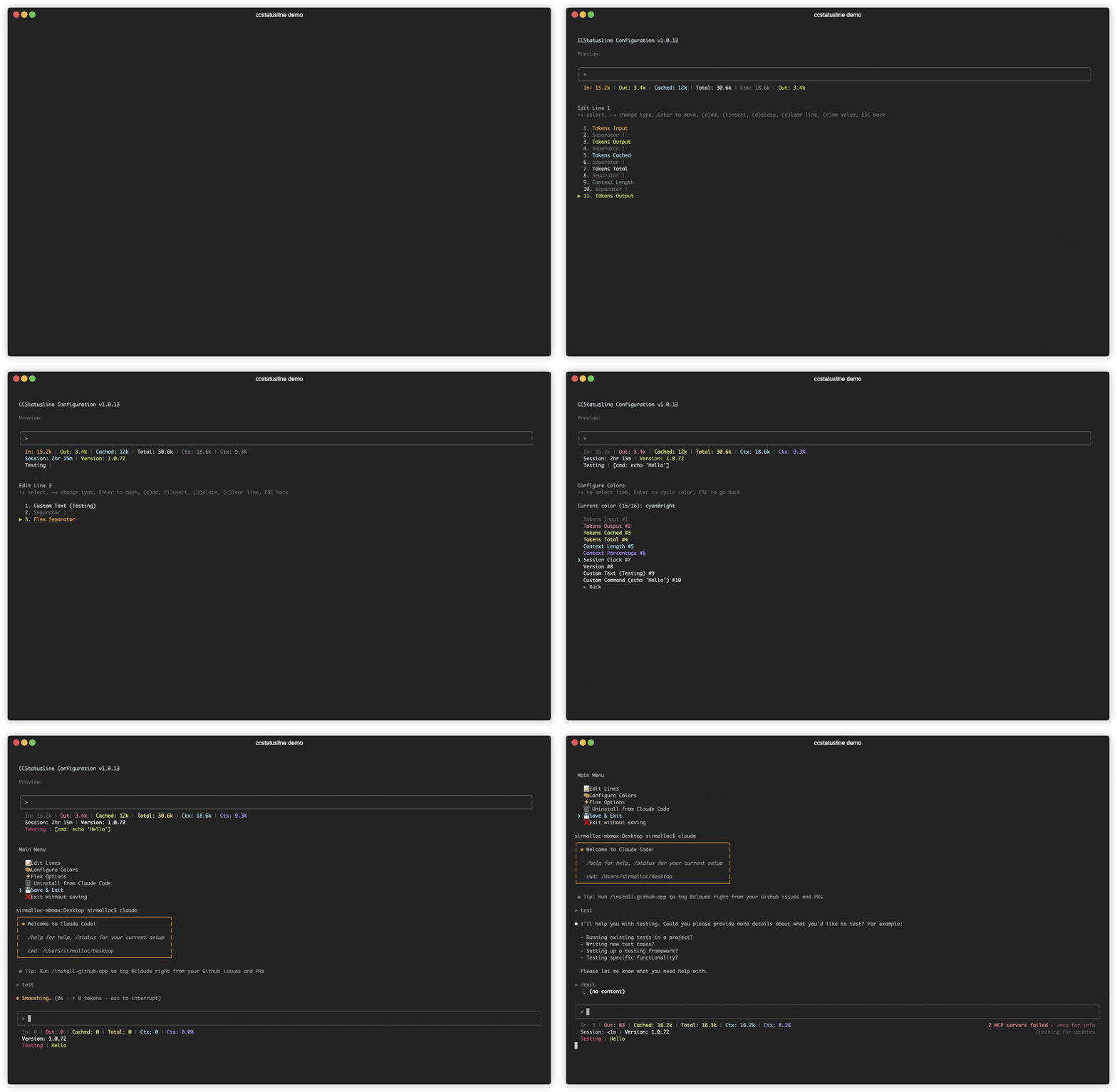

 ccstatusline 是一个高度可定制的 Claude Code 命令行状态栏,可以在你的终端里直接显示模型信息、git 分支、token 用量等各种指标。