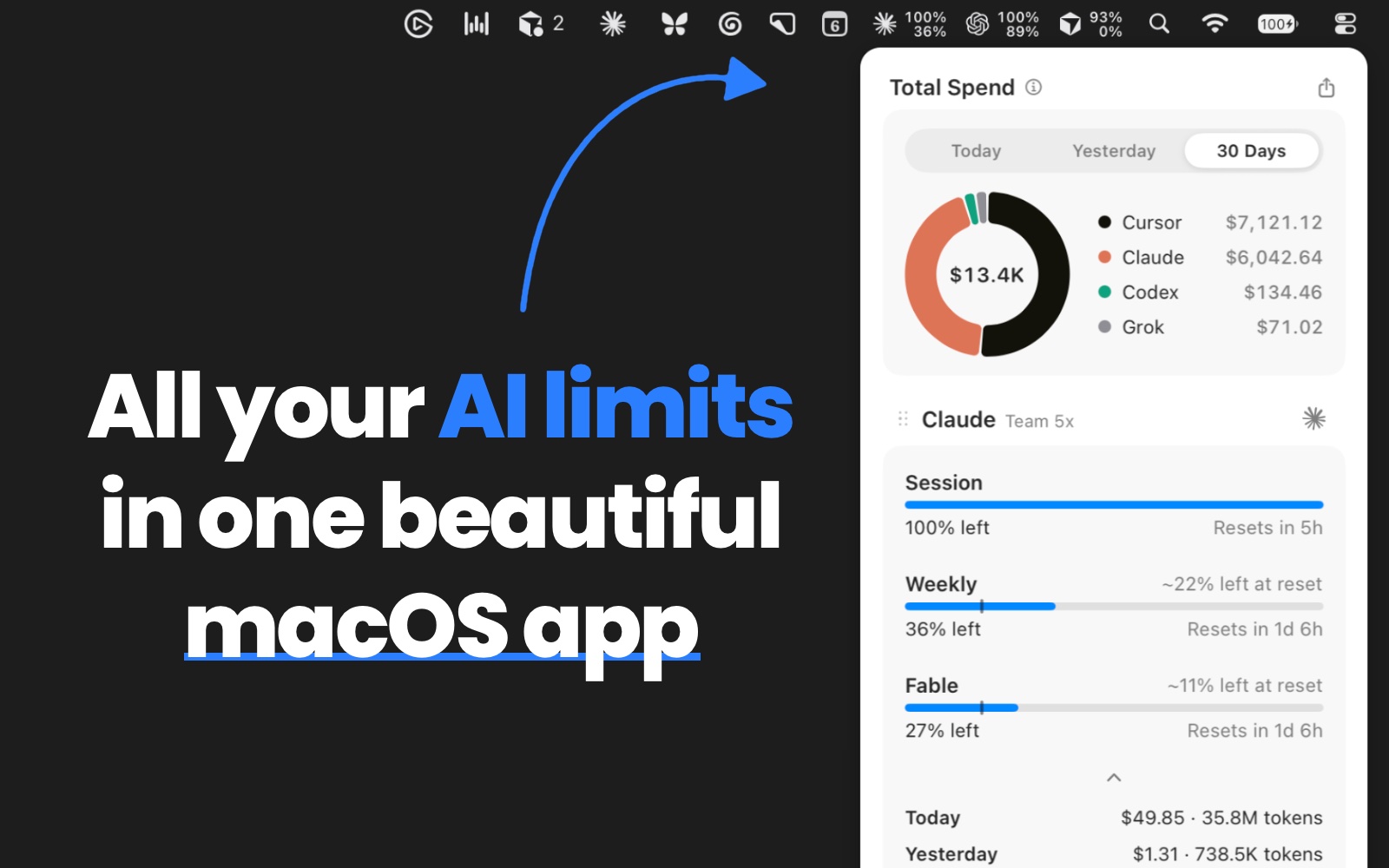
Что это такое?
 OpenUsage — бесплатное нативное macOS-приложение в строке меню с открытым кодом, написанное на Swift: оно показывает, сколько вы израсходовали в подписках на ИИ-кодинг (Claude, Codex, Copilot, Cursor и другие) — сессионные и недельные лимиты, кредиты и траты — и всё это в одном всплывающем окне.
OpenUsage — бесплатное нативное macOS-приложение в строке меню с открытым кодом, написанное на Swift: оно показывает, сколько вы израсходовали в подписках на ИИ-кодинг (Claude, Codex, Copilot, Cursor и другие) — сессионные и недельные лимиты, кредиты и траты — и всё это в одном всплывающем окне.Какая версия macOS нужна?macOS 15 (Sequoia) или новее; OpenUsage поставляется как универсальный бинарник, который нативно работает и на Apple Silicon, и на Intel Mac.
macOS 15 (Sequoia) или новее; OpenUsage поставляется как универсальный бинарник, который нативно работает и на Apple Silicon, и на Intel Mac.Нужно ли отдельно входить в каждого провайдера?Для большинства провайдеров — нет: OpenUsage читает учётные данные, которые уже есть на вашей машине (связка ключей, файлы аутентификации, состояние приложений); только для OpenRouter и Z.ai нужно вручную указать API-ключ, поскольку локальных учётных данных для повторного использования у них нет.
Для большинства провайдеров — нет: OpenUsage читает учётные данные, которые уже есть на вашей машине (связка ключей, файлы аутентификации, состояние приложений); только для OpenRouter и Z.ai нужно вручную указать API-ключ, поскольку локальных учётных данных для повторного использования у них нет.Не раскрываются ли где-то мои данные об использовании и учётные данные?Локальный HTTP API слушает только 127.0.0.1 и никогда не отдаёт учётные данные, но в README отмечается, что открытые в браузере страницы тоже могут читать данные с этого loopback-эндпоинта.
Локальный HTTP API слушает только 127.0.0.1 и никогда не отдаёт учётные данные, но в README отмечается, что открытые в браузере страницы тоже могут читать данные с этого loopback-эндпоинта.Можно проверить расход из терминала, не открывая приложение?Да — однострочный CLI (openusage) читает те же кешированные данные о лимитах в виде JSON, а openusage --force обходит 5-минутный кеш; чтобы это работало, приложение в строке меню запускать не нужно.
Да — однострочный CLI (openusage) читает те же кешированные данные о лимитах в виде JSON, а openusage --force обходит 5-минутный кеш; чтобы это работало, приложение в строке меню запускать не нужно.Могут ли другие приложения читать мои данные об использовании?Да — через локальный HTTP API по адресу 127.0.0.1:6736/v1/limits, который доступен только через loopback и никогда не отдаёт учётные данные.
Да — через локальный HTTP API по адресу 127.0.0.1:6736/v1/limits, который доступен только через loopback и никогда не отдаёт учётные данные.Можно пускать запросы к провайдерам через прокси?Да, OpenUsage поддерживает маршрутизацию запросов к провайдерам через прокси SOCKS5 или HTTP(S), настроенный в ~/.openusage/config.json.
Да, OpenUsage поддерживает маршрутизацию запросов к провайдерам через прокси SOCKS5 или HTTP(S), настроенный в ~/.openusage/config.json.Как OpenUsage считает траты в долларах?Плитки расходов (Сегодня/Вчера/Последние 30 дней) вычисляются нативно из локальных логов CLI для Claude, Codex и Grok или из экспорта использования Cursor, а доллары оцениваются по динамически обновляемым ценам моделей — Node.js или другая среда выполнения не требуются.
Плитки расходов (Сегодня/Вчера/Последние 30 дней) вычисляются нативно из локальных логов CLI для Claude, Codex и Grok или из экспорта использования Cursor, а доллары оцениваются по динамически обновляемым ценам моделей — Node.js или другая среда выполнения не требуются.What are similar projects?token-monitor, casbin-gateway, tokscale, CodexBar, codenotch, headroom, ThinkWatch-Lite, codeburn
token-monitor, casbin-gateway, tokscale, CodexBar, codenotch, headroom, ThinkWatch-Lite, codeburnWhich topics is it in?subscription, subscriptions, cost-tracking, token-usage, copilot, openrouter, menu-bar, grok, github-copilot, opencode, macos-app, homebrew
subscription, subscriptions, cost-tracking, token-usage, copilot, openrouter, menu-bar, grok, github-copilot, opencode, macos-app, homebrew