














Что это такое?
 Pulumi — это open source-инструмент для «инфраструктуры как код»: вы пишете обычный программный код, а Pulumi CLI сам создаёт и управляет вашими ресурсами в облаках.
Pulumi — это open source-инструмент для «инфраструктуры как код»: вы пишете обычный программный код, а Pulumi CLI сам создаёт и управляет вашими ресурсами в облаках.Что именно в этом репозитории — CLI, библиотека или облачный сервис?В этом репозитории лежат CLI (pulumi), SDK для языков и ядро движка; библиотеки ресурсов для отдельных провайдеров хранятся в собственных репозиториях.
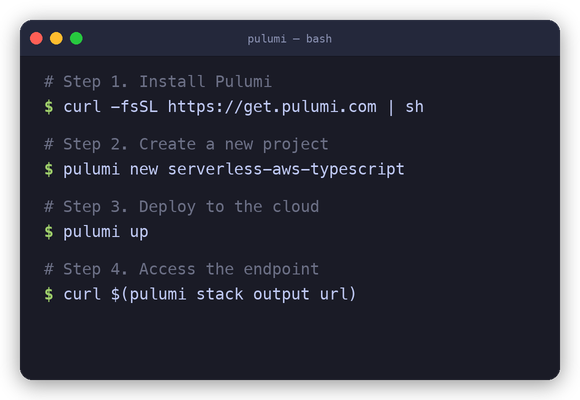
В этом репозитории лежат CLI (pulumi), SDK для языков и ядро движка; библиотеки ресурсов для отдельных провайдеров хранятся в собственных репозиториях.Как развернуть с ним свой первый проект?Установите CLI, выполните 'pulumi new' и выберите шаблон для своего языка и облака, затем 'pulumi up', чтобы создать ресурсы. Команда 'pulumi destroy' потом удаляет всё созданное.
Установите CLI, выполните 'pulumi new' и выберите шаблон для своего языка и облака, затем 'pulumi up', чтобы создать ресурсы. Команда 'pulumi destroy' потом удаляет всё созданное.На каких языках программирования я могу описывать инфраструктуру?JavaScript и TypeScript (Node.js LTS), Python, Go, .NET (C#, F#, VB.NET), Java на JDK 11+, а также YAML — всё помечено как стабильное.
JavaScript и TypeScript (Node.js LTS), Python, Go, .NET (C#, F#, VB.NET), Java на JDK 11+, а также YAML — всё помечено как стабильное.Мне обязательно писать YAML-файлы с описанием инфраструктуры?Не обязательно — главная идея как раз обратная: вместо YAML использовать циклы, функции, классы и управление пакетами из вашего языка. Стабильный вариант на YAML тоже есть.
Не обязательно — главная идея как раз обратная: вместо YAML использовать циклы, функции, классы и управление пакетами из вашего языка. Стабильный вариант на YAML тоже есть.Он работает локально на моём компьютере или это облачный сервис?Он работает локально на любой платформе — CLI написан на Go, а в руководстве Get Started описана настройка под вашу платформу ещё до выбора облака.
Он работает локально на любой платформе — CLI написан на Go, а в руководстве Get Started описана настройка под вашу платформу ещё до выбора облака.Какие облака и провайдеры он поддерживает?AWS, Azure, Google Cloud, Kubernetes и более 300 провайдеров в сумме. В Registry есть полный список, и оттуда можно установить нужные пакеты ресурсов прямо в свой проект.
AWS, Azure, Google Cloud, Kubernetes и более 300 провайдеров в сумме. В Registry есть полный список, и оттуда можно установить нужные пакеты ресурсов прямо в свой проект.Если я потом поменяю код, придётся всё снести и развернуть заново?Нет — при повторных запусках 'pulumi up' вычисляется минимальный набор изменений для применения ваших правок, поэтому обновления применяются инкрементально.
Нет — при повторных запусках 'pulumi up' вычисляется минимальный набор изменений для применения ваших правок, поэтому обновления применяются инкрементально.Что такое Automation API?Это способ встроить движок IaC от Pulumi в свои приложения и инструменты, чтобы создание инфраструктуры стало обычным вызовом библиотеки в вашей программе, а не ручным шагом через CLI.
Это способ встроить движок IaC от Pulumi в свои приложения и инструменты, чтобы создание инфраструктуры стало обычным вызовом библиотеки в вашей программе, а не ручным шагом через CLI.Как он обращается с секретами, например паролями от баз данных?Через Pulumi ESC — решение проекта для управления секретами, которое надёжно и централизованно хранит секреты и настройки для вашей облачной инфраструктуры и приложений.
Через Pulumi ESC — решение проекта для управления секретами, которое надёжно и централизованно хранит секреты и настройки для вашей облачной инфраструктуры и приложений.What are similar projects?kops, terraformer, encore, serverless, neckbeard, aws-cdk, trivy, redStackPRO
kops, terraformer, encore, serverless, neckbeard, aws-cdk, trivy, redStackPROWhich topics is it in?cloud-computing, gcp, infrastructure-as-code, azure, serverless, yaml, aws, containers, dotnet, csharp, golang, kubernetes
cloud-computing, gcp, infrastructure-as-code, azure, serverless, yaml, aws, containers, dotnet, csharp, golang, kubernetes