php-fts



A self-contained full-text search engine written in pure PHP.
No extensions. No external services. No dependencies. Just files.
$engine = SearchEngine::open('./search_data');

$engine->search('lether shoe');   // finds "leather shoe", one edit away
$engine->search('革靴');           // and finds it in Japanese too
Who is this for?
php-fts is for projects where running a dedicated search service is not an
option — shared hosting, a small VPS, or simply a stack you would rather keep
portable and boring.
If you have Elasticsearch, Meilisearch or Typesense and the infrastructure to
run them, use those. They are more powerful and built for scale this is not
built for.
If you don't — or would rather not — php-fts gives you ranked full-text search,
typo tolerance, filters, facets and sorting, with nothing to install and nothing
to configure beyond a directory path.
A good fit if:
- You are on shared hosting (OVH, Infomaniak, o2switch, …)
- You want zero infrastructure and zero moving parts
- Your dataset runs from hundreds to a few tens of thousands of documents
- You index offline or on a schedule, and serve searches at request time
Not a good fit if:
- You need real-time indexing under heavy concurrent writes
- Your dataset is in the millions of documents
- You need geo search or multi-tenant isolation
What you get
- Typo tolerance you can reason about — a query word matches an indexed word
within an edit budget (nothing under three characters, one edit up to five,
two beyond: the same rule as Elasticsearch's
fuzziness: AUTO). Edits are
counted in characters, not bytes, so one mistyped Cyrillic or Arabic
letter costs one edit, not two.
- Prefix completion —
leath finds leatherman, inox finds inoxydable.
- BM25F ranking — per-field term frequencies and per-field length
normalisation, with a boost per field.
- Filters — equality, comparisons, ranges, sets, presence, and
and / or /
not nested as deep as you like.
- Facets — counts and statistics computed over the whole match set, not over
the page, and without reading a single document.
- Sorting and pagination — by relevance or by any numeric field, with a real
total.
- Highlighting — HTML-escaped by default, with excerpts.
- Twenty-six writing systems — see below.
- Crash-safe writes — an index is a set of immutable segments published by
an atomic commit; an interrupted write leaves debris, never damage.
- No extensions required — plain PHP 8.1+.
ext-posix is used if present,
to spot locks left by a dead process, and the library works without it.
Requirements
- PHP 8.1 or higher
- Read/write access to a directory for the index
Installation
With Composer
composer require ols/php-fts
Without Composer — copy src/ into your project and require the bundled
autoloader:
require '/path/to/php-fts/src/autoload.php';
Quick start
use Ols\PhpFts\SearchEngine;

$engine = SearchEngine::open('./search_data');

// The array key is the document id. Anything else in the array is a field.
$engine->putMany([
    'p1' => [
        'title'       => 'Brown leather shoe',
        'description' => 'Elegant city shoe in soft leather.',
        'brand'       => 'Adidas',
        'category'    => 'Shoes',
        'price'       => 129.90,
        'stock'       => 42,
        'active'      => true,
        'tags'        => ['city', 'leather'],
    ],
    'p2' => [
        'title'       => 'Black leather boot',
        'description' => 'Winter boot, full grain leather.',
        'brand'       => 'Adidas',
        'category'    => 'Boots',
        'price'       => 189.00,
        'stock'       => 7,
        'active'      => true,
        'tags'        => ['winter', 'leather'],
    ],
    // …
]);

$result = $engine->search('leather shoe', limit: 20);

echo "$result->total matches in {$result->took} ms\n";

foreach ($result as $hit) {
    echo "{$hit->id}  {$hit->score}  {$hit->document['title']}\n";
}
3 matches in 4.07 ms
p1  1.1985  Brown leather shoe
p5  0.9139  Leather care kit
p2  0.8293  Black leather boot
There is no close(). A request opens the directory, reads what it needs, and
ends — which is also why it costs about 9 ms on shared hosting to open a
45 000-document index.
Languages and writing systems
Most pure-PHP search libraries are ASCII with an accent-stripping table bolted
on. This one classifies every code point it indexes from Unicode's own data, and
the tables are generated by a committed script rather than written by hand.
Twenty-six writing systems are indexed. The split below is not cosmetic — it
decides whether a word gets typo tolerance:
Eighteen that separate their words — indexed as words, and reachable by the
edit budget and by prefix completion:
Latin · Cyrillic · Greek · Arabic · Hebrew · Devanagari · Bengali · Gurmukhi ·
Gujarati · Oriya · Tamil · Telugu · Kannada · Malayalam · Sinhala · Armenian ·
Georgian · Ethiopic
Eight written continuously — indexed as n-grams of a run, because finding
word boundaries there needs a segmentation dictionary this library does not
ship. They are never expanded: an n-gram one edit away is a different word, not
a misspelling.
Han · Hiragana · Katakana · Hangul · Thai · Lao · Khmer · Myanmar
$engine->putMany([
    'ja' => ['title' => '革靴 ブラウン',       'description' => '柔らかい革の街歩き用の靴。'],
    'ru' => ['title' => 'Кожаные ботинки',     'description' => 'Зимние ботинки из натуральной кожи.'],
    'ar' => ['title' => 'حذاء جلدي بني',       'description' => 'حذاء جلدي ناعم للمدينة.'],
    'th' => ['title' => 'รองเท้าหนังสีน้ำตาล', 'description' => 'รองเท้าหนังนุ่มสำหรับเดินในเมือง'],
]);

$engine->search('革靴');     // finds ja
$engine->search('ботинки');  // finds ru
$engine->search('ботинок');  // a different form of it — also finds ru
$engine->search('جلدي');     // finds ar
$engine->search('รองเท้า');  // finds th
A few consequences worth knowing up front. Arabic harakat, Hebrew niqqud and the
tatweel are dropped, so كِتَاب, كــتاب and كتاب are one term. Digits fold
across systems: ٢٠٢٤ and 2024 are the same term, and so are ۱۲۳, १२३ and
123. Case folding is done from Unicode's mappings, so Vietnamese VIỆT meets
việt — which a hand-written table got wrong for 916 code points.
Anything outside the twenty-six is treated as a separator: a language written in
it finds nothing rather than finding it badly. See Limits.
Usage
Documents
$engine->put('p1', ['title' => 'Brown leather shoe', 'price' => 129.90]);
$id = $engine->insert(['title' => 'Suede boot']);   // generates an id, returns it

$engine->putMany($documents);   // one commit for the whole batch
$engine->get('p1');             // the document, or null
$engine->has('p1');             // bool
$engine->delete('p1');          // bool
$engine->count();               // live documents
$engine->clear();               // wipe the index
putMany() takes anything iterable and holds one segment's worth of data
rather than the whole input, so an import is bounded in memory whatever its
size. Yield straight out of a cursor:
$engine->putMany((function () use ($pdo) {
    foreach ($pdo->query('SELECT * FROM products') as $row) {
        yield $row['sku'] => $row;
    }
})());
The whole 45 000-product reference catalogue imports in one call at 64 MB
peak against a 128 MB limit. The batch is transactional: it lands whole or
leaves the index exactly as it was.
What a search returns
$result = $engine->search('leather shoe', limit: 20, offset: 0);

$result->total;     // matches across the whole index, not the page size
$result->took;      // milliseconds
$result->hits;      // Hit[]
$result->facets;    // see below
$result->unknown;   // typed words the index holds nothing resembling
$result->isEmpty();

foreach ($result as $hit) {
    $hit->id;
    $hit->score;
    $hit->document;     // the stored document
    $hit->highlights;   // field => marked text, when highlighting was asked for
}
$result->unknown is what lets you answer the way every search engine answers:
$result = $engine->search('leather zwilling');

$result->unknown;   // ['zwilling']
$result->total;     // 3 — the results for 'leather'
Unknown words have to be dropped: keeping one would put its weight in the
threshold with no way to ever satisfy it, so a single stray keystroke would
empty the result instead of narrowing it. Dropping them silently is how
couteau zwilling quietly becomes couteau. Now you can say so.
Filters
use Ols\PhpFts\Filter;

$result = $engine->search('', filters: Filter::all(
    Filter::eq('active', true),
    Filter::gt('stock', 0),
    Filter::between('price', 50, 200),   // either end may be null
    Filter::any(
        Filter::eq('brand', 'Adidas'),
        Filter::eq('brand', 'Puma'),
    ),
));
An empty query means everything, so the same call doubles as a category page
with no search box.
| Factory |
Meaning |
eq neq |
equal / not equal |
gt gte lt lte |
comparisons |
between($field, $min, $max) |
range, either end optional |
in notIn |
value in a set — on a tags field, holds any of |
exists missing |
the field is present / absent |
all any not |
and / or / negation, nested freely |
Two distinctions that surprise people once:
Filter::neq('brand', 'Nike');             // has a brand, and it is not Nike
Filter::not(Filter::eq('brand', 'Nike')); // is not a Nike — including no brand at all
neq follows SQL, where a comparison against a missing value is not true. not
is plain set complement. Both are useful, so both exist. On a catalogue of three
products where one has no brand at all, the first returns one document and the
second returns two.
Filtering needs a column, so a field must be in the schema to be filtered,
faceted or sorted on — including by exists and missing. A field the schema
does not know is stored and returned, but never filtered, and asking throws
rather than quietly matching nothing.
Filters also accept an array, validated as a structure before any of it reaches
the code that reads files — so Filter::fromArray() is safe to point at request
input:
Filter::fromArray(['op' => 'and', 'filters' => [
    ['op' => '=', 'field' => 'active', 'value' => true],
    ['op' => '>', 'field' => 'stock',  'value' => 0],
]]);
A malformed filter throws FilterException rather than silently matching
nothing. Comparisons are strict: '42' does not match 42. Cast request input
before you build a filter.
Facets
use Ols\PhpFts\Facet;

$result = $engine->search('', filters: Filter::all(
    Filter::eq('active', true),
    Filter::in('brand', ['Adidas'])->tag('brand'),
), facets: [
    'brand'    => Facet::terms(exclude: 'brand'),
    'category' => Facet::terms(),
    'price'    => Facet::stats(),
]);
$result->total;   // 2

$result->facets;
// [
//   'brand'    => ['Adidas' => 2, 'Puma' => 2],
//   'category' => ['Boots' => 1, 'Shoes' => 1],
//   'price'    => ['count' => 2, 'min' => 129.9, 'max' => 189.0,
//                  'sum' => 318.9, 'avg' => 159.45],
// ]
Look closely at that output, because it is the whole point of tag and
exclude. The search is filtered to Adidas, so total is 2 and the category
facet counts only those two. But the brand facet still reports Puma => 2,
because it excludes its own clause — which is what makes a multi-select brand
list stay usable after the shopper has clicked Adidas. Without it, picking a
brand makes every other brand vanish and the filter becomes a one-way door.
Facet::stats() is the same idea for a slider: excluding price gives you the
real bounds of the catalogue rather than of the range already chosen.
Counting happens over bitsets and columns, so no document is read to compute
a facet.
Sorting and pagination
use Ols\PhpFts\Sort;

$engine->search('', sort: Sort::asc('price'));
$engine->search('', sort: [Sort::desc('stock'), Sort::asc('price')]);
$engine->search('shoe');   // relevance, the default

$page2 = $engine->search('shoe', limit: 20, offset: 20);
Sorting is the engine's job rather than yours, because it is the same problem as
pagination: twenty hits sorted by price are the twenty best-scoring documents
arranged by price, not the twenty cheapest matches.
Highlighting
use Ols\PhpFts\Highlight;

$result = $engine->search('leather', highlight: Highlight::fields(['title', 'description']));

$result->hits[0]->highlights;
// ['title'       => 'Brown <mark>leather</mark> shoe',
//  'description' => 'Elegant city shoe in soft <mark>leather</mark>.']
Highlight::fields(['description'])->tags('<b>', '</b>')->excerpt(3);
// ['description' => '…grain <b>leather</b>.']
Field text is HTML-escaped before the tags are inserted, so the result is
safe to render even when the indexed content came from users. ->raw() turns
that off; only use it if you escape downstream.
If you would rather render the marks yourself, ->positions() hands you the
plain text and the spans instead:
Highlight::fields(['title'])->positions();
// ['title' => ['text' => 'Black leather boot', 'spans' => [[6, 13]]]]
Schema
You do not need one. Types are inferred from the first batch you commit:
$engine = SearchEngine::open('./search_data'); // schema inferred
A string field becomes an exact keyword — searchable, filterable and
facetable — when its values are short (≤ 64 bytes) and it has few distinct ones;
otherwise it stays text, searchable only. So on a real catalogue you get this,
which is what you would have declared anyway:
title         text
description   text
brand         keyword
category      keyword
price         number
Declare one when you want boosts, or want to stop storing a field:
use Ols\PhpFts\Schema;

$schema = Schema::make()
    ->text('title', boost: 3.0)
    ->text('description')
    ->keyword('brand')
    ->tags('tags')
    ->number('price')
    ->number('stock')
    ->boolean('active');

$engine = SearchEngine::open('./search_data', $schema);
Per-query boosts work too, and override the schema's:
$engine->search('leather shoe', boosts: ['title' => 3.0, 'description' => 1.0]);
One thing to know about the inferred case: a field that first appears after
the first commit is refused loudly rather than silently ignored. Declare a schema
if your documents are not all the same shape.
Maintenance
$engine->stats();
// ['documents' => 4, 'deleted' => 1, 'segments' => 1, 'generation' => 2,
//  'bytes' => 6238, 'fields' => [...], 'needsOptimize' => true, 'schema' => [...]]

if ($engine->stats()['needsOptimize']) {
    $engine->optimize();   // merge segments, drop deleted documents
}
Writes are merged on their own as you go; optimize() is the manual version,
for a cron job after a big import. Deletes are logical until a merge removes
them, which is why deleted and needsOptimize exist.
Errors
Everything thrown descends from Ols\PhpFts\Exception\FtsException, so one
catch covers the library:
use Ols\PhpFts\Exception\FtsException;

try {
    $result = $engine->search($query, filters: Filter::fromArray($input));
} catch (FtsException $e) {
    // FilterException, SortException, HighlightException, StorageException,
    // CorruptSegmentException, LockException, FieldTypeException, …
}
The number that matters is a cold one: nothing survives between requests on
shared hosting, so every visitor pays for opening the index as well as for the
search. These figures include both.
Measured on an OVH mutualisé (cluster105, PHP 8.3), 45 000 products, 100
fresh interpreters, on acier lame longueur — three words each present in about
46% of the catalogue, which is the hardest shape this design has:
| step |
p50 |
p95 |
min |
max |
open() the index |
8.7 ms |
13.3 |
7.7 |
21.8 |
| one search |
118.6 ms |
156.0 |
110.8 |
179.6 |
| both |
127.4 ms |
165.7 |
118.5 |
201.4 |
So the typical request lands inside a 150 ms budget and the tail runs about 10%
over it, on the worst query. A one- or two-word search — what most people
actually type — is a fraction of that. Both halves of the pair are given here
rather than the flattering one.
open() costs 8.7 ms, which is faster than on the development machine: an
index that is only files, with no daemon to reach and no connection to open,
opens as quickly on a shared host as anywhere.
For the shape of it across queries, cold, on a development machine at the same
45 000 products:
| query |
matches |
cold total |
steel |
1 412 |
23 ms |
stel (a typo) |
1 379 |
25 ms |
steel cold |
746 |
29 ms |
couteau de cuisine inox |
1 013 |
61 ms |
couteau (38% of the catalogue) |
18 750 |
70 ms |
acier lame longueur |
20 109 |
109 ms |
At 45 000 products the index is about 70 MB on disk and imports in one call
at 64 MB of memory. The full method, and every figure that was wrong before it
was right, is in the CHANGELOG.
Limits
Stated plainly, because finding out later is worse:
- Ranking is tuned against French. The analyzer is proven over every script,
and recall and precision are asserted end to end in Latin, Cyrillic, Japanese
and Thai. What has been judged in one language is order — whether the best
result comes first. That needs a native reader, not another test.
- Outside the twenty-six systems, nothing is indexed. Tibetan, Mongolian and
Cherokee find nothing rather than finding it badly.
- A word inside a longer word is not found.
shoe does not match
snowshoes. Deliberate: the alternative returns Victorinox for inox.
- Languages that inflect by prefix are not bridged. Arabic and Hebrew attach
the definite article at the front, so
مطبخ is a suffix of المطبخ and
neither the edit budget nor prefix completion reaches it.
- Korean gets no typo tolerance. Hangul is treated as continuous, like
Lucene's
CJKBigramFilter does by default. Bigrams handle its agglutination
well, but Korean does put spaces between words, so this one is a trade rather
than a necessity.
- One writer at a time. Writes take a directory lock. Reads never block.
- Not for millions of documents, and not for real-time indexing under
concurrent writes.
Upgrading from 1.x
Reindex from your own source data. There is no migration path and there
cannot be one: a 1.x index stores the character trigrams of documents, and this
one stores words. Opening a version-1 index raises UnsupportedFormatException
— deliberately outside the corruption hierarchy, so the rollback machinery
cannot mistake an old index for a torn commit and quietly present it as empty.
The API changed with it: SearchEngine::open() is static and there is no
close(); insertBulk() is putMany(); results are Hit objects rather than
arrays; filters are built with Filter rather than nested arrays; and
compact() is optimize().
Index files
search_data/
  seg_59b50f835f95.fts   — an immutable segment: terms, postings, columns, documents
  commit.26              — the manifest naming the segments that are live
A commit is one atomic rename of a manifest, so a reader sees either the old set
of segments or the new one, never a mixture. A segment nobody's manifest names is
invisible, which is what makes an interrupted write debris rather than damage.
Files are portable — copy the directory between servers, no rebuild.
Keep this directory outside your web root. Documents are stored in it in
readable form; served over HTTP, your whole index is downloadable. See
SECURITY.md.
Security
- Put the index directory outside the web root. The library cannot enforce it.
- Never build filters straight from request input. Cast and whitelist first.
Strict comparisons stop type confusion; they cannot know which fields a given
user is allowed to filter on.
- Highlights are HTML-escaped by default. Only disable it if you escape later.
- Index files are opened without following symbolic links, and the open
descriptor is checked against the path, so a link pre-placed in a shared
directory cannot redirect a write.
Reporting a vulnerability: see SECURITY.md.
Example application
The gif below shows one use of php-fts — a product search with facets, filters
and ranked results, over a fake shoe catalogue. It is an illustration: php-fts is
an engine, not an interface. Use it for a product search, a documentation
search, an admin filter, a CLI tool, or anything else that needs full-text
matching over a set of documents.
To run it locally:
php demo/seed.php
php -S localhost:8000 -t demo
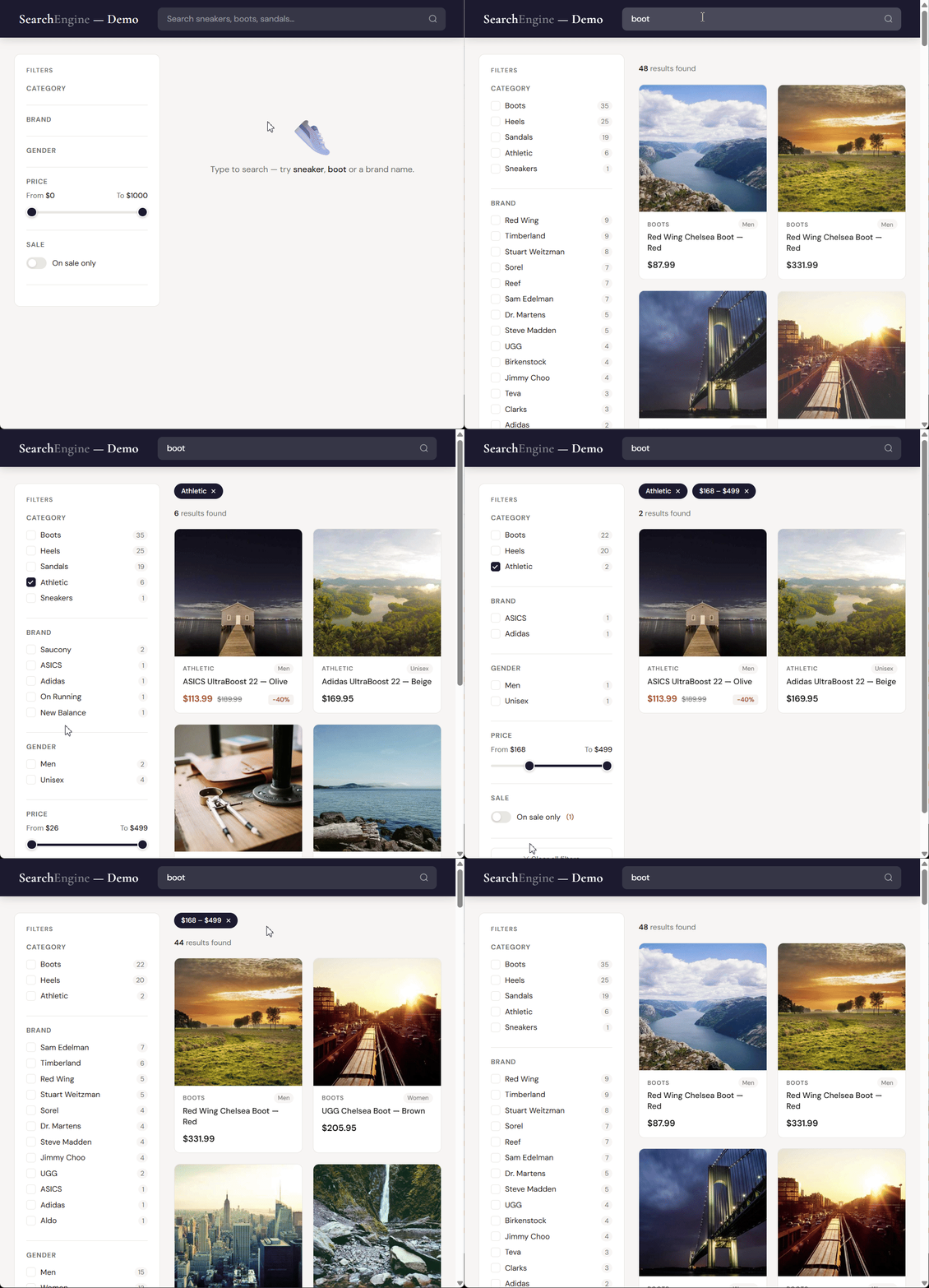
No database. No external service. The filters, facet counts, scores and totals
on that page are all computed by the engine, in one call per search.
License
MIT — see LICENSE.

 php-fts is a self-contained full-text search engine written in pure PHP: no extensions, no external services, no dependencies. You get ranked search, typo tolerance, filters, facets, sorting and highlighting from files on disk.