Obot is an open-source platform for organizations to manage, secure, and govern their AI ecosystems.
obot (obot-platform/obot)
Searching Database…
The project's README from github.com/obot-platform/obot. As one markdown file: README.md.
Obot is an open-source platform for organizations to manage, secure, and govern their AI ecosystems. It provides shared infrastructure for connecting AI clients to models and tools, distributing approved MCP servers and skills, managing agent access and credentials, running hosted AI workloads, and recording activity across hosted services and user devices.
Obot does not require an organization to standardize on a single AI client, model provider, or tool ecosystem. Desktop agents and tools such as Claude Code, Codex, Cursor, VS Code, and other IDEs and CLIs can use the parts of the platform that apply to them.
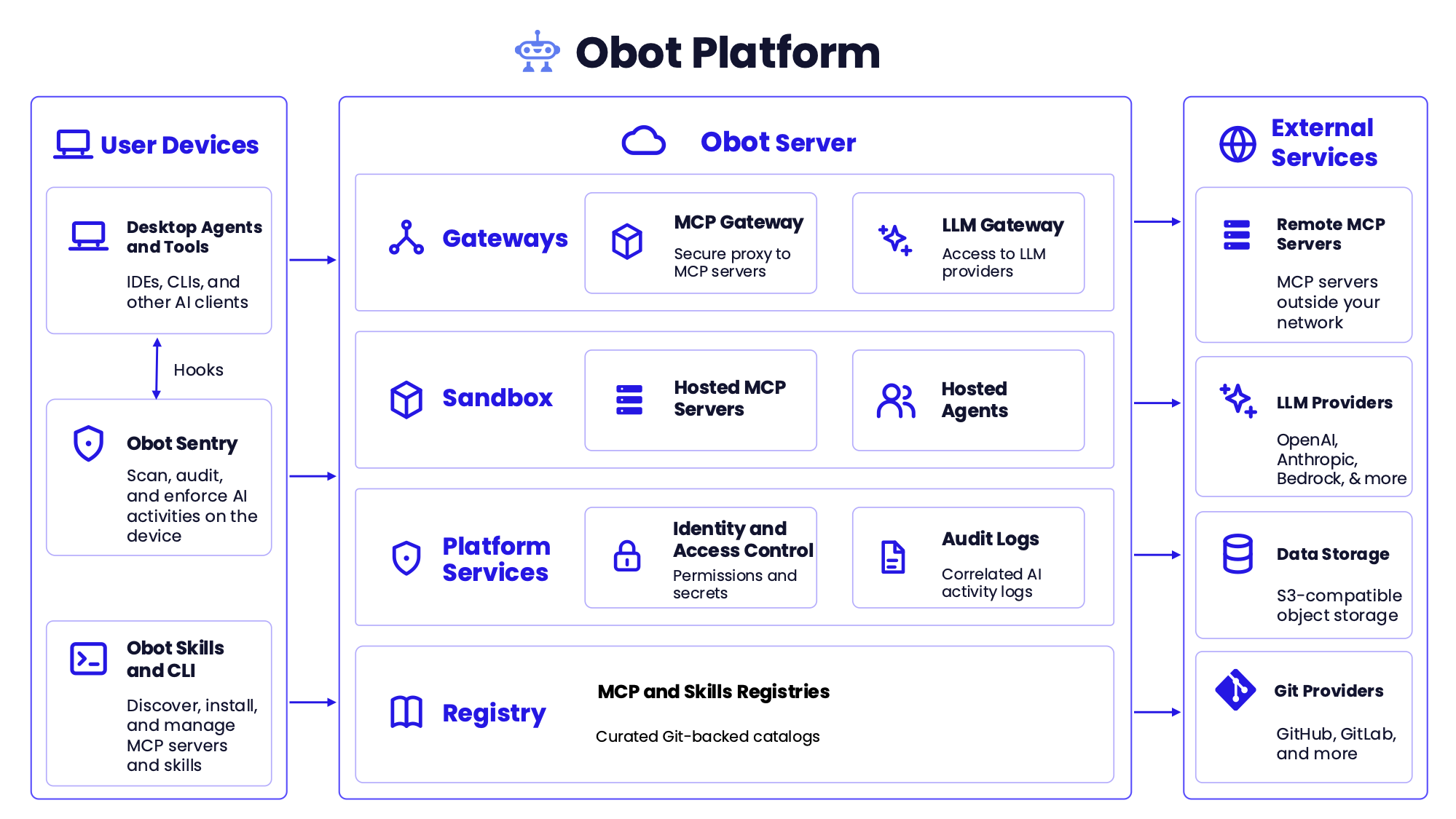
The Obot Platform connects AI activity on user devices with services managed by or proxied through Obot Server.
On user devices, desktop agents and tools connect to Obot gateways, while Obot Sentry scans, audits, and enforces policy on AI activity taking place on the device. The Obot CLI lets users and AI clients discover, install, and manage approved MCP servers and skills.
Obot Server provides:
Obot integrates with remote MCP servers, LLM providers, S3-compatible object storage, Git providers, and auth providers.
The MCP Gateway is a single governed entry point to every MCP server a user is allowed to reach.
The LLM Gateway presents provider-compatible endpoints that AI clients use to reach approved models.
Obot can run MCP servers itself, in isolated execution environments outside the main Obot Server process.
npx, uvx, and containerized MCP servers as Docker containers or Kubernetes workloads.Claude Environments runs Claude cloud sessions on an organization's own Kubernetes infrastructure. Users keep working in Claude, while Obot controls who can start a session and what that session can reach. Claude Environments is experimental and disabled by default. Support for more agent platforms is planned.
The MCP and Skills Registries centralize the discovery, installation, and management of MCP servers and Agent Skills.
The Obot CLI brings approved MCP servers and skills to users and their local AI clients, and the Obot skill teaches an agent to use the CLI itself.
Obot Sentry extends Obot governance to AI activity occurring directly on user devices. Device Management is currently beta.
Obot governs who can reach each part of the platform, and with which credentials.
Obot correlates activity across MCP servers, LLM providers, hosted workloads, and user devices.
For local development or evaluation, run Obot with Docker:
docker run -d \
  --name obot \
  -p 8080:8080 \
  -v obot-data:/data \
  -v /var/run/docker.sock:/var/run/docker.sock \
  -e OBOT_SERVER_ENABLE_AUTHENTICATION=true \
  -e OBOT_BOOTSTRAP_TOKEN=<token> \
  ghcr.io/obot-platform/obot:latest
The bootstrap token must be at least six characters. If you omit OBOT_BOOTSTRAP_TOKEN, Obot generates one and prints it in the container logs.
Open http://localhost:8080, sign in with the bootstrap token, and configure an authentication provider. For evaluation, the built-in Local provider lets you create user accounts without setting up an external identity provider. A model provider is required only when using the LLM Gateway. The UI is available in English, Japanese, Korean, and Simplified Chinese.
This Docker configuration mounts the host Docker socket so Obot can launch hosted MCP servers as sibling containers. Use it only for development, evaluation, or trusted single-tenant environments. Use the Kubernetes deployment for production or multi-tenant installations.
See the Installation Guide for Kubernetes, external PostgreSQL, encryption, authentication, and production configuration.
Significant changes begin as Obot Design Proposals so the architecture can be discussed before implementation. Architectural decisions that ship are recorded as concise Architecture Decision Records in this repository.
An ODP captures the proposed design and the discussion that shaped it. An ADR records the durable decision reflected in the implementation.
Obot is licensed under the MIT License. Every edition, including Obot Community and Obot Enterprise, runs the same open source code from the same container image, and editions differ only in their license key. See Editions and licensing for user and device limits and what each edition includes.
Obot is an open-source platform for organizations to manage, secure, and govern their AI ecosystems.