What is this?
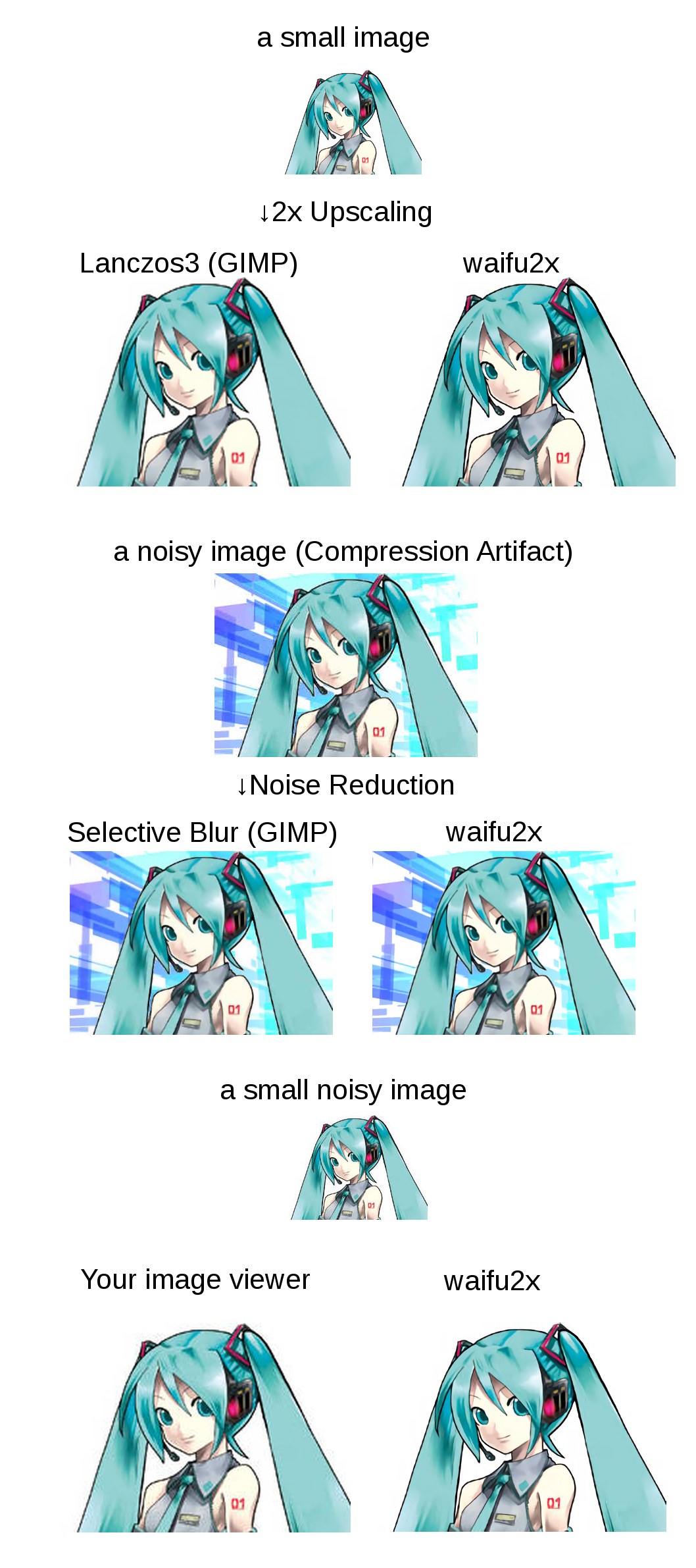
 waifu2x is a command-line tool that upscales anime-style art 2x and removes noise using deep convolutional neural networks — it also supports photos with a separate model.
waifu2x is a command-line tool that upscales anime-style art 2x and removes noise using deep convolutional neural networks — it also supports photos with a separate model.Is it a GUI app or something I run from the terminal?It is a command-line tool built on Torch7 — you run it as 'th waifu2x.lua' with options like -cropsize or -modeldir. If you just want to try it, the README links cloud and in-browser demo versions.
It is a command-line tool built on Torch7 — you run it as 'th waifu2x.lua' with options like -cropsize or -modeldir. If you just want to try it, the README links cloud and in-browser demo versions.How do I get it running on Linux?The README walks through an Ubuntu 16.04 setup: install NVIDIA CUDA, install Torch7 and the LuaRocks packages (lua-csnappy, md5, uuid, csvigo, turbo), clone the repo, then run a validation test.
The README walks through an Ubuntu 16.04 setup: install NVIDIA CUDA, install Torch7 and the LuaRocks packages (lua-csnappy, md5, uuid, csvigo, turbo), clone the repo, then run a validation test.Do I need a specific GPU for this?Yes — an NVIDIA GPU with CUDA is a listed hardware requirement. With the cuDNN library you can add -forcecudnn 1 for a big speedup, and -cropsize (e.g. 128) helps if you hit out-of-memory errors.
Yes — an NVIDIA GPU with CUDA is a listed hardware requirement. With the cuDNN library you can add -forcecudnn 1 for a big speedup, and -cropsize (e.g. 128) helps if you hit out-of-memory errors.Does it run natively on Windows?No — the author tells Windows users to use ready-made alternatives instead: waifu2x-caffe (download from its releases tab), waifu2x-ncnn-vulkan or waifu2x-convert-cpp.
No — the author tells Windows users to use ready-made alternatives instead: waifu2x-caffe (download from its releases tab), waifu2x-ncnn-vulkan or waifu2x-convert-cpp.What can it actually do to an image?Three modes: noise reduction, 2x upscaling, or both combined, plus batch conversion where %s and %d in the output name become the source basename and a sequence number.
Three modes: noise reduction, 2x upscaling, or both combined, plus batch conversion where %s and %d in the output name become the source basename and a sequence number.Can I use it on real photos, not just anime art?Yes — switch to the photo model by adding -modeldir models/photo to the command.
Yes — switch to the photo model by adding -modeldir models/photo to the command.Can it upscale video?Not in one command, but the README shows an ffmpeg workflow: extract frames and audio from the video, run waifu2x over the images, then generate the video back from the upscaled frames and audio.
Not in one command, but the README shows an ffmpeg workflow: extract frames and audio from the video, run waifu2x over the images, then generate the video back from the upscaled frames and audio.Can I train my own model?Yes — training commands are included (appendix/trainupconv7art.sh and trainupconv7photo.sh) for noise-reduction and 2x upscaling models. The author trained on about 6,000 high-resolution, noise-free PNG images.
Yes — training commands are included (appendix/trainupconv7art.sh and trainupconv7photo.sh) for noise-reduction and 2x upscaling models. The author trained on about 6,000 high-resolution, noise-free PNG images.Is there a Docker image?Yes, but it requires nvidia-docker, and without JIT caching it runs very slowly — the workaround is mounting a host volume to the CUDA cache path.
Yes, but it requires nvidia-docker, and without JIT caching it runs very slowly — the workaround is mounting a host volume to the CUDA cache path.Is this repo still being developed?Not really — as of February 2023 development moved to the PyTorch-based 'nunif' repository, so this Torch7 version is essentially in maintenance mode.
Not really — as of February 2023 development moved to the PyTorch-based 'nunif' repository, so this Torch7 version is essentially in maintenance mode.What are similar projects?Waifu2x-Extension-GUI, Real-ESRGAN, Anime4K, ALH-Pro, ComfyUI-VOSR2, neural-enhance, sentrysearch, CorridorKey
Waifu2x-Extension-GUI, Real-ESRGAN, Anime4K, ALH-Pro, ComfyUI-VOSR2, neural-enhance, sentrysearch, CorridorKeyWhich topics is it in?torch, anime, super-resolution, upscaling, lua, video-processing, neural-network, ffmpeg, image-processing, computer-vision, cuda, command-line-tool
torch, anime, super-resolution, upscaling, lua, video-processing, neural-network, ffmpeg, image-processing, computer-vision, cuda, command-line-tool