
115 ·GitHub
App Store Optimization on your Mac, with honest numbers. Rank tracking, Apple popularity, difficulty, AI listing writer and publishing to App Store Connect.
The project's README from github.com/mustafakendiguzel/aso-workbench. As one markdown file: README.md.
App Store Optimization on your Mac, with honest numbers. Track where your app ranks, find keywords you can actually win, write and publish your listing in every language, and see what each change did.


Install · Quick start · Features · Keys · How the numbers work · FAQ
Most ASO tools show one confident number per keyword. Often that number is a guess, and nobody tells you which part is Apple's and which part is the tool's.
ASO Workbench takes a different path:
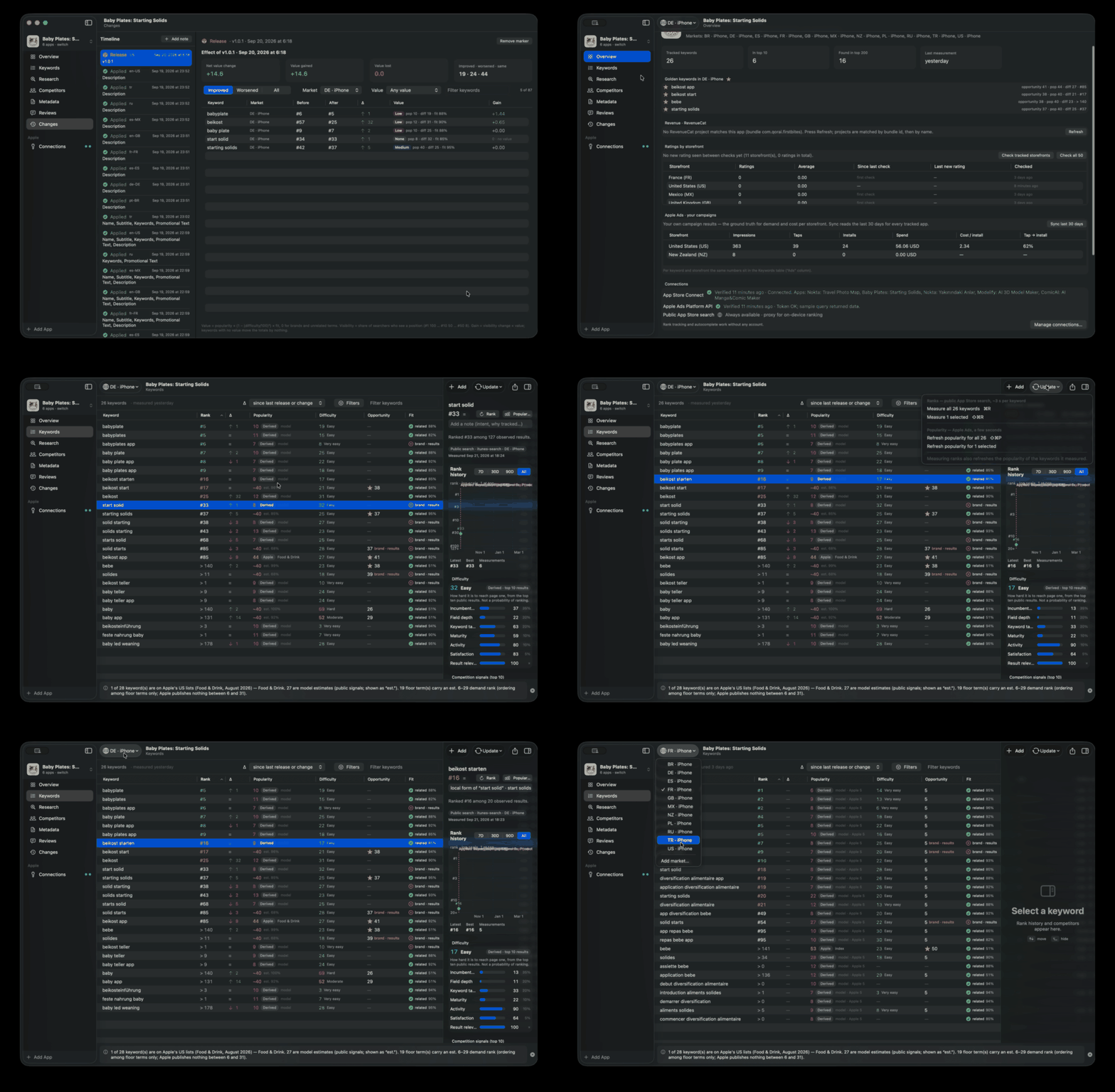
| 📈 Track | Rank for every keyword, per country and device, from real App Store search (top 200). History chart with your releases on it. Δ against your last release, so gains don't vanish when you re-measure. Ratings per country and written reviews. |
| 🔎 Research | Popularity from Apple wherever Apple publishes it, a labelled estimate elsewhere. Difficulty from the top ten results, fully explained. Golden keywords (real demand, beatable competition, not someone else's brand, relevant to your app). Import a competitor's keywords. Autocomplete ideas. |
| 🌍 Go global | Try your keywords in other countries in one pass, including AI-suggested phrasings in the local language, and track the winners with one click. |
| ✍️ Write | An AI writer that fills title, subtitle and keyword field with the keywords you can win first. Make better fixes every rule finding. Write every language at once, What's New for all languages, Terms and Privacy links added automatically. |
| 🚀 Publish | Send drafts to App Store Connect: missing languages are created, screenshots copied, the next version created, every write read back. Nothing is submitted for review. |
| 🧪 Measure | A timeline of releases and changes with a before/after report weighted by keyword value. Your Apple Ads results per keyword and country. MRR and subscriptions from RevenueCat. |
ASO-Workbench-x.y.z.dmg from the latest release.When a new version comes out, the app tells you (bottom of the sidebar, or ASO Workbench ▸ Check for Updates…). Your data is backed up automatically before a new version opens it.
Needs macOS 15+ and Xcode 26 (Swift 6.2). No dependencies.
git clone https://github.com/mustafakendiguzel/aso-workbench.git
cd aso-workbench
make install        # optimized build → /Applications/ASO Workbench.app
Later: make update pulls the latest code and reinstalls. make help lists everything.
You don't need any key to start. Each one unlocks something specific; the Connections screen explains each in the app, with step-by-step instructions.
| Connection | Need | Unlocks | Cost |
|---|---|---|---|
| (none) | not needed | Ranks, autocomplete, competitors, difficulty, ratings, reviews | free |
| Apple Ads API | Recommended | Apple's own popularity, your campaign results | free, spends nothing |
| App Store Connect API | Optional | Pull and publish your listing in every language | free |
| OpenRouter | Optional | AI writer, translations, brand / relevance checks, popularity estimates | pay per use, fractions of a cent |
| RevenueCat | Optional | MRR and subscriptions on Overview | free |
| Apple Ads website session | Advanced | Apple's exact index for terms missing from the lists (undocumented, at your own risk) | free |
Keys live in one file on your Mac, readable only by you, and each key goes only to its own service. Details and how to get each key: docs/CONNECTIONS.md.
| Number | Plain meaning | Good is |
|---|---|---|
| Rank | Where your app appears when someone searches this word. | low (#1 is best) |
| Popularity (5–100) | How many people search this word, on Apple's scale. | high |
| Difficulty (0–100) | How hard it is to reach page one, measured by how big and focused the apps already there are. | low |
| Opportunity | Popularity, discounted by difficulty: popularity × (1 − (difficulty ÷ 100)²). | high |
| Fit | How likely someone searching this wants an app like yours. | related (≥ 50%) |
| Golden ★ | Popularity ≥ 30, difficulty ≤ 45, not a brand, related to your app. | ★ |
Apple publishes a 1–100 popularity only for the top of each genre (monthly lists), and since 29 September 2025 reports 5 for everything below. ASO Workbench shows, in order:
Apple, needs the Apple Ads key),Apple · index, optional website session),Derived · est.), and for Apple's "5" a 6–29 rank among floor terms so you can still compare them,The estimate comes from a model we trained ourselves and ship inside the app:
In use, Jev answers the same questions for your new terms, which is why the estimate needs the OpenRouter key. On terms it never saw, the model ranks them in the same order as Apple with a correlation of 0.74 and is off by about 10 points on a typical term. It is an aid for ordering, always labelled, and Apple's number always wins. The full method and test results →
Computed from the top ten public results, the ones a searcher actually sees. It weighs how big the top three are (35%), how big the rest of page one is (20%), how many name the keyword in their title (20%), how established (10%), how actively updated (10%) and how well rated (5%) they are, with a discount when Apple fills the page with unrelated apps. The keyword inspector shows every part. Details →
Every release (detected automatically), every change you publish and every note you add becomes a marker. The Changes page compares ranks before and after it, weighted by each keyword's value. Climbing 50 places on a term nobody searches counts for nothing.
~/Library/Application Support/ASO Workbench/credentials.json (permissions 600). Data: store.sqlite in the same folder, a plain SQLite file you can back up or delete.See SECURITY.md.
Sources/
├── ASOCore/        pure logic: models, rules, difficulty, diffs, features (no network, no UI)
├── ASOProviders/   Apple, OpenRouter and RevenueCat adapters behind an allow-listed HTTP client
└── ASOWorkbench/   the SwiftUI app: screens, services, SwiftData model, design system
Resources/          Info.plist, icon, bundled popularity model
scripts/            bundle-app.sh (build the .app), release.sh (.dmg + GitHub release)
docs/               POPULARITY, CONNECTIONS, ARCHITECTURE, RELEASING
Three layers the compiler keeps apart, Swift 6 strict concurrency, zero dependencies. Architecture →
make open      # debug build and launch
make test      # unit tests
make lab       # launch with the developer Lab (retrain the popularity model)
make dist      # build the .dmg and .zip for a release (maintainers)
Releases, versioning and how updates reach users: docs/RELEASING.md. Contributions: CONTRIBUTING.md. Changes: CHANGELOG.md.
Why do my numbers differ from other ASO tools? Because Apple publishes very little below the top of each genre, other tools fill the gap with their own estimates, usually without saying so. ASO Workbench shows Apple's value when Apple has one and labels everything else.
Does connecting Apple Ads cost money? No. The popularity and report endpoints are read-only and need no running campaign.
Can it break my App Store listing? It writes only when you press Apply and confirm, refuses if the listing changed since you last pulled it, re-reads after writing, and never submits for review.
Why macOS 15? It uses SwiftData, the SwiftUI inspector and Swift 6 features that need macOS 15.
Where is my data? How do I start over?
~/Library/Application Support/ASO Workbench/. Quit the app and delete store.sqlite to start over; delete credentials.json to remove every key.
Free to use, not to sell. MIT License with the Commons Clause: you may use ASO Workbench for free (also for your own commercial apps), read and change the code, and share it with this license attached. You may not sell it, a modified copy, or a paid service built mostly on it. See LICENSE.
ASO Workbench is not affiliated with or endorsed by Apple. App Store, Apple Ads and App Store Connect are trademarks of Apple Inc.
App Store Optimization on your Mac, with honest numbers. Rank tracking, Apple popularity, difficulty, AI listing writer and publishing to App Store Connect.