
Что это?
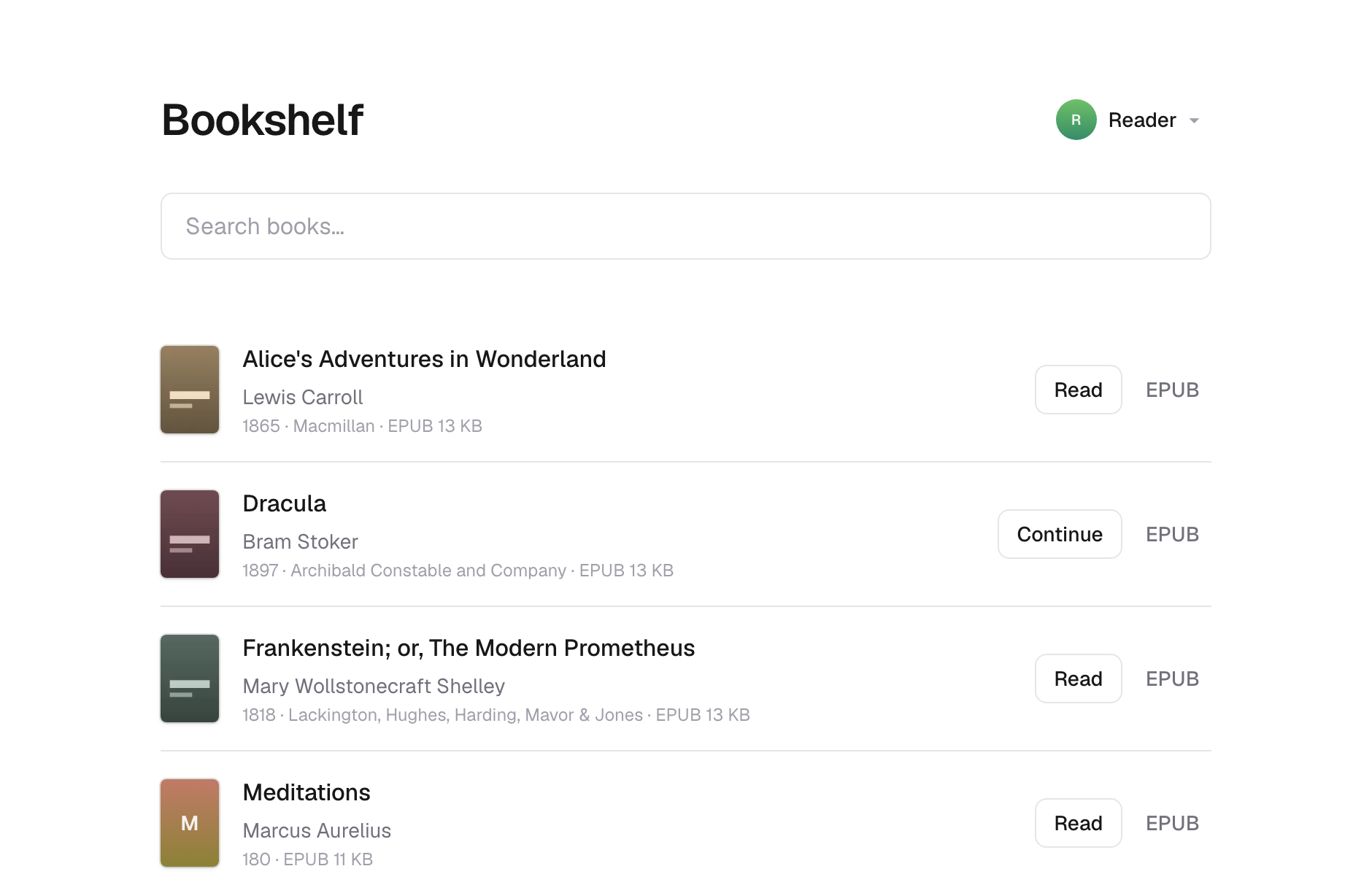
 Bookshelf — это селфхостед-библиотека для электронных книг, которые у вас уже есть. Вы кладёте EPUB и PDF в папку, публикуете их и читаете в браузере или на Kobo через OPDS-каталог.
Bookshelf — это селфхостед-библиотека для электронных книг, которые у вас уже есть. Вы кладёте EPUB и PDF в папку, публикуете их и читаете в браузере или на Kobo через OPDS-каталог.Ему нужна база данных или отдельный бэкенд-сервис?Нет. Он работает целиком на объектном хранилище: либо как Cloudflare Worker поверх R2, либо как Node-сервер поверх обычной папки на вашей машине — и вообще без базы данных.
Нет. Он работает целиком на объектном хранилище: либо как Cloudflare Worker поверх R2, либо как Node-сервер поверх обычной папки на вашей машине — и вообще без базы данных.Как его запустить?Склонируйте репозиторий, запустите 'npm run demo' для генерации примеров книг, затем опубликуйте и запустите через Docker или локальную файловую систему, либо разверните на Cloudflare, отредактировав bookshelf.config.json и wrangler.jsonc так, чтобы они указывали на ваш R2-бакет и Worker.
Склонируйте репозиторий, запустите 'npm run demo' для генерации примеров книг, затем опубликуйте и запустите через Docker или локальную файловую систему, либо разверните на Cloudflare, отредактировав bookshelf.config.json и wrangler.jsonc так, чтобы они указывали на ваш R2-бакет и Worker.Что нужно установить перед началом?Node 24 или новее и Unix-подобная система; Windows не поддерживается, потому что инструмент синхронизации вызывает утилиты для работы с изображениями через 'which'. Если развернёте на Cloudflare, дополнительно понадобится аккаунт Cloudflare для R2 и Workers.
Node 24 или новее и Unix-подобная система; Windows не поддерживается, потому что инструмент синхронизации вызывает утилиты для работы с изображениями через 'which'. Если развернёте на Cloudflare, дополнительно понадобится аккаунт Cloudflare для R2 и Workers.Безопасно ли просто выложить мою библиотеку в сеть как есть?Нет — аутентификации нет, поэтому любой, кто доберётся до вашей полки, сможет скачать каждую книгу и переключать профили, и ничего не зашифровано; ключи объектов — это даже слаги из названий, так что списки в хранилище раскрывают названия ваших книг.
Нет — аутентификации нет, поэтому любой, кто доберётся до вашей полки, сможет скачать каждую книгу и переключать профили, и ничего не зашифровано; ключи объектов — это даже слаги из названий, так что списки в хранилище раскрывают названия ваших книг.Можно запустить на своей машине или обязательно Cloudflare?И так и так: запускайте локально или на VPS как Node-сервер поверх папки с провайдером файловой системы, либо разверните как Cloudflare Worker с хранилищем R2 — код и библиотека одинаковы в обоих случаях.
И так и так: запускайте локально или на VPS как Node-сервер поверх папки с провайдером файловой системы, либо разверните как Cloudflare Worker с хранилищем R2 — код и библиотека одинаковы в обоих случаях.Данные моей библиотеки где-либо шифруются?Нет. Библиотека хранится в открытом виде без шифрования, хотя провайдер файловой системы позволяет вам самому разместить её на зашифрованном томе.
Нет. Библиотека хранится в открытом виде без шифрования, хотя провайдер файловой системы позволяет вам самому разместить её на зашифрованном томе.Зачем нужен OPDS-каталог?Он представляет вашу библиотеку в машиночитаемом формате каталога, чтобы ридеры вроде Kobo или Kindle могли просматривать и скачивать книги напрямую, без браузера.
Он представляет вашу библиотеку в машиночитаемом формате каталога, чтобы ридеры вроде Kobo или Kindle могли просматривать и скачивать книги напрямую, без браузера.Что будет, если читать под одним профилем с двух устройств одновременно?Синхронизация позиции чтения работает по принципу «последняя запись побеждает», поэтому одновременное чтение с двух устройств под одним профилем может перезаписывать прогресс друг друга.
Синхронизация позиции чтения работает по принципу «последняя запись побеждает», поэтому одновременное чтение с двух устройств под одним профилем может перезаписывать прогресс друг друга.Можно подготовить библиотеку к публичному доступу?Да, установка BOOKSHELFREADONLY в 1 оставляет хранилищу раздачу чтения, но блокирует создание, переименование и удаление профилей, а также сохранение позиций чтения — это рассчитано на полки, до которых могут добраться посторонние.
Да, установка BOOKSHELFREADONLY в 1 оставляет хранилищу раздачу чтения, но блокирует создание, переименование и удаление профилей, а также сохранение позиций чтения — это рассчитано на полки, до которых могут добраться посторонние.Есть быстрый способ запустить через Docker?Да, Docker-образ — самый короткий путь: в нём уже есть инструменты для генерации обложек, так что нужно просто смонтировать свои книги и запустить.
Да, Docker-образ — самый короткий путь: в нём уже есть инструменты для генерации обложек, так что нужно просто смонтировать свои книги и запустить.What are similar projects?calibre-web, grimmory, bookorbit, audiobookshelf, readest, Kavita, koreader, nodewarden
calibre-web, grimmory, bookorbit, audiobookshelf, readest, Kavita, koreader, nodewardenWhich topics is it in?opds, ebook-reader, object-storage, epub, vps, cloudflare-workers, s3, serverless, ebook, backup, pdf, cloud
opds, ebook-reader, object-storage, epub, vps, cloudflare-workers, s3, serverless, ebook, backup, pdf, cloud