



这是什么?
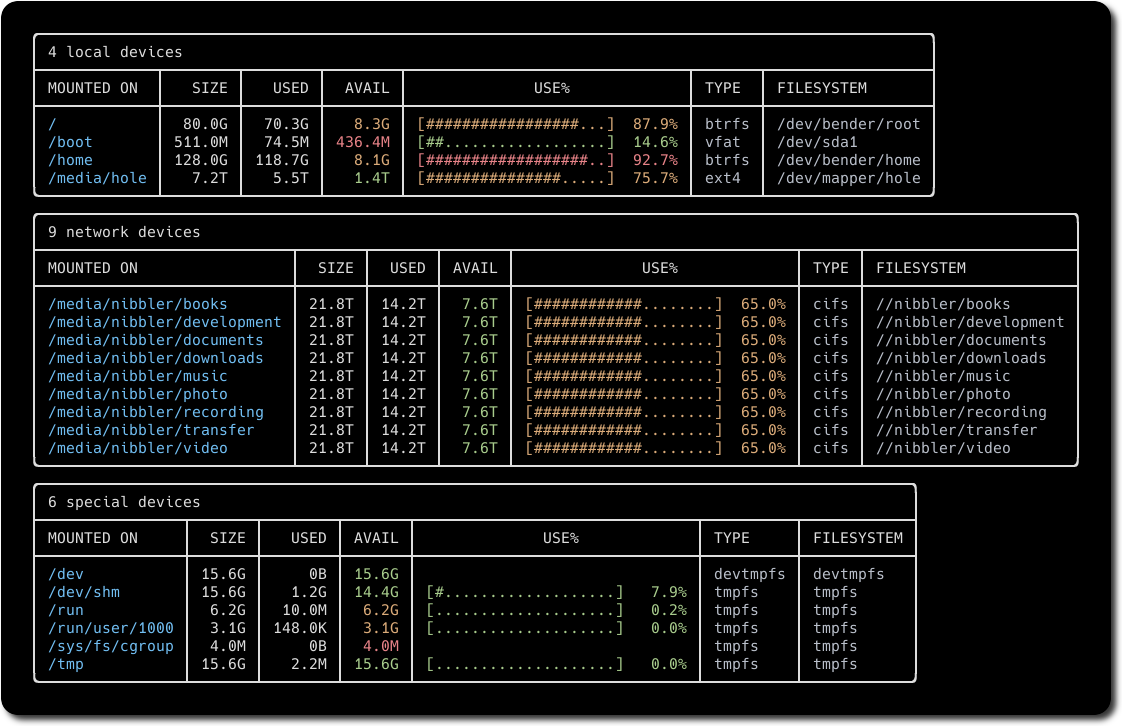
 duf 是一个查看磁盘占用和剩余空间的终端工具——它是 df 的替代品,对 Linux、BSD、macOS 和 Windows 都适用,更友好、更好看。
duf 是一个查看磁盘占用和剩余空间的终端工具——它是 df 的替代品,对 Linux、BSD、macOS 和 Windows 都适用,更友好、更好看。它和直接用 df 有什么不同?干的是同样的活,但输出更友好:彩色表格会自动适配终端的主题和宽度,还内置了分组、筛选、排序和 JSON 输出。
干的是同样的活,但输出更友好:彩色表格会自动适配终端的主题和宽度,还内置了分组、筛选、排序和 JSON 输出。我需要先装 Go 或其他东西吗?用软件包或预编译的二进制文件都不需要。只有想从源码编译 duf 时,才需要一个能用的 Go 环境,版本 1.23 或更高。
用软件包或预编译的二进制文件都不需要。只有想从源码编译 duf 时,才需要一个能用的 Go 环境,版本 1.23 或更高。装好之后有什么坑吗?oh-my-zsh 自带一个名为 duf 的别名,会覆盖真正的工具——在这种配置下,首次使用前先运行 unalias duf。
oh-my-zsh 自带一个名为 duf 的别名,会覆盖真正的工具——在这种配置下,首次使用前先运行 unalias duf。这是给系统管理员用的,普通用户也能上手吗?只要会在终端里查磁盘空间,谁都能用。它刻意做得对用户友好:开箱即有的彩色输出、设备分组和排序。
只要会在终端里查磁盘空间,谁都能用。它刻意做得对用户友好:开箱即有的彩色输出、设备分组和排序。装好之后怎么用?直接不带参数运行 duf,就能列出你的设备和挂载点。传入路径(如 duf /home)可以只看指定项,或者用 duf --all 把伪文件系统、重复和无法访问的文件系统也列出来。duf --json 则输出适合脚本处理的结果。
直接不带参数运行 duf,就能列出你的设备和挂载点。传入路径(如 duf /home)可以只看指定项,或者用 duf --all 把伪文件系统、重复和无法访问的文件系统也列出来。duf --json 则输出适合脚本处理的结果。能筛选显示的内容吗?可以——duf --only 和 --hide 用来选择表格类型(local、network、fuse、special、loops、binds),--only-fs 和 --hide-fs 按文件系统类型筛选(比如 tmpfs 或 vfat),--only-mp / --hide-mp 则按挂载点筛选。像 '/sys/' 这样带引号的通配符也能用。
可以——duf --only 和 --hide 用来选择表格类型(local、network、fuse、special、loops、binds),--only-fs 和 --hide-fs 按文件系统类型筛选(比如 tmpfs 或 vfat),--only-mp / --hide-mp 则按挂载点筛选。像 '/sys/' 这样带引号的通配符也能用。能排序输出或选择显示哪些列吗?可以:duf --sort size 按 size、used、usage、type、inodes 等键排序,duf --output mountpoint,size,usage 用来挑选列。duf --inodes 可以改为按 inode 使用情况而不是块使用情况来显示。
可以:duf --sort size 按 size、used、usage、type、inodes 等键排序,duf --output mountpoint,size,usage 用来挑选列。duf --inodes 可以改为按 inode 使用情况而不是块使用情况来显示。输出里的颜色是什么意思?可用空间和使用率这两列会根据设备的占用程度显示绿色、黄色或红色。可以用 --avail-threshold=10G,1G 或 --usage-threshold=0.5,0.9 这类参数自定义阈值。
可用空间和使用率这两列会根据设备的占用程度显示绿色、黄色或红色。可以用 --avail-threshold=10G,1G 或 --usage-threshold=0.5,0.9 这类参数自定义阈值。Which topics is it in?disk-space, disk-usage, openbsd, system, filesystem, freebsd, tui, sysadmin, monitoring, utility, hacktoberfest, go
disk-space, disk-usage, openbsd, system, filesystem, freebsd, tui, sysadmin, monitoring, utility, hacktoberfest, go