The native macOS console for herdr — see Claude Code, Codex,
Gemini, Grok and OpenCode across your Mac and every SSH box you own, and jump into any one
of them at full-TUI fidelity.
herdr is the runtime your coding agents live on — a background server that
owns their terminals and knows which one is working, blocked, or done. herdrm is a native
macOS window on top of it, and it's grown well past "attach to a terminal":
🖥️ Every device
Local + remote over SSH — keys, Tailscale, or a Keychain password — with auto-reconnect
🧭 Live status
Spaces, Agents & Terminals across every connected device
⌨️ Real terminal
Full PTY attach, not a chat wrapper — native selection, legible fonts, resilient sessions
📎 Paste anything
Files and images land straight in the agent's pane, locally or over SSH
📁 Move files
Browse Local + SSH files side by side and copy in either direction
🔔 Notifications
A system alert the moment an agent needs you — click it to jump right there
🔍 ⌘K search
Every agent, on every device, one keystroke away
See the full feature list
Every machine, one sidebar
All your devices, in parallel — remote sockets forwarded over ssh -L, each on its own
reconnect loop (1s → 30s backoff). The sidebar aggregates every device with a tinted OS badge;
the bottom-left switcher filters by device.
Flexible SSH targets — user@host, user@host:port, ssh:// URIs, and ~/.ssh/config
aliases. Auth falls back OpenSSH keys/agent → Tailscale SSH (1.98.0+) → an in-app password
prompt stored in the macOS login Keychain, never in a file.
Diagnosable failures — "herdr isn't running on <host>", a misconfigured
AllowStreamLocalForwarding, or why a disconnected device is unreachable — never a bare
"not connected".
Spaces, Agents & Terminals, always current
Spaces, Agents & Terminals sidebar — every workspace, coding agent (claude, codex,
gemini, grok, opencode, …), and ordinary Herdr shell pane, across local and SSH devices.
New Agent / New Terminal / New Space — New Terminal creates a persistent shell tab in
any device and space. Locally the agent picker only lists advertised CLIs found on the
login-shell PATH (captured once from a real interactive + login shell, not by grepping rc
files or trusting LaunchServices); SSH devices follow the remote server's manifest catalog
and validate on start. Each agent's bypass-permissions flag is on by default. ⌘N for a
new agent, ⌘T for a new terminal, ⇧⌘N for a new space. New Space includes an inline directory browser that
works over SSH. Settings → Agents accepts a per-kind binary path when detection is wrong.
Spaces rename straight from the sidebar's context menu.
A real terminal, not a chat wrapper
Live terminal — attaches directly to an agent or shell PTY (herdr agent attach /
herdr terminal attach); grabs
keyboard focus the moment you jump in from ⌘K, the sidebar, or a notification.
Standalone terminals — open a local login shell or choose any configured SSH device;
remote shells reuse the same OpenSSH config, agent, host-key, and Keychain password flow.
Native text selection — drag to select, no Shift needed; right-click for Copy/Paste/Select
All plus link actions (⌘-click opens a URL).
Legibility controls — Thin strokes, font Weight, and Line spacing settings.
Shift+Enter inserts a line break instead of submitting; colors adapt correctly in Light
mode instead of washing out.
Resilient sessions — a dropped connection or a takeover shows a Reconnect button instead
of freezing on the last frame; mixed-version herdr binaries no longer break attach.
Files, search, and staying in the loop
Two-pane file manager — browse Local and any configured SSH device side by side, then
upload or download regular files with progress, cancellation, and explicit Replace / Keep
Both conflict handling. Transfers use the same OpenSSH config, agent, host-key, and Keychain
password flow as terminals.
Paste files and images into Claude Code, Codex, Copilot, Cursor, Gemini, Grok, OpenCode,
or pi. Local pastes forward as Ctrl+V so the agent reads the clipboard itself; remote pastes
stream over SSH into a self-pruning cache (7-day retention, 50 MB cap) and paste the path.
Search — ⌘K across every device, ordered by urgency, scrolling to follow your selection.
Notifications — a sound and a system alert when any agent finishes or needs input;
clicking jumps straight to it. Agents you're already watching stay quiet.
Built like a native Mac app
Universal binary — Apple Silicon and Intel, one download.
Light & dark, auto-updates via Sparkle, signed and
notarized.
HerdrKit — the socket-RPC/SSH/device layer ships as its own, independently testable Swift
package (Packages/HerdrKit).
🤔 Why herdrm?
You already run agents through herdr because the model is right — spaces, live status, real
PTYs, not a chat window pretending to be one. But living in herdr attach and a wall of
terminal panes is its own skill, and not everyone wants to be a tmux person to get the benefit.
herdrm is the same model, built for people who'd rather click:
Herdr's mechanics, an Apple-native interface. Every space and agent is a sidebar row you
click, not a session name you type — built in SwiftUI, so it looks and moves like a
first-party Mac app, not a terminal skin bolted on top.
Native means fast. No Electron, no browser engine underneath — herdrm launches instantly
and stays light, the kind of responsiveness only a truly native app gets.
Still the real terminal when it matters. Click an agent and you're on its actual PTY, full
TUI, nothing summarized — you just don't have to live inside a multiplexer to get there.
One console, every machine. Laptop, dev box, home server — all rows in the same sidebar.
You stop polling. Status lives in the sidebar and in notifications, not in your head.
It gets out of the way. ⌘K, ⌘N, paste-to-attach — no new mental model to learn.
📋 Requirements
macOS 14+
herdr installed locally (herdrm starts it if it isn't running) and on
your remote machines
For remote devices: OpenSSH access, Tailscale SSH (1.98.0+), or a Keychain-stored password
📦 Install
Homebrew
brew install owo-network/brew/herdrm
Manual — download herdrm-x.y.z.zip from Releases,
unzip, drag herdrm.app into /Applications. Either way it self-updates from then on — HerdrM
→ Check for Updates…, or HerdrM → About HerdrM for the version you're running.
⚡ Quick Start
1. Launch herdrm            → no local herdr running? herdrm starts it for you
2. Add a device (optional)  → you@dev-box · you@dev-box:2222 · a Tailscale machine
3. ⌘N                       → pick a device + a CLI, you're attached to its live terminal
4. ⌘K                       → jump to any agent on any device, any time
🏗️ Architecture
flowchart LR
    A(["🖥️ herdr<br/>background server, owns the PTYs"]) -->|"Unix-socket RPC +<br/>herdr agent attach"| B[["Packages/HerdrKit<br/>RPC client · SSH tunnel · device store"]]
    B -->|SwiftUI bindings| C(["Sources/HerdrM<br/>sidebar · terminal · search · notifications"])
    style A fill:#161b22,stroke:#E2795B,color:#e6edf3
    style B fill:#1f2630,stroke:#3B82F6,color:#e6edf3
    style C fill:#161b22,stroke:#2FA35F,color:#e6edf3
herdr — the daemon: owns every agent's PTY, persists spaces, answers
over a local Unix socket.
Packages/HerdrKit — transport and domain layer, UI-independent and unit-tested on its
own (make kit-test).
Sources/HerdrM — the SwiftUI shell built on
SwiftTerm.
🔨 Build from source
brew install xcodegen
make build   # xcodegen + xcodebuild → build/Build/Products/Debug/herdrm.app
make run
make kit-test  # HerdrKit integration tests (needs a running local herdr)
🤝 Contributing
Early-stage software, PRs genuinely welcome — small and single-purpose lands fastest.
Bug?Open an issue with your macOS
version, herdr --version, and repro steps.
Feature idea? Open an issue first for anything beyond a small PR.
Sending a PR:make build + make kit-test locally (no CI gate yet — this is the bar),
plus a line under ## [Unreleased] in CHANGELOG.md (release automation requires it).
🙏 Credits
herdr — the agent runtime this app is a console for.
@lbr77 — the herdr.tailcat
server plugin, the embedded tailcat bridge, and the reference implementation
the libghostty terminal migration is built on (lbr77/herdrm).
Heeler — iOS herdr client; domain model and
transport patterns.
PolyForm Noncommercial 1.0.0 — free to use, modify, and share for
any noncommercial purpose. Commercial use requires a separate license from
the maintainer. Contributions are accepted under the same terms.
⚠️ Status
Early stage, without full test coverage — expect bugs. Issues and PRs are very welcome.
⭐ Star History
herdrm (missuo/herdrm)
Choose a tag and it will appear here. With no tags selected, all catalog projects are shown.
Searching Database…
Choose a tag and it will appear here. With no tags selected, all catalog projects are shown.





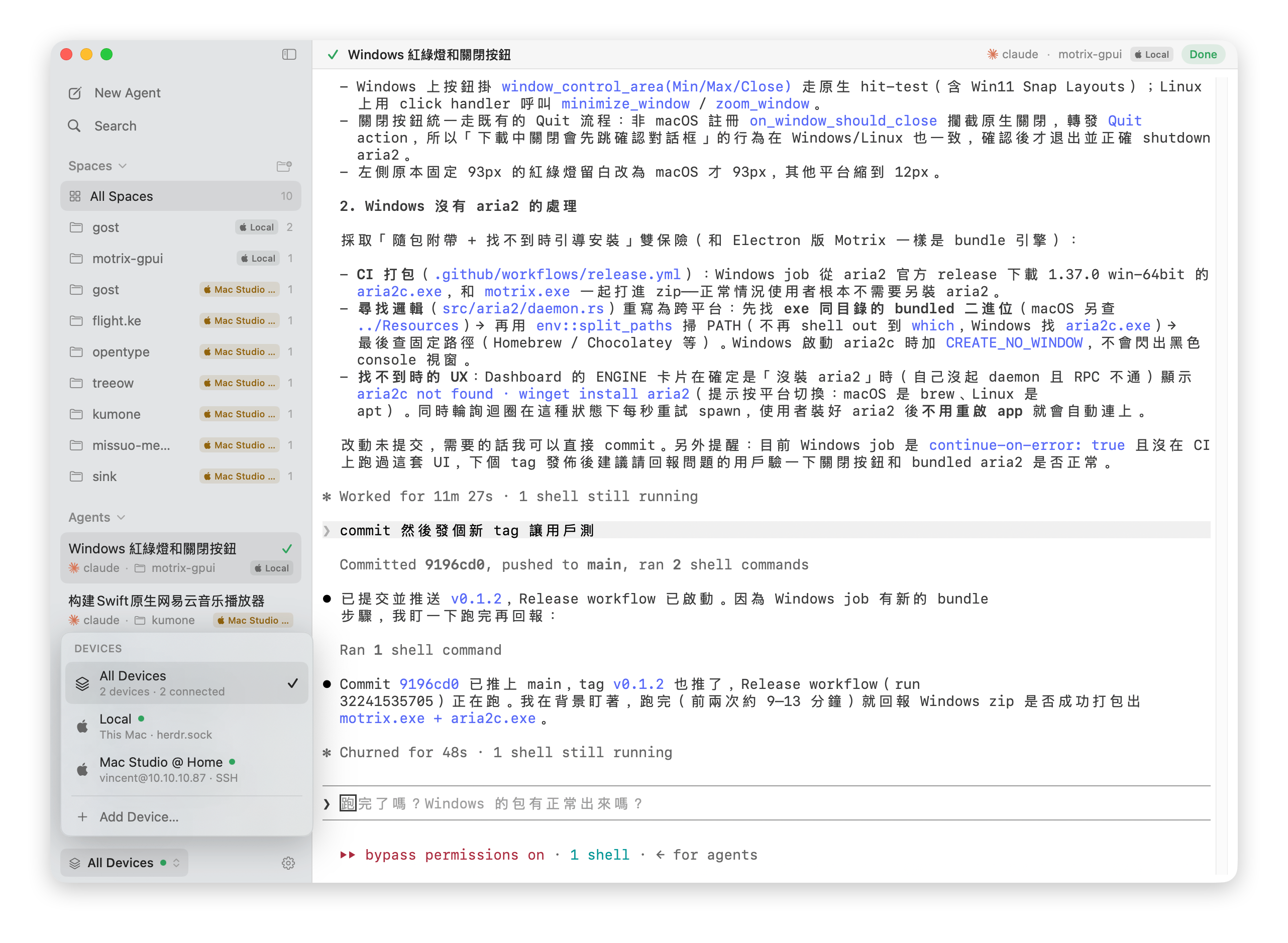

 herdrm 是一个原生 macOS 控制台应用,构建在 herdr 之上(herdr 是一个掌管你编码智能体终端的后台守护进程),让你通过一个侧边栏查看实时状态,并接入本地和远程(SSH)设备上的任意智能体或 shell 终端。