




Что это?
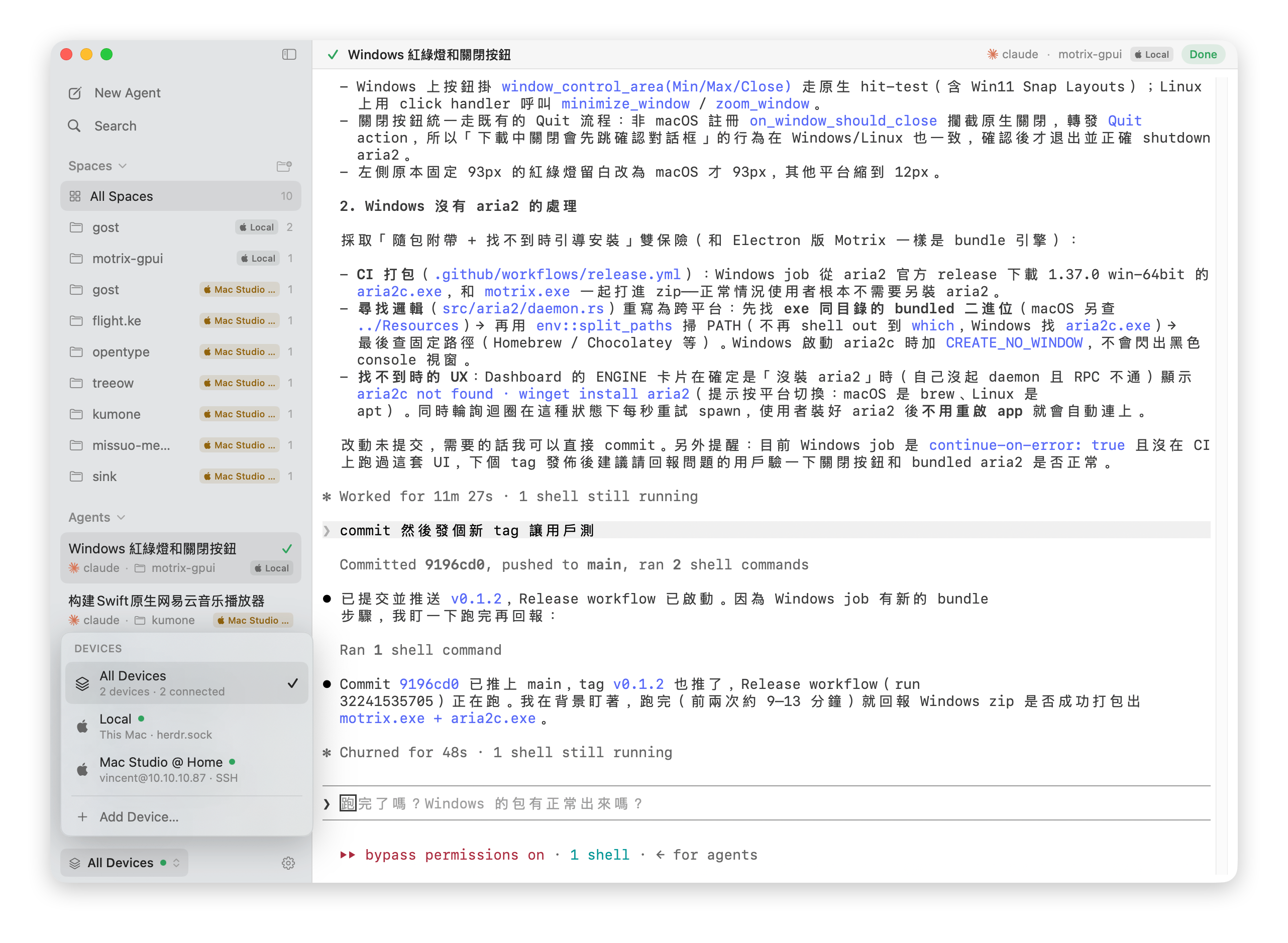
 herdrm — нативное консольное приложение для macOS, надстройка над herdr, фоновым демоном, который владеет терминалами ваших агентов для кодинга; оно позволяет видеть живой статус и подключаться к любому терминалу агента или shell на локальных и удалённых (SSH) устройствах из одной боковой панели.
herdrm — нативное консольное приложение для macOS, надстройка над herdr, фоновым демоном, который владеет терминалами ваших агентов для кодинга; оно позволяет видеть живой статус и подключаться к любому терминалу агента или shell на локальных и удалённых (SSH) устройствах из одной боковой панели.Это приложение с интерфейсом или терминальный мультиплексор вроде tmux?Это полностью нативное приложение macOS на SwiftUI, не Electron-обёртка и не чат-интерфейс — оно даёт настоящий PTY-терминал через кликабельную боковую панель вместо навигации с клавиатуры в стиле tmux.
Это полностью нативное приложение macOS на SwiftUI, не Electron-обёртка и не чат-интерфейс — оно даёт настоящий PTY-терминал через кликабельную боковую панель вместо навигации с клавиатуры в стиле tmux.Как установить herdrm?Установите через Homebrew или скачайте herdrm-x.y.z.zip со страницы Releases, распакуйте и перетащите herdrm.app в /Applications. После этого программа самообновляется через Sparkle.
Установите через Homebrew или скачайте herdrm-x.y.z.zip со страницы Releases, распакуйте и перетащите herdrm.app в /Applications. После этого программа самообновляется через Sparkle.Нужно ли устанавливать herdr отдельно?Да — сам herdr должен быть установлен локально (herdrm запустит его автоматически, если он не работает) и на любой удалённой машине, к которой вы хотите подключаться. Удалённым устройствам нужны доступ OpenSSH, Tailscale SSH 1.98.0+ или пароль, хранящийся в Связке ключей.
Да — сам herdr должен быть установлен локально (herdrm запустит его автоматически, если он не работает) и на любой удалённой машине, к которой вы хотите подключаться. Удалённым устройствам нужны доступ OpenSSH, Tailscale SSH 1.98.0+ или пароль, хранящийся в Связке ключей.Достаточно ли стабилен herdrm для ежедневного использования?Это явно ранняя стадия без полного покрытия тестами, так что баги ожидаемы; CI-шлюза пока нет, и контрибьюторов просят вручную запускать make build и make kit-test.
Это явно ранняя стадия без полного покрытия тестами, так что баги ожидаемы; CI-шлюза пока нет, и контрибьюторов просят вручную запускать make build и make kit-test.Он работает на Intel Mac или только на Apple Silicon?Он поставляется как универсальный бинарник и требует macOS 14 или новее, так что работает и на Apple Silicon, и на Intel Mac.
Он поставляется как универсальный бинарник и требует macOS 14 или новее, так что работает и на Apple Silicon, и на Intel Mac.Где хранятся SSH-пароли для удалённых устройств?Когда аутентификация по ключам недоступна, herdrm переключается на запрос пароля внутри приложения, значение которого сохраняется в связке ключей macOS и никогда не записывается в файл.
Когда аутентификация по ключам недоступна, herdrm переключается на запрос пароля внутри приложения, значение которого сохраняется в связке ключей macOS и никогда не записывается в файл.Можно ли пользоваться herdrm бесплатно, в том числе в коммерческих целях?Он лицензирован под PolyForm Noncommercial 1.0.0: бесплатно использовать, изменять и делиться можно для любых некоммерческих целей, а коммерческое использование требует отдельной лицензии от сопровождающего.
Он лицензирован под PolyForm Noncommercial 1.0.0: бесплатно использовать, изменять и делиться можно для любых некоммерческих целей, а коммерческое использование требует отдельной лицензии от сопровождающего.К каким агентам для кодинга может подключаться herdrm?Он показывает заявившие о себе CLI, найденные в PATH вашей login-оболочки, включая claude, codex, gemini, grok, opencode и pi, плюс обычные shell-терминалы как «обычные панели Herdr shell».
Он показывает заявившие о себе CLI, найденные в PATH вашей login-оболочки, включая claude, codex, gemini, grok, opencode и pi, плюс обычные shell-терминалы как «обычные панели Herdr shell».Можно ли перемещать файлы между моим Mac и удалённым SSH-хостом?Да — двухпанельный файловый менеджер показывает Local и любой настроенный SSH-девайс рядом, с загрузкой/выгрузкой, прогрессом, отменой и явной обработкой конфликтов с выбором «заменить» или «оставить оба».
Да — двухпанельный файловый менеджер показывает Local и любой настроенный SSH-девайс рядом, с загрузкой/выгрузкой, прогрессом, отменой и явной обработкой конфликтов с выбором «заменить» или «оставить оба».Зачем herdrm, если можно просто подключаться через tmux по SSH?Вы получаете ту же модель herdr (пространства, живой статус, настоящие PTY) через нативную кликабельную боковую панель с уведомлениями и поиском Cmd+K, так что не нужно жить внутри мультиплексора, чтобы следить за несколькими агентами на разных машинах.
Вы получаете ту же модель herdr (пространства, живой статус, настоящие PTY) через нативную кликабельную боковую панель с уведомлениями и поиском Cmd+K, так что не нужно жить внутри мультиплексора, чтобы следить за несколькими агентами на разных машинах.Что такое HerdrKit?HerdrKit — слой транспорта socket-RPC/SSH/устройств и слой домена, поставляемый как отдельный независимо тестируемый Swift-пакет, отделённый от кода интерфейса на SwiftUI.
HerdrKit — слой транспорта socket-RPC/SSH/устройств и слой домена, поставляемый как отдельный независимо тестируемый Swift-пакет, отделённый от кода интерфейса на SwiftUI.What are similar projects?WindTerm, herdr-web-ui, tuios, OpenYoink, AceShell, herdr-gpui, Codync, MacPacker
WindTerm, herdr-web-ui, tuios, OpenYoink, AceShell, herdr-gpui, Codync, MacPackerWhich topics is it in?pty, remote-development, ssh-client, terminal-emulator, file-manager, remote-access, swiftui, ssh, coding-agents, macos-app, homebrew, apple-silicon
pty, remote-development, ssh-client, terminal-emulator, file-manager, remote-access, swiftui, ssh, coding-agents, macos-app, homebrew, apple-silicon