


antislop
Anti Slop: Rules for AI Coding Agents. It stops them from generating generic "AI slop" UI and copy, without letting the result turn sterile. It is a filter, not a style guide: no prescribed colors, fonts, or layouts. It is not only for building pages: it also writes and audits copy, so AI text stops reading like AI. And it never beautifies on its own; DESIGN.md (yours) is where beauty and direction come from.
New here? Start with the GUIDE.md. It explains what antislop is and how to install it, from zero.
What it does
- 38 mandatory rules (R-01 to R-38) in three tiers: Hard Gate (absolute), Purpose-Gate (technique allowed, reason required), Quality Locks (consistency)
- A Liveliness Toolkit with three dials (ENERGY / RHYTHM / MOTION) and a Design Read, so the result is alive and specific, not just "clean"
- A Delivery Gate: a mandatory PASS/FAIL report in four blocks, run before anything ships
- Additive skills, one per concern, so an agent only loads what a task needs
The core prevents slop but cannot invent direction. DESIGN.md (yours) supplies it; a sterile result means the direction was missing, not that the filter failed (R-37).
See the difference
The same brief, the same page, generated four times over. antislop filters; DESIGN.md supplies direction. They are two different jobs, and these are the four results. Copy and code follow as before-and-after pairs instead of four separate builds, because nothing else has to supply direction there.
UI
Three of the four builds. The first uses neither tool, the second only antislop, the third only DESIGN.md.
| Nothing at all |
antislop alone |
DESIGN.md alone |
 |
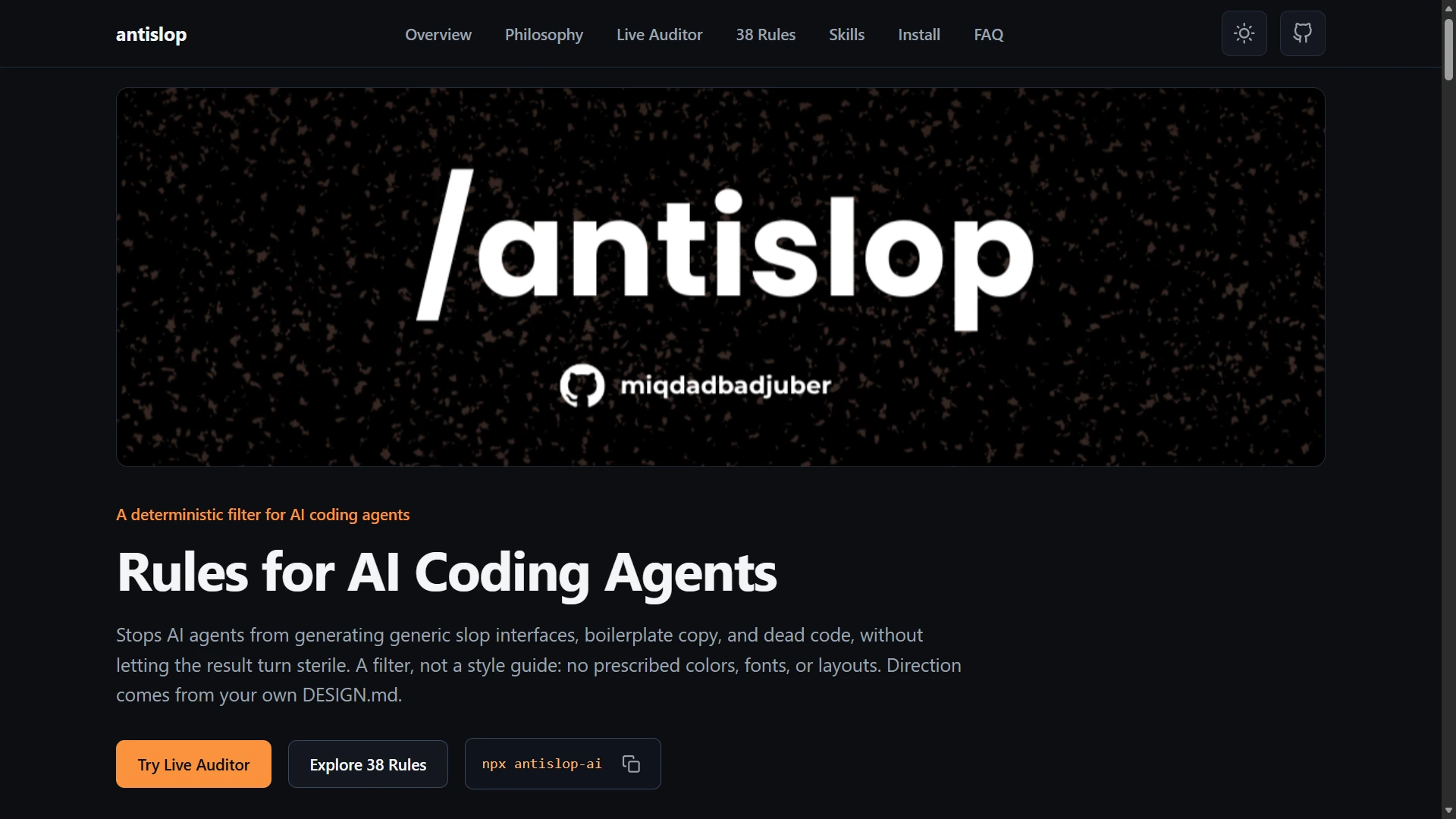 |
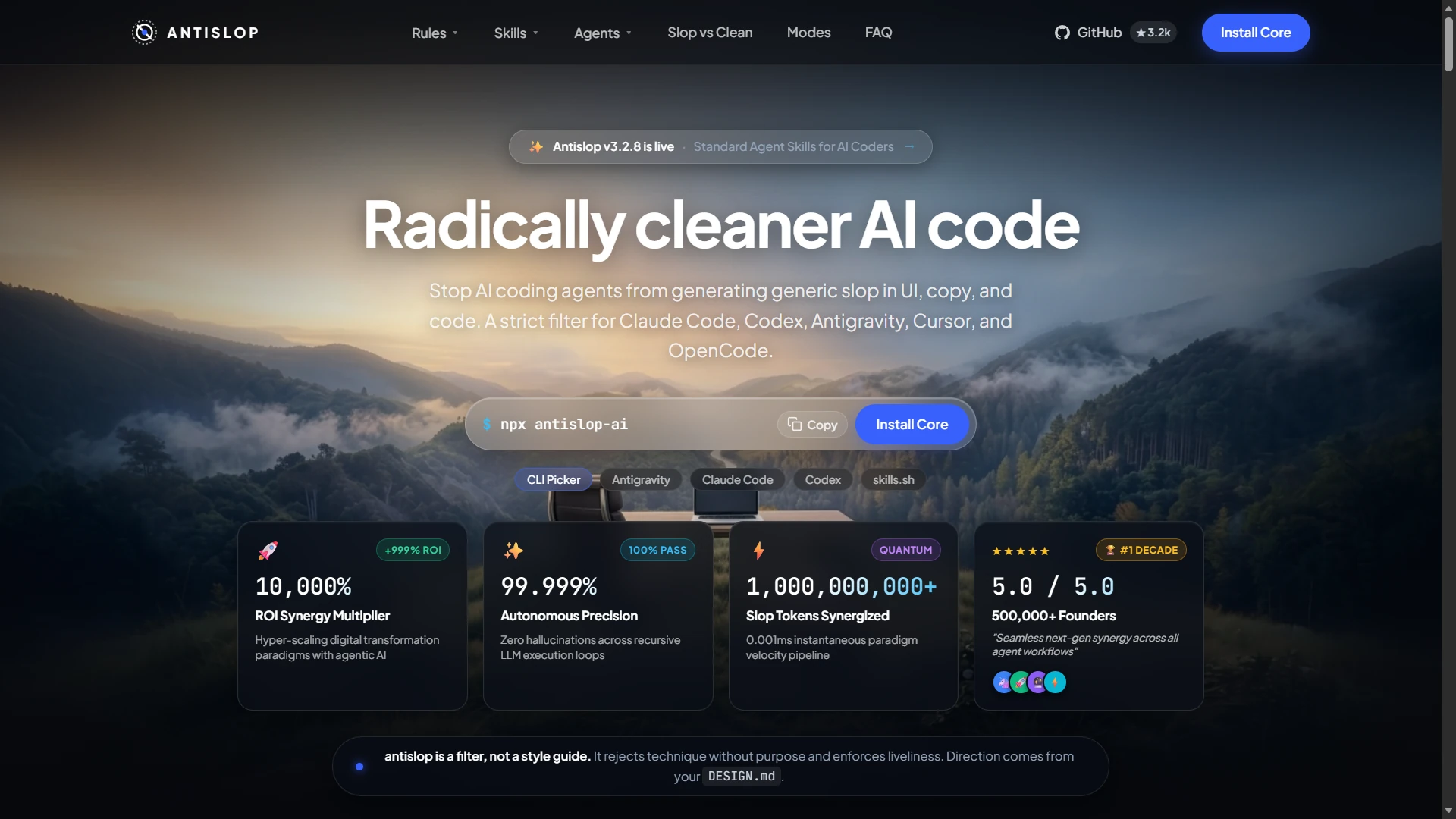 |
| Where most AI output starts: a sparkle logo, a beta pill, and a fake terminal. |
Honest, because the filter removed the invented numbers. Plain, because beauty is not its job. |
The direction lands, but the slop stays, because DESIGN.md directs and does not filter. |
The fourth uses both, and it is the only one of the four that is clean and directed at the same time:
antislop + DESIGN.md |
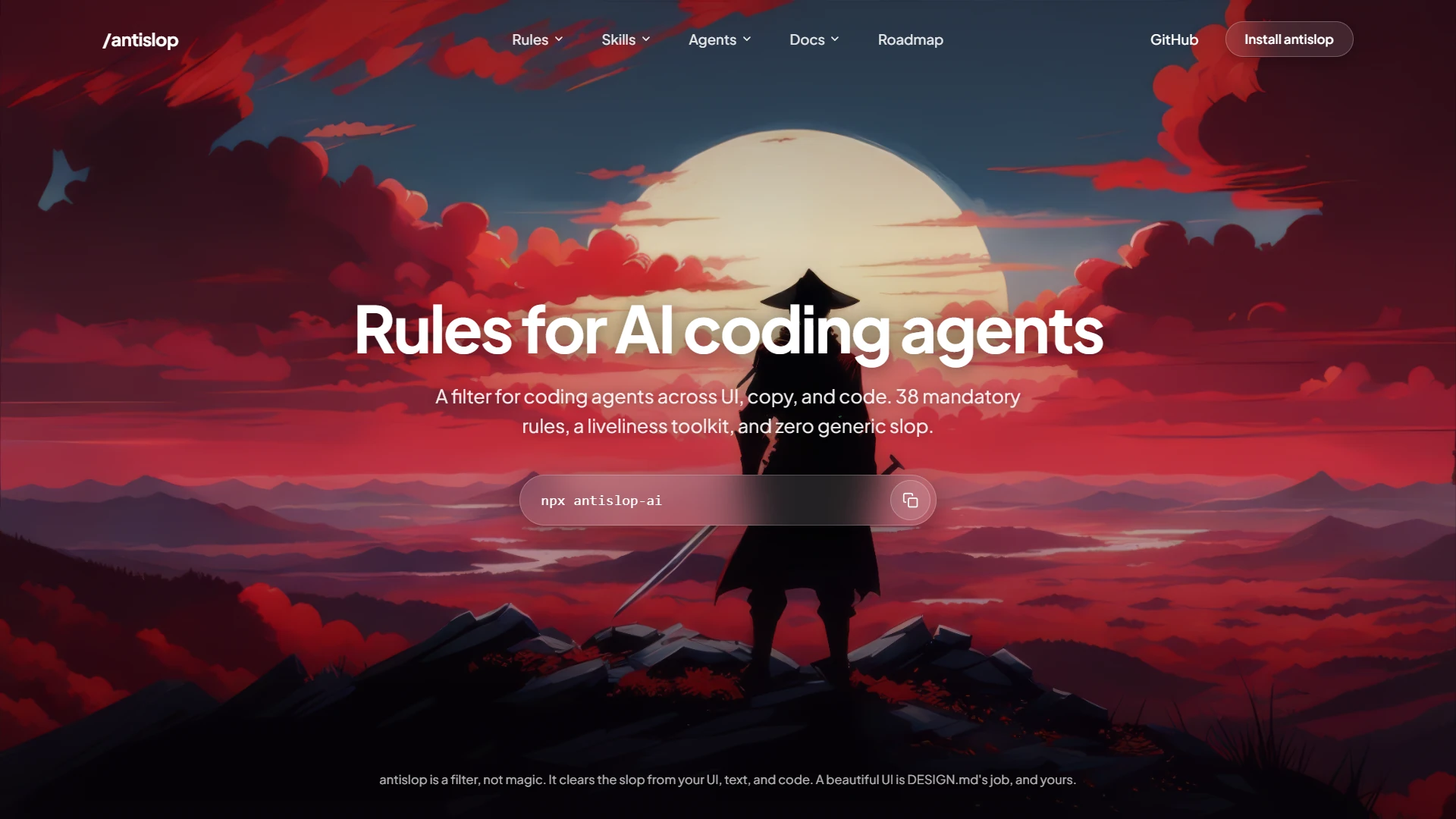 |
Honest numbers and a real direction in the same build. The filter removes what should not be there; DESIGN.md fills the space that leaves, which is the one thing neither tool manages alone. |
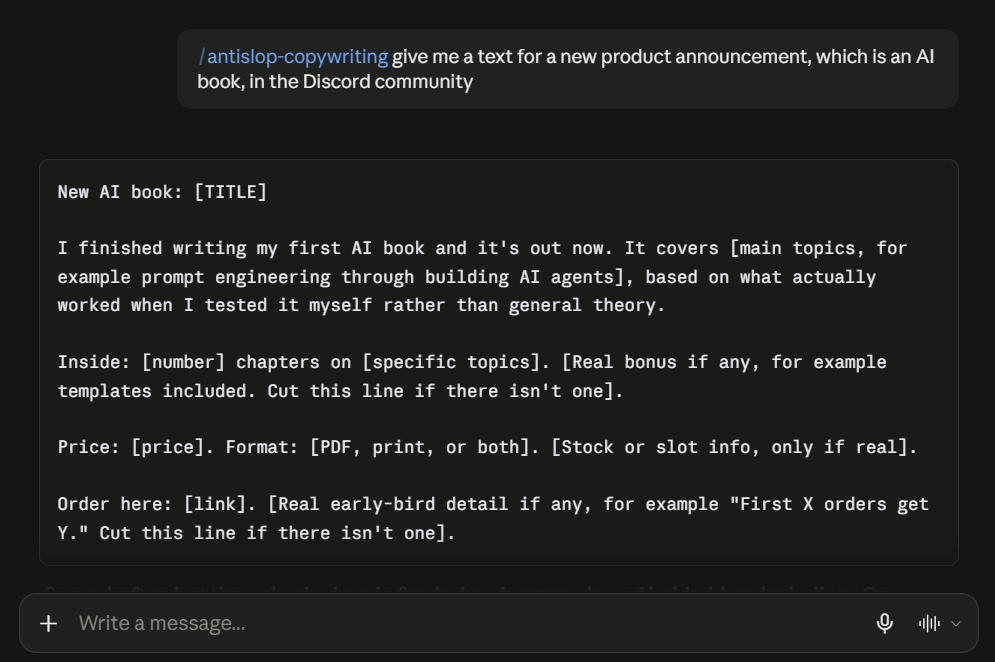
Copy
One prompt, run twice.
| Before |
After |
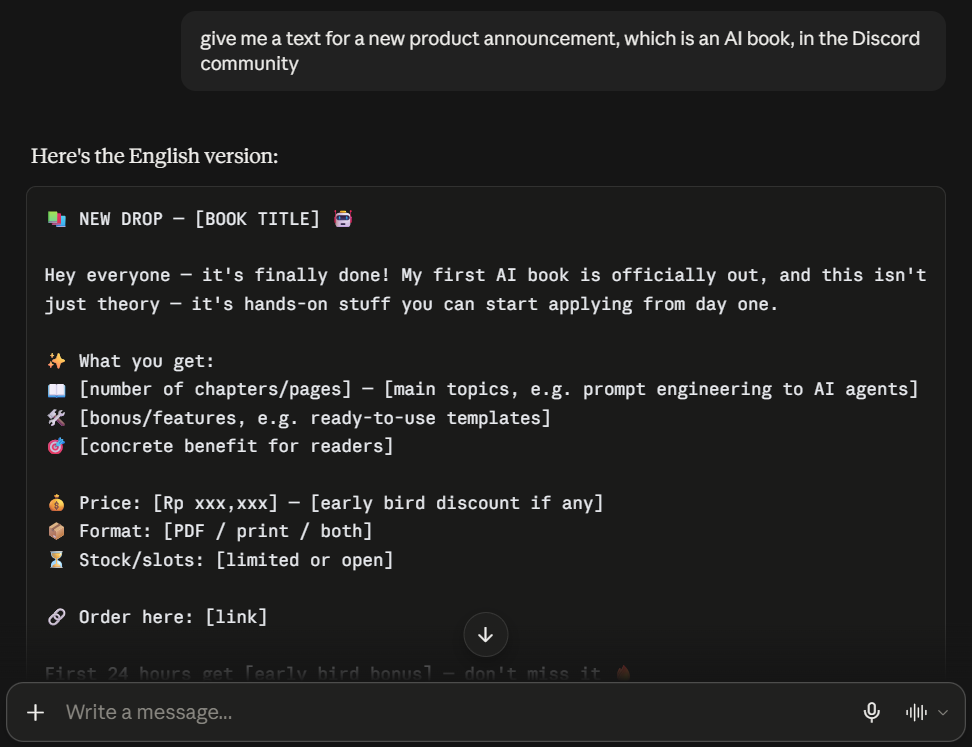 |
 |
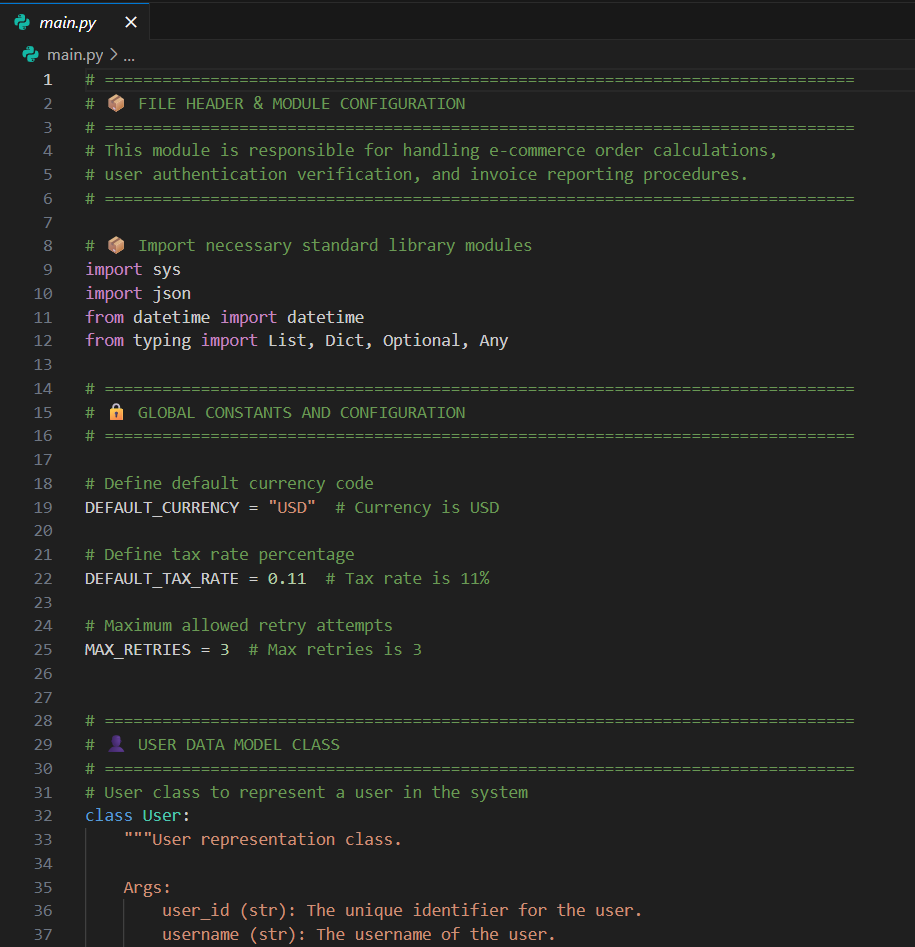
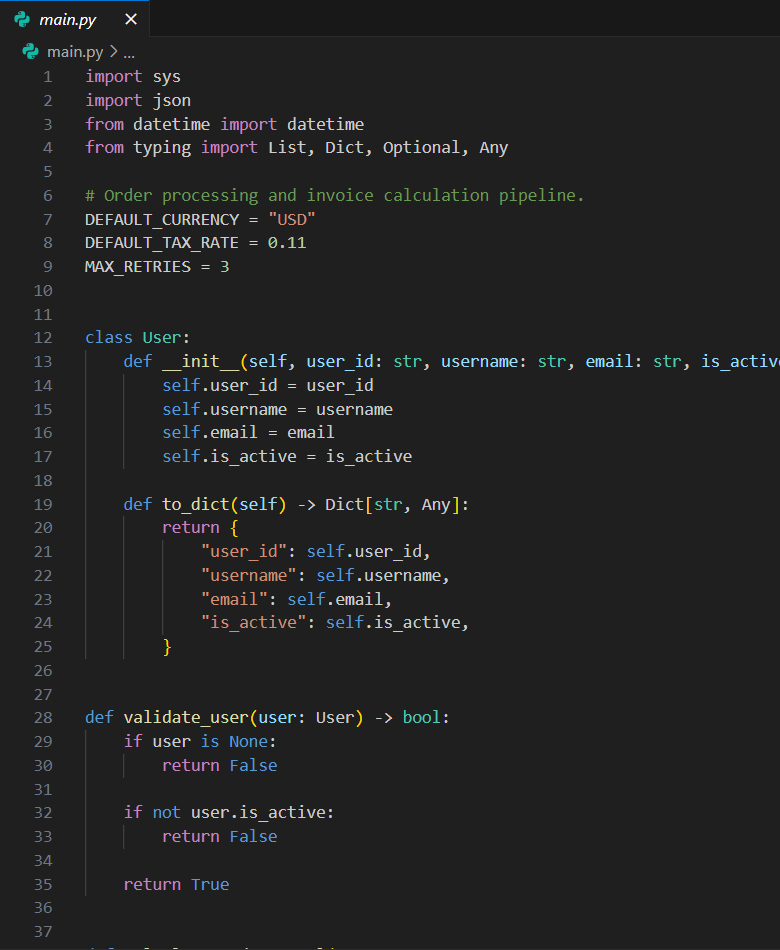
Code
One file, run twice.
| Before |
After |
 |
 |
Every image in this section opens full size if you click it.
Install
antislop ships as a set of standard agent skills (one folder per skill, holding a SKILL.md). The core is always loaded; the other skills load only when the task needs them. This section is the reference: every install command, in one place. GUIDE.md walks through them from zero, and its Update and Remove sections cover every route the same way.
1. The installer (recommended)
One command, then answer the prompts. It asks which extra skills you want, where to install (this project or everywhere), and which agents you use, then copies the folders. It is also the only route that writes the pointer reloading antislop every session on a project install; a global install relies on the skills loading themselves by description.
npx antislop-ai
To update later, run the same command and choose Overwrite them when it finds the existing folders. See Update.
2. The skills directory
antislop is listed on skills.sh, the open directory for agent skills:
npx skills add miqdadbadjuber/anti-slop
This copies the same folders as path 1 and nothing else: no pointer, so antislop reloads by description alone. GUIDE.md covers adding the pointer afterwards, and updating or removing this route.
3. The plugin (Claude Code)
Add the marketplace once, then install the plugin:
/plugin marketplace add https://github.com/miqdadbadjuber/anti-slop
/plugin install antislop@anti-slop
4. The plugin (Antigravity)
The same repo is an Antigravity plugin. Install it with the Antigravity CLI:
agy plugin install https://github.com/miqdadbadjuber/anti-slop
5. The plugin (Codex)
The same repo is a Codex plugin and marketplace. Add the marketplace once, then install the plugin:
codex plugin marketplace add miqdadbadjuber/anti-slop
codex plugin add antislop@anti-slop
6. The plugin (Cursor)
The same repo is a Cursor plugin. Add it as a plugin marketplace with the Cursor Agent CLI:
agent plugin marketplace add https://github.com/miqdadbadjuber/anti-slop
Then open Customize in Cursor, find antislop, and select Install, choosing project or user scope.
7. The plugin (Kimi Code)
The same repo is a Kimi Code plugin. Install it in a Kimi Code session, then start a new one:
/plugins install https://github.com/miqdadbadjuber/anti-slop
The URL resolves to the latest release. Kimi Code installs plugins per user, so this covers every project.
8. The plugin (Cline)
The same repo is a Cline plugin. Install it with the Cline CLI:
cline plugin install https://github.com/miqdadbadjuber/anti-slop.git
The plugin ships no tools and no hooks. Its whole payload is the skills/ folder it bundles, which Cline discovers on install. This has to be said plainly: Cline's own documentation limits plugins to the SDK, the CLI, and Kanban, and says the feature does not apply to the VS Code and JetBrains extensions yet. So this door covers a Cline CLI install and not an editor install, and the installer in path 1 is the route for an editor.
Where the skills live
Every skill is a folder of the open Agent Skills standard (<name>/SKILL.md), so it drops into any agent that reads the standard. The installer (path 1) installs into whichever of these you use, creating the folder if it is missing:
| Agent |
Reads antislop from |
| Claude Code |
.claude/skills/ |
| Codex |
.codex/skills/ |
| Antigravity |
.agents/skills/ |
| OpenCode |
.opencode/skills/ |
| Cursor |
.cursor/skills/ |
| Cline |
.cline/skills/ |
| Gemini CLI |
.gemini/skills/ |
| Hermes |
.hermes/skills/ |
| GitHub Copilot |
.agents/skills/ |
| Kimi Code |
.agents/skills/ |
The Gemini CLI row is legacy support: Antigravity replaced it, but the installer still writes there for existing setups.
Antigravity, Copilot, and Kimi Code share one folder. Copilot also reads .github/skills/ and .claude/skills/, and Kimi Code also reads .kimi-code/skills/, but the installer writes the folder they have in common, so picking them together installs antislop once.
Cline is the one agent that keeps a folder of its own and reads another one the installer writes: it loads .cline/skills/ and .claude/skills/, so installing both Claude Code and Cline puts the same names in two folders Cline reads, and the installer names that collision. It also resolves a name collision the other way round from every other agent here: a global skill outranks a project one.
Those are the project paths. A global install writes the same folder under your home directory, with three exceptions: OpenCode writes to ~/.config/opencode/skills/, Antigravity to ~/.gemini/config/skills/, and Codex to ~/.agents/skills/, the user-level folder Codex documents in place of its own ~/.codex/skills/. Copilot, OpenCode, and Kimi Code read that home-level folder too, so it is where a global install reaches them.
Hermes needs one extra step after a project install: it will not load skills out of a cloned repository until you run hermes skills trust once in that project.
Manual (single file, no packaging)
The core antislop.md alone is a complete filter you can paste into any chat window. Download it and tell your agent to read it; the First-Run wizard inside it installs skills the manual way:
curl -o antislop.md https://raw.githubusercontent.com/miqdadbadjuber/anti-slop/main/antislop.md
Update
antislop does not update itself and nothing tells you a release is out. Every route updates by running its own command again:
| Route |
Update it with |
| The installer |
npx antislop-ai, then Overwrite them. It prints the version on disk next to the one it carries. |
| The skills directory |
npx skills add miqdadbadjuber/anti-slop |
| The plugin (Claude Code) |
claude plugin update antislop@anti-slop |
| The plugin (Antigravity) |
agy plugin install https://github.com/miqdadbadjuber/anti-slop |
| The plugin (Codex) |
codex plugin marketplace upgrade anti-slop |
| The plugin (Cursor) |
agent plugin marketplace update https://github.com/miqdadbadjuber/anti-slop |
| The plugin (Kimi Code) |
/plugins install https://github.com/miqdadbadjuber/anti-slop |
| The plugin (Cline) |
cline plugin install https://github.com/miqdadbadjuber/anti-slop.git --force |
| Manual |
download antislop.md again |
Skills load when a session starts, so start a new one afterwards. To see which version you are on, open the VERSION file in the installed antislop folder, or ask your agent. GUIDE.md covers each route step by step.
Skills
| Skill |
What it covers |
Ships in |
| antislop |
The core filter: rules, tiers, Delivery Gate, liveliness |
v3.0.0 |
| antislop-ui |
UI / visual: layout, color, components, decoration, motion, structure |
v2.2.0 |
| antislop-copywriting |
Copy & text: headlines, CTAs, tone, fake stats, anti-AI-writing patterns, markdown hygiene |
v2.3.0 |
| antislop-human |
Human: contrast (with the checker), keyboard, focus, states |
v2.4.0 |
| antislop-layoutmobile |
Responsive / mobile: reflowing across screen widths (phone to desktop), breakpoints, grids, overflow, tap targets |
v2.5.0 |
| antislop-code |
Code comments: remove generic AI-slop comments, keep the valuable ones, never touch the code |
v3.1.0 |
Pick what matches the work:
- UI work → antislop-ui
- Copy work → antislop-copywriting
- People work → antislop-human
- Responsive layout work → antislop-layoutmobile
- Code comments work → antislop-code
- More than one kind of work → install several
- None → the core alone is a complete filter
Usage modes
antislop is used one of two ways, chosen at the start of a session:
- During guides the work while it is built, ending with the Delivery Gate. Use it when building new UI.
- After audits finished work: a numbered findings list, you approve which to fix, then a follow-up report. Use it to clean up existing output.
Roadmap
v3.2.14 is the current release.
- Cline joins as an installer target. It is the first agent here that reads a folder of its own,
.cline/skills/, and one the installer already writes, .claude/skills/, so picking it with Claude Code puts the same skills in two folders it reads and the installer names that. It also resolves a shared name the other way round from every other agent: a global skill outranks a project one.
- Cline also has a plugin door. The repository root is now a Cline plugin.
package.json declares the entry point and the plugin bundles the six skill folders, so there is nothing to copy into your project. Cline's documentation limits plugins to the SDK, the CLI, and Kanban, so this door covers a CLI install and not an editor install.
Every earlier release, and what comes next, is in ROADMAP.md.
In motion
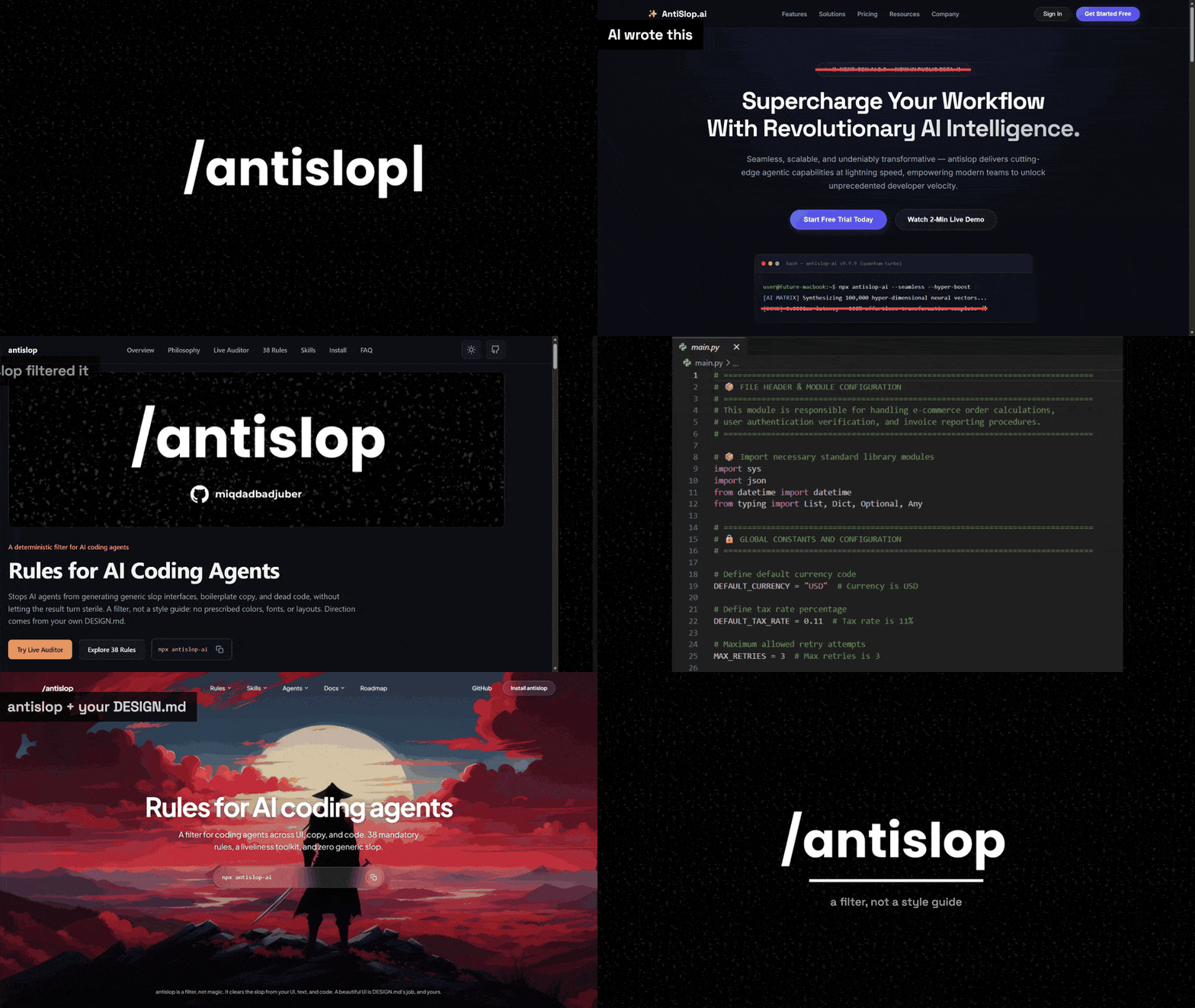
The same four images from See the difference, in motion.
FAQ
Is antislop a style guide?
No, a filter. It does not prescribe colors, fonts, or layouts. It rejects technique without purpose and requires liveliness; direction is yours.
Which agents does it work with?
All of them, but the install paths differ:
- The installer and the skills directory support Claude Code, Codex, Antigravity, OpenCode, Cursor, Cline, Gemini CLI, Hermes, GitHub Copilot, and Kimi Code (the installer detects each agent's skill folder). These are the recommended paths.
- The plugins are per-agent doors: the Claude Code marketplace plugin (path 3), the Antigravity plugin (path 4), the Codex plugin (path 5), the Cursor plugin (path 6), the Kimi Code plugin (path 7), and the Cline plugin (path 8), all installed from the same repo.
- The single file (
antislop.md) works with any agent that reads plain Markdown, including a plain chat window.
The packaged skills use the open Agent Skills standard (folder per skill), so they drop into any tool that reads the standard.
What is a "skill"?
A folder that goes deeper into one concern (UI, copywriting, accessibility, and so on), holding a SKILL.md with its rules. It references the core rules by number and never duplicates them, so adding a skill does not change the core.
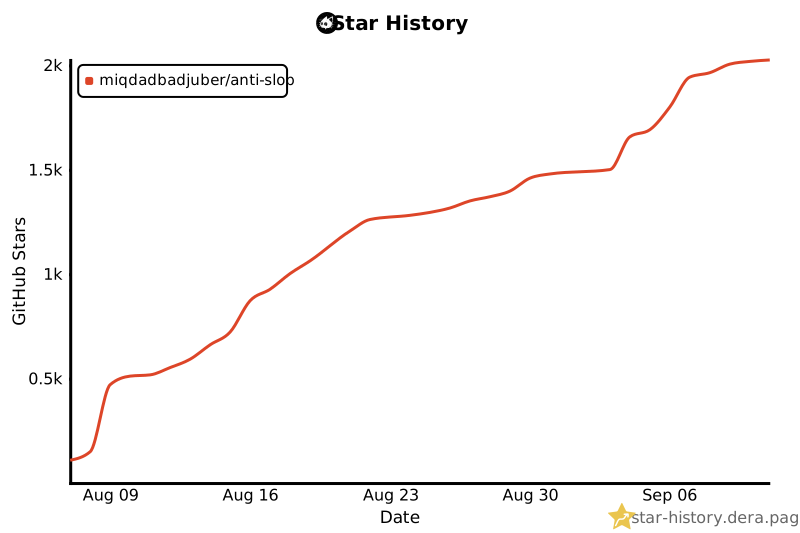
Star History
Contributors
Thanks to everyone who helps make antislop better.

Found a new AI slop pattern, a rule that missed something, or a bug in the installer? Open an issue. PRs are welcome for new AI slop patterns, clarifications, or checklist items out of sync with their rule.
“antislop is a filter, not magic.
It clears the slop from your UI, text, and code.
A beautiful UI is DESIGN.md's job, and yours.”
License
MIT: LICENSE


 antislop is a rulebook for your AI coding agent so it stops producing generic 'AI slop' - cliched UI, copy, and code. It is a filter, not a style guide: it bans the slop but prescribes no colors, fonts, or layouts.