Milky glass, editorial typography, and a three-dimensional bookshelf. Discover a book, organize your local library, then settle into offline reading or text-to-speech.
[!IMPORTANT]
This is a third-party reading client for reading and managing local books. It does not operate an online library, publish novels, or bundle novel files. Online content and availability are determined by Wenku8; the app does not provide online access to books withdrawn for copyright reasons.
The app is entirely free. We do not sell memberships, activation codes, or feature unlocks. Please beware of anyone charging for access in the name of this project or its developer.
Only Wenku8 and local imports are supported. Other sources and custom book sources are no longer supported. The app supports Android, iOS, and HarmonyOS and is not an official Wenku8 app.
A look inside
Discover stories / Read without distractions / Make it your own The screenshots use demo book data. The app interface is in Chinese.
Read your way
Horizontal, vertical, or scrolling: Two-page spreads on larger screens, with curved pages that follow your finger and unfold from the spine. Choose paragraph-continuation, slide, cover, or no animation, and adjust page-turn speed.
A layout for every book: Save fonts, size, weight, letter spacing, line height, and all four margins per book. Preview indentation, alignment, and background opacity with a transparent settings panel.
Colors and type that work together: Use system Monet colors, choose an accent, or extract colors from an image. Set reader-specific colors and backgrounds. Download reading fonts on demand, use them offline, and remove them whenever you like; reading font libraries are not preinstalled. Import TTF/OTF files and choose fonts separately for the app and reader.
Find your place: Volume-based contents, chapter and whole-book progress, in-chapter and whole-book search, volume-key page turns, auto-reading, and continuous chapter transitions. Pinch to zoom into covers and illustrations, or save the original images.
Bilingual reading: Preserve the book's lighter text styling and choose the displayed language per book. Select spoken languages separately, with a voice for each language; languages without a matching voice model are skipped.
Turn your reading history into something to keep
Distinct views for different records: Explore the overview, reading rhythm, books, marks, and touch activity. Choose a preset period or custom date range; fields and charts without data are omitted.
More than a change of color: Eight distinct report layouts, with optional reading calendars, rhythms, companion book lists, progress, and excerpts. Previews and exports use the same content.
A page for a favorite line: Bookmarks, annotations, excerpt images, and reading keepsakes. Seasonal illustrations follow the current season, and saving an image shows a brief confirmation.
Your reading life, on your home screen
Today's reading, weekly heatmaps, reading calendars, keepsakes, and excerpt cards, with five visual styles including seasonal journals. Configure each widget's content and appearance independently and place several at once. Small, medium, and large sizes support light and dark mode.
Tap statistics to open your reading stats, tap a recent book to resume, or cycle directly to another excerpt. Android uses in-app configuration, iOS uses WidgetKit's system editing controls, and HarmonyOS uses form configuration.
A library you can organize your way
Three-dimensional shelves or lists: A looping carousel with inertial snapping and haptics, or a straightforward list. Filter by category, reading status, and source. Keep the local library separate or merge it with your bookshelf.
Choose before importing: Select multiple files, scan shared storage, or scan a chosen folder. Review the results before importing, and confirm how volumes in the same series should be merged.
Link original files by default: Linking is available across the supported formats; copying into the app is an explicit option. TXT uses a contents index, EPUB resources are read on demand, and other formats retain necessary converted files and caches. Keep linked originals in place. If a file moves or access expires, relink it without losing progress or bookmarks.
Keep the details: EPUB ruby text, note pop-ups, common alignment, separators, and mixed horizontal/vertical text. Customize TXT contents rules. Online books support chapter and illustration caching, not whole-book file downloads or exports.
Less repetitive housekeeping: Select multiple books to move between categories, remove from a shelf, or delete. Replace covers or restore originals. Manually upgrade older EPUB layouts and consolidate duplicate resources while preserving original books, contents, progress, and bookmarks.
Supported formats and cloud imports
TXT, EPUB, MOBI/AZW/AZW3/PRC, FB2, PDF, DOC/DOCX, RTF, HTML, Markdown, and ZIP. Edit titles, authors, covers, and volume order.
Import through OpenList/WebDAV or Quark Drive (experimental). Access OneDrive, Google Drive, and similar services through the system document picker. Manually merge and sync original books and reading records.
Continue over your local network: Discover devices on the same Wi-Fi, confirm on both devices the first time, and reconnect automatically afterward. Choose a device under Contents → Chapter progress → Continue on another device (目录 → 章节进度 → 在其他设备上续读). Transfer the book if it is missing; send only the reading position if it is already there.
S3 cloud sync: Manually merge original books, reading progress, bookmarks, and categories through S3 or compatible storage. Import connections and sync destinations are configured separately.
Offline dictionaries: Import MDict, StarDict, or Kindle dictionaries for local lookups while reading.
Bookmark and category sync: With both apps in the foreground, automatically continue from the newer reading position and incrementally sync bookmarks and categories. Resolve simultaneous edits on the conflict page.
Keep a favorite passage: Long-press to select a sentence or paragraph, copy it, add a bookmark, or view the current volume's illustrations. Categorize bookmarks, jump to highlighted passages, or share them as images with the app's icon watermark.
Listen instead: Use natural online voices, a custom Microsoft SSML endpoint, or a system TTS engine installed on your device. Supports 0.5–3× speed, paragraph following, sleep timers, background playback, and lock-screen controls. Offline availability depends on the engine and voice.
More: discovery, accounts, and reading preferences
Book discovery: Browse categories, rankings, and publishing labels; search by title, author, or tag. Tap an author or tag to explore related works. Search guide (Chinese) →
Accounts and community: Wenku8 accounts, cloud bookshelves, reviews, and replies.
Reading controls: Configure tap zones, including turning to the next page from either side. Set books in Discover, Bookshelf, and Local to resume directly, then open book details from the reader.
Offline and backup: Resume failed cache jobs, manage caches, view reading history, and make local backups.
Themed icons: Independently enable home-screen icons that follow system theme colors.
Chinese language support: Simplified Chinese, Hong Kong Traditional Chinese, and Taiwan Traditional Chinese, following the system or selected manually.
Orientation and offline use: Lock the app to portrait without affecting rotation in other apps. Keep offline-readable books available without a connection; reader modes follow your separate or merged local-library settings.
Performance and motion: Frame-rate preferences and a low-performance mode, with separate controls for glass refraction, blur, transitions, animated icons, and three-dimensional shelves. Haptics have a master switch, category switches for buttons and shelves, intensity controls, and a test vibration.
Content and responsible use
Online listings and content come from Wenku8. Local books are imported by the user. Novels, covers, and illustrations belong to their respective rights holders; the source-code license does not grant rights to that content. Access only content you are entitled to use and follow the source website's rules. Do not bypass access restrictions, break DRM, or copy, distribute, or sell content without permission.
Third-party services may change, rate-limit requests, or become unavailable. Never include passwords, cookies, or tokens in issue reports.
Development and contributions
Report bugs through Issues or contribute through pull requests. Include the app version, device, operating-system version, and steps to reproduce.
About the source snapshot
This repository shares selected implementation code for reference. It contains references to modules not included in the snapshot, cannot be built independently, and is not the complete corresponding source for the release packages. Previously distributed release packages included the full app functionality. GitHub's automatically generated “Source code” archives are not app installers.
Source checks validate only the public file inventory and publication boundaries. They do not build or modify release packages.
Что это такое?Это клиент для Android для чтения легких новелл с сайта Wenku8 (轻小说文库), написанный на Flutter. Он включает поиск книг, управление книжной полкой, локальную библиотеку, чтение без интернета и онлайн-озвучивание текста.
Насколько надёжен импорт из облачного диска?Импорт из облачного диска Quark прямо помечен как экспериментальный, а синхронизация через облачный доступ к документам в стиле OneDrive и Google Drive требует вручную объединять библиотеку и прогресс чтения, а не выполняется автоматически.
Работает ли это на iOS или только на Android?Только на Android, ориентировано именно на телефоны и планшеты; сборки для iOS в проекте нигде не упоминаются.
Могу ли я читать свои файлы TXT или EPUB, а не только контент Wenku8?Да, можно выбрать несколько файлов TXT или EPUB и импортировать их, объединять разделённые на тома части одной серии с сохранением оглавления, иллюстраций и истории чтения; такие импорты хранятся в отдельном разделе «Локальные».
Как работает онлайн-озвучивание текста?Доступны китайские голоса через собственный интерфейс Microsoft SSML, есть настройка скорости чтения, подсветка абзаца, который озвучивается, таймер сна и управление воспроизведением в фоне и на заблокированном экране.
Зачем создавать это, если есть оригинальное приложение Wenku8Android?Это переработка на Flutter проекта light-novel-library/Wenku8Android от MewX, переделанная с новым интерфейсом «milk-glass», 3D-книжной полкой и функциями кэширования и синхронизации для офлайн-работы, которых в оригинале не было.
Есть ли что-то для слабых или старых Android-устройств?Да, режим для устройств с низкой производительностью позволяет независимо настраивать преломление стекла, размытие, анимационные эффекты и отрисовку 3D-книжной полки, чтобы снизить нагрузку.







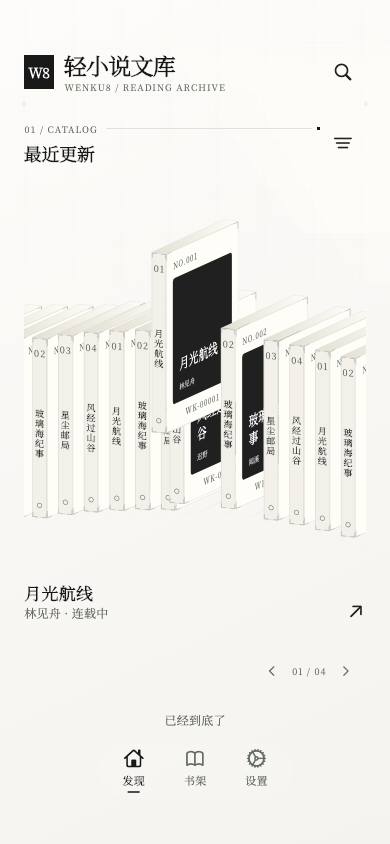
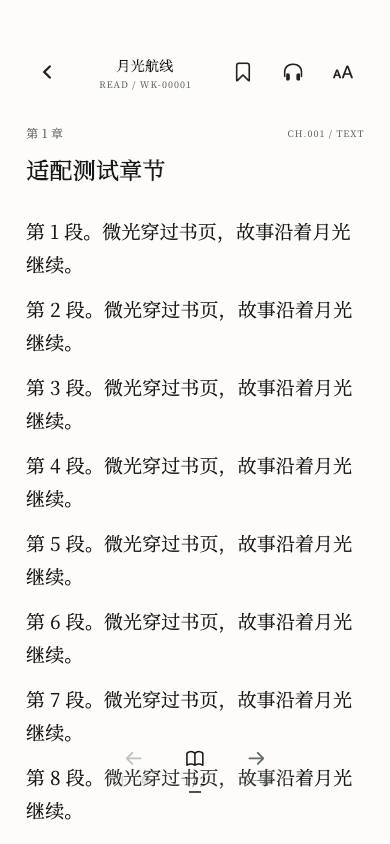
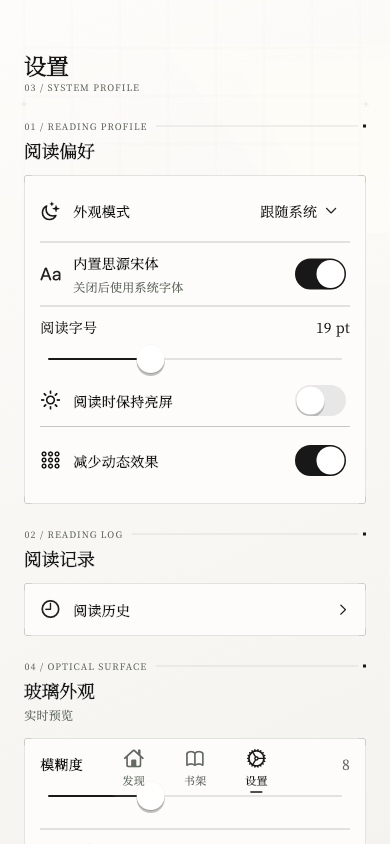

 Это клиент для Android для чтения легких новелл с сайта Wenku8 (轻小说文库), написанный на Flutter. Он включает поиск книг, управление книжной полкой, локальную библиотеку, чтение без интернета и онлайн-озвучивание текста.