
frontend-bootcamp README

The project's README from github.com/microsoft/frontend-bootcamp. As one markdown file: README.md.

Frontend Bootcamp / Days in the Web

Welcome

In this two-day workshop you'll learn the basics of frontend development while building a working web app.

The first day provides an introduction to the fundamentals of the web: HTML, CSS and JavaScript. This is targeted at new and experienced developers alike. On the second day we'll dive into more advanced topics like TypeScript, state management, and testing. While the examples should be accessible to anyone, you'll get the most out of it if you have some prior experience with programming and web technologies.

Getting set up

1. Required software

Before starting, make sure your computer has up-to-date versions of the following installed:

2. Installing and opening the project

3. Run the "inner loop" build

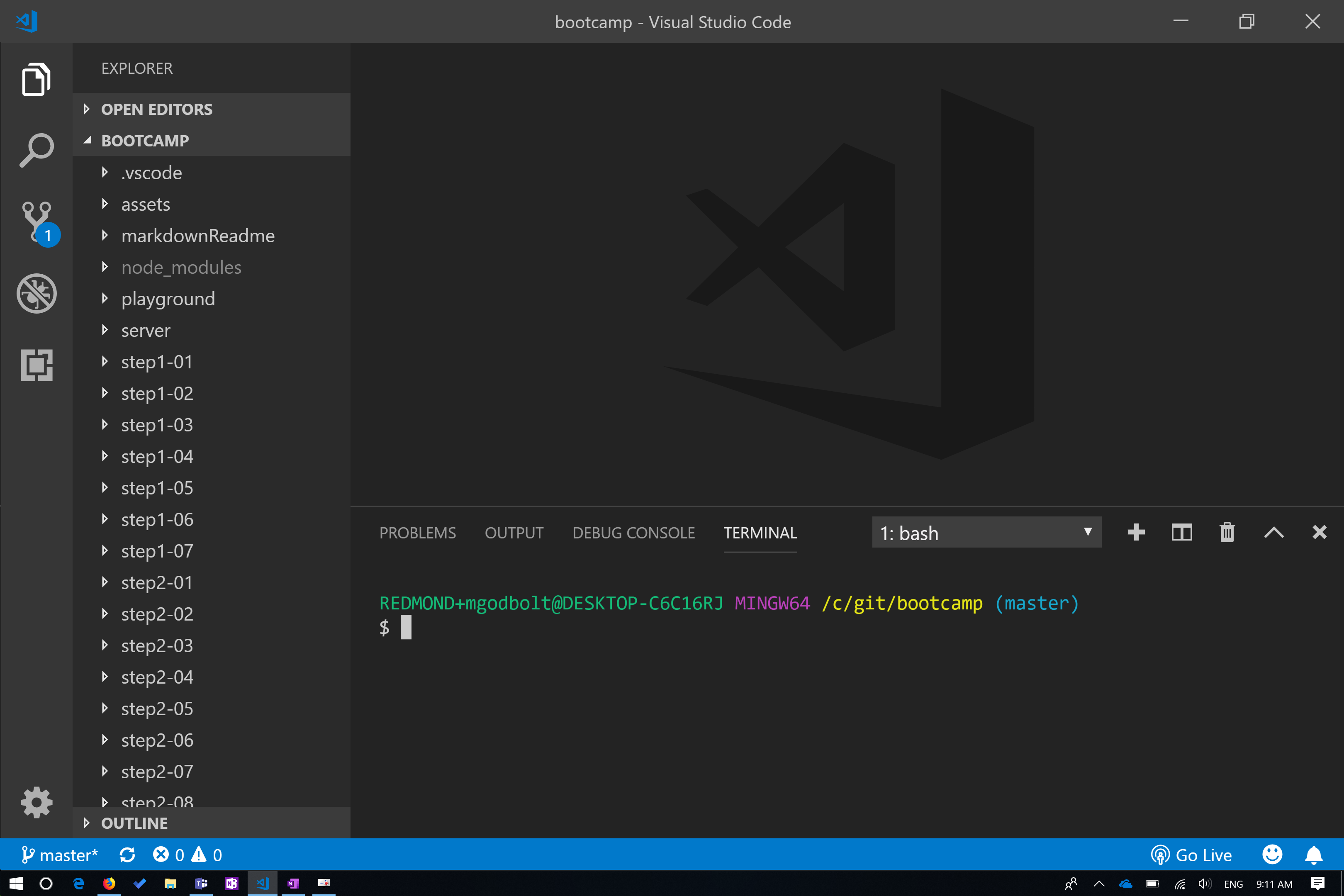
At this point, your VS Code window should look something like this:

To start the dev "inner loop," run:

npm start

This will load the site shown below.

4. Lesson Structure

  1. Demos will either be via CodePen (Steps 1, 2 and 3) or done in the step folder. Follow the step README to walkthrough the demo.

  2. Much like demos, exercises are done via CodePen or in the project step folders. These exercises will give you an opportunity to try what was demonstrated in the first step.

What to expect

For each lesson, the presenter will walk through some demo code to teach core concepts about the topic. Don't worry about writing code at this point. Just follow along via the readmes linked below.

Most lessons also have an exercise portion. Exercise instructions are usually found in the readme for each step's "exercise" folder.

Day one

Day one covers the basics of HTML, CSS and JavaScript, as well as an introduction to React and Typescript.

  1. Introduction to HTML
  2. Introduction to CSS
  3. Introduction JavaScript
  4. Introduction to React
  5. React Components
  6. State-driven UI
  7. Types and UI-driven state

Day two

  1. TypeScript basics
  2. Fluent UI component library
  3. Theming and styling
  4. React Context
  5. Redux: Store
  6. Redux: React binding

Bonus content

Additional resources

Follow the authors!

If you are interested in JavaScript, TypeScript, React, Redux, or Design Systems, follow us on Twitter:

Contributing

This project welcomes contributions and suggestions. Most contributions require you to agree to a Contributor License Agreement (CLA) declaring that you have the right to, and actually do, grant us the rights to use your contribution. For details, visit https://cla.microsoft.com.

When you submit a pull request, a CLA-bot will automatically determine whether you need to provide a CLA and decorate the PR appropriately (e.g., label, comment). Simply follow the instructions provided by the bot. You will only need to do this once across all repos using our CLA.

This project has adopted the Microsoft Open Source Code of Conduct. For more information see the Code of Conduct FAQ or contact [email protected] with any additional questions or comments.

Microsoft and any contributors grant you a license to the Microsoft documentation and other content in this repository under the Creative Commons Attribution 4.0 International Public License, see the LICENSE file, and grant you a license to any code in the repository under the MIT License, see the LICENSE-CODE file.

Microsoft, Windows, Microsoft Azure and/or other Microsoft products and services referenced in the documentation may be either trademarks or registered trademarks of Microsoft in the United States and/or other countries. The licenses for this project do not grant you rights to use any Microsoft names, logos, or trademarks. Microsoft's general trademark guidelines can be found at http://go.microsoft.com/fwlink/?LinkID=254653.

Privacy information can be found at https://privacy.microsoft.com/en-us/

Microsoft and any contributors reserve all other rights, whether under their respective copyrights, patents, or trademarks, whether by implication, estoppel or otherwise.

frontend-bootcamp (microsoft/frontend-bootcamp)

Searching Database…

10.8K ·GitHub
archived
这是什么?这是一个免费的为期两天的微软工作坊,通过让你构建一个可以运行的小型网页应用,讲授前端开发,内容从 HTML、CSS、JS 基础一直到 TypeScript、React 和 Redux。
这是打包好的应用,还是动手实践课程?这是一门由讲师带领的两天动手实践课程,由一步步的课程文件夹组成,包含演示和练习。你不只是阅读文档,而是要在提供的步骤文件夹或 CodePen 中编写代码。
我该怎样让它运行起来?克隆仓库,在 frontend-bootcamp 文件夹内运行 'npm install',然后运行 'npm start',同时启动开发用的客户端和服务器。
开始之前我需要先安装什么?开始之前,你需要安装 Node/NPM(LTS 版本 10)、Git、Visual Studio Code,以及 React Developer Tools 浏览器扩展。
这个工作坊还在维护吗?该仓库现已在 GitHub 上归档,这意味着课程内容已经冻结,不会再接收更新或修复。
这个工作坊适合哪些人?它面向新手和有经验的开发者,不过如果你已有一些编程和网页开发基础,收获会最大。
两天的课程都涵盖哪些主题?第一天涵盖 HTML、CSS、JavaScript,以及 React 和 TypeScript 入门;第二天进入 TypeScript 基础、Fluent UI(office-ui-fabric-react)组件库、主题设置、React Context,以及 Redux(store 和 bindings)。
除了主线课程,还有额外的加餐内容吗?有的,包括在 Redux 中调用服务的内容,以及用 Jest 测试 React 组件的内容。
课程使用哪个 UI 库来构建组件?课程使用微软的 office-ui-fabric-react(Fluent UI)库,以及它的 Fluent 主题和主题示例包。
想深入了解课程所讲的概念,可以去哪里?README 中链接了 MDN Web Docs、React 官方文档,以及“Thinking in React”指南,供你深入阅读。
Creator
microsoft
Size
14.5 MB
Stars
10.8K
Updated
CommitJan 13
Age
7y
Commits · 90 Days