










mermaid README

The project's README from github.com/mermaid-js/mermaid. As one markdown file: README.md.

Mermaid

Generate diagrams from Markdown-like text.

Live Editor!

📖 Documentation | 🚀 Getting Started | 🌐 CDN | 🙌 Join Us

简体中文

Try Live Editor previews of future releases: Develop | Next


NPM Build CI Status npm minified gzipped bundle size Coverage Status CDN Status NPM Downloads Join our Discord! Twitter Follow Covered by Argos Visual Testing OpenSSF Scorecard

:trophy: Mermaid was nominated and won the JS Open Source Awards (2019) in the category "The most exciting use of technology"!!!

Thanks to all involved, people committing pull requests, people answering questions! 🙏

Banner for "The Official Guide to Mermaid.js" book

Table of content

Expand contents

About

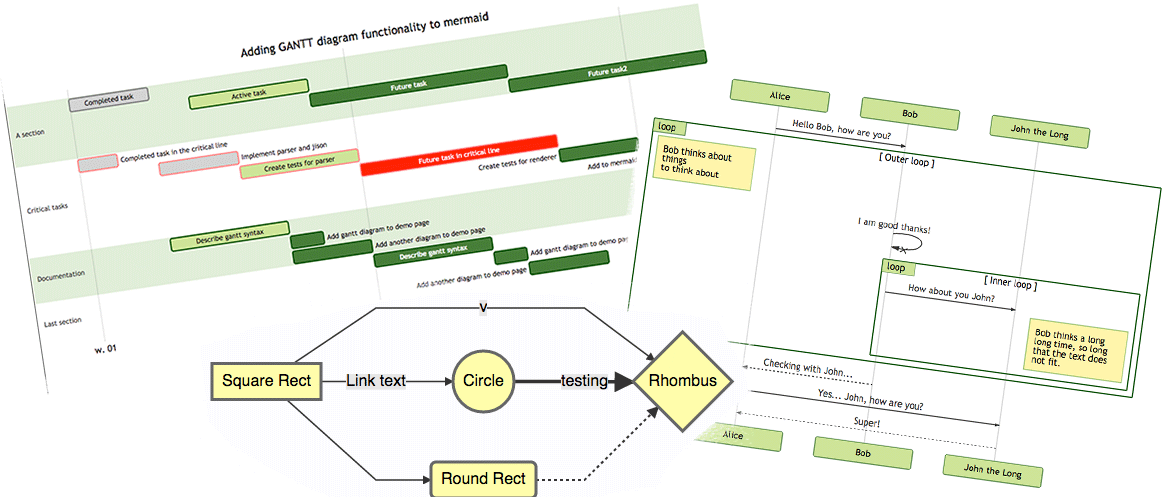
Mermaid is a JavaScript-based diagramming and charting tool that uses Markdown-inspired text definitions and a renderer to create and modify complex diagrams. The main purpose of Mermaid is to help documentation catch up with development.

Doc-Rot is a Catch-22 that Mermaid helps to solve.

Diagramming and documentation costs precious developer time and gets outdated quickly. But not having diagrams or docs ruins productivity and hurts organizational learning.
Mermaid addresses this problem by enabling users to create easily modifiable diagrams. It can also be made part of production scripts (and other pieces of code).

Mermaid allows even non-programmers to easily create detailed diagrams through the Mermaid Live Editor.
For video tutorials, visit our Tutorials page. Use Mermaid with your favorite applications, check out the list of Integrations and Usages of Mermaid.

You can also use Mermaid within GitHub as well many of your other favorite applications—check out the list of Integrations and Usages of Mermaid.

For a more detailed introduction to Mermaid and some of its more basic uses, look to the Beginner's Guide, Usage and Tutorials.

Our PR Visual Regression Testing is powered by Argos with their generous Open Source plan. It makes the process of reviewing PRs with visual changes a breeze.

Covered by Argos Visual Testing

In our release process we rely heavily on visual regression tests using applitools. Applitools is a great service which has been easy to use and integrate with our tests.

Features

Examples

The following are some examples of the diagrams, charts and graphs that can be made using Mermaid. Click here to jump into the text syntax.

Flowchart [docs - live editor]

flowchart LR

A[Hard] -->|Text| B(Round)
B --> C{Decision}
C -->|One| D[Result 1]
C -->|Two| E[Result 2]
flowchart LR

A[Hard] -->|Text| B(Round)
B --> C{Decision}
C -->|One| D[Result 1]
C -->|Two| E[Result 2]

Sequence diagram [docs - live editor]

sequenceDiagram
Alice->>John: Hello John, how are you?
loop HealthCheck
    John->>John: Fight against hypochondria
end
Note right of John: Rational thoughts!
John-->>Alice: Great!
John->>Bob: How about you?
Bob-->>John: Jolly good!
sequenceDiagram
Alice->>John: Hello John, how are you?
loop HealthCheck
    John->>John: Fight against hypochondria
end
Note right of John: Rational thoughts!
John-->>Alice: Great!
John->>Bob: How about you?
Bob-->>John: Jolly good!

Gantt chart [docs - live editor]

gantt
    section Section
    Completed :done,    des1, 2014-01-06,2014-01-08
    Active        :active,  des2, 2014-01-07, 3d
    Parallel 1   :         des3, after des1, 1d
    Parallel 2   :         des4, after des1, 1d
    Parallel 3   :         des5, after des3, 1d
    Parallel 4   :         des6, after des4, 1d
gantt
    section Section
    Completed :done,    des1, 2014-01-06,2014-01-08
    Active        :active,  des2, 2014-01-07, 3d
    Parallel 1   :         des3, after des1, 1d
    Parallel 2   :         des4, after des1, 1d
    Parallel 3   :         des5, after des3, 1d
    Parallel 4   :         des6, after des4, 1d

Class diagram [docs - live editor]

classDiagram
Class01 <|-- AveryLongClass : Cool
<<Interface>> Class01
Class09 --> C2 : Where am I?
Class09 --* C3
Class09 --|> Class07
Class07 : equals()
Class07 : Object[] elementData
Class01 : size()
Class01 : int chimp
Class01 : int gorilla
class Class10 {
  <<service>>
  int id
  size()
}
classDiagram
Class01 <|-- AveryLongClass : Cool
<<Interface>> Class01
Class09 --> C2 : Where am I?
Class09 --* C3
Class09 --|> Class07
Class07 : equals()
Class07 : Object[] elementData
Class01 : size()
Class01 : int chimp
Class01 : int gorilla
class Class10 {
  <<service>>
  int id
  size()
}

State diagram [docs - live editor]

stateDiagram-v2
[*] --> Still
Still --> [*]
Still --> Moving
Moving --> Still
Moving --> Crash
Crash --> [*]
stateDiagram-v2
[*] --> Still
Still --> [*]
Still --> Moving
Moving --> Still
Moving --> Crash
Crash --> [*]

Pie chart [docs - live editor]

pie
"Dogs" : 386
"Cats" : 85.9
"Rats" : 15
pie
"Dogs" : 386
"Cats" : 85.9
"Rats" : 15

Git graph [experimental - live editor]

gitGraph
  commit
  commit
  branch develop
  checkout develop
  commit
  commit
  checkout main
  merge develop
  commit
  commit
gitGraph
  commit
  commit
  branch develop
  checkout develop
  commit
  commit
  checkout main
  merge develop
  commit
  commit

Bar chart (using gantt chart) [docs - live editor]

gantt
    title Git Issues - days since last update
    dateFormat  X
    axisFormat %s

    section Issue19062
    71   : 0, 71
    section Issue19401
    36   : 0, 36
    section Issue193
    34   : 0, 34
    section Issue7441
    9    : 0, 9
    section Issue1300
    5    : 0, 5
gantt
    title Git Issues - days since last update
    dateFormat  X
    axisFormat %s

    section Issue19062
    71   : 0, 71
    section Issue19401
    36   : 0, 36
    section Issue193
    34   : 0, 34
    section Issue7441
    9    : 0, 9
    section Issue1300
    5    : 0, 5

User Journey diagram [docs - live editor]

  journey
    title My working day
    section Go to work
      Make tea: 5: Me
      Go upstairs: 3: Me
      Do work: 1: Me, Cat
    section Go home
      Go downstairs: 5: Me
      Sit down: 3: Me
  journey
    title My working day
    section Go to work
      Make tea: 5: Me
      Go upstairs: 3: Me
      Do work: 1: Me, Cat
    section Go home
      Go downstairs: 5: Me
      Sit down: 3: Me

C4 diagram [docs]

C4Context
title System Context diagram for Internet Banking System

Person(customerA, "Banking Customer A", "A customer of the bank, with personal bank accounts.")
Person(customerB, "Banking Customer B")
Person_Ext(customerC, "Banking Customer C")
System(SystemAA, "Internet Banking System", "Allows customers to view information about their bank accounts, and make payments.")

Person(customerD, "Banking Customer D", "A customer of the bank, <br/> with personal bank accounts.")

Enterprise_Boundary(b1, "BankBoundary") {

  SystemDb_Ext(SystemE, "Mainframe Banking System", "Stores all of the core banking information about customers, accounts, transactions, etc.")

  System_Boundary(b2, "BankBoundary2") {
    System(SystemA, "Banking System A")
    System(SystemB, "Banking System B", "A system of the bank, with personal bank accounts.")
  }

  System_Ext(SystemC, "E-mail system", "The internal Microsoft Exchange e-mail system.")
  SystemDb(SystemD, "Banking System D Database", "A system of the bank, with personal bank accounts.")

  Boundary(b3, "BankBoundary3", "boundary") {
    SystemQueue(SystemF, "Banking System F Queue", "A system of the bank, with personal bank accounts.")
    SystemQueue_Ext(SystemG, "Banking System G Queue", "A system of the bank, with personal bank accounts.")
  }
}

BiRel(customerA, SystemAA, "Uses")
BiRel(SystemAA, SystemE, "Uses")
Rel(SystemAA, SystemC, "Sends e-mails", "SMTP")
Re

mermaid (mermaid-js/mermaid)

Searching Database…

90.8K ·GitHub
Что это такое?Mermaid — это инструмент для построения диаграмм и графиков на JavaScript. Он позволяет создавать блок-схемы, диаграммы последовательностей, диаграммы Ганта и другие виды диаграмм из простых текстовых описаний в стиле Markdown, без редактора с перетаскиванием.
Это библиотека, которую я добавляю в своё приложение, или отдельный редактор?В первую очередь это библиотека на JavaScript/TypeScript, которую встраивают в веб-страницы или инструменты. Но также есть Live Editor (mermaid.live) для тех, кто просто хочет вставить текст и получить диаграмму без программирования.
Как добавить это в мой проект?Установите пакет mermaid и передайте ему текст диаграммы или просто используйте блок кода, помеченный как 'mermaid'. GitHub, многие вики и инструменты для документации отображают такие блоки сами, без дополнительной настройки.
Безопасно ли отрисовывать диаграммы из ненадёжного текста?В Mermaid встроена санитизация текста, а также есть режим отрисовки в песочнице. Он нужен именно потому, что текст диаграммы может приходить от пользователей. Поэтому ненадёжные источники всё равно должны использовать этот режим песочницы, а не отрисовку по умолчанию.
Это только для разработчиков?Он рассчитан и на разработчиков, которые хотят хранить диаграммы в виде текста вместе с кодом под версионным контролем, и на непрограммистов, которые могут визуально создавать диаграммы через Live Editor.
Сколько типов диаграмм поддерживает Mermaid?Более 20, включая блок-схемы, диаграммы последовательностей, классов, состояний, ER-диаграммы, диаграммы Ганта, круговые диаграммы, графы Git, ментальные карты, временные шкалы, диаграммы Санкея и C4.
Зачем мне использовать Mermaid вместо инструмента для рисования, например draw.io?Потому что диаграммы — это простой текст. Они хранятся в системе контроля версий, аккуратно показывают различия в pull request и мгновенно обновляются при изменении текста, а не представляют собой непрозрачные бинарные файлы.
Можно ли посмотреть диаграммы без установки чего-либо?Да, Mermaid Live Editor на mermaid.live позволяет писать диаграммы и сразу видеть результат прямо в браузере, без установки.
Получал ли Mermaid какое-нибудь признание?Да, в 2019 году он получил премию JS Open Source Awards в номинации «Самое захватывающее использование технологий».
Creator
mermaid-js
Size
275.7 MB
Stars
90.8K
Age
11y
Commits · 90 Days