DockTail watches Docker containers, reads docktail.* labels, and exposes matching containers as Tailscale Services. App containers do not need published Docker ports by default; DockTail proxies directly to their Docker network IPs.
DockTail uses native Tailscale Services, not per-container Tailscale devices.
DockTail
TSDProxy
ScaleTail
tsbridge
Plain Services
Native Tailscale Services
✅
❌
❌
❌
✅
Configured via Docker labels
✅
✅
❌
✅
❌
Apps do not consume separate Tailscale device slots
✅
❌
❌
❌
✅
No app port publishing
✅
⚠️¹
⚠️²
⚠️¹
⚠️³
Automatic Docker reconciliation
✅
✅
❌
✅
❌
Low manual setup after install
✅
✅
⚠️⁴
✅
❌
¹ Depends on proxy and Docker network setup.
² Depends on the sidecar template and app network setup.
³ You configure how the service host reaches the backend yourself.
⁴ ScaleTail is template-based, so each app usually starts from its own Compose recipe.
Features
Automatic Docker container discovery through labels.
Automatic Tailscale service creation with OAuth or API key credentials.
HTTP, HTTPS, TCP, and TLS-terminated TCP support.
Optional PROXY protocol on TCP services so backends see the tailnet client IP.
Tailscale HTTPS with automatic certificates.
Tailscale Funnel for public internet access.
Multiple Tailscale services from one container.
Automatic reconciliation when containers restart or IPs change.
Optional cleanup of unused Tailscale service definitions (opt-in, safe with multiple instances).
Stateless Docker container runtime.
Optional DockTail Cloud reporting — multi-host monitoring, opt-in via one env var.
Quick Start
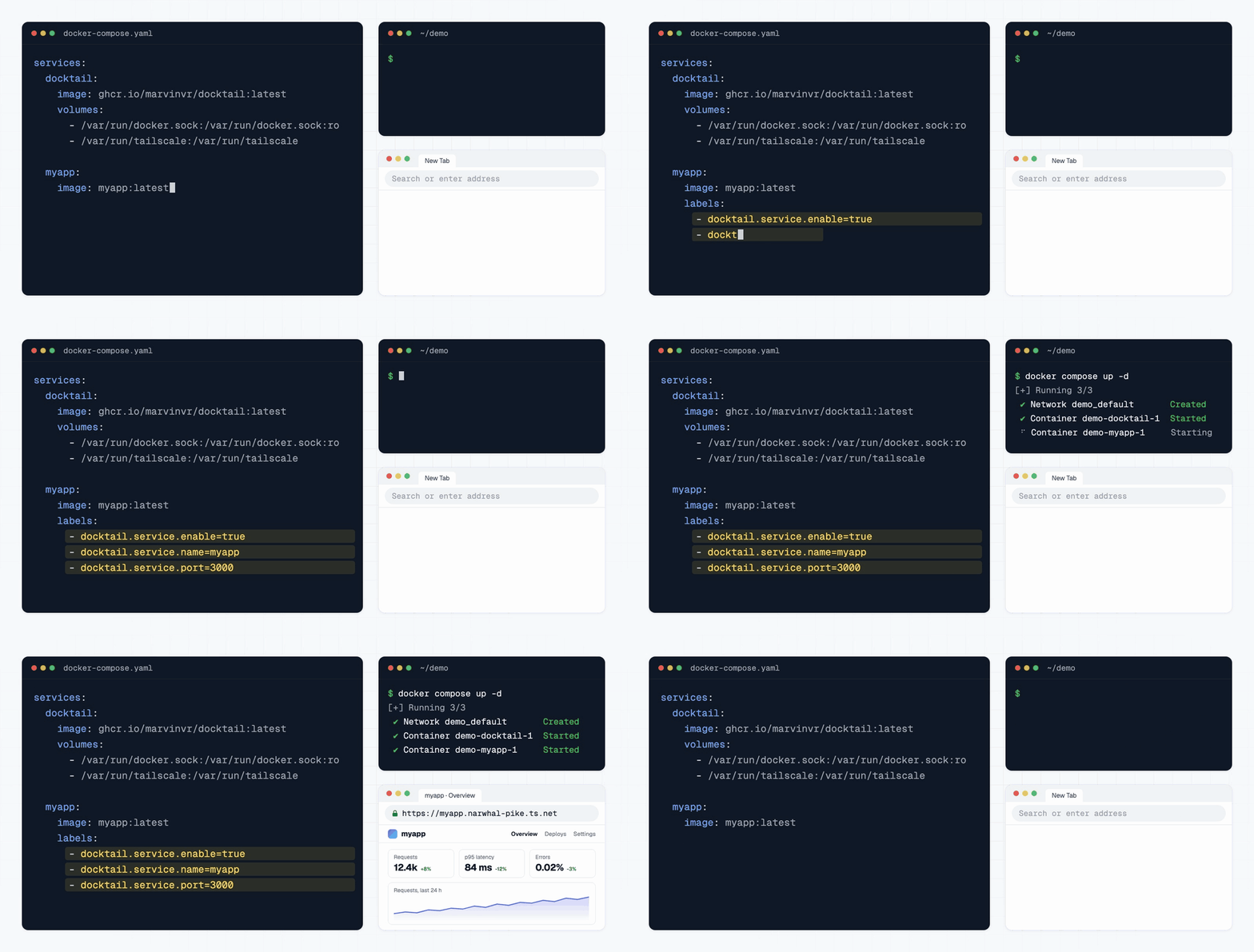
services:
  docktail:
    image: ghcr.io/marvinvr/docktail:latest
    restart: unless-stopped
    volumes:
      - /var/run/docker.sock:/var/run/docker.sock:ro
      - /var/run/tailscale:/var/run/tailscale
    environment:
      # Optional but recommended. Enables automatic service creation.
      - TAILSCALE_OAUTH_CLIENT_ID=${TAILSCALE_OAUTH_CLIENT_ID}
      - TAILSCALE_OAUTH_CLIENT_SECRET=${TAILSCALE_OAUTH_CLIENT_SECRET}

  myapp:
    image: nginx:latest
    # No ports needed. DockTail proxies directly to the container IP.
    labels:
      - "docktail.service.enable=true"
      - "docktail.service.name=myapp"
      - "docktail.service.port=80"
docker compose up -d
curl http://myapp.your-tailnet.ts.net
This assumes the Docker host is connected to Tailscale and allowed to advertise services. See the full docs for host setup, sidecar setup, rootless Docker, OAuth permissions, ACLs, labels, Funnel, and examples. docker-compose.yaml is a ready-to-run version of this setup; for Podman, Synology, Unraid, TrueNAS, macOS, Windows, Swarm and Kubernetes see the platform guides, and for a read-only Docker socket proxy and dropped capabilities see Hardening.
For Docker secrets or other mounted secret files, set FILE__TAILSCALE_OAUTH_CLIENT_ID / FILE__TAILSCALE_OAUTH_CLIENT_SECRET or TAILSCALE_OAUTH_CLIENT_ID_FILE / TAILSCALE_OAUTH_CLIENT_SECRET_FILE to the mounted file paths instead of putting the values directly in the environment.
Once you run DockTail on more than one machine, "is it still up?" gets tedious. DockTail Cloud is a hosted dashboard for that — and because it already has the Docker and Tailscale context, it tells you which kind of broken you're looking at:
● down · OOM-killed                   →  the container was killed for running out of memory
● local up · awaiting approval        →  the app is fine, the exposure isn't
● host offline · heartbeat missing    →  the box stopped reporting
It rides along with the agent you already run — no second binary. Set one environment variable and the same container starts reporting:
environment:
  - DOCKTAIL_CLOUD_KEY=${DOCKTAIL_CLOUD_KEY}   # from cloud.docktail.org
Without the key the module is completely inert: no connection is opened and DockTail behaves exactly as before. The link is outbound-only and metadata-only — the protocol has no exec, deploy, or shell message types, which you can verify in cloud/.
The canonical documentation source lives in docs/. The site at
docktail.org is built from a separate repository, which pins this one as a
submodule and renders those Markdown files with tools/docsgen at build time.
Build From Source
go build -o docktail .
docker build -t docktail:latest .
The image is published for linux/amd64, linux/arm64 and linux/arm/v7, and releases newer than 1.8.3 carry static Linux binaries for the same platforms; see Platforms And Release Binaries.






 DockTail 会监控 Docker 容器,读取 docktail 标签,并将匹配的容器以 Tailscale Services 的形式对外提供。默认情况下,应用无需发布 Docker 端口,因为 DockTail 会代理到它们的 Docker 网络 IP。