




What is this?
 DockTail watches Docker containers, reads docktail labels, and exposes matching containers as Tailscale Services. Apps do not need published Docker ports by default because DockTail proxies to their Docker network IPs.
Is it a Tailscale device per container, or something else?Neither. It uses native Tailscale Services instead of one Tailscale device per container, so your apps do not consume separate device slots.
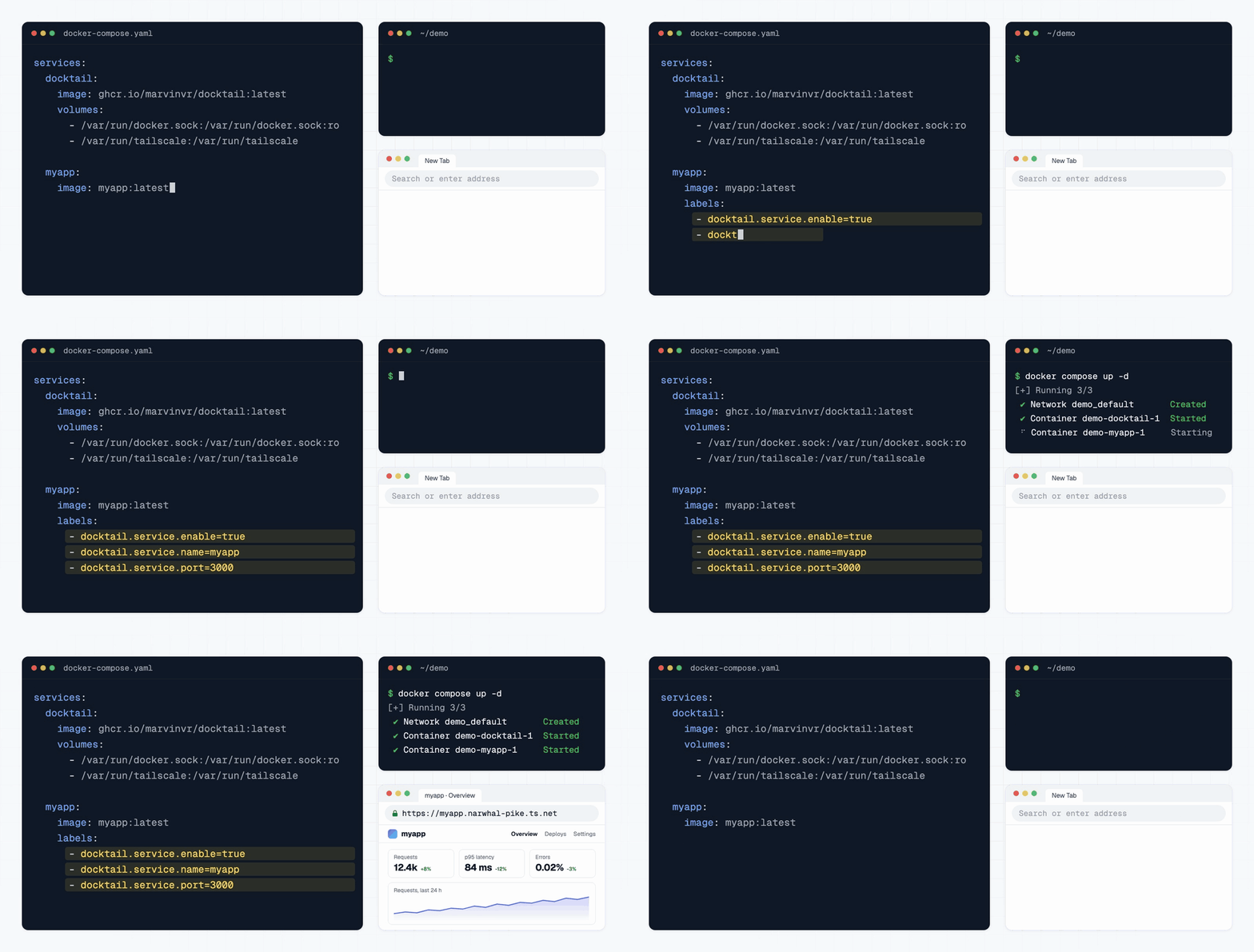
Neither. It uses native Tailscale Services instead of one Tailscale device per container, so your apps do not consume separate device slots.How do I get it running?Start from the ready-to-run docker-compose.yaml, after connecting the Docker host to Tailscale and allowing it to advertise services. Then add docktail labels to the containers you want exposed.
Start from the ready-to-run docker-compose.yaml, after connecting the Docker host to Tailscale and allowing it to advertise services. Then add docktail labels to the containers you want exposed.What do I need before I start?A Docker host connected to Tailscale and allowed to advertise services, plus OAuth client credentials or an API key so DockTail can create Tailscale services automatically.
A Docker host connected to Tailscale and allowed to advertise services, plus OAuth client credentials or an API key so DockTail can create Tailscale services automatically.Are there any pitfalls?Tailscale Funnel exposes a service to the public internet, so enable it on purpose. Cleanup of unused Tailscale service definitions is opt-in.
Tailscale Funnel exposes a service to the public internet, so enable it on purpose. Cleanup of unused Tailscale service definitions is opt-in.Does it work on Synology, Unraid, TrueNAS or Kubernetes?Yes, platform guides exist for Podman, Synology, Unraid, TrueNAS, macOS, Windows, Swarm and Kubernetes, and there is a hardening guide for a read-only Docker socket proxy.
Yes, platform guides exist for Podman, Synology, Unraid, TrueNAS, macOS, Windows, Swarm and Kubernetes, and there is a hardening guide for a read-only Docker socket proxy.Does it send my data anywhere?Not by default. DockTail Cloud reporting is optional and turned on only by setting one environment variable. Without the key, no connection is opened, and the link is outbound-only and metadata-only.
Not by default. DockTail Cloud reporting is optional and turned on only by setting one environment variable. Without the key, no connection is opened, and the link is outbound-only and metadata-only.Is it free to use?The core project is licensed under AGPL v3 and is free. DockTail Cloud is a separate paid service, and its Homelab and Team plans start with a 30-day free trial.
The core project is licensed under AGPL v3 and is free. DockTail Cloud is a separate paid service, and its Homelab and Team plans start with a 30-day free trial.What is DockTail Cloud?An optional hosted dashboard for monitoring several machines running DockTail. It reuses the same container, and your AI agent can investigate incidents through its MCP server and API.
An optional hosted dashboard for monitoring several machines running DockTail. It reuses the same container, and your AI agent can investigate incidents through its MCP server and API.Why not just use plain Tailscale Services?Plain Tailscale Services need manual configuration. DockTail reads Docker labels and reconciles automatically when containers restart or their IPs change.
Plain Tailscale Services need manual configuration. DockTail reads Docker labels and reconciles automatically when containers restart or their IPs change.Can I expose a database over TCP?Yes. HTTP, HTTPS, TCP and TLS-terminated TCP are supported, and optional PROXY protocol lets TCP backends see the real tailnet client IP.
Yes. HTTP, HTTPS, TCP and TLS-terminated TCP are supported, and optional PROXY protocol lets TCP backends see the real tailnet client IP.What are similar projects?labtether, gately, nginx-proxy, 3x-ui, awesome-tunneling, hivepaas, scanopy, NewYork
labtether, gately, nginx-proxy, 3x-ui, awesome-tunneling, hivepaas, scanopy, NewYorkWhich topics is it in?tailscale, https, remote-access, homelab, tunnel, reverse-proxy, containers, vpn, golang, docker-compose, proxy, devops
tailscale, https, remote-access, homelab, tunnel, reverse-proxy, containers, vpn, golang, docker-compose, proxy, devops