react-native-continued-task: Continued Background Tasks for React Native (iOS 26 & Android)





Run user-initiated work that keeps going after the user leaves your app — a large export, an upload, a batch encode — behind one cross-platform API.
Overview
react-native-continued-task is a React Native and Expo library for long-running background tasks that survive the app being backgrounded. It wraps iOS 26's BGContinuedProcessingTask and Android's WorkManager foreground services behind a single typed API, so an upload, export, or batch encode the user started keeps running — with the progress UI each platform draws for it.
It is built on Nitro Modules with Swift on iOS and Kotlin on Android, ships an Expo config plugin, and is written for the constraints these APIs actually impose rather than hiding them.
| iOS 26 — Live Activity on the Lock Screen |
Android — foreground-service notification |
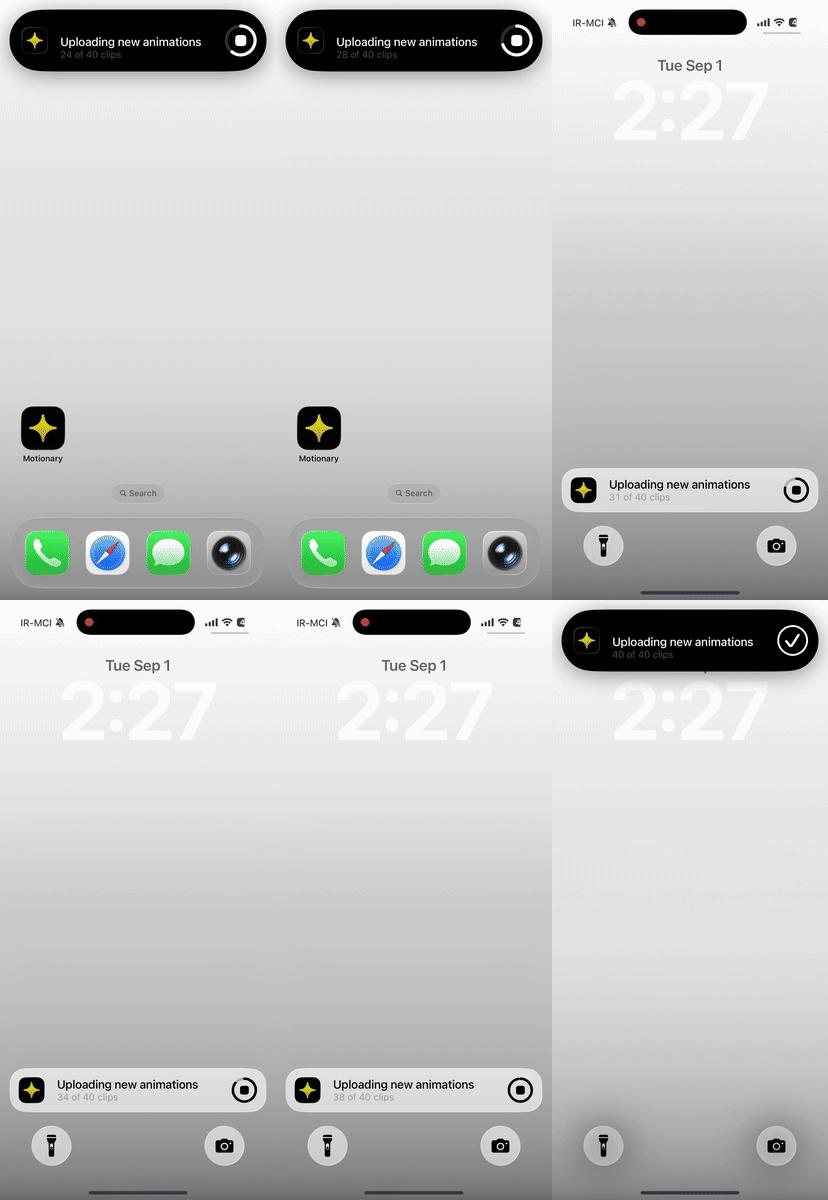 |
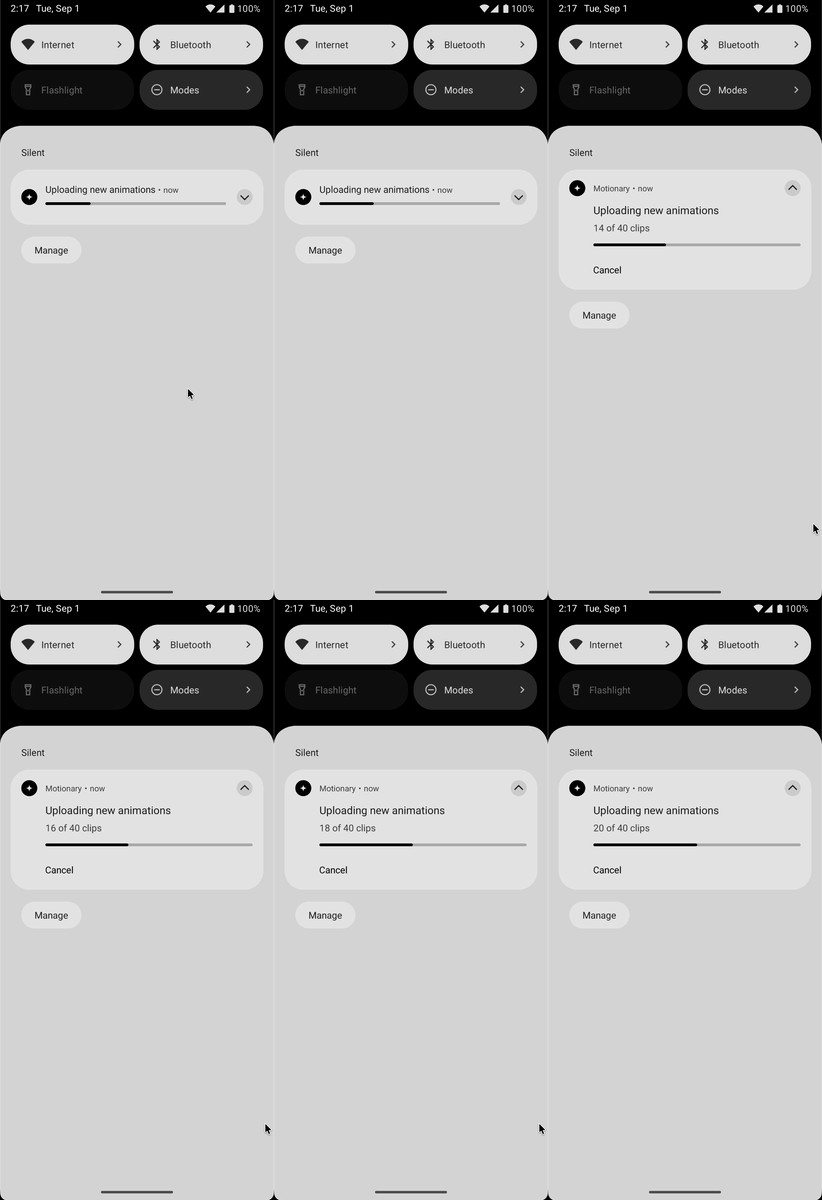 |
Both show the same task: a title and subtitle that update as it runs, live progress, and a control to cancel it. On iOS that cancel arrives as expired — the system routes it through the same handler as an expiry and gives the app no way to tell them apart. On Android the same tap arrives as user-cancelled.
Features
- 📱 One API over iOS 26's
BGContinuedProcessingTask and Android's WorkManager foreground services
- 🔔 System-drawn progress UI — a Live Activity on iOS, an ongoing notification on Android — that the user can cancel from
- 📊 Progress reporting that is load-bearing, not decoration: iOS expires tasks that report none
- ♻️
getKnownTasks() reconciles work lost when the app is swiped away — the only way to detect it on iOS, which reports it no other way
- 🧭 Typed submit errors and stop reasons, each carrying the raw platform domain and code instead of one generic failure
- 🧩 Expo config plugin for the
Info.plist, entitlement and AndroidManifest wiring
- ✅ Verified on a real device — 13/13 on iOS 26.6.1
- 🔥 Powered by Nitro Modules
This is not a general "run some code in the background" library. Both platforms only grant this runtime to work the user just asked for, both show UI they can cancel from, and both kill work that looks stalled. The API is shaped around those constraints rather than hiding them.
| Platform |
Backed by |
| iOS 26+ |
BGContinuedProcessingTask, with the system-provided Live Activity |
| Android (minSdk 24) |
WorkManager CoroutineWorker running as a foreground service |
Installation
npm install react-native-continued-task react-native-nitro-modules
Requires a dev build. Nitro modules never work in Expo Go.
react-native-nitro-modules is an optional peer dependency, so npm and yarn resolve the single copy your app already has instead of nesting a second one. A nested second copy crashes at startup with Nitro was installed twice.
Expo
Add the config plugin and declare the identifier prefixes your app will submit under:
{
  "expo": {
    "plugins": [
      [
        "react-native-continued-task",
        {
          "identifierPrefixes": ["com.foo.MyApp.export"],
          "enableGPU": false
        }
      ]
    ]
  }
}
Then npx expo prebuild. The plugin writes BGTaskSchedulerPermittedIdentifiers on iOS (expanding each prefix to <prefix>.*), the GPU entitlement when enableGPU is set, and on Android the foreground-service permissions plus the merged SystemForegroundService block. See Config plugin for the full option list and the bare-workflow equivalents.
Usage
import {
  ContinuedTasks,
  getSubmitErrorCode,
} from 'react-native-continued-task';

async function exportLibrary(photos: Photo[]) {
  if (!ContinuedTasks.isSupported) return exportInForeground(photos);

  // Must be called from the foreground, in response to a user action.
  const task = await ContinuedTasks.submit({
    identifierPrefix: 'com.foo.MyApp.export',
    title: 'Exporting library',
    subtitle: `0 of ${photos.length} photos`,
    totalUnitCount: photos.length,
  });

  task.addOnStopListener(({ reason, native }) => {
    console.log(`export stopped: ${reason} (${native.domain} ${native.name})`);
    // The task is already gone. Save whatever partial state you have.
  });

  try {
    for (const [index, photo] of photos.entries()) {
      await exportOne(photo);
      // Report progress. This is what keeps the task alive.
      task.setProgress(index + 1, photos.length);
      task.updateTitle(
        'Exporting library',
        `${index + 1} of ${photos.length} photos`
      );
    }
    task.complete(true);
  } catch (error) {
    task.complete(false);
  }
}
API
ContinuedTasks
The entry point. A ContinuedTaskManager.
isSupported: boolean
true on iOS 26+ and on Android once the foreground-service permissions are granted. false on the iOS Simulator, which has no background task scheduler, and on web.
supportsGPU: boolean
Reads BGTaskScheduler.supportedResources — whether this device can grant background GPU access. Always false on Android. Check it before setting ios.requiresGPU; asking for a resource the device cannot provide makes submit reject with not-permitted.
supportsReattach: boolean
true on Android, where a WorkManager worker outlives the app process and attachToTask can hand you a live handle again. false on iOS, where the system cancels continued processing tasks when the app is terminated.
submit(options: ContinuedTaskOptions): Promise<ContinuedTask>
Submits a task and resolves once the platform scheduler accepts it. The returned task starts in the pending state.
Call this from the foreground, in direct response to a user action. iOS requires that submission "occur as a result of a person's action, such as tapping a button"; tasks submitted from a timer, from a push handler, or from the background get cancelled.
Rejects with an Error whose message is prefixed with a stable code. Read it with getSubmitErrorCode(error) instead of matching on the message:
SubmitErrorCode |
Cause |
not-permitted |
BGTaskScheduler.Error.notPermitted — identifier missing from BGTaskSchedulerPermittedIdentifiers, unentitled or unavailable GPU, or the user denied background launches |
too-many-pending-requests |
.tooManyPendingTaskRequests — cancel pending work and retry |
unavailable |
.unavailable — background refresh off in Settings, or running in the Simulator |
immediate-run-ineligible |
.immediateRunIneligible — only ever with the fail submission strategy |
unsupported-platform |
iOS older than 26, or web |
invalid-identifier |
The prefix is empty, already ends in .*, or is not prefixed with the bundle ID |
invalid-options |
Options failed validation before reaching the platform |
foreground-service-unavailable |
Android could not start the foreground service |
unknown |
Anything else — read the message |
The four BGTaskScheduler cases are kept distinct on purpose; they call for different fixes.
ContinuedTaskOptions
| Field |
Type |
Default |
Notes |
identifierPrefix |
string |
— |
Written without the trailing .*, e.g. com.foo.MyApp.export. Must start with the bundle ID on iOS and be listed in the plugin's identifierPrefixes. The library appends a UUID to build the concrete identifier. |
title |
string |
— |
Shown in the Live Activity / notification |
subtitle |
string |
— |
Shown under the title |
totalUnitCount |
number |
— |
The size of the work, in any unit. Required, because progress is mandatory |
ios.submissionStrategy |
'queue' | 'fail' |
'queue' |
fail rejects with immediate-run-ineligible rather than waiting |
ios.requiresGPU |
boolean |
false |
Needs the GPU entitlement and supportsGPU |
android.notificationChannelId |
string |
'continued-task' |
Created if absent |
android.notificationChannelName |
string |
'Background tasks' |
Only used when creating the channel |
android.notificationIcon |
string |
app icon |
Drawable resource name |
android.showCancelAction |
boolean |
true |
Wired to WorkManager's createCancelPendingIntent |
android.cancelActionLabel |
string |
'Cancel' |
|
android.foregroundServiceType |
'dataSync' | 'mediaProcessing' | 'specialUse' |
'dataSync' |
Must match what the plugin declared |
getKnownTasks(): Promise<KnownTask[]>
Every task this app has submitted that the library still holds a record for, newest first. Call it on launch — see Reconciling after a silent kill.
interface KnownTask {
  id: string;
  identifierPrefix: string;
  title: string;
  subtitle: string;
  submittedAt: number; // ms since epoch
  state: ContinuedTaskState;
  completedUnitCount: number;
  totalUnitCount: number;
  stopReason?: TaskStopReason;
}
attachToTask(id: string): Promise<ContinuedTask | undefined>
Re-attaches to a task still running natively after the process restarted. Resolves to undefined when there is nothing live — always the case on iOS. Gate on supportsReattach.
forgetTasks(ids: string[]): Promise<void>
Drops persisted records once you have reconciled them. Unknown ids are ignored. Records are never dropped for you, so you decide when reconciliation is done.
ContinuedTask
A live handle to one piece of work. It owns the native task, so there are no ids to thread through your own code and no way to address a task that no longer exists.
| Member |
Notes |
id: string |
'<identifierPrefix>.<uuid>' |
title, subtitle: string |
As currently shown to the user |
state: ContinuedTaskState |
'pending' | 'running' | 'finished' | 'stopped' |
completedUnitCount, totalUnitCount: number |
Last reported progress |
updateTitle(title, subtitle): void |
Replaces both; iOS has no API for changing one alone |
setProgress(completed, total): void |
Clamped to [0, total]. See below |
complete(success): void |
Idempotent. Not calling it is a bug |
cancel(): void |
Stops with reason app-cancelled |
addOnStartListener(cb): ListenerSubscription |
Fires immediately if already running, so there is no subscribe race |
addOnStopListener(cb): ListenerSubscription |
See Stop reasons |
Both listener methods return { remove: () => void }. Removing stops future emissions; it does not un-deliver an event already dispatched to the JS thread.
Progress is load-bearing
"Tasks that do not report any progress will be expired." — Apple
Progress is not decoration on iOS. The scheduler deprioritizes and then kills tasks that look stalled, so setProgress is the call that keeps your task alive. This is why totalUnitCount is a required submit option rather than an optional one: the task starts at a defined 0 / total and the shape of the API pushes you toward reporting as you go.
Stop reasons
addOnStopListener fires when a task stops without complete(). Every event carries a normalized reason and the raw platform detail, because a mapped enum on its own makes these APIs undebuggable on a real device:
interface TaskStopEvent {
  taskId: string;
  reason: TaskStopReason;
  native: {
    domain: string; // 'BGTaskScheduler' | 'WorkManager'
    code?: number; // Android's WorkInfo stop reason; absent for an iOS expiration
    name: string; // e.g. 'STOP_REASON_FOREGROUND_SERVICE_TIMEOUT'
  };
}
TaskStopReason |
Platform |
Means |
user-cancelled |
both |
Cancelled from the iOS Live Activity or the Android notification action |
app-cancelled |
both |
Your own task.cancel() |
expired |
both |
System expiration. On iOS this is where a stalled task ends up |
fgs-timeout |
Android 15+ |
The 6-hour dataSync budget ran out (STOP_REASON_FOREGROUND_SERVICE_TIMEOUT) |
quota |
Android 16+ |
JobScheduler quota exhausted (STOP_REASON_QUOTA = 10) |
app-terminated |
both |
Reconstructed on next launch; only ever seen on KnownTask.stopReason |
unknown |
both |
Read native |
iOS cannot tell you the user cancelled
BGContinuedProcessingTask delivers user cancellation and system expiration through the same expirationHandler, which takes no arguments. There is nothing in the shipping SDK that distinguishes them, so this library reports 'expired' with native.name of 'expirationHandler' rather than guessing at `'user-cancell

 A React Native and Expo library that keeps user-initiated background work (exports, uploads, batch encodes) running after the app is backgrounded, wrapping iOS 26's BGContinuedProcessingTask and Android's WorkManager foreground services behind one typed API.