Moxnox v1.0
Moxnox is an NT-like, POSIX-compatible hobby OS which runs on btrfs and is
capable of self-hosting. That means:
- Its design, such as the choice of syscalls, is modelled after that of Windows
NT...
- ...yet at the same time, it should be capable of running software written for
Unix-like systems, provided that they have been recompiled for it, and comes
with a full GNU base system
- It is mature enough that you can build Moxnox on Moxnox
- And it runs on everybody's favourite Linux filesystem
Version 1.0 is around 130,000 lines of C++, and runs on amd64 and aarch64.
The btrfs code works for basic purposes, but has not been battle-hardened.
Please don't try to mount anything but throwaway filesystems.
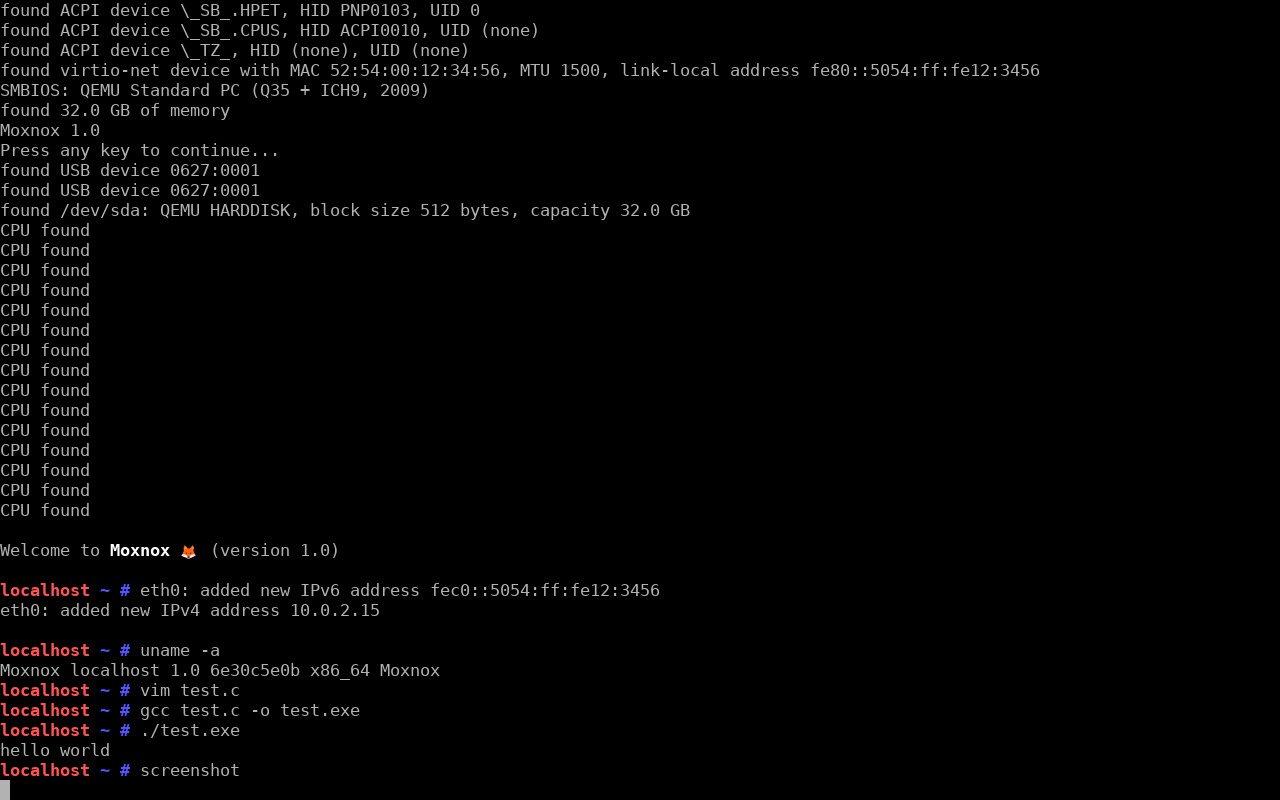
Running
To test Moxnox in qemu, download moxnox-amd64-1.0.img.gz and moxnox-kernel-amd64-1.0.efi. Run gunzip moxnox-amd64-1.0.img.gz to decompress the image.
Then:
qemu-system-x86_64 -M q35 -enable-kvm -cpu host -m 1024 \
-smp cores=4,threads=1 \
-kernel moxnox-kernel-amd64-1.0.efi \
-append "root=/dev/sda" \
-device ich9-ahci,id=ahci -drive id=disk,file=moxnox-amd64-1.0.img,if=none \
-device ide-hd,drive=disk,bus=ahci.0 \
-nic user,model=virtio-net-pci \
-device qemu-xhci \
-device usb-kbd,id=kbd \
-device usb-tablet,id=tablet \
-serial stdio
You will need to increase the memory from 1024 MB if you are trying anything
strenuous, like self-hosting.
For ARM, something like the below should work:
qemu-system-aarch64 -M virt -cpu cortex-a76 -m 1024 \
-smp cores=4,threads=1 \
-kernel moxnox-kernel-aarch64-1.0.efi \
-append "root=/dev/sda" \
-device ich9-ahci,id=ahci -drive id=disk,file=moxnox-aarch64-1.0.img,if=none \
-device ide-hd,drive=disk,bus=ahci.0 \
-nic user,model=virtio-net-pci \
-drive if=pflash,unit=0,file=/usr/share/qemu/edk2-aarch64-code.fd,readonly=on \
-device qemu-xhci \
-device usb-kbd,id=kbd \
-device usb-tablet,id=tablet \
-serial stdio
Installing
First, use gparted or similar to create a new partition. 32 GB should be
plenty. I'm calling it /dev/nvme0n1p99 below - don't get this wrong.
Make sure you have a recent versions of btrfs-progs, as we don't support some
of the default settings used by the older versions.
Prepare the root drive:
# mkfs.btrfs /dev/nvme0n1p99
# mkdir /mnt/moxnox
# mount /dev/nvme0n1p99 /mnt/moxnox
# cd /mnt/moxnox
# wget https://github.com/maharmstone/moxnox/releases/download/v1.0/moxnox-amd64-1.0.tar.gz
# tar -xvzf moxnox-amd64-1.0.tar.gz
# rm moxnox-amd64-1.0.tar.gz
# cd
# umount /mnt/moxnox
Copy the kernel:
# mount /boot/efi
# cd /boot/efi
# wget https://github.com/maharmstone/moxnox/releases/download/v1.0/moxnox-kernel-amd64-1.0.efi
To install the boot entry, do something like:
# efibootmgr -c -d /dev/nvme0n1 -p 1 -L "Moxnox" -l '\moxnox-kernel-amd64-1.0.efi' -u 'root=/dev/nvme0n1p99'
efibootmgr likes to change the boot order afterwards, this probably is not
what you want. The names of block devices should be more or less the same on
Linux and Moxnox.
The "EFI" file is actually a polyglot file that also conforms to the Linux boot
protocol, so it should also work on non-EFI GRUB. I have not tested this.
How to set this up is left as an exercise for the reader.
Hardware support
For amd64, everything is compiled for x86-64-v3, which covers more or less
anything manufactured since 2015 or so. Moxnox automatically uses and enables
AVX512 if it detects it. For qemu, you need to specify the q35 machine type;
the default pc machine is ancient, and doesn't have PCI Express. microvm
works too.
For aarch64, we're using LSE atomics, which require ARMv8.1. That means the
Raspberry Pi 5, but not any earlier models. Moxnox only supports ACPI, not
Device Tree, so for the Pi you will also need https://github.com/worproject/rpi5-uefi.
Unfortunately there is no raspi5 machine type in qemu, but I have had success
with virt, and sbsa-ref works too.
Device support:
- Block devices: NVMe, SATA, SDHCI (i.e. SD cards), virtio-block, USB mass
storage
- Network cards: virtio-net, RTL8168, RTL8125
- Input devices: USB HID, PS/2 keyboard, PS/2 mouse, virtio-input
- Graphics: virtio-gpu, GOP framebuffer, VBE, VGA text console (pass
text=80x25
on non-UEFI boots)
- Serial ports: virtio-console, x86 serial port, PL011 ARM serial port
- USB: XHCI
Building
The easiest way to build is to pull the Docker containers maharmstone/moxnox-ci-amd64
or maharmstone/moxnox-ci-aarch64, which contain the cross-compilers for
x86_64-pc-moxnox or aarch64-pc-moxnox.
Then in the container:
$ git clone https://github.com/maharmstone/moxnox
$ cd moxnox
CMake will compile whichever of the submodules are checked out. For a minimal
system:
$ git submodule update --init --depth 1 ports/acpica/repo ports/freetype/repo ports/gnu-efi/repo ports/harfbuzz/repo ports/libpng/repo ports/mingw-w64/repo ports/zlib/repo ports/musl/repo ports/tre/repo
For all of the ports, which might take a while:
$ git submodule update --init --recursive
Then:
$ mkdir build
$ cd build
$ cmake -DCMAKE_TOOLCHAIN_FILE=amd64.cmake -GNinja ..
or
$ cmake -DCMAKE_TOOLCHAIN_FILE=clang-aarch64-native.cmake -GNinja ..
Make sure you specify Ninja - we need this as we're using C++ modules. CMake
defaults to Unix Makefiles, which don't work.
Finally:
$ ninja
gcc, llvm, and rust are not compiled unless explicitly requested due to
their size. hexyl and ripgrep also need to be specified explicitly due to
their dependency on rust.
To build on Moxnox, as above, but you don't need a toolchain file: cmake -GNinja ...
gcc, rust, hexyl, and ripgrep can't yet be compiled in Moxnox, but
everything else works (eventually). You may need a lot of RAM and even more
patience. If CMake complains about rust-libc, make sure that you don't have
the Rust submodules checked out.
Licence
The kernel and first-party programs are licensed under the GPL. The first-party
DLLs are licensed under the LGPL. The contents of the modules directory are
MIT.
See the ports submodules for details of their particular licences.
Ports
Current ports:
- bash
- binutils
- bison
- bzip2
- cairo
- cmake
- coreutils
- curl
- diffutils
- expat
- file
- findutils
- flex
- freetype
- gawk
- gcc (amd64 only)
- git
- gmp
- gperf
- grep
- gzip
- harfbuzz
- hexyl
- jsoncpp
- less
- libarchive
- libiconv
- libpng
- librhash
- libuv
- llvm
- m4
- make
- mako
- markupsafe
- mesa
- mpc
- mpfr
- nano
- ncurses
- netcat
- ninja
- openssh
- openssl
- patch
- perl
- pixman
- python
- pyyaml
- readline
- ripgrep
- rust
- sed
- tar
- vim
- wget
- xz
- zlib
- zstd
FAQs
What's missing?
Loads - but this is version 1.0. In particular:
- A GUI
- Support for different timezones
- Support for different keyboard layouts
- Locales and non-UTF-8 character sets
- Any sort of security
- Multiple users and groups
For performance issues and similar:
- The userspace heap allocator could be a lot quicker (this is the bottleneck
when self-hosting)
- TCP is slow, because we don't negotiate an MSS and keep to the default 64KB
window
- We ought to be doing early writeback on memory pressure
- There should be an LRU system to drop clean pages from the page cache...
- ...made worse by the fact that the dentry cache never gets pruned, so inodes
stay open until deleted
And obviously there should be more ports and hardware support.
How compatible is it with NT?
The contract is that the syscalls and low-level interfaces match those of NT,
but not the daemons or how the kernel itself is structured. This is in contrast
to what ReactOS aims to do, which is an exact recreation of Windows.
So:
- Binaries are PE format rather than ELF, and have a
.exe or .dll extension
- C++ exceptions are done through SEH
- POSIX signals are done through Asynchronous Procedure Calls
- All the non-kernel kernel-like stuff gets done in
ntdll.dll
- The rcx, rdx, r8, r9 calling convention matches that of Windows
- And its C eccentricities match those of Windows:
sizeof(long) == sizeof(int32_t),
sizeof(wchar_t) == sizeof(char16_t), sizeof(long double) == sizeof(double).
There's an awful lot of stuff in NT, but the interesting stuff that's missing
is tokens, the Registry, and I/O completion ports.
NT has a complex system where there's a virtual filesystem but it's hidden
(unless you use winobj), with the true path of a file hanging off the name of
its block device (so C:\Windows\System32 might actually be \Device\HarddiskVolume1\Windows\System32).
I've not replicated any of that. Paths are POSIX-like: slashes rather than
backslashes, / as the root filesystem, and mounted directories. Unlike real
Windows, NtCreateFile resolves . and .., to work better with the dentry cache.
Other things I've deliberately not copied are the various forms of transactions,
which were a product of their time, and the idea of paged kernel memory, which
causes more problems than it solves.
How compatible is it with POSIX?
We have implemented 642 of the ~1,200 functions in POSIX 2024. This is the vast
majority of what's used in practice, with gnulib papering over some of the
cracks. Unlike Windows, fork is there. I've used musl for its mathematical
and cryptographic functions, and mingw for printf and some other things,
and tre for its regexes.
The POSIX functions are split over ucrtbase, iphlpapi, and ws2_32, as on
Windows, with anything that Windows doesn't implement put in mnposix.
I've borrowed liberally from Linux's best ideas: the dentry cache, large folios,
mapping the whole of physical memory, evdev.
Other POSIX shortcomings:
- AF_UNIX is half-complete.
socketpair works, including for SCM_RIGHTS (ssh
uses this), but the normal client-server code doesn't work
mkfifo creates an inode, but I/O to it does not get redirected to a buffer
as it ought to do- APCs (i.e. signals) only get delivered when a thread returns from a syscall.
So a program doing
while (true) { } is currently unkillable.
How do I start sshd?
There's nothing that automatically starts daemons yet, so manually.
First generate the host key:
# ssh-keygen -A
There's no passwords yet, so you will need to add a /root/.ssh/authorized_keys
file so that you can connect. If you have trouble, double-check that /root is
owned by root, as sshd will ignore this file otherwise.
Then start sshd using its full path:
# /bin/sshd.exe
Can this run Windows programs?
No. Or at least, not yet.
We deliberately do not implement any Win32 DLLs, bar a few functions in
kernelbase that the mingw runtime wants. A future improvement would be to
strip these out entirely, then port across Wine's versions of the Win32 DLLs.
Some parts of Wine, like wineserver and ntdll, we would not need as we are
already taking care of it ourselves.
How sloppy is this?
None of the substantive code was written by AI.
I used AI to help with the mechanical parts of porting (e.g. translating
autotools to CMake, replacing ioctl calls with tcgetwinsize, translating
the C structs into Rust), as well as to write some of the smoke tests (e.g.
cairo-test, mesa-test).
Where Claude really shines though is in reviewing your own commits. You give it
a hash, and it tells you about the silly memory leak or deadlock that you left
in, before you can make a fool of yourself.
Why?
For funsies. Plus the only way of really learning how something works is to
have a go at writing it yourself.
Also, the NT kernel is criminally underrated, and pretty much unknown to
hobbyists. It had features that Linux took years and years to come up with its
own design for, such as eventfd and pidfd.
It's a shame that Windows keeps shying away from full POSIX compatibility. They
had a half-complete version in the early days, then more recently had WSL1, only
to then abandon it. And Nano Server was another cool idea, only again to be
itself abandoned. So this is my take on what I wish Windows had been like.

 Moxnox 是一个用 C++ 编写的业余操作系统(约 13 万行代码)。它在设计上类似 NT,兼容 POSIX,可以在 btrfs 上运行,能够自行编译,目标平台为 amd64 和 aarch64。