



loopx README

The project's README from github.com/loopx-project/loopx. As one markdown file: README.md.

LoopX

LoopX loop engineering social preview banner

The open, provider-neutral, stateful control plane for long-horizon agents.

Runs on top of Codex, Claude Code, Cursor, and other agent harnesses. LoopX preserves objectives, gates, todos, evidence, quota, and handoffs across turns; the harness executes bounded work.

huangruiteng/loopx on Trendshift

License Release Discord Python Local first Loop Agents

Public website · Blog · Docs · Developer Book · Try LoopX · See real loops · How it works · 简体中文


Open and provider-neutral, LoopX is a lightweight state kernel and local-first control plane for loop engineering. It runs on top of different agent harnesses rather than replacing them, providing the long-horizon state, semantic decisions about what happens next, governance, recovery, and human-agent collaboration that keep long-running work reviewable, restartable, and easier to hand off across turns, tools, and agents.

Loop engineering for long-horizon AI agents and peer agent teams.

Keep the loop moving. Keep the judgment human.

Learn LoopX

Meet the Personal Agent Workspace

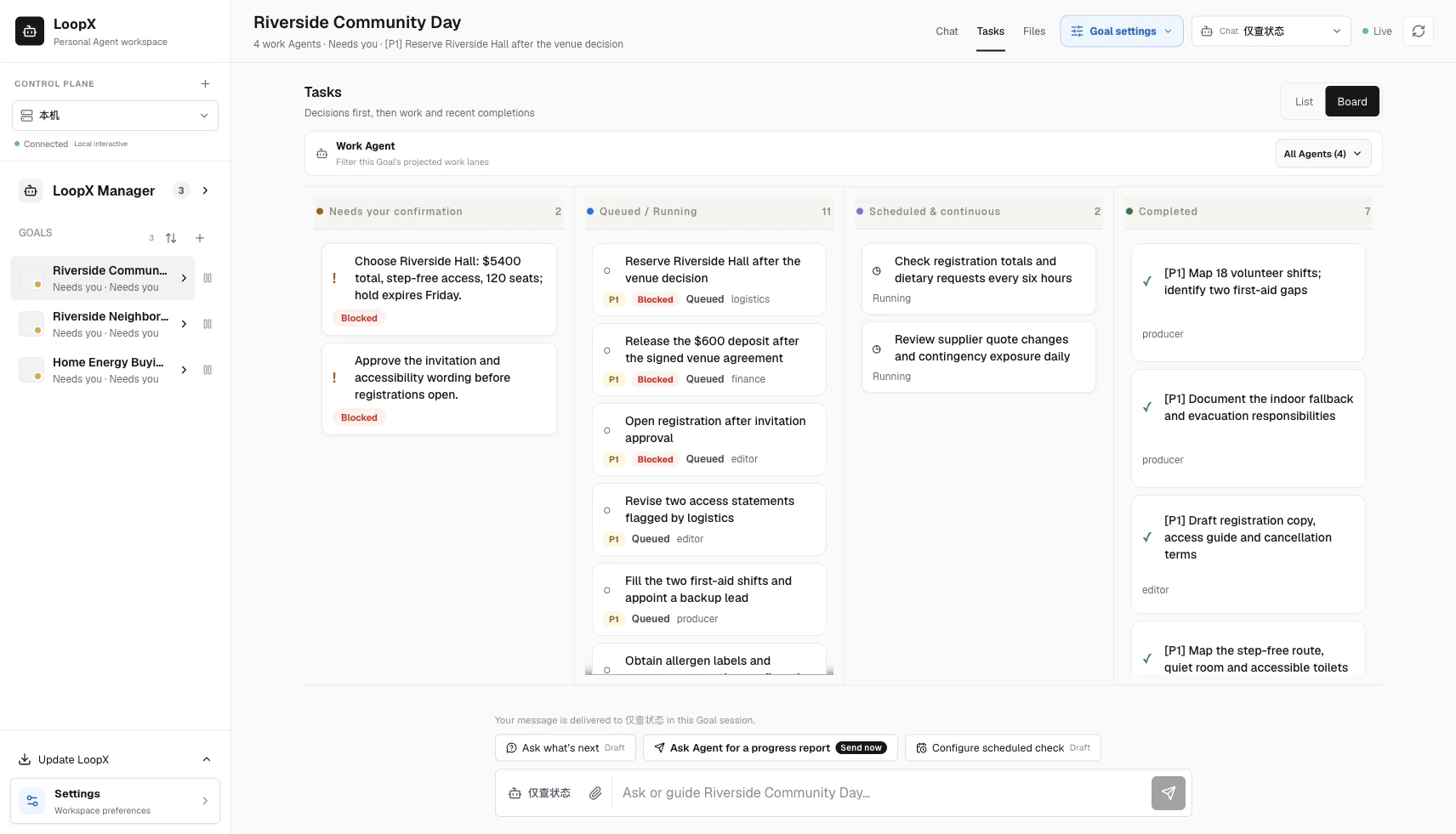
Keep long-horizon goals in one local-first workspace. Goals, attention, conversations, tasks, files, schedules, and recovery stay durable across days, restarts, and harnesses. Reopen a project, inspect the previous turn’s state and evidence, and continue the next permitted action.

LoopX Workspace: owner decisions, Agent tasks, scheduled watches and completed work

LoopX 1.0 brings these long-horizon control states into the Personal Workspace. It gives you one place to:

loopx dashboard

loopx dashboard is the supported browser/PWA launch path. You can also download native desktop previews from the 1.0 release; they reuse the same loopback services and Goal state. Apple Silicon macOS supports signed App updates that pair the shell with its bundled runtime, plus repair and recovery. Python 3.11+ is required; the App is ad-hoc signed, not notarized. Windows preview installers currently use manual updates and a separately installed CLI. Desktop installation, updates, and source development.


Real Workspace recording: configure child-task capacity and allowed responsibility domains

From a source checkout, run python -m demo.workspace serve to explore a community event, a home-energy comparison, and a neighborhood website release. Each has four work roles, 18 tasks, two decisions, and two watches. The screenshot above comes from this reproducible workspace. Scenarios and replay instructions.

Watch the full 32-second walkthrough · Read the workspace guide · Try the five-minute tour

Why LoopX

An agent can finish a task in one session. Long-running work is harder: objectives change, owner decisions appear, evidence goes stale, agents hand work to peers, and a scheduler can keep spending after no useful transition remains. Chat memory and a timer are not enough to govern that.

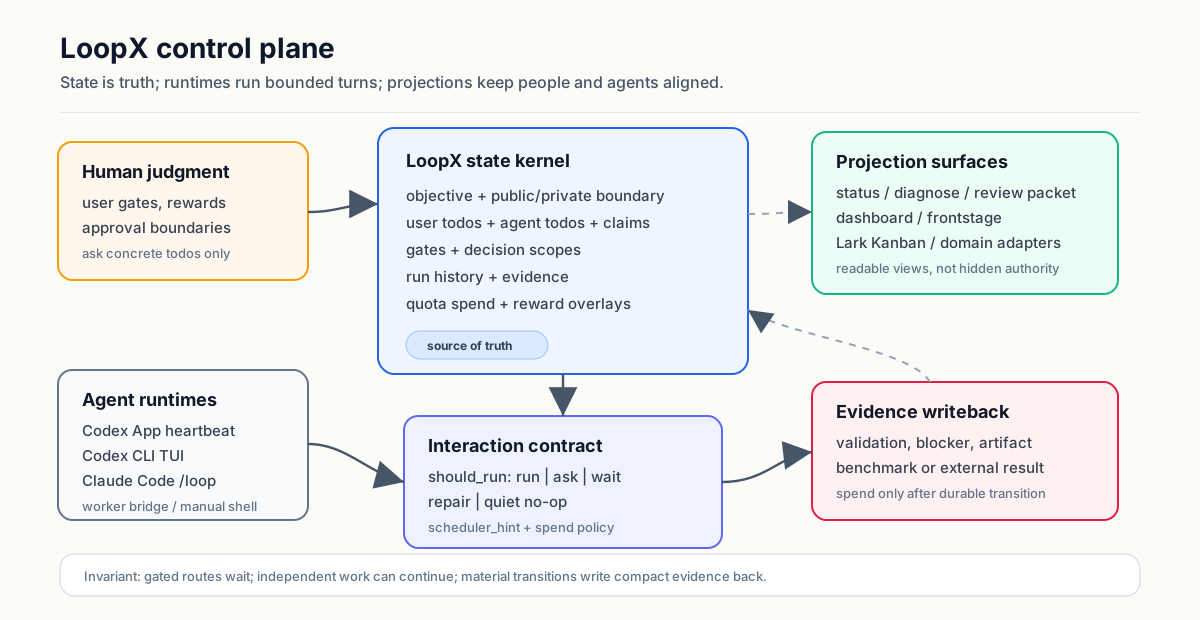
LoopX keeps the durable control state in one compact layer:

objective / issue / project
   │
   ▼
LoopX state: objective + gates + todos + scope + evidence + quota
   │
   ├─ human judgment needed? ── yes ─▶ ask a concrete question and wait
   │
   ├─ safe fallback available? ──────▶ run one bounded agent slice
   │
   ▼
Codex / Claude Code / Cursor / shell agent executes one turn
   │
   ▼
write evidence + handoff + next todo ─▶ quota decides the next tick

Agent runtimes execute the work. LoopX governs the state that lets engineering, research, discovery, and operations loops continue across runs. It is not another agent framework or a provider-specific orchestration runtime.

LoopX control-plane board

A useful mental model is an agent-native Kanban for long-running work. Cards carry identity, authority, evidence, and continuation. Moves are validated operators such as claim, gate, monitor, and writeback. The board is a projection; LoopX state remains the source of truth.

Registered agents are peers. Claims, leases, task boundaries, capabilities, and typed continuation decide who acts next; no durable leader identity is required.

LoopX is useful when you run:

LoopX is not an autonomous production controller. Dangerous permissions, publishing, production writes, and final ownership stay with the human.

Evidence

The public OpenViking contribution sequence and the redacted, owner-run Auto ML showcase each span 200+ hours of elapsed loop lifetime, preserving bounded turns, decisions, and evidence updates. This measures wall-clock project time, not continuous model execution or unattended production autonomy. Open each visual to inspect the public-safe task graph, evidence branches, and cross-turn decisions; each case states its source and reproducibility boundary.

Open-Source Issue Fix

200+ hour public contribution arc: PR delivery and reusable fix knowledge evolve together.

Open-source issue-fix trajectory linking focused PR delivery with reusable LoopX capabilities

LoopX's creator uses this path as an OpenViking contributor. The represented public contribution sequence spans more than 200 elapsed hours from its first PR creation to the latest represented review or update. The Issue-Fix capability keeps rolling repository context, revision-stamped fix knowledge, and reviewer-facing preferences separate; linked PRs plus current checkout source and tests remain authoritative.

Auto ML Experiment

Redacted owner-run showcase: a 200+ hour experiment arc keeps hypotheses, matched evidence, invalid lineages, running replicates, and promote/stop gates visible in one graph.

Auto ML Experiment trajectory with experiment lineages, evidence gates, and promotion decisions

The redacted public-safe graph preserves decision lineage across that 200+ hour elapsed window. It is an owner-run showcase, not a claim of continuous compute, independent reproduction, a production result, or company or employer endorsement. The redacted image is not sufficient to reproduce the underlying experiment independently.

Auto Research

Reproducible public KNN demo: proposer, executor, and evaluator/promoter agents iterate in parallel while todo, quota, evidence, and targeted wake remain visible.

Auto Research multi-agent workspace with proposer, executor, evaluator/promoter, todo, quota, evidence, and targeted wake activity

This screenshot comes from LoopX's built-in exact-KNN demo. The public task, editable and protected files, deterministic CPU evaluator, and dev/held-out commands all live in this repository. Follow the showcase walkthrough or the demo command path to reproduce the workflow; it is a demo result, not a production research claim.

Used In Real Projects

These are the three strongest current cases, not the full inventory. Browse the complete Showcase catalog for contributor cases, creator dogfooding, reproducible demos, and explicit evidence-strength labels.

Exploratory Benchmark Studies

SWE-Marathon has one trial per task and mode; DeepSWE uses selected cases and post-hoc analysis. Neither establishes a general performance gain.

More inspectable surfaces:

Try LoopX

Requirements: Python 3.11+ and Node.js 22.6+; Node.js 24 LTS is recommended. Use an active Python environment whose console scripts are on PATH; macOS and Linux use a POSIX shell, while native Windows uses PowerShell 7. Node.js runs the managed, idle-exiting TypeScript Effect core; LoopX starts it automatically. Git is only needed for contributor clone/canary workflows.

Install from PyPI without cloning:

python3 -m pip install --upgrade loopx
loopx workflow-skills --install
loopx doctor

Existing installs can use loopx update plan and loopx update apply; LoopX keeps the detected pip, pipx, or archive owner instead of switching channels.

On native Windows PowerShell 7, use the same PyPI release without a POSIX compatibility layer:

py -3.11 -m pip install --upgrade loopx
loopx workflow-skills --install
loopx doctor

Restart your agent host after first install so it reloads the workflow skills. See Installing LoopX for pipx, host command surfaces, native Windows checkout installation, upgrade, rollback, uninstall, and the archive fallback.

Then connect from your project root:

cd /path/to/your-project
loopx connect
loopx status

If the project has not been initialized and connect tells you state is missing, use the guided path:

loopx start-goal --guided --project . --goal-text "Your long-running objective"

LoopX should reuse existing state rather than overwrite it. Keep .loopx/, .codex/goals/, and .local/ ignored.

Start From Your Agent

Host Recommended start Loop driver
Codex App Ask the agent to connect this project to LoopX, run loopx doctor, preserve existing state, and report the current gate and next todo. Then use $loopx <complex task> or choose loopx from /skills. Codex App heartbeat automation, refreshed from quota should-run.scheduler_hint
Codex App over SSH loopx agent-onboard --agent-type codex-app-ssh --project . The returned visible /goal <task_body>
Codex CLI Start codex in the project, ask it to connect and diagnose LoopX, then use $loopx <complex task> or /skills. Visible /goal <task_body>; no hidden headless execution by default
Claude Code Install the opt-in adapter, then run /loopx <task> followed by /loop. Native Claude Code /loop gated by LoopX
KunlunCode Run loopx-kunluncode connect --project . --goal-id <goal-id> --agent-id <registered-agent-id>, add a bounded todo, then run loopx-kunluncode run --project .. Native Goal Pro through app-server; LoopX writes completion and quota only after strict verification
OpenCode Install the static command facade; opt in to --with-goal-bridge for recurring goals. OpenCode command facade and explicit goal bridge
Pi Install the opt-in goal extension with loopx slash-commands --install --surface pi, then use /loopx <task> from a trusted Pi session. Visible Pi goal extension gated by LoopX quota (loopx_goal_activate + agent_settled continuation)
ZCode Install the skill facade with loopx slash-commands --install --surface zcode, then invoke the $loopx skill (or /loopx <complex task>) from a ZCode session in the project. The ZCode session's own turn loop; every continuation enters through quota should-run
Antigravity CLI (agy) Install the skill facade with loopx slash-commands --install --surface agy, then invoke the loopx skill (or /loopx <complex task>) from an agy session in the project. The session's native /goal loop (audited until <!-- GOAL_COMPLETE -->) with schedule self-wakes while the session lives; the facade instructs every turn/wake to re-enter through quota should-run — advisory pacing, not a host-enforced gate
Kiro CLI Install the skill facade with loopx slash-commands --install --surface kiro-cli, then run /loopx <complex task> from a kiro-cli session in the project. The session's native /goal --max <N> <task_body> Done when: <criteria> loop, with the acceptance criteria stated inside the goal statement because the host derives them from it, bounded by the host's own iteration budget (default 5) and settled through the built-in goal completion contract; the facade instructs every turn and iteration to re-enter through quota should-run — advisory pacing, not a host-enforced gate
DeepSeek Harness (dsh) Install the native DSH plugin, select the loopx skill, and describe the task. The dsh goal-mode adapter remains available for headless turns. Native same-session continuation and GoalBar, or headless dsh segments; both remain gated by LoopX authority
Cursor, shell, or custom runner Use the installer and loopx doctor; connect manually or call LoopX from your runner. Your shell, scheduler, or runner

The exact, copy-ready setup messages and host recovery paths live in Getting Started. Host integrations can inspect the Codex App host command registry contract, the Codex CLI packaged install path, the Claude Code adapter, the KunlunCode native Goal adapter, the Kiro CLI goal-mode adapter, or the DeepSeek Harness turn adapter.

See the 60-second DSH × LoopX Replan recording and reproducible fixture for the native path: install the plugin, select one skill, change a material constraint, and inspect the preserved decision trail.

For custom runners, start with the minimal custom runtime example (python3 examples/custom-runtime-minimal-cli-turn-smoke.py), then the full Embed LoopX in Your Agent Runner guide and the worker bridge install contract. The core tick is deliberately small:

loopx quota should-run      # should this registered agent act now?
loopx todo claim            # who owns this slice?
loopx todo update           # what changed?
loopx refresh-state         # what should the next turn see?
loopx quota spend-slot      # account for a co

loopx (loopx-project/loopx)

Searching Database…

6.3K ·GitHub
Что это такое?LoopX — открытый провайдер-независимый слой управления, который работает поверх агентных харнесов вроде Codex, Claude Code и Cursor. Он надёжно сохраняет цели, гейты, список задач, доказательства, квоты и передачи работы между ходами и сессиями, чтобы долгая работа ИИ-агентов не терялась.
Это фреймворк для агентов, который заменяет Codex или Claude Code, или что-то другое?Ни фреймворк для агентов, ни оркестрационная среда под конкретного провайдера. LoopX — тонкий слой состояния, который работает поверх существующих харнесов: харнес по-прежнему выполняет работу, а LoopX определяет, что будет дальше. По сути это канбан-доска для агентов, где его собственное состояние является источником истины.
Как установить LoopX и подключить его к проекту?Установите релиз с PyPI (клонировать ничего не нужно), затем из корня проекта выполните команду connect. LoopX обнаружит уже существующее состояние и не перезапишет его, а если его нет, проведёт вас через пошаговую инициализацию. Также доступны панель в браузере (PWA) и предварительные версии нативных десктопных приложений для macOS и Windows.
Что нужно установить перед запуском LoopX?Обязательны Python 3.11+ и Node.js 22.6+ (рекомендуется 24 LTS). Node запускает управляемое ядро на TypeScript (Effect), которое LoopX стартует автоматически. Git нужен только участникам проекта для работы с клонированием и canary-сборками, а для нативной Windows вместо POSIX-оболочки требуется PowerShell 7.
Десктопное приложение уже готово к использованию?Приложение для macOS на Apple Silicon подписано ad-hoc (без нотаризации), а установщик предварительной версии для Windows пока требует ручных обновлений и отдельно установленного CLI. LoopX также прямо не является автономным контроллером для продакшена: опасные права доступа, публикация и записи в продакшен остаются за человеком.
Какие хосты агентов поддерживает LoopX?LoopX имеет нативные или фасадные интеграции с Codex App, Codex CLI, Claude Code, KunlunCode, OpenCode, Pi, ZCode, Antigravity CLI (agy) и Kiro CLI. У каждой из них своя рекомендуемая команда запуска и свой драйвер цикла.
Мои данные проекта остаются на моём компьютере?Да: LoopX описан как локальное рабочее пространство, где цели, то, что требует внимания, разговоры, задачи, файлы, расписания и данные для восстановления надёжно хранятся на вашем компьютере между перезапусками и харнесами. Авторитетным остаётся собственное состояние LoopX, а не браузер.
Что такое Personal Agent Workspace?Это панель LoopX для долгосрочной работы: одно место, где видно, что требует внимания, что запущено или запланировано, можно настроить возможности Goal, направлять текущий ход в реальном времени и просматривать защищённые изменения с явным подтверждением до их применения.
Что подтверждает, что LoopX действительно работает на длинных циклах?В README приведены: серия из более чем 200 часов публичных вкладов в open-source в виде исправления issue; обезличенная демонстрация экспериментов Auto ML длительностью более 200 часов; воспроизводимая встроенная демонстрация exact-KNN; а также несколько независимых отзывов пользователей, в том числе о 4-дневном прогоне без присмотра и рефакторинге движка из 7 слитых PR.
Почему «инженерия циклов», а не просто более длинный промпт для агента?Памяти чата и таймера недостаточно, когда цели меняются, решения накапливаются, данные устаревают, а работа передаётся между агентами. LoopX хранит это долговечное управляющее состояние в одном компактном слое, чтобы длинные циклы оставались понятными для проверки и могли быть перезапущены.
Есть ли быстрый способ попробовать без подключения реального проекта?Да: из исходников репозитория можно выполнить python -m demo.workspace serve и изучить воспроизводимое демо-рабочее пространство с примерами рабочих ролей, задач, решений и наблюдений.
Size
148.5 MB
Stars
6.3K
Age
4mo
Commits · 90 Days